A vertical mouse can make laptop work more comfortable by keeping your hand and wrist in a more natural handshake position. For travel, however, comfort must be balanced with portability, battery life, connectivity, and reliable tracking.
We selected 10 vertical mice for travel across compact, wireless, Bluetooth, wired, rechargeable, and budget categories, so you can find a practical fit for your work setup and packing style.
Best 10 Vertical Mice for Travel Picks for 2026
Premium Ergonomics

- 57-degree angle supports a neutral wrist posture
- 4000 DPI tracking with cursor-speed switch
- Wireless design with USB receiver and USB-C cable
Best For: Right-handed travelers seeking advanced ergonomic comfort
Value Wireless Pick
Amazon Basics 6-Button Vertical Mouse

- Wireless range reaches up to 33 feet
- Adjustable 1000–2400 DPI settings
- Best suited to medium and large hands
Best For: Budget-conscious right-handed travelers with larger hands
Simple Wired Option

- Wired setup avoids batteries and wireless pairing
- 1000/1600 DPI optical tracking
- Lightweight body with webpage navigation buttons
Best For: Travelers who prefer dependable wired plug-and-play use
Compact Comfort
Perixx PERIMICE-719 Mini Vertical Mouse

- Mini design fits small to medium hands
- Quiet primary buttons reduce clicking noise
- Wireless connection with three DPI settings
Best For: Right-handed travelers wanting a compact, quieter mouse
Best Multi-Device Pick

- Three-device connectivity via 2.4G and Bluetooth
- USB-C charging with up to two months of battery life
- Quiet clicks and built-in volume controls
Best For: Travelers switching between multiple devices
Best for Small to Medium Hands
TECKNET 4800 DPI Vertical Mouse

- 52-degree ergonomic vertical design
- Five DPI settings up to 4800
- Driver-free 2.4GHz connection with 32-foot range
Best For: Travelers with small or medium hands
Best Bluetooth Range
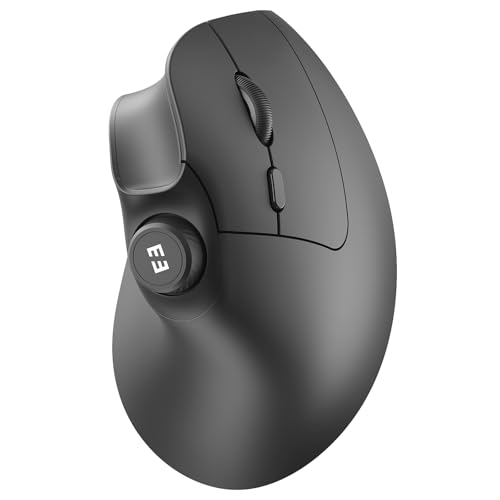
- 10-meter stated wireless range
- Three-device USB and Bluetooth connectivity
- Rechargeable battery rated for up to two months
Best For: Right-handed travelers needing flexible connectivity
Travel-Ready Comfort
UGREEN Vertical Wireless Mouse
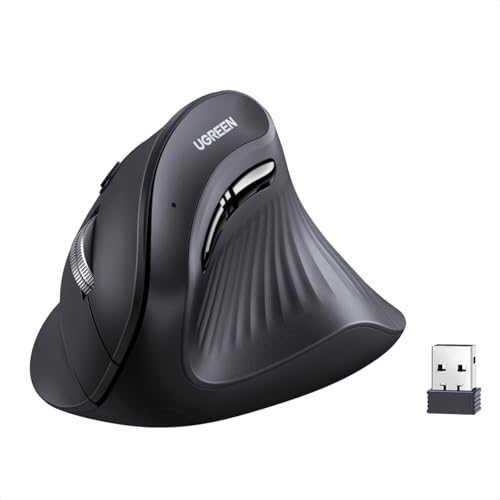
- 57-degree ergonomic design
- Bluetooth and 2.4G connectivity
- 1000–4000 DPI adjustment
Best For: Medium- to large-handed travelers using multiple devices
Long-Battery Travel Pick
TECKNET Rechargeable Vertical Mouse

- Up to 60 days of use per charge
- Switches among three devices
- Quiet clicks with media knob
Best For: Travelers prioritizing rechargeable power and media control
Compact Connection Flexibility
JYKEYMOUT Rechargeable Vertical Mouse

- Bluetooth and 2.4G dual modes
- Connects to two devices
- Silent, rechargeable design
Best For: Travelers switching between a Bluetooth laptop and USB device
Premium Ergonomics – Logitech MX Vertical
For travelers who prioritize wrist comfort over compactness, the Logitech MX Vertical is a substantial option among vertical mice for travel. Its 57-degree angle, handshake grip, textured surface, and high-precision tracking are designed for comfortable, accurate use with a laptop or desktop.
Best For: Right-handed travelers who want advanced ergonomic support and long battery life.
Pros:
- 57-degree vertical angle and thumb rest support a more neutral wrist posture.
- 4000 DPI optical tracking and a cursor-speed switch provide flexible control.
- Wireless operation, USB receiver, USB-C cable, and an advertised four-month battery life.
- Works with Windows, macOS, iPadOS, Linux, Chrome OS, and Android.
Cons:
- The larger ergonomic shape may be less convenient to pack than a compact mouse.
- Designed for right-handed use only.
The MX Vertical is a strong comfort-first choice, but its size makes it better for travelers with room in a laptop bag than for minimalist packers.
Value Wireless Pick – Amazon Basics 6-Button Vertical Mouse
The Amazon Basics 6-Button Vertical Mouse offers a straightforward, budget-friendly approach to vertical mice for travel. Its wireless 2.4 GHz connection, adjustable DPI, and plug-and-play USB-A receiver make it practical for laptop and desktop use when your hands benefit from a more natural grip.
Best For: Right-handed travelers with medium to large hands who want an affordable wireless option.
Pros:
- Vertical shape encourages natural finger placement.
- Six buttons include adjustable DPI settings from 1000 to 2400.
- Wireless range extends up to 33 feet.
- Two included AAA batteries offer an approximate four-month lifespan.
Cons:
- Designed for medium to large hands, with stated palm-size requirements.
- Uses a USB-A receiver, which may require an adapter with some newer laptops.
- Right-handed design limits orientation flexibility.
This mouse is a sensible travel companion when you want vertical ergonomics and wireless convenience without paying for advanced features.
Simple Wired Option – Anker USB Vertical Mouse
The Anker USB Wired Vertical Mouse keeps travel setup simple: plug it into a compatible computer and use its handshake-style grip, optical tracking, and navigation buttons. Among vertical mice for travel, it suits users who prefer a lightweight wired design and do not want to manage batteries or wireless receivers.
Best For: Travelers who regularly use a USB-equipped laptop or desktop and prefer wired reliability.
Pros:
- Handshake position is designed to reduce wrist and arm strain.
- 1000/1600 DPI optical tracking supports everyday precision.
- Next and previous buttons simplify webpage navigation.
- Lightweight 5.3-ounce design includes a 4.9-foot cable and an 18-month warranty.
Cons:
- The 4.9-foot cable adds packing bulk and can be inconvenient in tight workspaces.
- Requires a wired USB connection, limiting use with devices lacking compatible ports.
- Its stated compatibility is centered on personal computers, Linux, and Windows 10.
If you value a no-battery setup and predictable plug-in use, the Anker is practical; wireless travelers may prefer a cable-free model.
Compact Comfort – Perixx PERIMICE-719 Mini Vertical Mouse
The Perixx PERIMICE-719 is a mini right-handed model for shoppers comparing vertical mice for travel and wanting a smaller form factor. It combines a soft rubber coating, quiet primary clicks, adjustable DPI, and a 2.4 GHz wireless connection for portable everyday work.
Best For: Right-handed travelers with small to medium hands who want a compact, quieter mouse.
Pros:
- Mini vertical design is intended for hand lengths under 7.5 inches.
- Quiet left and right buttons help reduce clicking noise.
- 800/1200/1600 DPI settings and back/forward buttons support flexible navigation.
- Wireless range reaches about 30 feet, with compatibility across Windows, macOS, and Android.
Cons:
- Requires two AAA batteries, which are not included.
- Back and forward buttons are not supported on macOS.
- First-time vertical-mouse users may need one to two weeks to adjust.
Its compact dimensions and quiet primary buttons make the PERIMICE-719 especially travel-friendly, provided its hand-size fit and right-handed layout work for you.
Best Multi-Device Pick – seenda MOU-302 Vertical Mouse
For shoppers comparing vertical mice for travel, the seenda MOU-302 stands out for flexible connectivity and convenient recharging. Its handshake-style design, quiet clicks, USB-C charging, and support for three connected devices make it practical for moving between a laptop, tablet, and desktop.
Best For: Travelers and hybrid workers who switch among multiple devices and want built-in media controls.
Pros:
- Connects to three devices through 2.4G USB, BT1, and BT2.
- USB-C rechargeable battery is rated for up to two months per charge.
- Quiet clicks, adjustable 1000/1600/2400 DPI, and a natural vertical grip.
- Built-in control supports volume adjustment, pause, and play.
Cons:
- Right-hand orientation limits flexibility for left-handed users.
- The 4.8-inch length and vertical shape may take more bag space than a compact travel mouse.
- Volume controls may be unnecessary if you prefer a simpler mouse.
The MOU-302 is a feature-rich travel option when device switching and battery convenience matter more than minimizing size. Its broad compatibility covers Windows, macOS, iOS, Android, and Chrome OS.
Best for Small to Medium Hands – TECKNET 4800 DPI Vertical Mouse
Among vertical mice for travel, the TECKNET ergonomic wireless mouse offers a straightforward 2.4G setup and a shape designed for small to medium hands. Its 52-degree angle, quiet primary clicks, and adjustable sensitivity suit portable office work without requiring Bluetooth pairing.
Best For: Travelers with small or medium hands who want a simple USB-receiver connection and high adjustable DPI.
Pros:
- 52-degree vertical angle encourages a natural handshake position.
- Five DPI settings range from 800 to 4800 for adaptable cursor control.
- 2.4GHz wireless connection reaches up to 32 feet and needs no drivers.
- Quiet main clicks and forward/back buttons support discreet browsing.
Cons:
- Uses a USB connection rather than Bluetooth.
- Forward/back buttons are not silent and are not supported on Mac OS.
- Right-hand design may not suit left-handed users.
This TECKNET model is a practical choice when you prioritize easy plug-and-play use and a hand-friendly shape. It is less versatile than a multi-device Bluetooth model, but its simple receiver setup can be convenient on compatible laptops.
Best Bluetooth Range – seenda MOU-302 Vertical Mouse
If you want vertical mice for travel with Bluetooth flexibility, this black seenda MOU-302 combines three-device connectivity with a stated 10-meter range. Its rechargeable battery, quiet operation, and compatibility with computers, tablets, and phones make it useful for mobile work setups.
Best For: Right-handed travelers who want Bluetooth and USB connectivity in one rechargeable mouse.
Pros:
- Supports three simultaneous connections through 2.4G USB, BT1, and BT2.
- Provides a stated 10-meter wireless range.
- USB-C rechargeable 500mAh battery lasts up to two months per charge.
- Works with Windows, macOS, iOS, Android, and Chrome OS.
Cons:
- Right-hand-only design is not ideal for left-handed users.
- Maximum sensitivity is 2400 DPI, lower than some high-DPI alternatives.
- Its vertical 4.8-inch profile may be less compact for tightly packed luggage.
This version is a strong fit for travelers who value connection range and cross-device compatibility. The included receiver adds flexibility, while the rechargeable design avoids carrying disposable mouse batteries.
Travel-Ready Comfort – UGREEN Vertical Wireless Mouse
For shoppers comparing vertical mice for travel, the UGREEN stands out for flexible connectivity and adjustable sensitivity. Its 57-degree design supports a more natural hand position, while Bluetooth and 2.4G wireless modes make it adaptable to laptops, tablets, and other compatible devices.
Best For: Medium- to large-handed travelers who need multi-device connectivity and adjustable DPI.
Pros:
- 57-degree vertical shape is designed to reduce wrist strain.
- Supports Bluetooth and 2.4G wireless connections, with up to three devices supported.
- Four DPI settings from 1000 to 4000 provide adjustable cursor control.
- Compatible with Windows, macOS, Linux, Chrome OS, iOS, iPadOS, and Android devices with the appropriate connection support.
Cons:
- Designed for medium to large hands, so it may feel oversized for smaller users.
- The 2.4G receiver requires a USB-A port.
- Device switching requires pressing the switch button rather than happening automatically.
The UGREEN is a practical choice when travel work involves several devices and you want more sensitivity range than a basic portable mouse. Confirm the hand-size fit and available ports before buying.
Long-Battery Travel Pick – TECKNET Rechargeable Vertical Mouse
Among vertical mice for travel, the TECKNET is suited to users who want rechargeable power and convenient device switching. It combines a 57-degree tilt with palm support, quiet clicks, and a dedicated volume knob for controlling media without reaching for another device.
Best For: Frequent travelers who want long battery life, quiet operation, and media controls.
Pros:
- Rechargeable 500mAh battery provides up to 60 days of use from a 2.5-hour charge, according to the supplied notes.
- Connects to up to three devices through 2.4G and dual Bluetooth 5.0 connections.
- 57-degree tilt and integrated palm support are designed for a relaxed hand position.
- Quiet clicks and a dedicated volume/play-pause knob suit shared spaces and travel.
Cons:
- The 2.4G connection uses a USB-A receiver.
- Its vertical shape and 4.74-inch length may take more packing space than a compact travel mouse.
- The warranty requires customer registration.
The TECKNET makes sense for travelers who dislike carrying spare batteries and appreciate quick access to audio controls. Its rechargeable design and multi-device support are especially useful for work trips involving a laptop, tablet, and phone.
Compact Connection Flexibility – JYKEYMOUT Rechargeable Vertical Mouse
The JYKEYMOUT is one of the more flexible vertical mice for travel because it supports both Bluetooth and 2.4G USB connections. It can connect to two devices simultaneously, and its rechargeable battery, silent buttons, and moderate 4.8-inch length make it practical for laptop and tablet use.
Best For: Travelers who need a rechargeable mouse for a Bluetooth laptop and a second USB-connected device.
Pros:
- Bluetooth and 2.4G modes provide flexibility, including USB-free use with compatible laptops.
- Can connect to two devices simultaneously and switch between them with a button.
- Six silent buttons include back and forward controls for browsing on supported systems.
- Rechargeable Type-C battery is rated for approximately one to three months depending on usage.
Cons:
- Its 1000/1200/1600 DPI range is narrower than some competing options.
- The back and forward buttons are not compatible with Mac OS.
- It enters power-saving mode after 10 minutes of inactivity and must be woken with a button press.
The JYKEYMOUT is a sensible budget-minded travel option when dual-mode connectivity matters more than high DPI settings. It is particularly convenient for users moving between a Bluetooth laptop and a second device with a USB receiver.
How We Picked These Vertical Mice for Travel
We focused on features that matter when a mouse moves between home, office, and hotel desks: ergonomic shape, overall portability, connection options, power requirements, tracking controls, button layout, and hand-size compatibility. The selection includes right-handed designs in several sizes, from mini models for smaller bags to larger options suited to medium and large palms.
We also considered whether each mouse uses Bluetooth, a 2.4GHz USB receiver, a wired connection, or multiple modes. Travel-friendly extras such as silent clicks, rechargeable batteries, adjustable DPI, and receiver storage can make a noticeable difference in daily use.
Quick Comparison
| Type | Best For | Main Advantage | Potential Trade-Off |
|---|---|---|---|
| Bluetooth | Modern laptops and tablets | No USB receiver required | Pairing and compatibility vary |
| 2.4GHz wireless | Broad device compatibility | Simple plug-and-play setup | Uses a USB port |
| Dual-mode wireless | Flexible travel setups | Bluetooth and receiver support | Usually costs more |
| Wired | Reliability and occasional use | No batteries or charging | Cable adds packing clutter |
| Rechargeable | Frequent mobile work | Lower ongoing battery waste | Must be charged |
Key Buying Factors for Vertical Mice for Travel
Size, Grip, and Portability
Choose a shape that supports your palm without taking over your bag. Mini vertical mice are easier to pack but may feel cramped for larger hands. A larger shell can provide better support during long sessions, although it adds bulk.
Connectivity and Device Compatibility
Bluetooth is convenient for laptops with limited USB ports. A 2.4GHz receiver is useful for dependable plug-and-play operation, while a dual-mode model offers the most flexibility. Check whether your laptop needs a USB-A adapter for the included receiver.
Battery and Charging
For frequent travel, compare battery type, expected runtime, charging method, and whether the mouse can operate while charging. Replaceable batteries may be convenient on longer trips, while rechargeable models reduce the need to carry spares.
DPI, Buttons, and Noise
Adjustable DPI helps you balance precision and cursor speed across screens. Extra buttons can improve productivity, but they may also make the mouse wider. Silent clicks are particularly useful in shared offices, libraries, and hotel rooms.
Who Should Buy Which Vertical Mice for Travel?
Choose a compact or mini model if bag space is your top priority or you have smaller hands. Choose a Bluetooth mouse if you want to avoid carrying a receiver. Choose dual-mode wireless if you switch between laptops, desktops, or tablets. Choose a wired model if you value constant availability and do not want to manage batteries. For long work sessions, prioritize a supportive vertical angle and a size that lets your palm rest naturally over extra features.