Choosing video conferencing equipment for large rooms is about more than just picture quality. You need wide coverage, reliable microphone pickup, and simple setup for meetings that stay clear from every seat.
This roundup highlights 10 strong options for large conference spaces, from all-in-one bars to flexible systems built for bigger teams and hybrid collaboration.
Best 10 Video Conferencing Equipment for Large Rooms Picks for 2026
Premium Room System
Poly Studio X70 for Large Conference Rooms

- Dual 4K lenses and 20MP sensors
- Boardroom-filling speakers with NoiseBlockAI
- Native Zoom and Microsoft Teams support
Best For: Large rooms up to 25 feet that need a premium all-in-one bar
Panoramic Pick
Jabra PanaCast 50 180° Meeting Camera

- 180° view with adjustable framing
- Three 13 MP cameras and real-time stitching
- Plug-and-play USB setup
Best For: Teams that want wide room coverage and fast setup
Modular System
Poly G7500 Video Conference Equipment

- Modular design for custom room builds
- Works with nearly every video platform
- Poly Lens and REST API management
Best For: Custom large rooms that need flexible components and centralized management
Budget Workhorse
Logitech GROUP for Big Meeting Rooms

- Plug-and-play USB meeting setup
- HD 1080p video with autofocus
- Four mics with optional expansion
Best For: Budget-conscious rooms that need a proven conferencing system
360° Hybrid Collaboration Hub

- 360° 1080p video with auto speaker focus
- 18-foot mic pickup for larger rooms
- Plug-and-play USB setup in about 6 minutes
Best For: Large hybrid rooms that need simple all-in-one coverage
Large-Room Conference Core

- Large-room video conferencing system
- 4K UHD for live video and content
- Echo cancellation with automatic gain control
Best For: Teams standardizing on a dedicated room conferencing system
Auto-Tracking PTZ Kit

- 4K PTZ camera with 5X digital zoom
- Auto-tracking and gesture control options
- Speakerphone with 5m pickup and full duplex audio
Best For: Large rooms that need flexible framing and bundled audio
Premium All-in-One Teams Room Pick
Yealink MeetingBar A40 4K Conference Bar

- Dual 48MP cameras with 4K video
- AI auto-framing and speaker tracking
- Built-in audio plus touch panel
Best For: Teams wanting a simple all-in-one room system
Immersive 360-Degree Pick
COOLPO AI Huddle Pana 4K Conference Camera

- 360-degree room capture with no stitching
- 4K video with AI speaker tracking
- 8 microphones for voices within 15 feet
Best For: Large collaborative rooms needing full-room coverage
Reliable Mid-Size Room Value Pick
Logitech ConferenceCam CC3000e HD System
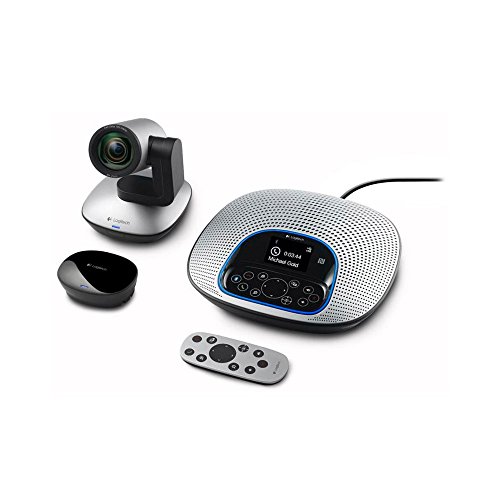
- 1080p HD video with 10x zoom
- Noise-canceling full-duplex speakerphone
- USB, Bluetooth, and NFC connectivity
Best For: Mid-size rooms needing an affordable conferencing system
Premium Room System – Poly Studio X70 for Large Conference Rooms
If you’re comparing video conferencing equipment for large rooms, the Poly Studio X70 is built for boardroom-scale meetings that need strong audio, clear framing, and simple cloud-service compatibility. Its dual 4K lenses, 20MP sensors, and native support for leading platforms make it a polished all-in-one choice for bigger spaces.
Best For: Large conference rooms up to 25 feet long that need premium video and audio in one bar.
Pros:
- Dual 4K lenses and 20MP sensors deliver life-like video with speaker tracking and group framing.
- Two-way stereo speakers, tweeters, and bass ports are designed to fill a boardroom.
- NoiseBlockAI and Acoustic Fence help reduce distracting noises and side conversations.
- Works natively with Zoom and Microsoft Teams without a PC or separate gateway.
Cons:
- Designed specifically for larger rooms, so it may be more system than smaller spaces need.
- Poly Lens management features depend on cloud software, and some solutions are sold separately.
For teams that want a premium, streamlined setup, the Studio X70 stands out as a room-ready conference bar rather than a basic webcam solution. It is strongest where you need high-end video pickup, strong voice coverage, and minimal setup complexity.
Panoramic Pick – Jabra PanaCast 50 180° Meeting Camera
Jabra PanaCast 50 180° Panoramic-4K Meeting Room Webcam, 4 Kilopixel Video Resolution, Black
Check Price On AmazonFor video conferencing equipment for large rooms, the Jabra PanaCast 50 focuses on wide coverage and flexible framing. Its 180-degree panoramic view, three 13 MP cameras, and automatic zoom adjustment make it a practical fit when you need everyone visible without constantly tweaking the setup.
Best For: Rooms that need a wide field of view and quick plug-and-play deployment.
Pros:
- 180-degree field of view with selectable 90, 120, 140, and 180-degree framing.
- Three 13 MP cameras and real-time stitching help capture larger groups.
- Eight microphones and four speakers support room audio coverage.
- Plug-and-play USB setup and compatibility with leading conferencing platforms.
Cons:
- It is a webcam-style solution, so buyers needing a full room system may need additional components.
- Its wide-angle design may be more than smaller rooms require.
This is a strong choice if your priority is seeing the whole room clearly with minimal setup effort. It also adds room usage insights, which can be useful for managing shared meeting spaces.
Modular System – Poly G7500 Video Conference Equipment
If you need video conferencing equipment for large rooms with flexibility at the center, the Poly G7500 is built as a modular room solution. It connects to cameras, microphones, and other third-party components, making it a strong fit for customized meeting spaces that need to work across nearly any platform.
Best For: Custom conference rooms that need a modular base and broad platform compatibility.
Pros:
- Modular design connects to cameras, microphones, and other third-party room components.
- Compatible with nearly every video platform, helping simplify mixed-environment deployments.
- NoiseBlockAI and Acoustic Fence help keep background noise and side conversations out.
- Poly Lens and REST APIs support remote provisioning, updates, and device monitoring.
Cons:
- It is a room system component, so it depends on paired hardware for a complete setup.
- Best suited to organizations comfortable integrating multiple room pieces.
The G7500 is a good pick when you want more control over how a conference room is built and managed. Its value is strongest in environments where flexibility, admin tools, and platform support matter as much as the core conferencing hardware.
Budget Workhorse – Logitech GROUP for Big Meeting Rooms
For teams shopping for video conferencing equipment for large rooms on a budget, the Logitech GROUP is an established plug-and-play system. It brings HD 1080p video, a 90-degree field of view, and audio coverage designed for mid to large conference rooms without requiring a complicated setup.
Best For: Mid to large conference rooms that want affordable, familiar USB-based conferencing.
Pros:
- Plug-and-play USB connection makes it easy to launch meetings from a laptop.
- HD 1080p video with autofocus and Zeiss-certified optics.
- Four omnidirectional mics and advanced noise cancellation support group conversations.
- Compatible with Mac, PC, and most UC/cloud conferencing apps.
Cons:
- Its 90-degree field of view is narrower than some modern panoramic systems.
- Audio is optimized for up to 14 people, with optional expansion mics needed for larger groups.
Logitech GROUP remains appealing because it delivers the basics reliably and at a lower barrier to entry. It is especially practical when you want a familiar USB setup and don’t need the latest all-in-one features.
360° Hybrid Collaboration Hub – Meeting Owl 3
If you need video conferencing equipment for large rooms that keeps remote attendees oriented, the Owl Labs Meeting Owl 3 is built around a 360° camera and 360° audio pickup. It captures the room in 1080p HD and automatically shifts focus to whoever is speaking, which can make hybrid meetings feel more balanced and easier to follow.
Best For: Large meeting rooms that need a simple, plug-and-play system for hybrid collaboration.
Pros:
- 360° video in 1080p HD with speaker-tracking.
- 18-foot audio pickup helps cover bigger rooms.
- Plug-and-play USB setup with a fast 6-minute start.
- Can be expanded with other Owl Labs devices for larger spaces.
Cons:
- 1080p resolution may not suit buyers prioritizing 4K video.
- Best performance in larger rooms may require adding compatible expansion gear.
Overall, this is a practical choice if your priority is making in-room participation visible and audible without a complex install. It leans more toward collaboration simplicity than advanced AV customization, which is often exactly what large hybrid rooms need.
Large-Room Conference Core – Poly Studio G62
For video conferencing equipment for large rooms that centers on a dedicated room system, the Poly Studio G62 is positioned as a meeting-room video conferencing platform with large-room support. It delivers 4K live and content resolution and includes echo cancellation plus automatic gain control, which are useful building blocks when you want a more controlled conference-room setup.
Best For: Large meeting rooms that need a dedicated conferencing system with 4K support.
Pros:
- Large-room support designed for meeting spaces.
- 4K UHD for both live video and content.
- Echo cancellation and automatic gain control.
- Supports H.239, SIP, and H.323.
Cons:
- Supplied details are limited, so installation and accessory needs may require extra research.
- Less plug-and-play oriented than simpler USB camera kits.
This system makes the most sense when you want a room-based solution rather than an all-in-one camera/speakerphone combo. Its protocol support and 4K output suggest a stronger fit for organizations standardizing on a dedicated conferencing stack.
Auto-Tracking PTZ Kit – TONGVEO 4K Conference System
If you want video conferencing equipment for large rooms with more camera control, the TONGVEO 4K Conference Room Camera System combines auto-tracking, gesture control, and a 5X digital zoom PTZ camera. The included speakerphone adds 5-meter pickup and full duplex audio, making it a practical bundle for presentations and remote meetings where the speaker may move around the room.
Best For: Large rooms that need a controllable PTZ camera and included speakerphone.
Pros:
- 4K@30fps PTZ camera with 120° wide-angle view.
- Auto-tracking plus gesture and remote control options.
- Speakerphone includes two microphones and 5m pickup range.
- USB3.0 plug-and-play compatibility with common conferencing apps.
Cons:
- Some advanced controls rely on menus, remote functions, or gesture setup.
- 4K performance depends on both the equipment and the software supporting 4K.
As a bundled camera-and-audio kit, it offers more hands-on control than a simple conference camera. That makes it a good fit when the room layout or presenter movement calls for flexible framing and manual overrides.
Premium All-in-One Teams Room Pick – Yealink MeetingBar A40 4K Conference Bar
If you’re shopping for video conferencing equipment for large rooms, the Yealink MeetingBar A40 is worth a look for teams that want a cleaner, all-in-one setup. It combines dual 48MP cameras, 4K video, built-in audio, and a touch panel, while also supporting Microsoft Teams and Zoom for straightforward deployment.
Best For: Teams that want an all-in-one conferencing bar with 4K video, AI framing, and simple room deployment.
Pros:
- Dual 48MP cameras with 4K video for sharp meeting visuals.
- AI-controlled auto-framing and speaker tracking help keep presenters centered.
- Built-in speakers and microphones reduce the need for extra peripherals.
- Plug-and-play design makes setup easier for quick installs.
Cons:
- Listed as better suited to small to medium sized conference rooms.
- Android 13-based system may not fit every IT preference.
This is a strong choice if you want a tidy, integrated conferencing solution and value simplicity over building a modular system. For larger rooms, its camera and audio features are appealing, but room sizing should be checked against the product’s own guidance.
Immersive 360-Degree Pick – COOLPO AI Huddle Pana 4K Conference Camera
For video conferencing equipment for large rooms, the COOLPO Camera 360 is built around a 360-degree view that helps everyone stay visible without stitching. Its 4K resolution, AI speaker tracking, and 8 microphones make it a practical fit for hybrid meetings where room coverage matters more than a traditional front-facing camera.
Best For: Rooms that need full 360-degree coverage with AI speaker tracking and built-in microphones.
Pros:
- 360-degree capture is designed to show the entire room.
- 4K resolution helps keep meeting video sharp.
- AI-driven voice tracking follows active speakers.
- 8 microphones can capture voices within 15 feet.
Cons:
- USB connection means it’s tied to compatible host devices and software.
- The all-in-one design may not suit teams wanting separate camera and audio components.
This is a strong option when room-wide visibility is the priority, especially for collaborative spaces with several participants. The privacy-focused, local processing approach is also a nice fit for organizations that want to keep data handling contained on-device.
Reliable Mid-Size Room Value Pick – Logitech ConferenceCam CC3000e HD System
The Logitech ConferenceCam CC3000e is a practical option if you need video conferencing equipment for large rooms on a budget, especially where you still want enterprise-style features. It offers 1080p video, a 90-degree field of view, 10x zoom, and a full-duplex speakerphone, making it a solid all-in-one choice for business meetings.
Best For: Mid-size conference rooms that need an affordable all-in-one camera and speakerphone.
Pros:
- 1080p HD video at 30 fps for clear conferencing.
- 90-degree room view with remote pan, tilt, and 10x zoom.
- Built-in noise-canceling speakerphone supports clear audio.
- USB plug-and-play plus Bluetooth and NFC pairing improve flexibility.
Cons:
- Its listed field of view is narrower than 360-degree room systems.
- Best suited to mid-size rooms rather than very large spaces.
This model makes sense when you want dependable conferencing basics without moving into a more advanced room system. It gives you a familiar, business-ready setup, but larger rooms may need more camera coverage than its 90-degree view provides.
How We Picked the Best Video Conferencing Equipment for Large Rooms
We focused on systems that make large-room meetings easier to run day after day. That means broad camera coverage, strong audio pickup, support for common platforms, and hardware that can handle conference tables, distant speakers, and active discussion.
We also looked for practical features such as AI framing, speaker tracking, 4K video, expansion options, and straightforward deployment. For Video Conferencing Equipment for Large Rooms, consistency matters as much as specs.
Quick Comparison
All-in-one bars are the simplest choice when you want faster installation and fewer components. Modular systems and room kits can offer more flexibility for custom layouts, larger tables, or more complex AV needs. Panoramic cameras are useful when you want a full-room view, while PTZ systems are better for zooming in on presenters or whiteboards.
Key Buying Factors for Video Conferencing Equipment for Large Rooms
Camera Coverage
Look for a wide field of view, high-resolution imaging, and intelligent framing. Large rooms need enough coverage to capture both the presenter and the people seated around the table without constant manual adjustments.
Microphone Pickup and Audio Quality
Audio is often the biggest failure point in big rooms. Prioritize beamforming mics, long pickup ranges, echo reduction, and speaker tracking if the room is frequently used for discussion-heavy meetings.
Room Size and Layout
Match the system to the room. A narrow boardroom may benefit from a single bar, while deeper spaces may need a more advanced camera or expansion mics to keep voices clear at the far end.
Platform Compatibility and Ease of Use
Make sure the equipment works smoothly with your preferred conferencing platforms and room setup. Simple one-touch join, easy cable management, and reliable mounting can save time for every meeting.
Who Should Buy Which Video Conferencing Equipment for Large Rooms?
Choose a premium all-in-one system if you want the cleanest setup for executive or high-use conference rooms. Pick a panoramic or speaker-tracking camera if your priority is keeping everyone visible during group discussions. Go with a modular conferencing kit if you need more control over large spaces, custom AV integration, or future expansion.
If your team wants dependable Video Conferencing Equipment for Large Rooms without overcomplicating deployment, focus on the combination of room size, audio reach, and daily usability first. The best system is the one your team will actually use well every time.