Choosing the right video switcher with multiview can make live production faster, clearer, and more reliable. The best models let you monitor multiple camera feeds, switch sources confidently, and send polished output to a stream, display, or recorder.
This roundup covers compact HDMI units, touchscreen production systems, SDI-capable mixers, and all-in-one switchers for creators, churches, classrooms, events, and professional productions.
Best 10 Video Switcher with Multi View Picks for 2026
Best All-in-One Production Hub

- Four HDMI inputs with two MultiView-capable outputs
- Built-in audio, recording, playback, and overlays
- Streams to up to three platforms
Best For: Integrated live productions and multi-camera events
Best Touchscreen Workflow
FEELWORLD L4 10.1-Inch Switcher

- 10.1-inch touchscreen with real-time preview
- Four HDMI and one SDI camera input
- HDMI, SDI, and USB 3.0 outputs
Best For: Mixed HDMI/SDI multi-camera streaming
Best for Simple 4K Monitoring
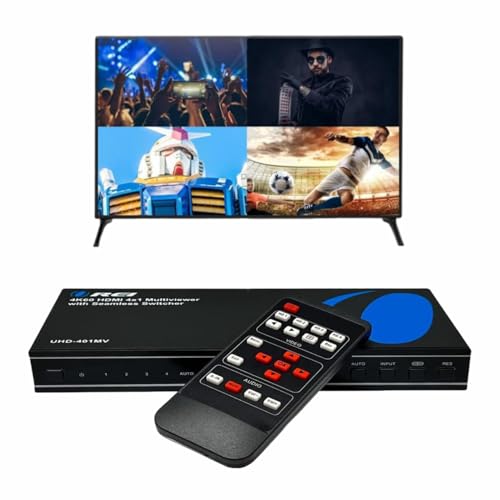
- Four HDMI inputs with switching up to 4K at 60Hz
- Five display modes for source monitoring
- Remote and front-panel control with audio outputs
Best For: Gaming, presentations, and home HDMI setups
Best Hybrid SDI/HDMI Flexibility

- Four SDI, four HDMI, USB-C, NDI HX, and playback sources
- Advanced keys, transitions, PIP, and DSK effects
- Streams to up to three platforms
Best For: Complex mixed-camera live productions
Best Budget HDMI Pick
PORTTA 4x1 Multiviewer Switcher

- Six viewing layouts with PiP and quad view
- Seamless switching between four HDMI sources
- Supports 1080p60 with 3.5mm audio output
Best For: Home theaters, gaming, and basic monitoring
Best for Live Production

- Four HDMI and four SDI inputs
- Records eight ISO feeds plus program output
- Built-in XLR audio and triple RTMP streaming
Best For: Professional livestreams, events, churches, and podcasts
Best 4K Multi-View Value
J-Tech Digital 4x1 HDMI Switcher

- 4K60 support for four HDMI sources
- Eight modes with PiP, PBP, and quad view
- RCA and Toslink audio extraction
Best For: 4K monitoring, home theaters, gaming, and HDMI installations
Premium All-in-One Pick
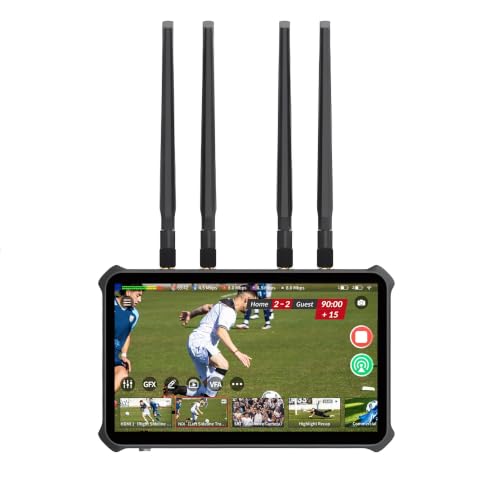
- Up to four HDMI, two USB, and 10 IP sources
- Independent HDMI outputs for program and multiview
- 4K60 program plus three 1080p60 ISO recordings
Best For: Advanced 4K streaming and mobile production setups
Best Compact HDMI Value

- Four HDMI inputs with four-camera multiview
- Built-in streaming, recording, and audio mixing
- Transitions, keyers, and USB-C webcam output
Best For: Compact HDMI multicamera livestreams
Best Portable Kit

- Four HDMI/SDI inputs with two HDMI outputs
- 14-inch built-in screen for multiview monitoring
- AC, DC, and USB power-bank support
Best For: Portable multicamera field production
Best All-in-One Production Hub – GoStream Deck HDMI Pro
If you need a video switcher with multi view for a multi-camera stream, the Osee GoStream Deck combines four HDMI inputs with two HDMI outputs for monitoring and MultiView. Its built-in controls, audio tools, recording, playback, overlays, and direct streaming make it suited to productions that need more than basic source switching.
Best For: Live events, churches, conferences, weddings, podcasts, and educational broadcasts requiring integrated production controls.
Pros:
- Four HDMI inputs and two HDMI outputs support multi-camera setups and MultiView monitoring.
- Records to an SD card or USB SSD and supports MP4 playback during productions.
- Offers audio processing, graphics overlays, chroma key, PIP, and streaming to up to three platforms.
- Supports landscape and portrait streaming plus hardware control without a PC.
Cons:
- Its broad feature set may require more setup than a basic HDMI switcher.
- It is limited to HDMI camera inputs rather than offering native SDI inputs.
The GoStream Deck is a strong choice when you want a self-contained video switcher with multi view and production features in one compact unit. Choose it if recording, audio control, overlays, and direct streaming are priorities.
Best Touchscreen Workflow – FEELWORLD L4 10.1-Inch Switcher
The FEELWORLD L4 is a video switcher with multi view designed around a large 10.1-inch touchscreen. It accepts four HDMI sources and one SDI source, provides real-time preview, and combines touch controls with buttons and a T-bar for switching between cameras.
Best For: Multi-camera streaming teams that want touchscreen operation, mixed HDMI/SDI connectivity, and direct USB output for streaming software.
Pros:
- Large 10.1-inch touchscreen provides an intuitive menu and real-time preview.
- Supports five camera inputs through four HDMI ports and one SDI port.
- Includes HDMI, SDI, and USB 3.0 outputs for display and streaming workflows.
- Supports chroma key and logo overlays for branded productions.
Cons:
- The supplied notes do not indicate direct network streaming, recording, or audio-processing features.
- Its format support varies by input and output type, so source compatibility should be checked before purchase.
For operators who value a clear interface, the L4 offers a practical balance of touchscreen control and physical switching. Its HDMI/SDI combination is especially useful when a production uses different camera connection standards.
Best for Simple 4K Monitoring – OREI 4×1 HDMI MultiViewer
The OREI 4×1 is a video switcher with multi view for users who need to view and select among four HDMI sources on one display. It supports switching up to 4K at 60Hz and includes multiple display modes, remote control, and audio outputs, but it is more focused on source viewing than full live production.
Best For: Home entertainment, gaming, presentations, and straightforward HDMI source monitoring on one screen.
Pros:
- Supports four HDMI inputs and switching up to 4K at 60Hz.
- Offers five display modes for viewing multiple sources.
- Includes IR remote and front-panel controls for source selection.
- Provides optical and L/R audio output with support for several Dolby and DTS formats.
Cons:
- Has one HDMI output, so it is not designed for a larger broadcast monitoring setup.
- It does not list camera-production features such as overlays, chroma key, or streaming output.
- Only one source can output audio at a time.
The OREI is best viewed as a compact 4K HDMI multi-viewer and switch rather than a live production mixer. It is a sensible fit when easy source selection and display flexibility matter more than broadcast controls.
Best Hybrid SDI/HDMI Flexibility – Osee GoStream Duet
Osee GoStream Duet Multiple Camera SDI and HDMI Live Stream Video Mixer Switcher
Check Price On AmazonThe Osee GoStream Duet is a video switcher with multi view for productions that mix SDI, HDMI, USB-C, NDI HX, and media playback sources. It supports landscape and portrait workflows, multiple control methods, key effects, and direct streaming to up to three platforms, making it the most flexible option here for larger live setups.
Best For: Professional and semi-professional live events using mixed SDI and HDMI cameras with advanced switching and streaming needs.
Pros:
- Supports four SDI, four HDMI, USB-C, NDI HX, and SD/SSD playback sources.
- Provides MIX, DIP, WIPE, and T-bar transitions plus multisource, chroma key, PIP, and DSK effects.
- Can stream to up to three platforms through Ethernet or connect with OBS and vMix.
- Offers built-in GUI, Mac/Windows software, and Bitfocus Companion control options.
Cons:
- Its advanced source and effects options may be more than a simple streaming setup requires.
- The free NDI HX functionality requires downloading the latest firmware to unlock it.
- The supplied notes do not specify a built-in display size for multi-view monitoring.
If your cameras use both SDI and HDMI, the GoStream Duet offers considerable room to grow. Its broad input support and control options make it a strong choice for complex live productions, provided you are comfortable with a more advanced workflow.
Best Budget HDMI Pick – PORTTA 4×1 Multiviewer Switcher
If you need a practical video switcher with multi view for gaming, security cameras, or multiple media sources, the PORTTA combines four HDMI inputs with six viewing layouts. It supports 1080p at 60Hz, seamless switching, and both remote and RS232 control.
Best For: Home theaters, gaming setups, and basic multi-camera or security-feed monitoring.
Pros:
- Six layouts include quad view, side-by-side, PiP, full screen, and 1-big/3-small.
- Seamless switching helps reduce interruptions when changing sources.
- Includes scaler support for 1080p and 720p signals, plus 3.5mm audio output.
- Works with consoles, computers, cameras, projectors, and monitors.
Cons:
- Video support is limited to 1080p at 60Hz rather than 4K.
- Audio connectivity is less extensive than models with optical or professional audio outputs.
The PORTTA is a straightforward choice when flexible layouts matter more than 4K resolution. Its compact design, broad compatibility, and included two-year warranty make it appealing for smaller installations.
Best for Live Production – Osee GoStream Duet 8 ISO
For demanding productions, the Osee GoStream Duet 8 ISO is a video switcher with multi view built around eight mixed HDMI and SDI inputs. It adds ISO and program recording, professional XLR audio, network video support, and direct streaming for crews that need a broader live-production workflow.
Best For: Churches, event crews, podcasts, panels, and multi-camera livestreaming.
Pros:
- Combines four HDMI 2.0 inputs with four 3G-SDI inputs, accepting HDMI signals up to 4K60.
- Records eight individual ISO feeds plus the program output.
- Offers XLR and 3.5mm audio connections with phantom power and built-in processing.
- Supports NDI|HX, SRT, RTMP, UVC output, and streaming to up to three RTMP destinations.
Cons:
- Its professional feature set may be more than a simple streaming setup requires.
- HDMI and SDI sources have different input capabilities, so system planning is important.
- It provides 4K input but is specified for 1080p output.
The GoStream Duet 8 ISO is the most capable option here for integrated production. Its recording, audio, graphics, networking, and hybrid-input features can reduce the need for several separate devices.
Best 4K Multi-View Value – J-Tech Digital 4×1 HDMI Switcher
The J-Tech Digital JTECH-MV41A is a video switcher with multi view for users who want four-source monitoring with 4K at 60Hz support. It offers eight display modes, including PiP, PBP, and quad view, along with OSD or PC-based layout controls and dedicated audio extraction.
Best For: 4K home theaters, security monitoring, gaming, and professional HDMI installations.
Pros:
- Supports 4K at 60Hz for sharper multi-source viewing.
- Eight viewing modes provide flexible PiP, PBP, and quad-view configurations.
- OSD and PC software allow source rearrangement, window adjustment, and aspect-ratio changes.
- RCA and Toslink outputs support stereo, optical, surround sound, Dolby Digital, and DTS-HD formats.
Cons:
- It is designed for HDMI sources and does not provide SDI inputs.
- It requires an AC adapter and may need more setup than a basic switcher.
- The listed manufacturer warranty is one year.
Choose the J-Tech Digital when 4K clarity and audio flexibility are priorities. Mounting hardware, adjustable layouts, and lifetime technical support also make it a strong fit for more permanent installations.
Premium All-in-One Pick – Magewell Director Plus 55290
If you need a video switcher with multi view that can also handle streaming, recording, and encoding without a separate computer, the Magewell Director Plus is a powerful standalone option. It combines broad source support, a built-in touchscreen, independent HDMI outputs, and 4K60 production features in one system.
Best For: Advanced creators, event producers, and mobile production teams that need flexible 4K switching, recording, and streaming.
Pros:
- Supports up to four HDMI, two USB, and 10 simultaneous IP sources.
- Dual HDMI outputs can be assigned independently for program, multiview, or monitoring.
- Records a 4K60 program feed plus three independent 1080p60 ISO sources.
- Built-in 7-inch AMOLED touchscreen, 5G, Wi-Fi 6E, and 2.5Gbps Ethernet.
Cons:
- Advanced features may be more than a simple streaming setup requires.
- NP-F batteries and cellular service are sold separately.
The Director Plus stands out when you want a portable, highly integrated production hub rather than a basic HDMI switcher. Its extensive connectivity and recording flexibility come at the cost of a more feature-heavy workflow.
Best Compact HDMI Value – Blackmagic ATEM Mini Pro
The Blackmagic ATEM Mini Pro is a practical video switcher with multi view for creators who want four-camera HDMI production in a compact desktop unit. It adds built-in streaming, recording, transitions, keying, and audio mixing without requiring a large production console.
Best For: Livestreamers, educators, presenters, and small multicamera productions using HDMI cameras.
Pros:
- Four HDMI inputs support multicamera switching and a four-camera multiview.
- Includes cut, mix, dip, wipe, and DVE transitions.
- Built-in six-input, two-channel audio mixer and multiple keying options.
- USB-C supports webcam output, panel connection, and external-drive recording.
Cons:
- Connections are centered on four HDMI inputs rather than HDMI/SDI combinations.
- Its single HDMI output must serve the available output and multiview functions.
For straightforward four-camera HDMI work, the ATEM Mini Pro offers a strong feature set in a small footprint. It is especially appealing when you value familiar live-production controls and integrated streaming over extensive input expansion.
Best Portable Kit – Osee GoStream Duet Kit
The Osee GoStream Duet Kit is a video switcher with multi view designed for portable multicamera production. Its four HDMI/SDI inputs, dual HDMI outputs, built-in 14-inch screen, and flexible power options make it useful when you need to monitor and deliver a program feed while working away from a fixed studio.
Best For: Mobile streamers and small production crews needing an integrated monitor, switching, and flexible field power.
Pros:
- Four HDMI/SDI inputs and two HDMI outputs support flexible signal routing.
- Dual outputs let you retain multiview while providing a program output.
- Includes a 14-inch 1080×1920 screen, silent fan, and mounting cheese plates.
- Can run from AC, DC, or a USB power bank and can supply USB 5V power.
Cons:
- At about 5kg, it is less lightweight than a compact desktop switcher.
- The supplied kit is more specialized for portable production than minimal setups.
The GoStream Duet Kit makes a strong case for field usability by combining switching, monitoring, mounting hardware, and multiple power methods. Choose it when portability and an integrated operating package matter more than minimizing size and weight.
How We Picked the Best Video Switcher with Multi View
We focused on the features that matter during real-world production: multiview monitoring, input types, supported resolutions, switching speed, audio handling, streaming and recording options, and ease of setup. The selection includes simple HDMI viewers for straightforward source switching as well as advanced systems with SDI, ISO recording, XLR audio, touchscreens, encoding, and built-in storage workflows.
Because production needs vary, we did not treat the most expensive or feature-rich model as automatically best. Instead, the strongest choice depends on how many sources you use, whether you need 4K, and how much control you want in one device.
Quick Comparison
| Best For | What to Prioritize | Typical Fit |
|---|---|---|
| Basic multi-source monitoring | HDMI compatibility, clear layouts, reliable switching | Home studios and small presentations |
| Live streaming | USB output, encoding, audio mixing, overlays | Creators and online events |
| Professional camera systems | SDI, XLR audio, multiview flexibility, recording | Churches, venues, and production teams |
| 4K workflows | 4K input/output support, EDID control, bandwidth | Modern cameras and commercial displays |
Key Buying Factors for a Video Switcher with Multi View
Inputs, Outputs, and Signal Format
Count your cameras and playback sources before buying, then leave room for expansion. HDMI is common and convenient, while SDI is better suited to longer cable runs and professional environments. Check whether the switcher supports your exact frame rates and resolutions; a 4K-capable input does not always mean every output or multiview mode operates in 4K.
Multiview Layout and Monitoring
Look for a clear quad or multiview display with source labels, program output, preview, audio meters, and status information. Touchscreen control can speed up operation, but physical buttons may be preferable when you need fast, tactile switching.
Audio, Streaming, and Recording
Determine whether audio is embedded through HDMI, connected through 3.5mm inputs, or handled with XLR microphones and mixers. For streaming, verify USB webcam output, network encoding, platform support, and recording formats. ISO recording is valuable when you want to edit individual camera feeds later.
Future-Proofing and Setup
Consider power requirements, cooling, firmware updates, control software, and the cables or converters your installation needs. A compact switcher may be ideal for travel, while a larger all-in-one unit can reduce the number of separate devices in a permanent setup.
Who Should Buy Which Video Switcher with Multi View?
Choose a compact HDMI multiviewer if you mainly need to view and switch a few sources without streaming or advanced audio production. Streamers and small content teams should prioritize USB or network output, built-in audio tools, and simple scene control. Buyers working with professional cameras should look for SDI support, XLR inputs, dependable multiview layouts, and recording options.
If you produce larger events or want one central production hub, an all-in-one switcher with encoding, recording, touchscreen control, and multiple output options may justify the higher cost. Before ordering, confirm connector types, resolution support, and the number of simultaneous sources your production actually requires.