A dependable router is essential for video calls, cloud apps, large uploads, and connected home devices. The right model can reduce dead zones, manage busy networks, and keep work traffic responsive.
We compared 10 WiFi routers for home offices across WiFi standards, coverage, speed, security features, and upgrade value so you can choose a practical fit for your space and budget.
Best 10 Wifi Routers for Home Offices Picks for 2026
Best Value Wi-Fi 6 Pick

- AX1800 dual-band Wi-Fi 6 performance
- OFDMA, beamforming, and four antennas
- VPN server support and WPA3 security
Best For: Moderate home-office networks seeking dependable Wi-Fi 6 value
Best for High-Demand Home Offices

- Tri-band Wi-Fi 7 with a 6 GHz band
- Up to 9.3 Gbps and 100-device capacity
- Two 2.5G and two gigabit Ethernet ports
Best For: Busy homes with fast plans and newer Wi-Fi 7 devices
Best Feature-Rich Wi-Fi 6 Upgrade
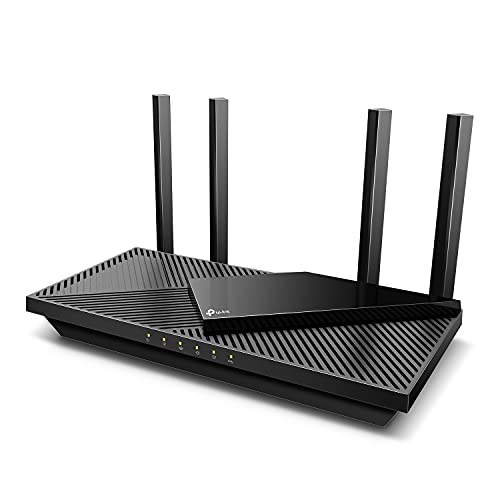
- AX3000 Wi-Fi 6 with up to 2,402 Mbps on 5 GHz
- OFDMA, beamforming, and four high-gain antennas
- QoS, VPN support, and basic HomeShield features
Best For: Home offices wanting extra control and Wi-Fi 6 capacity
Best Compact Wi-Fi 7 Option

- Dual-band Wi-Fi 7 up to 3.6 Gbps
- Coverage for up to 2,000 square feet
- One 2.5G and three gigabit ports
Best For: Smaller home offices wanting an accessible Wi-Fi 7 upgrade
Best Wi-Fi 7 Value

- Wi-Fi 7 with Multi-Link Operation and 4K-QAM
- Two 2.5G ports plus three 1G LAN ports
- Coverage for up to 2,000 sq. ft. and 60 devices
Best For: Multi-gig home offices wanting Wi-Fi 7
Best for Busy Homes

- Wi-Fi 7 speeds up to 5.5 Gbps
- Coverage for up to 2,500 sq. ft. and 80 devices
- One 2.5G port and simple Nighthawk app controls
Best For: Busy homes with video calls and many devices
Best Security-Focused Choice

- Wi-Fi 6 with MU-MIMO and OFDMA
- Four Gigabit LAN ports plus one WAN port
- Subscription-free AiProtection and Instant Guard VPN
Best For: Security-conscious home offices on Gigabit internet
Best for Future-Ready Connectivity
TP-Link AXE5400 WiFi 6E Router

- Tri-band WiFi 6E with up to 5400 Mbps
- 2.5Gbps WAN port and VPN support
- EasyMesh and basic HomeShield features
Best For: Busy home offices with newer WiFi 6E devices
Best for WiFi 7 Performance

- WiFi 7 features including MLO and 4K-QAM
- Up to 2,400 sq. ft. and 90 devices
- Two 2.5Gbps ports plus three gigabit LAN ports
Best For: WiFi 7 households and multi-gig internet plans
Best Budget Pick
TP-Link AC1900 Smart WiFi Router

- Dual-band WiFi 5 speeds up to 1900 Mbps
- Four gigabit LAN ports for wired devices
- OneMesh and Tether app support
Best For: Smaller home offices with everyday connectivity needs
Best Value Wi-Fi 6 Pick – TP-Link Archer AX21
For shoppers comparing wifi routers for home offices, the TP-Link Archer AX21 is a practical dual-band Wi-Fi 6 option for everyday video calls, streaming, and connected devices. Its AX1800 rating, OFDMA support, beamforming, and four high-gain antennas are designed to help maintain a stable connection, though a separate modem is required.
Best For: Home offices seeking an affordable, reliable Wi-Fi 6 router for moderate device loads.
Pros:
- Wi-Fi 6 and OFDMA help support multiple connected devices.
- Beamforming, four antennas, and an FEM chipset are designed for broad coverage.
- Supports WPA3 security and OpenVPN or PPTP VPN server functions.
- Works with major cable, fiber, DSL, and other internet providers when paired with the required modem.
Cons:
- It is dual-band and does not support the 6 GHz band.
- Actual speeds depend on the internet plan, distance, interference, and obstacles.
- A separate modem is required for internet access.
The Archer AX21 is a sensible starting point for a home office that needs Wi-Fi 6 features without moving to a more expensive Wi-Fi 7 system. Its gigabit Ethernet ports and app or voice control add useful flexibility for a typical home network.
Best for High-Demand Home Offices – NETGEAR Nighthawk BE9300
The NETGEAR Nighthawk BE9300 is a strong choice among wifi routers for home offices that handle demanding devices, frequent video calls, streaming, and smart-home traffic. Its tri-band Wi-Fi 7 design adds a 6 GHz band and offers up to 9.3 Gbps of combined throughput, with coverage rated for up to 2,500 square feet.
Best For: Busy homes with newer Wi-Fi 7 devices, fast internet plans, and many simultaneous connections.
Pros:
- Tri-band Wi-Fi 7 provides separate 2.4 GHz, 5 GHz, and 6 GHz bands.
- Up to 9.3 Gbps combined throughput and support for up to 100 devices.
- Includes two 2.5G ports plus two gigabit ports.
- Nighthawk app supports guided setup, speed tests, device pausing, and guest networks.
Cons:
- Real-world performance depends on device capability and the internet plan.
- Walls, floors, and interference can reduce the stated coverage.
- Larger or multi-story homes may need a mesh system instead.
This Nighthawk model offers considerable headroom for a demanding home office, especially when newer Wi-Fi 7 devices and multi-gigabit networking are part of the setup. It connects to an existing modem or gateway by Ethernet, and some modem-router combinations may require bridge mode.
Best Feature-Rich Wi-Fi 6 Upgrade – TP-Link Archer AX55
The TP-Link Archer AX55 is a feature-rich option for wifi routers for home offices, combining Wi-Fi 6 speeds with tools for handling simultaneous video calls, streaming, and connected devices. It offers up to 2,402 Mbps on 5 GHz, 574 Mbps on 2.4 GHz, and includes beamforming, OFDMA, QoS, and TP-Link HomeShield features.
Best For: Home offices that want stronger Wi-Fi 6 performance plus network-management and security features.
Pros:
- AX3000-class Wi-Fi 6 speeds support demanding everyday activities.
- OFDMA is designed to reduce latency and jitter across multiple clients.
- Four high-gain antennas and beamforming help extend wireless coverage.
- Includes QoS, guest mode, VPN server and client support, and basic HomeShield features.
Cons:
- It is dual-band and does not offer a 6 GHz band.
- Actual speeds vary with the internet plan, distance, obstacles, and interference.
- A modem is required for most internet providers.
The Archer AX55 is a well-rounded upgrade when an office needs more capacity and configuration options than a basic router provides. Its cooling-focused design, gigabit Ethernet, and Alexa compatibility make it convenient for a broader home network.
Best Compact Wi-Fi 7 Option – NETGEAR Nighthawk RS100
The NETGEAR Nighthawk RS100 is a straightforward dual-band Wi-Fi 7 choice for wifi routers for home offices in smaller or open-layout homes. It delivers up to 3.6 Gbps across the 2.4 GHz and 5 GHz bands, covers up to 2,000 square feet, and supports up to 50 devices.
Best For: Smaller home offices that want Wi-Fi 7 capability without needing a tri-band router.
Pros:
- Wi-Fi 7 supports faster networking than Wi-Fi 6 and remains backward compatible.
- Coverage is rated up to 2,000 square feet and up to 50 devices.
- Includes one 2.5G port and three gigabit ports.
- Nighthawk app provides guided setup, speed tests, device pausing, and guest-network management.
Cons:
- Dual-band design does not include a 6 GHz band.
- Coverage can be reduced by walls, floors, and interference.
- Larger or multi-story homes may benefit more from a mesh system.
The RS100 makes sense when a home office needs a modern Wi-Fi 7 router but has a moderate footprint and device count. It works with an existing modem or gateway over Ethernet, although bridge mode may be needed with some combinations.
Best Wi-Fi 7 Value – TP-Link Archer BE230
For home offices that need modern performance without moving to a tri-band system, the TP-Link Archer BE230 is a practical Wi-Fi 7 option. Its dual-band design, Multi-Link Operation, 2.5G networking, and support for up to 60 devices make it well suited to video calls, streaming, and busy connected homes.
Best For: Home offices with gigabit-plus internet, several wired devices, and interest in Wi-Fi 7 features.
Pros:
- Wi-Fi 7 features include Multi-Link Operation, Multi-RUs, and 4K-QAM.
- Includes one 2.5G WAN/LAN port, one 2.5G LAN port, and three 1G LAN ports.
- Rated for up to 2,000 square feet and up to 60 connected devices.
- Supports EasyMesh, WPA3 security, parental controls, and Tether app management.
Cons:
- Dual-band design does not include the 6 GHz band.
- Coverage and actual speeds vary with walls, distance, interference, and internet-plan limits.
- Requires a separate modem.
The Archer BE230 is a strong fit when wired multi-gig connectivity matters as much as wireless performance. Its dual-band layout is less flexible than a 6 GHz model, but the 2.5G ports and mesh compatibility give a home office room to grow.
Best for Busy Homes – NETGEAR Nighthawk RS180
The NETGEAR Nighthawk RS180 is one of the more capable wifi routers for home offices that share bandwidth with streaming, gaming, and smart-home devices. It combines dual-band Wi-Fi 7 with up to 5.5 Gbps of combined throughput, coverage rated for 2,500 square feet, and support for up to 80 devices.
Best For: Busy home offices that need broad dual-band coverage and straightforward app-based management.
Pros:
- Wi-Fi 7 performance reaches up to 5.5 Gbps across the 2.4 GHz and 5 GHz bands.
- Coverage is rated for up to 2,500 square feet and 80 devices.
- Includes one 2.5G port and three Gigabit ports.
- Nighthawk app supports guided setup, speed tests, guest networks, and device pausing.
Cons:
- Dual-band design does not provide a 6 GHz band.
- Walls, floors, interference, devices, and internet service can reduce real-world performance.
- Larger or multistory homes may need a separate Orbi mesh system.
The RS180 makes sense for users who want Wi-Fi 7 capacity without a complicated setup. Its 2.5G connection is useful for compatible internet service or local networking, while the app keeps common home-office management tasks accessible.
Best Security-Focused Choice – ASUS RT-AX1800S
The ASUS RT-AX1800S is a sensible choice among wifi routers for home offices when reliable Wi-Fi 6 performance and network protection matter more than the newest Wi-Fi generation. It offers MU-MIMO and OFDMA for connected-device efficiency, five Gigabit ports, subscription-free AiProtection Classic security, and built-in VPN access through ASUS Instant Guard.
Best For: Home offices seeking affordable Wi-Fi 6, strong security features, and four wired LAN connections.
Pros:
- Wi-Fi 6, MU-MIMO, OFDMA, and 1024-QAM support efficient connections for multiple devices.
- Five Gigabit ports include one WAN port and four LAN ports.
- AiProtection Classic provides network security without a subscription.
- Includes parental controls, AiMesh compatibility, and Instant Guard VPN access.
Cons:
- Wi-Fi 6 is an older generation than Wi-Fi 7.
- Ports are Gigabit rather than multi-gigabit.
- Actual throughput and coverage depend on network traffic, building materials, and other environmental factors.
The RT-AX1800S is a good match for a conventional home office with Gigabit internet and several wired workstations or peripherals. Its security and VPN tools add useful flexibility, while AiMesh offers an upgrade path for extending coverage.
Best for Future-Ready Connectivity – TP-Link AXE5400 WiFi 6E Router
For home offices with newer laptops, phones, and video-calling devices, the TP-Link Archer AXE75 is a strong choice among wifi routers for home offices. Its tri-band WiFi 6E design adds a 6 GHz band for more bandwidth and lower latency, while the 2.5Gbps WAN port helps support fast internet plans.
Best For: Home offices that need responsive video calls, heavy multitasking, and room to grow into WiFi 6E.
Pros:
- Tri-band WiFi 6E with speeds up to 5400 Mbps and a dedicated 6 GHz band
- OFDMA and tri-band capacity support simultaneous connections across multiple devices
- 2.5Gbps WAN port, VPN server/client support, WPA3, and EasyMesh compatibility
- Includes basic HomeShield security, parental controls, and QoS features
Cons:
- Most internet providers require a separate modem
- WiFi 6E benefits depend on compatible client devices
The Archer AXE75 is a well-rounded upgrade for a busy home office, particularly if your household has compatible 6 GHz devices. Its security and mesh-expansion features add flexibility beyond raw wireless speed.
Best for WiFi 7 Performance – TP-Link BE6500 WiFi 7 Router
The TP-Link Archer BE400 is a forward-looking option among wifi routers for home offices, pairing WiFi 7 features with multi-gig wired ports. Multi-Link Operation, Multi-RUs, and 4K-QAM are designed to improve throughput and reliability on compatible devices.
Best For: Remote workers and households with WiFi 7 devices, multi-gig internet, and demanding streaming or gaming needs.
Pros:
- WiFi 7 support with Multi-Link Operation, Multi-RUs, and 4K-QAM
- Coverage rated up to 2,400 square feet for as many as 90 devices
- Includes a 2.5Gbps WAN/LAN port, a 2.5Gbps LAN port, and three 1Gbps LAN ports
- Supports EasyMesh, VPN client functionality, and TP-Link HomeShield features
Cons:
- WiFi 7 features require compatible client devices to deliver their benefits
- Requires a separate modem and is not compatible with Deco mesh systems
The Archer BE400 makes the most sense when you are building around WiFi 7 hardware or a gig-plus connection. Its dual-band design and strong wired connectivity also make it practical for a work-from-home setup with Ethernet-equipped devices.
Best Budget Pick – TP-Link AC1900 Smart WiFi Router
The TP-Link Archer A8 is a straightforward, affordable choice among wifi routers for home offices. Its dual-band WiFi 5 connection reaches up to 1900 Mbps, while four gigabit LAN ports provide reliable wired connections for a work computer, printer, or other office equipment.
Best For: Small to medium home offices that want dependable everyday connectivity without WiFi 6E or WiFi 7 features.
Pros:
- Dual-band speeds up to 600 Mbps on 2.4 GHz and 1300 Mbps on 5 GHz
- Four gigabit LAN ports support fast wired office connections
- MU-MIMO, beamforming, guest WiFi, and OneMesh extender compatibility
- Simple setup and management through the TP-Link Tether app
Cons:
- Uses older WiFi 5 technology and does not support the 6 GHz band
- No USB port
- Coverage is rated at up to 1,200 square feet
The Archer A8 is a sensible fit for basic remote work, browsing, video calls, and streaming when your internet plan and device count are moderate. Choose a newer model if you need maximum capacity or want longer-term WiFi 7 support.
How We Picked the Best Wifi Routers for Home Offices
We focused on features that matter during real workdays rather than headline speed alone. Each model was evaluated by wireless standard, advertised capacity, band configuration, coverage claims, wired ports, security tools, parental controls, mesh expandability, and overall value. WiFi 6 models remain strong choices for most households, while WiFi 6E and WiFi 7 routers can provide more capacity for newer devices and demanding networks.
Advertised throughput and coverage vary by client device, building materials, internet plan, interference, and placement. Treat manufacturer speed figures as comparisons, not guaranteed results.
Quick Comparison
| Best For | Recommended Type | Why It Makes Sense |
|---|---|---|
| Budget home office | WiFi 6 or AC1900 | Reliable everyday connectivity without paying for unused capacity |
| Several active users | Tri-band WiFi 6E or WiFi 7 | More spectrum and capacity for simultaneous work, streaming, and gaming |
| Newer laptops and phones | WiFi 7 | Better long-term compatibility and improved performance on supported devices |
| Larger homes | Mesh-ready router | Allows coverage expansion when one router cannot reach every room |
Key Buying Factors for Wifi Routers for Home Offices
WiFi Standard and Capacity
WiFi 6 is the practical baseline for most offices. WiFi 6E adds access to the less congested 6 GHz band, but compatible devices are required. WiFi 7 is the newest option and may be worthwhile if you are buying for several years, use many high-performance devices, or regularly move large files across the network.
Coverage and Placement
Choose a router suited to your floor plan, but do not rely solely on square-footage claims. Place it in an open, central location, elevated from the floor and away from dense walls, appliances, and metal objects. For multi-story or unusually shaped homes, prioritize AiMesh or another mesh expansion system.
Ports, Security, and Management
Gigabit Ethernet is adequate for many internet plans, while faster multi-gig ports help households with high-speed service or local network storage. Look for automatic firmware updates, WPA3 support, guest networking, parental controls, and clear app-based management. Subscription-free security can also reduce ongoing ownership costs.
Who Should Buy Which Wifi Routers for Home Offices?
Choose a basic WiFi 6 or AC1900 router if you have a modest internet plan, a small home, and a few connected devices. Choose a higher-capacity WiFi 6 or WiFi 6E model if multiple people work, stream, and make video calls at the same time. Choose WiFi 7 if you own compatible devices, want the latest standard, or prefer a longer upgrade cycle. Choose a mesh-compatible model if your office is far from the router or your home has persistent dead zones.
Before buying, check your internet plan, device compatibility, Ethernet needs, and return policy. A well-placed midrange router often delivers a better experience than an expensive model installed in a poor location.