Choosing the right access control can make everyday office entry smoother, safer, and easier to manage. The best Wi‑Fi smart locks for office use combine remote control, reliable locking, and simple user management.
Below, we focus on practical options that fit real workplace needs, from small teams to shared entrances and higher-traffic doors.
Best 10 Wifi Smart Locks for Office Picks for 2026
Biometric Office Access Pick
ULTRALOQ U-Bolt Pro WiFi Smart Lock
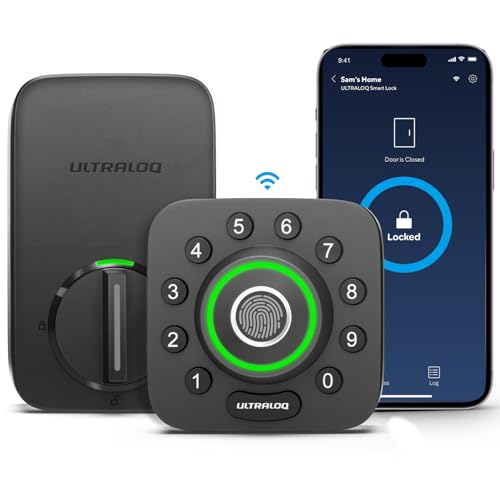
- Built-in Wi-Fi with no hub required
- Fingerprint, passcode, app, and voice entry
- Door sensor plus ANSI Grade 1 security
Best For: Offices and shared spaces needing flexible access control
Keypad Office Security Pick
Schlage Encode Smart WiFi Deadbolt

- Built-in Wi-Fi with app-based access management
- Up to 100 access codes for shared entry
- BHMA-certified with alarm and auto-lock
Best For: Offices wanting a keypad smart lock from a trusted brand
Complete Entry Set Pick
Philips WiFi Keypad Door Lock with Handle

- Built-in Wi-Fi with no hub required
- 0.3-second fingerprint unlock and app control
- Includes handle set plus flexible PIN options
Best For: Offices needing a full lock-and-handle upgrade
Straightforward Wi-Fi Pick

- Built-in Wi-Fi with no bridge required
- Physical buttons, app control, and voice access
- Auto-lock plus event history and notifications
Best For: Offices that want simple remote management and easy installation
Flexible Access for Busy Offices
Philips Wi-Fi Smart Deadbolt Lock

- App, passcode, fingerprint, key, and voice unlock
- Built-in Wi-Fi for remote access without a hub
- Up to 100 codes with alerts and access history
Best For: Offices needing flexible entry methods and scheduled code sharing
Shared Entry Made Simple
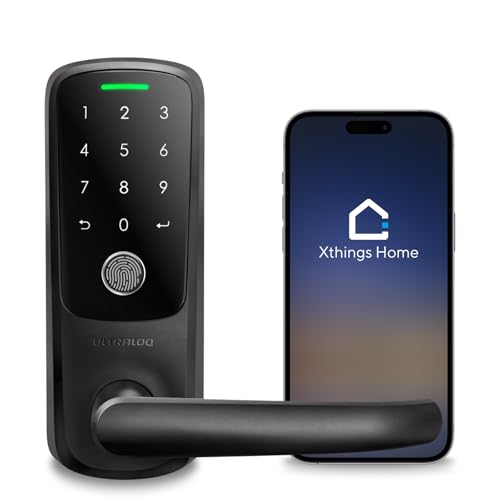
- Built-in Wi-Fi with no gateway required
- Temporary passwords and access logs in the app
- Fingerprint, code, key, and remote control
Best For: Shared offices and spaces with frequent guest access
Fast Access for Side and Office Doors

- Built-in Wi-Fi with app control and notifications
- Fingerprint, keypad, and app entry options
- Installs quickly with no drilling
Best For: Side or office doors that need fast biometric access
Office-Ready Keyless Entry
Built-in WiFi Fingerprint Smart Door Lock with Handle

- Built-in WiFi with no extra gateway needed
- 6-in-1 unlocking: fingerprint, code, card, app, key, voice
- Stores 200 codes and 100 fingerprints
Best For: Small offices and shared spaces needing remote access
Handle Set Upgrade
Philips Wi-Fi Smart Lock with Handles

- Includes lock plus two lever handles
- Built-in Wi-Fi with remote app control and alerts
- Unlock by fingerprint, PIN, key, or app
Best For: Offices needing a full lock-and-handle replacement
Fast Biometric Access
Fingerprint Smart Door Lock with Handle & Keypad
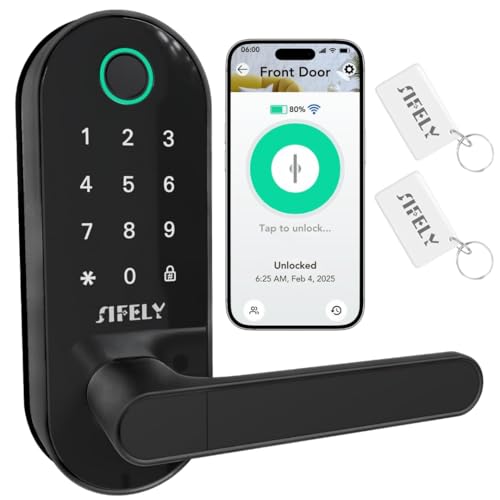
- Built-in WiFi with no gateway required
- Fingerprint unlock works in 0.3 seconds
- Supports app, passcode, FOB, and key access
Best For: Offices that want fast biometric entry and remote control
Biometric Office Access Pick – ULTRALOQ U-Bolt Pro WiFi Smart Lock
If you want wifi smart locks for office use that can handle shared access and remote oversight, the ULTRALOQ U-Bolt Pro WiFi Smart Lock is built for that kind of workflow. It connects directly to 2.4GHz Wi-Fi with no hub, so you can lock, unlock, share eKeys or codes, and review access logs from the app from wherever you are.
Best For: Offices, rentals, and teams that need fingerprint access plus remote control without adding a hub.
Pros:
- Built-in Wi-Fi supports remote lock/unlock, access sharing, and activity logs.
- Multiple entry methods include fingerprint, passcode, app control, voice, and physical keys.
- Door sensor, auto-lock, and open-door alerts add practical oversight.
- ANSI Grade 1 rating and IP65 weather resistance add durability.
Cons:
- Works on 2.4GHz Wi-Fi only.
- Not recommended for metal doors.
This is a strong fit when you want a security-focused smart deadbolt for a workplace that still needs convenient day-to-day access management. The fingerprint option and remote code sharing are especially useful where multiple people need entry.
Keypad Office Security Pick – Schlage Encode Smart WiFi Deadbolt
For buyers comparing wifi smart locks for office entry points, the Schlage Encode Smart WiFi Deadbolt stands out for simple remote management and a familiar keypad layout. Built-in Wi-Fi lets you control the lock through the Schlage Home app, manage up to 100 access codes, and review lock history without needing a separate hub.
Best For: Offices that want a keypad-first smart lock with strong brand security and easy app-based management.
Pros:
- Built-in Wi-Fi enables remote access and monitoring through the app.
- Supports up to 100 access codes for shared keyless entry.
- Built-in alarm, fingerprint-resistant touchscreen, and BHMA certification support security.
- Auto-lock and one-touch exterior locking make daily use straightforward.
Cons:
- Uses a keypad rather than fingerprint access.
- Battery life is listed at up to six months with typical use.
This model makes sense when your priority is dependable keypad access and solid security features over extra biometric options. It is a practical choice for office doors where code sharing and remote oversight matter more than advanced unlocking modes.
Complete Entry Set Pick – Philips WiFi Keypad Door Lock with Handle
If you want wifi smart locks for office doors with a full handle set, the Philips WiFi Keypad Door Lock combines built-in Wi-Fi, fingerprint access, and app control in one package. It connects directly to 2.4GHz Wi-Fi with no hub and lets you manage lock status, codes, fingerprints, and access history from the Philips Home Access App.
Best For: Offices that want a complete front-door lock set with fingerprint access and remote management.
Pros:
- Built-in Wi-Fi works without a hub and supports remote app control.
- Fingerprint unlock is rated at 0.3 seconds for fast access.
- Supports permanent, one-time, periodic, and recurring PIN codes.
- Includes a matching handle set for a complete door upgrade.
Cons:
- Must stay within about 33 ft of the Wi-Fi router for best performance.
- Batteries are not included.
This is a good fit when you want a more complete entry solution instead of just a deadbolt. The combination of fingerprint access, flexible PIN types, and app-based oversight makes it useful for offices with changing users.
Straightforward Wi-Fi Pick – eufy Security Smart Lock C30
For wifi smart locks for office use where simplicity matters, the eufy Security Smart Lock C30 keeps the feature set focused on built-in Wi-Fi, app control, and straightforward access methods. With no bridge required, you can manage the lock remotely, view event history, and use a physical key, app, voice commands, or the physical button to get in.
Best For: Offices that want an easy-to-install Wi-Fi keypad deadbolt with dependable app management.
Pros:
- Built-in Wi-Fi and no bridge required for remote control.
- Physical buttons are designed for durability and easier use than touchscreens.
- Auto-lock, event history, and real-time notifications improve oversight.
- 15-minute DIY installation and 24/7 support make setup easier.
Cons:
- Battery life is up to five months and batteries are not included.
- Security rating is BHMA Grade 3, below some higher-rated rivals.
This lock is best when you want a practical office smart lock without extra complexity. It focuses on core features that make remote management simple while still offering useful durability and access controls.
Flexible Access for Busy Offices – Philips Wi-Fi Smart Deadbolt Lock
For wifi smart locks for office use, the Philips Wi-Fi Smart Deadbolt Lock is a practical pick if you want multiple ways to get in without relying on a physical key. It supports app, passcode, fingerprint, physical key, and voice unlock, plus built-in Wi-Fi for remote control without an extra hub. That makes it a convenient fit for small offices, shared workspaces, or front-entry doors where access needs can change throughout the day.
Best For: Offices that want flexible access methods and remote control without a separate hub.
Pros:
- Multiple unlock options: app, passcode, fingerprint, key, and voice
- Built-in Wi-Fi supports remote access anywhere
- Up to 100 custom passcodes plus one-time or scheduled codes
- Real-time alerts and access history help you track entry
Cons:
- Only supports 2.4GHz Wi-Fi
- Batteries are not included
- No door sensor included
This lock leans toward convenience and control, especially if your office needs scheduled access for staff, cleaners, or deliveries. The auto-lock feature and Away Mode add helpful security layers, while the touchscreen and fingerprint access keep entry fast during busy hours.
Shared Entry Made Simple – ULTRALOQ Latch 5 Smart Lock
If you’re comparing wifi smart locks for office entrances, the ULTRALOQ Latch 5 stands out for simple shared access and remote management. It combines built-in Wi-Fi with app control, fingerprint access, keypad entry, and a mechanical key, so teams can get in the way that works best for them. The remote password sharing and access logs make it especially useful for offices with rotating visitors or multiple users.
Best For: Offices, rentals, or shared spaces that need easy remote user management.
Pros:
- Built-in Wi-Fi with no gateway required
- App, fingerprint, code, and mechanical key access
- Temporary password sharing through the smartphone app
- Access logs and real-time notifications help with oversight
Cons:
- Works with 2.4GHz Wi-Fi only
- Primarily a lever lock style, not a deadbolt
- Installation tips should be checked before setup
As a smart lever lock, this model is a strong fit for doors where you want quick access and easier visitor management. Its sturdy zinc alloy build and weatherproof exterior add confidence for everyday use, while the DIY installation keeps setup straightforward.
Fast Access for Side and Office Doors – eufy Security Smart Lock C33
The eufy Security Smart Lock C33 is a good match for wifi smart locks for office doors where fast access and simple management matter. It combines built-in Wi-Fi, app control, fingerprint entry, and keypad access in a handle-style design that works well for side doors, garage entries, or office access points. If you want a straightforward lock with remote control and event history, this one keeps the feature set focused.
Best For: Office side doors or entry points that need quick biometric access and app control.
Pros:
- Built-in Wi-Fi supports remote access and notifications
- Fingerprint, app, and keypad entry options
- Installs in about 15 minutes with no drilling
- Works with left- and right-hand doors
Cons:
- Powered by 8 AA batteries, so battery maintenance is required
- Handle-style lock may not suit every office door preference
- Designed around doors like side, garage, or bedroom entries
Overall, this model is best if you want an office-friendly lock that emphasizes quick entry and easy installation. The IP53 rating, event history, and 18-month coverage add reassurance for everyday use, especially on secondary access doors.
Office-Ready Keyless Entry – Built-in WiFi Fingerprint Smart Door Lock with Handle
If you’re comparing wifi smart locks for office use, this Sifely model stands out for simple remote access and flexible entry options. Built-in WiFi means you can check lock status, share eKeys, and manage access from the app without adding a separate gateway, which is especially useful for small offices, private suites, or shared workspaces.
Best For: Small offices, rental-style workspaces, and managers who want remote control without extra hardware.
Pros:
- Built-in WiFi with remote control, real-time status, alerts, and eKey sharing
- 6-in-1 entry options: fingerprint, keypad, RFID card, app, key, and voice commands
- Stores up to 200 codes and 100 fingerprints for multi-user access
- Easy DIY install on most standard US doors
Cons:
- Best suited to standard door sizes and backsets
- Battery-powered, so you’ll need to watch low-power alerts
- Voice control depends on Alexa or Google setup
This is a practical pick if you want an office lock that balances convenience and control. The long battery life, Type-C emergency power backup, and auto-lock features make it a solid everyday option for keyless access management.
Handle Set Upgrade – Philips Wi-Fi Smart Lock with Handles
For buyers looking at wifi smart locks for office entry, this Philips set is a good fit when you want to upgrade both the lock and handles at once. It connects to 2.4GHz Wi-Fi for remote lock control, access sharing, and instant alerts through the app, which helps office managers stay on top of who comes and goes.
Best For: Offices or front entries that need a complete lock-and-handle replacement with app control.
Pros:
- Includes two lever handles plus the smart lock for a full door upgrade
- Built-in Wi-Fi lets you lock, unlock, monitor status, and manage permissions remotely
- Four unlock methods: fingerprints, PIN codes, keys, and app
- Works with Alexa and Google Assistant for voice control
Cons:
- Auto-lock depends on the door being fully closed
- One-time and recurring PIN sharing with timed codes requires a separate Philips WiFi Gateway
- Best fit for standard doors only
This Philips option is strongest if you want a coordinated hardware refresh, not just a lock swap. With app control, access logs, and multiple unlock methods, it suits office settings where convenience and oversight matter.
Fast Biometric Access – Fingerprint Smart Door Lock with Handle & Keypad
If you need wifi smart locks for office doors with quick, low-friction entry, this Sifely model is built around fast biometric access and built-in WiFi. It lets you manage users, view access logs, and control the lock remotely from the app without a separate gateway, which is useful for offices, apartment entries, and rental-style access points.
Best For: Offices and shared entries that need quick fingerprint access plus remote management.
Pros:
- Built-in WiFi enables remote control without a gateway
- Fingerprint sensor unlocks in 0.3 seconds for fast access
- Multiple unlock methods: fingerprint, passcode, app, FOB, and mechanical key
- Auto-lock and low-battery alerts support daily reliability
Cons:
- Most useful when biometric access is a priority
- Designed for standard front-door style installs
- Some advanced sharing features are app-based rather than standalone
This is the most speed-focused option in the group, which makes it appealing for offices with frequent in-and-out traffic. The combination of remote access, access logs, and strong deadbolt security gives it a good balance of convenience and control.
How We Picked the Best Wifi Smart Locks for Office
We focused on locks that offer dependable Wi‑Fi connectivity, app-based access management, auto-lock features, and installation styles that suit common office doors. We also looked at whether each lock supports multiple users, temporary codes, fingerprint access, or remote control without extra hubs.
For office settings, convenience matters only if it comes with consistent performance, clear access logs, and dependable lock/unlock behavior. We prioritized products that balance security with straightforward day-to-day use.
Quick Comparison: What Matters Most
Not every smart lock is ideal for every office. Deadbolt models are often best for exterior entry doors, while lever and handle-style locks can work well for interior suites, shared rooms, or secondary entrances. If your team needs fast credential changes, app control and keypad access are especially useful. If you want fewer steps at the door, fingerprint support can speed up entry for approved staff.
Key Buying Factors for Wi-Fi Smart Locks for Office
Access Control
Look for systems that let you add or remove users quickly. App management, PIN codes, fingerprints, and remote unlock options are especially valuable for rotating staff, contractors, and cleaning crews.
Connection and Reliability
Built-in Wi‑Fi is convenient because it removes the need for a separate hub. For office use, stable connectivity is important so admins can issue credentials and monitor entry from anywhere.
Door Type and Installation
Match the lock to your door style before buying. Deadbolts suit many exterior office doors, while lever and handle designs may be better for interior or mixed-use spaces. Check door thickness, backset compatibility, and whether the installation can be done without major hardware changes.
Security and Convenience Features
Auto-lock, activity history, voice assistant support, and temporary access codes can help reduce misuse and improve workflow. A physical key backup is also worth considering for emergency access.
Who Should Buy Which Wifi Smart Locks for Office?
Small offices and startups should usually choose a simple deadbolt with built-in Wi‑Fi and app control for easy administration. Teams that expect frequent visitors or shared access may prefer a model with keypad codes and remote permissions. Offices that want faster daily entry may benefit from fingerprint-enabled locks, while interior doors or private suites may be better served by lever or handle-style smart locks.
If your priority is minimizing maintenance, choose a lock with built-in Wi‑Fi, straightforward setup, and strong battery efficiency. If your priority is flexible access, focus on models that support multiple unlock methods and user-friendly management tools.