Professional livestreams depend on more than a good camera. The right capture card converts HDMI video into a dependable computer-ready signal for webinars, product demonstrations, interviews, training, and virtual events.
These 10 options cover simple USB setups, internal desktop capture, multi-input production, and high-refresh passthrough. Use the buying guide below to match features with your team’s equipment and streaming workflow.
Best 10 Capture Cards for Business Livestreaming Picks for 2026
Camera-to-Computer Pro

- 1080p60 and 4K capture options
- Ultra-low latency for synced video
- Works with cameras, PC, Mac, and iPad
Best For: Professional camera-based business livestreams
Plug-and-Play Broadcast Link

- Uncompressed 1080p at 60 FPS
- Plug-and-play on Mac and Windows
- Includes a dedicated analog audio input
Best For: Straightforward Full HD organizational broadcasts
High-Bandwidth Studio Core
Elgato 4K Pro Internal Capture Card

- 4K60 HDR10 capture with 8K60 passthrough
- HDMI 2.1 and VRR support
- Up to 1080p240 recording
Best For: Advanced Windows and dual-PC production studios
Budget-Friendly HDMI Bridge

- Captures up to 4K30 and 1080p120
- Compatible with cameras and consoles
- Portable, driver-free USB 3.0 setup
Best For: Cost-conscious Windows or Mac livestreaming setups
Portable Value Pick
Guermok 1080p60 USB 3.0 Capture Card

- 1080p60 output with input support up to 4K30
- Plug-and-play USB-C and USB connectivity
- Compact option for meetings and mobile livestreams
Best For: Portable business livestreaming and online meetings
Professional Camera Capture
AVerMedia CamStream 4K BU113G2

- Captures DSLR and camcorder video up to 4K60
- Synchronized audio and video for presentations
- Plug-and-play support for OBS, Zoom, and Streamlabs
Best For: Professional camera-based webinars and livestreams
Dual-Source Production Pick
Osee GoStream M2 Dual HDMI Capture Card

- Two 4K60 HDMI inputs with 1080p60 output
- PIP, PBP, and physical source switching
- Built-in 3.5mm microphone and audio ports
Best For: Multi-camera livestreams and hybrid productions
Best Value USB Capture
1080p60 Streaming Capture Card

- 1080p60 recording with 4K preview
- Plug-and-play USB setup
- Compact design with HDMI passthrough
Best For: Small business livestreams, podcasts, and portable camera or console capture
Best PCIe Performance
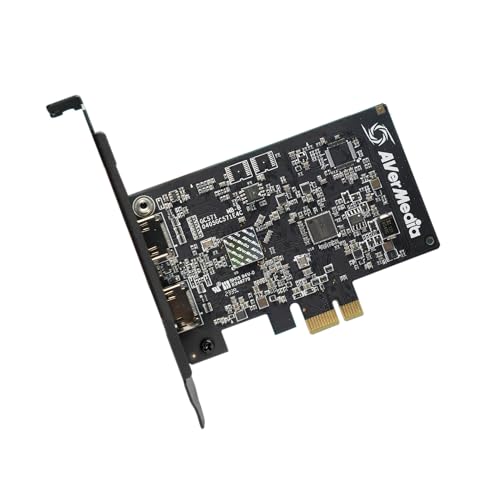
- 4K60 passthrough with 4K30 capture
- VRR and 1080p120 support
- Compatible with multiple PCIe slot sizes
Best For: Windows desktop studios and high-frame-rate livestream production
Best Advanced Control
PORTTA DX20R 4K60 Capture Card

- 4K60 capture with HDR and VRR
- High-refresh-rate passthrough
- Windows, macOS, and Linux support
Best For: Technical teams managing flexible, high-refresh-rate livestream workflows
Camera-to-Computer Pro – Elgato Cam Link 4K
For businesses seeking capture cards for business livestreaming, the Elgato Cam Link 4K is a compact way to turn a compatible DSLR, mirrorless camera, camcorder, action camera, or iPhone into a computer-connected video source. It supports 1080p60 and 4K capture options, with ultra-low latency for live presentations, webinars, and video calls.
Best For: Businesses using a dedicated camera for professional-looking livestreams, meetings, and webinars.
Pros:
- Supports 1080p60 and 4K60 capture with compatible equipment.
- Works with PC, Mac, and iPad, plus platforms such as OBS and Zoom.
- Ultra-low latency helps keep video and audio synchronized.
- Compact design and USB 3.0 connectivity simplify mobile setups.
Cons:
- Requires a compatible HDMI camera and computer setup.
- Maximum results depend on the camera and the latest Cam Link 4K model.
The Cam Link 4K is a strong choice when image quality and camera flexibility matter more than having a built-in camera. Its broad compatibility and low-latency performance make it practical for polished business broadcasts.
Plug-and-Play Broadcast Link – Roland UVC-01 HDMI Capture
The Roland UVC-01 makes capture cards for business livestreaming straightforward: connect an HDMI camera, camcorder, or Roland V-series switcher, then plug the encoder into a computer’s USB 3.0 port. It delivers uncompressed 1080p HD at 60 FPS and supports webcam operation on both Mac and Windows.
Best For: Businesses, schools, event teams, and houses of worship that need simple 1080p HDMI streaming.
Pros:
- Plug-and-play USB webcam operation for Mac and Windows.
- Provides uncompressed 1080p video at 60 FPS.
- Dedicated analog audio line input supports live music and other audio sources.
- USB-powered design avoids a separate power supply.
Cons:
- Capture resolution is limited to 1080p rather than 4K.
- Its HDMI-focused design requires a compatible camera, camcorder, or switcher.
With a simple connection workflow and an audio input designed for flexibility, the UVC-01 is well suited to organizations that prioritize dependable Full HD streaming over higher-resolution capture.
High-Bandwidth Studio Core – Elgato 4K Pro Internal Capture Card
For demanding capture cards for business livestreaming, the Elgato 4K Pro is an internal Windows card built around HDMI 2.1. It supports 4K60 HDR10 capture, 8K60 passthrough, high-frame-rate recording up to 1080p240, and VRR passthrough, making it suitable for advanced production or gaming-focused broadcasts.
Best For: Windows production teams and businesses running high-performance, multi-PC, or gaming livestream setups.
Pros:
- Supports 4K60 HDR10 capture and 8K60 passthrough.
- HDMI 2.1 connectivity enables high-frame-rate workflows up to 1080p240.
- VRR passthrough helps provide smooth visuals without screen tearing.
- Compatible with OBS, Streamlabs, Zoom, Teams, and other major apps.
Cons:
- Requires a Windows 10 computer with an available PCIe slot.
- Internal installation is less portable than an external USB capture device.
- Its advanced capabilities may exceed the needs of basic webinar setups.
The 4K Pro is best viewed as a production-grade upgrade for teams that need high frame rates, HDR, VRR, or dual-PC compatibility. It is powerful, but its internal Windows format demands suitable hardware.
Budget-Friendly HDMI Bridge – Mwin Cam Link 4K
The Mwin Cam Link 4K offers an affordable entry point for capture cards for business livestreaming. Its USB 3.0 connection supports 4K30 capture, 1440p60, and 1080p120, while compatibility with cameras, consoles, OBS, VLC, and Amcap makes it useful for meetings, demonstrations, gaming, and real-time previews.
Best For: Small businesses and creators seeking a portable, low-cost HDMI capture option for Windows or Mac.
Pros:
- Supports up to 4K30 capture, 1440p60, and 1080p120.
- Works with DSLR cameras, camcorders, action cameras, consoles, and PCs.
- Plug-and-play USB 3.0 operation requires no driver or external power.
- Compact and portable for traveling presentations or remote broadcasts.
Cons:
- HDMI cable is not included.
- Requires a computer with USB 3.0 and compatible streaming software.
- Its capture performance and feature set are less extensive than premium models.
The Mwin is a practical budget choice for teams that need flexible HDMI capture without investing in a higher-end card. Confirm the computer, software, and source-device requirements before building a business workflow around it.
Portable Value Pick – Guermok 1080p60 USB 3.0 Capture Card
For buyers seeking practical capture cards for business livestreaming, the Guermok model offers 1080p at 60fps output, USB 3.0 connectivity, and broad compatibility in a compact design. It can support meetings, online teaching, recording, and livestreaming, provided it is used with compatible capture software.
Best For: Portable business livestreaming, online meetings, teaching, and general HDMI-to-computer capture.
Pros:
- Captures up to 1080p at 60fps or 2K at 30fps, with input support up to 4K at 30Hz.
- Plug-and-play design requires no additional drivers or external power.
- Includes USB-C and USB connectivity, with compatibility across Windows, macOS, Linux, Android, OBS, Zoom, and major streaming platforms.
- Compact aluminum-alloy housing is convenient for mobile or backup setups.
Cons:
- It is for capture use only and cannot directly cast to a monitor or TV.
- USB 3.0 is recommended; adapter use may result in USB 2.0 recognition or reduced bandwidth.
- Audio setup in OBS may require restarting the software.
The Guermok is a sensible budget-friendly option when a business needs straightforward HDMI capture rather than a standalone display adapter. Its portability and software compatibility are useful for traveling presenters, but users should verify their USB connection and software configuration before going live.
Professional Camera Capture – AVerMedia CamStream 4K BU113G2
The AVerMedia CamStream 4K is designed for camera-based capture cards for business livestreaming, supporting up to 4K60 RGB24 video from DSLR, mirrorless, camcorder, and action cameras. Its plug-and-play setup and synchronized audio and video make it well suited to polished presentations, webinars, and virtual meetings.
Best For: Camera-based business livestreams, webinars, podcasts, video conferences, and professional presentations.
Pros:
- Captures up to 4K60 video with RGB24 color.
- Supports synchronized audio and video for livestreams, webinars, and recorded content.
- Designed for ultra-low-latency monitoring and works with OBS Studio, Streamlabs, Zoom, Twitch, and YouTube Live.
- Works with Windows, macOS, and iPadOS without requiring drivers or external power.
Cons:
- Its 4K camera-focused feature set may be more than needed for basic 1080p presentations.
- Compatibility depends on the listed operating-system versions and supported applications.
- The package includes a USB Type-C-to-Type-A cable, so users should confirm their computer’s port requirements.
For teams using a dedicated camera, the CamStream 4K offers a more polished capture workflow than entry-level adapters. Its 4K60 support, low-latency monitoring, and included mount adapter make it a strong fit for professional on-camera production.
Dual-Source Production Pick – Osee GoStream M2 Dual HDMI Capture Card
Businesses comparing capture cards for business livestreaming may value the Osee GoStream M2 for its two HDMI inputs and built-in switching features. It accepts two 4K60 sources, outputs 1080p at 60fps, and adds microphone and audio I/O for more involved streaming, conference, and presentation setups.
Best For: Multi-source livestreams, hybrid meetings, gaming broadcasts, and productions using two cameras or HDMI devices.
Pros:
- Provides two 4K60 HDMI inputs for connecting separate cameras or streaming sources.
- Supports PIP and PBP layouts, plus button-based source switching.
- Includes 3.5mm microphone and audio input/output ports for voice commentary or external audio.
- Offers USB 3.0 transmission, plug-and-play operation, and compatibility with Windows, macOS, Linux, Android, OBS, Zoom, and major platforms.
Cons:
- Output capture is specified at 1080p60, despite the 4K60 input support.
- Its dual-input controls and PIP/PBP features may be unnecessary for a simple one-camera stream.
- The listed warranty is one year, shorter than some competing options.
The GoStream M2 is the most flexible choice here for teams that need to combine or switch between two HDMI sources. It adds useful production controls and audio connectivity, although a single-source business stream may not benefit from its additional hardware.
Best Value USB Capture – 1080p60 Streaming Capture Card
For straightforward capture cards for business livestreaming, this compact USB 3.0 model focuses on accessible setup and reliable 1080p at 60fps recording. It supports Windows and macOS, works with OBS Studio, Streamlabs, and XSplit, and accepts HDMI sources such as cameras, PCs, consoles, and laptops.
Best For: Small businesses, creators, and mobile teams that need an affordable plug-and-play capture setup for presentations, podcasts, gameplay, or camera feeds.
Pros:
- Records 1080p video at 60fps and offers 4K HDMI real-time preview.
- Plug-and-play USB design requires no drivers and includes USB adapters and extension cables.
- Supports HDMI passthrough and is compatible with PS5, Xbox, Nintendo Switch, PCs, Macs, and cameras.
- Compact, lightweight design is convenient for travel or changing production locations.
Cons:
- Requires a USB 3.0 port on the host computer.
- Although it accepts 4K input, its listed recording resolution is 1080p at 60fps.
This is a practical entry-level choice when ease of deployment matters more than recording above 1080p. Its included connectivity accessories and broad device support can simplify a small livestreaming workflow.
Best PCIe Performance – AVerMedia 4K60 Capture Card
Businesses using a dedicated Windows production PC may prefer PCIe capture cards for business livestreaming, and the AVerMedia GC571 is built for that format. It provides 4K60 passthrough, 4K30 capture, VRR support, and 1080p at 120fps high-frame-rate capture for compatible HDMI sources.
Best For: Windows-based studios and production teams that want smooth, high-quality capture from gaming consoles or other HDMI devices.
Pros:
- Supports 4K60 passthrough and 4K30 capture.
- Offers VRR support for a tear-free, responsive display experience.
- Captures 1080p at up to 120fps for especially smooth footage.
- Fits PCIe x1, x4, x8, or x16 slots and carries a three-year manufacturer warranty.
Cons:
- Requires installation in a compatible desktop PC rather than a simple USB connection.
- Its listed operating-system support is Windows 10 x64 and Windows 11 x64 or later.
The GC571 is a strong fit for a fixed streaming workstation where high frame rates and smooth passthrough are priorities. It is less suitable for laptop-based or frequently mobile production setups.
Best Advanced Control – PORTTA DX20R 4K60 Capture Card
For capture cards for business livestreaming that need modern display features and cross-platform flexibility, the PORTTA DX20R offers 4K60 capture and passthrough. It supports HDR, VRR, high-refresh-rate passthrough, and plug-and-play operation with Windows, macOS, and Linux.
Best For: Technical production teams that want flexible operating-system support, high-refresh-rate sources, and software controls for video, audio, EDID, and VRR settings.
Pros:
- Captures 4K at 60Hz and supports passthrough up to 1080p at 240Hz or 2K at 120Hz.
- Supports HDR, VRR, and multiple video formats including YUY2, NV12, and RGB24.
- Works with Windows, macOS, and Linux without driver installation.
- PORTTA CapHub software enables video, audio, firmware, EDID, and VRR adjustments.
Cons:
- Advanced settings and utility software may be more involved than a basic plug-and-play capture device.
- The supplied compatibility details identify gaming consoles and laptops, so a specific business camera workflow should be checked before purchase.
The DX20R stands out when a livestreaming team needs more control over signal formats and display behavior. Its broad platform support makes it adaptable, while the advanced controls are most valuable for users comfortable tuning a production setup.
How We Picked the Best Capture Cards for Business Livestreaming
We evaluated these capture cards by looking at the specifications that matter in a professional production environment: supported input and output resolutions, frame rates, passthrough performance, connection type, latency, audio handling, software compatibility, and setup complexity. We also considered whether a device fits a portable single-camera workflow or a more permanent studio installation.
For business use, advertised maximum resolution is only one part of the decision. Reliable operation, consistent signal conversion, driver support, and compatibility with popular applications such as OBS Studio, Zoom, Microsoft Teams, and browser-based platforms can be more important than peak gaming specifications.
Quick Comparison
| Type | Best suited to | Main advantage | Potential limitation |
|---|---|---|---|
| External USB capture | Portable cameras and laptops | Simple installation and flexible placement | Usually limited to one HDMI source |
| Internal PCIe capture | Dedicated production desktops | High bandwidth and integrated workflow | Requires an available compatible slot |
| Dual-input capture | Interviews and multi-camera events | More sources from one device | More complex switching and configuration |
| Passthrough-focused capture | Low-latency monitoring or hybrid events | Lets a display receive the original signal | Passthrough does not always mean matching capture quality |
Key Buying Factors for Capture Cards for Business Livestreaming
Resolution, Frame Rate, and Passthrough
Confirm the camera’s actual HDMI output and the resolution your software can process. A 4K input or passthrough feature is useful for preserving detail, but many business streams still deliver at 1080p. Higher frame rates can help with demonstrations and motion, while 60 fps is generally sufficient for most presentations.
Connectivity and Compatibility
USB 3.0 or faster connections are preferable for uncompressed or high-quality video. Check the computer’s ports, cable requirements, operating-system support, and whether the device appears as a standard UVC webcam. Plug-and-play UVC models are especially convenient for rotating presenters and mixed-device teams.
Latency, Audio, and Reliability
Low latency helps presenters monitor themselves naturally and keeps live demonstrations synchronized. Verify how embedded HDMI audio is handled and whether the card supports a separate microphone workflow. For recurring events, prioritize stable drivers, adequate cooling, dependable power, and a return or support policy.
Who Should Buy Which Capture Cards for Business Livestreaming?
Choose a compact external USB model for a laptop-based presenter, remote executive, or mobile event kit. Select an internal card when a dedicated desktop handles encoding, recording, and multiple applications. A dual-input option makes more sense for interviews, panel discussions, or two-camera productions. If your team needs to monitor a source on a separate display with minimal delay, prioritize a model with clearly specified passthrough performance. Finally, favor a straightforward 1080p workflow when reliability and ease of use matter more than 4K production overhead.