The best short-throw projectors for meetings deliver large, readable images from limited distances, making them useful in compact conference rooms, classrooms, and hybrid workspaces.
This roundup compares ten selected models across business-focused brightness, smart features, portability, resolution, audio, and setup flexibility.
Best 10 Short Throw Projector for Meetings Picks for 2026
Best Bright-Room Pick
ViewSonic PS502W WXGA Short Throw Projector

- 4,000 ANSI lumens for moderate ambient light
- 0.5 throw ratio for compact rooms
- Auto-keystone and flexible mounting
Best For: Classrooms and small meeting rooms
Best Portable Smart Option
iWIMIUS S29 Native 1080P Projector

- Native 1080P with 4K input support
- 2.4-pound body with 360-degree stand
- Autofocus, keystone, Wi-Fi 6, and Bluetooth
Best For: Mobile presenters and small offices
Best Ultra-Short-Throw Premium Pick
Optoma ML1080UST Photon Go Full HD Projector

- Projects up to 100 inches from ultra-short distances
- Native 1080P with triple RGB laser technology
- Built-in battery and Google TV
Best For: Space-constrained offices and portable presentations
Best All-in-One Flexible Pick
iSinbox Short Throw 4K Projector
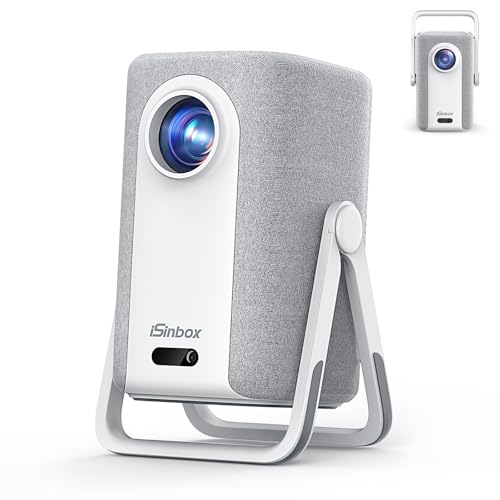
- 100-inch image from about 7.9 feet
- Native 1080P with 4K HDR10+ support
- Autofocus, 6D keystone, and built-in apps
Best For: Small multipurpose rooms and portable use
Flexible Mini Pick
Portable Short Throw Projector

- Up to 200-inch image in compact spaces
- Electric focus and keystone correction
- 270-degree rotating stand
Best For: Small rooms, portable presentations, and casual entertainment
Smart Meeting Upgrade
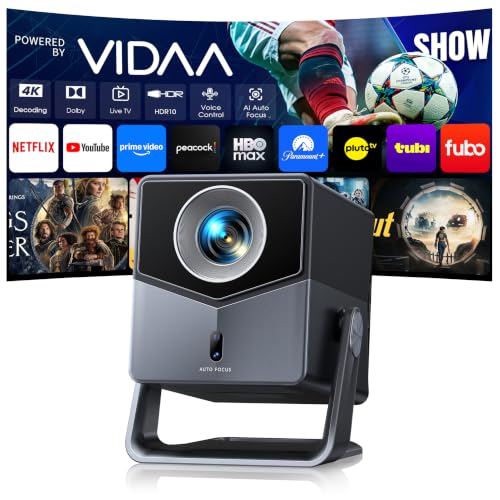
- 1.0:1 throw ratio for 100-inch images
- Built-in VIDAA streaming and live TV
- 650 ISO ANSI brightness with 36W Dolby Audio
Best For: Multipurpose meeting rooms and home theaters
Placement-Friendly Choice

- 100% offset projection reduces blocked views
- Native 1080p with 4K support
- Wi-Fi 6 and extensive device connectivity
Best For: Tabletop meetings, classrooms, and compact setups
Best Compact USB-C Pick
YQHS Ultra Short Throw Smart Projector

- 0.65:1 throw ratio for tight spaces
- Native 1080p with autofocus and keystone
- USB-C PD power and Android 14 apps
Best For: Small rooms and portable presentations
Best All-Angle Option
Google TV 360° Short Throw Projector

- 360° stand supports flexible placement
- Native 1080p with 4K support and HDR10
- 30W audio, Wi-Fi 6, and AI setup
Best For: Flexible home offices and multipurpose rooms
Best Screen-Fit Features
Portable Google TV Short Throw Projector

- 0.8:1 throw ratio for compact spaces
- AI focus, keystone, obstacle avoidance, and screen fit
- Wi-Fi 6, mirroring, HDMI ARC/CEC, and USB
Best For: Mobile presenters and frequently changing setups
Best Bright-Room Pick – ViewSonic PS502W WXGA Short Throw Projector
For a short throw projector for meetings in a classroom or compact conference room, the ViewSonic PS502W emphasizes brightness, straightforward connectivity, and quick setup. Its WXGA resolution and 4,000 ANSI lumens are suited to presentations that need to remain visible with moderate ambient light.
Best For: Classrooms, small meeting rooms, and business presentations where brightness and flexible installation matter.
Pros:
- 0.5 throw ratio can produce a 100-inch image from about 4.5 feet.
- 4,000 ANSI lumens help presentations remain visible in moderate ambient light.
- Vertical auto-keystone, digital zoom, instant power, and table or ceiling mounting simplify setup.
- Dual HDMI, VGA, USB, RS232, and 3.5mm audio support varied presentation equipment.
Cons:
- WXGA resolution is lower than Full HD models.
- Its stationary design and 6.3-pound weight are less convenient for frequent travel.
The PS502W is the most meeting-focused option here, particularly when room lighting and shadow reduction are priorities. Choose it over a portable smart projector when presentation visibility and installation flexibility are more important than streaming features.
Best Portable Smart Option – iWIMIUS S29 Native 1080P Projector
The iWIMIUS S29 can serve as a short throw projector for meetings when portability and fast positioning are more important than dedicated conference-room brightness. Its native 1080P image, 360-degree stand, autofocus, and wireless connectivity make it adaptable for offices, classrooms, and temporary setups.
Best For: Mobile presenters, small offices, classrooms, and hybrid spaces that also need built-in streaming and audio.
Pros:
- Native 1080P resolution provides sharper presentation detail than WXGA.
- Lightweight 2.4-pound design and 360-degree stand support flexible placement.
- Autofocus, auto vertical keystone, 4D/4P correction, and 50%-100% zoom speed setup.
- Wi-Fi 6, Bluetooth 5.2, Dolby Audio, and built-in apps reduce accessory needs.
Cons:
- The supplied notes do not specify brightness, so daytime meeting performance is harder to assess.
- Some streaming apps may be available through the web browser rather than as native apps.
This model is a practical choice for presenters who move between rooms and want one compact device for meetings and entertainment. Its lack of a stated brightness rating means it is better suited to controlled lighting than to bright boardrooms.
Best Ultra-Short-Throw Premium Pick – Optoma ML1080UST Photon Go Full HD Projector
The Optoma ML1080UST is a premium short throw projector for meetings when space is extremely limited and Full HD clarity is required. Its ultra-short-throw design can create an image up to 100 inches from as little as 0.34 feet, while built-in Google TV, Wi-Fi, Bluetooth, and a battery add flexibility beyond presentations.
Best For: Compact offices, portable presentations, and users who want a Full HD projector that can double as a smart entertainment system.
Pros:
- Ultra-short-throw placement works in very tight spaces.
- Native 1920×1080 resolution supports detailed presentation content.
- Triple RGB laser technology and a 20,000-hour light-source life support long-term use.
- Built-in battery, Google TV, autofocus, auto-keystone, Wi-Fi, Bluetooth, and Dolby Audio add convenience.
Cons:
- 650 ANSI lumens may be less suitable for bright rooms than the ViewSonic PS502W.
- Maximum image size is listed as 100 inches.
- Its one-year limited parts-and-labor warranty is shorter than the ViewSonic’s listed warranty.
The ML1080UST stands out when the projector must sit very close to the screen or wall. It offers sharper Full HD output and modern smart features, but meeting buyers should plan for controlled lighting because its rated brightness is comparatively modest.
Best All-in-One Flexible Pick – iSinbox Short Throw 4K Projector
The iSinbox is a versatile short throw projector for meetings in compact rooms, especially when built-in apps, easy alignment, and portable placement are useful. It uses native 1080P resolution with 4K HDR10+ support and can project a 100-inch image from about 7.9 feet.
Best For: Small offices, multipurpose rooms, and users who want a meeting projector that can also handle streaming and portable home use.
Pros:
- 1.1:1 throw ratio produces a 100-inch image from approximately 7.9 feet.
- AI autofocus, 6D keystone, obstacle avoidance, and 50%-100% zoom simplify positioning.
- Native 1080P resolution supports 4K HDR10+ input and AI image enhancement.
- Built-in smart apps, a 360-degree stand, handle, and universal M4 mount support flexible use.
Cons:
- The supplied notes do not specify brightness, making bright-room suitability unclear.
- Its 1.1:1 ratio requires more distance than an ultra-short-throw projector for the same screen size.
- Some listed smart features are oriented toward entertainment rather than business presentation workflows.
The iSinbox is a good multipurpose choice when meetings share space with streaming, movie nights, or portable use. For consistently bright conference rooms, verify the projector’s brightness before choosing it over a business-focused model.
Flexible Mini Pick – Portable Short Throw Projector
For shoppers seeking a short throw projector for meetings as well as casual entertainment, this compact model emphasizes flexible placement and quick image adjustments. Its electric focus, electric keystone, and rotatable stand make it practical for rooms where setup space or viewing angles change frequently.
Best For: Small rooms, portable presentations, bedrooms, dorms, and occasional movie nights.
Pros:
- Short throw design can create an image up to 200 inches in smaller spaces.
- Electric focus and keystone correction simplify setup and alignment.
- 270-degree rotating stand supports wall, ceiling, and varied-angle projection.
- HDMI, USB, and AUX connections support laptops, TV sticks, consoles, and other devices.
Cons:
- Native resolution is 1080p rather than 4K, despite supporting 4K input.
- No Bluetooth or built-in apps are included.
- Wired iOS mirroring requires a compatible USB connection.
This is a versatile budget-oriented choice when portability and placement flexibility matter more than built-in streaming. For meetings, confirm that your laptop or presentation device matches the available wired connections.
Smart Meeting Upgrade – VIDAA Short Throw Projector
This short throw projector for meetings is designed for users who also want a complete home theater experience. Its 1.0:1 throw ratio, native 1080p display, smart VIDAA platform, voice control, and strong built-in audio reduce the need for extra equipment in multipurpose rooms.
Best For: Multipurpose offices, meeting rooms, home theaters, live TV, and larger group viewing.
Pros:
- Projects a 100-inch image from about 2.2 meters with its 1.0:1 throw ratio.
- VIDAA provides built-in streaming access and more than 1,000 live TV channels.
- 650 ISO ANSI brightness, HDR10, and 4K decoding support detailed content.
- 36W Dolby Audio, Bluetooth, HDMI ARC, and CEC offer flexible sound options.
Cons:
- 4K content is decoded but displayed at the native 1080p resolution.
- The feature-rich smart platform may be more than a basic presentation setup requires.
- Meeting suitability still depends on having compatible source-device connections and room lighting.
This is the most feature-complete option of the three for spaces that transition between presentations and entertainment. The shorter throw and smart controls are especially useful when a clean, low-clutter setup is important.
Placement-Friendly Choice – Antmap Offset Projector
For a short throw projector for meetings where table or shelf placement is preferred, this Antmap model uses 100% offset technology to project from below the screen without blocking the image. Auto keystone, electric focus, wireless connectivity, and broad input support make it adaptable for presentations, gaming, and outdoor viewing.
Best For: Tabletop presentations, compact rooms, classrooms, gaming setups, and outdoor movie use.
Pros:
- 100% offset projection helps avoid shadows and obstructed views from below the screen.
- Native 1080p resolution supports 4K input and provides up to a 200-inch image.
- Auto keystone and electric focus enable quick remote setup.
- Wi-Fi 6, Bluetooth, HDMI, USB-C, USB, and AV support varied devices.
Cons:
- Its 600 ANSI brightness is best suited to dimmer environments for strongest results.
- The built-in 12W speaker is convenient but less powerful than a dedicated sound system.
- Wireless mirroring and streaming performance depend on the network and source device.
The offset design is the key advantage for meeting spaces where a projector cannot sit directly in front of the screen. It offers useful flexibility without giving up common presentation, streaming, and gaming connections.
Best Compact USB-C Pick – YQHS Ultra Short Throw Smart Projector
For buyers seeking a short throw projector for meetings in tight rooms, this YQHS model combines a 0.65:1 throw ratio with native 1080p resolution and automatic setup. Its USB-C Power Delivery support also makes it practical for mobile presentations when a compatible 45W-plus, 12V power source is available.
Best For: Small meeting rooms, mobile presentations, bedrooms, and users who value built-in streaming apps and USB-C portability.
Pros:
- Projects a 60-inch image from about 0.8 meters and a 100-inch image from about 1.4 meters.
- TOF autofocus and automatic vertical and horizontal keystone correction simplify setup.
- Native 1080p, HDR10, Wi-Fi, Bluetooth 5.4, and built-in Android 14 apps offer flexible use.
- USB-C PD input works with compatible laptop chargers, wall chargers, and power banks.
Cons:
- Requires a 45W-or-higher PD power source that supports 12V output.
- Its 350-lumen rating may be better suited to controlled lighting than bright conference rooms.
- 4K content is supported but displayed at the projector’s 1080p resolution.
This is a space-conscious option when short projection distance and portable power matter most. Confirm the power-bank specifications and room lighting before using it for important meetings.
Best All-Angle Option – Google TV 360° Short Throw Projector
This Google TV model is a versatile short throw projector for meetings when placement flexibility is important. Its built-in 360-degree stand, 1.17:1 throw ratio, AI auto-setup, and native 1080p image make it easy to adapt between desk, wall, ceiling, or tripod use.
Best For: Flexible home-office setups, multipurpose rooms, ceiling viewing, and users who want strong built-in audio.
Pros:
- 360-degree rotatable stand supports wall, ceiling, tripod, and desktop projection.
- AI autofocus and auto keystone help produce a clear image with minimal manual adjustment.
- Native 1080p resolution, 4K decoding support, HDR10, and stated 500 ISO ANSI brightness.
- Built-in Google TV, voice control, Wi-Fi 6, Bluetooth 5.4, and a 30W speaker system add convenience.
Cons:
- 4K material is decoded but displayed at the native 1080p resolution.
- The 1.17:1 throw ratio requires more distance than the most aggressive ultra-short-throw designs.
- Its entertainment-focused features may be more than needed for basic presentations.
The rotating stand is the standout advantage for users who frequently change viewing or presentation positions. For meeting use, its claimed brightness and automatic setup are useful, though room lighting will still affect visibility.
Best Screen-Fit Features – Portable Google TV Short Throw Projector
For presentations that involve frequent repositioning, this portable short throw projector for meetings offers AI-assisted focus, keystone correction, obstacle avoidance, and screen fit. Its 0.8:1 ratio can produce large images at relatively short distances, while Wi-Fi 6 and screen mirroring support flexible connections.
Best For: Mobile presenters, small offices, classrooms, and users who switch between laptops, phones, streaming devices, and external audio.
Pros:
- 0.8:1 throw ratio produces 60 inches at about 3.5 feet and 100 inches at about 5.9 feet.
- AI setup combines autofocus, keystone correction, obstacle avoidance, and screen alignment.
- Wi-Fi 6, Bluetooth 5.3, screen mirroring, HDMI ARC/CEC, and USB provide broad connectivity.
- Compact 2.6-pound design and built-in rotatable stand support portable use and ceiling projection.
Cons:
- Native resolution is 1080p, despite support for decoding 4K content.
- Larger projected sizes may appear softer when the projector is positioned farther away.
- Some automated corrections may be unnecessary in a fixed installation and may need to be disabled for manual setup.
This model is a strong fit when quick setup and connectivity matter more than native 4K resolution. Its compact design and screen-fitting tools can reduce adjustment time between meeting locations.
How We Picked the Best Short Throw Projector for Meetings
We evaluated the selected projectors by focusing on the factors that affect real meeting performance: throw distance, image brightness, resolution, input options, wireless connectivity, setup assistance, built-in audio, and portability. Business presentations usually benefit more from readable text, dependable connections, and easy placement than from entertainment features alone.
We also considered the difference between conventional short-throw, ultra-short-throw, and portable designs. Specifications such as 4K support, autofocus, smart operating systems, and streaming compatibility can be useful, but they do not replace adequate brightness or strong input support.
Quick Comparison
| Priority | Look For | Why It Matters |
|---|---|---|
| Small meeting room | Short or ultra-short throw | Creates a large image without requiring a long installation distance. |
| Bright office | Higher ANSI or ISO brightness | Helps preserve contrast and legibility under ambient light. |
| Detailed spreadsheets | 1080p or higher native resolution | Makes small text, charts, and remote-participant windows easier to read. |
| Hybrid meetings | HDMI, USB, wireless casting, and Bluetooth | Provides more ways to connect laptops, streaming devices, and speakers. |
| Frequent relocation | Compact design, autofocus, and automatic keystone | Reduces setup time when the projector moves between rooms. |
Key Buying Factors for a Short-Throw Projector for Meetings
Throw Distance and Placement
Measure the distance from the intended mounting or tabletop position to the screen or wall. Ultra-short-throw models can sit very close to the display surface, while standard short-throw units may need more room. Confirm the projected image size at your available distance before buying.
Brightness and Room Lighting
For meeting rooms with windows or overhead lighting, prioritize a genuinely bright model and avoid relying on vague marketing claims. Brightness affects whether text and presentation colors remain visible when the room cannot be darkened.
Resolution and Image Shape
WXGA may work for basic slides, but 1080p is a stronger general-purpose choice for documents, video calls, and detailed graphics. Check the native resolution rather than only a projector’s maximum supported input resolution.
Connections and Smart Features
At minimum, look for HDMI and a reliable power arrangement. Wi-Fi, Bluetooth, USB, Google TV, VIDAA, or built-in streaming apps can simplify media playback, but workplace users should verify compatibility with company security policies and presentation software.
Setup, Audio, and Reliability
Autofocus, automatic keystone correction, adjustable stands, and lens shift can make temporary setups easier. Built-in speakers are convenient for small groups, although larger rooms or video conferences may still require external audio equipment.
Who Should Buy Which Short Throw Projector for Meetings?
Choose a brighter business-oriented model if the projector will remain in a conference room with moderate ambient light and must handle presentations reliably. Choose an ultra-short-throw model if table or wall space is limited and you want to minimize shadows and presenter glare.
Choose a portable smart projector for mobile presenters, pop-up meetings, and occasional use in different rooms. Choose a higher-resolution model for spreadsheets, engineering diagrams, detailed dashboards, or frequent video playback. Finally, prioritize straightforward HDMI connectivity over extra smart features if the projector will be managed by an IT department or used with restricted corporate networks.