A reliable power strip can simplify a computer setup by protecting essential electronics, adding usable outlets, and reducing cable clutter. The right model depends on your equipment count, desk layout, charging needs, and available wall outlets.
We selected 10 power strips for computers with different strengths, from compact everyday options to high-outlet models for multi-device workstations. Use the guide below to compare capacity, protection, ports, and practical features before buying.
Best 10 Power Strips for Computers Picks for 2026
Best All-Around Pick
Anker 351 12-Outlet Power Strip

- 12 AC outlets plus USB-C and USB-A charging
- 2,100J surge protection and 8-point safety system
- Spaced outlets and mounting support for desks
Best For: Home-office desks and compact computer setups
Best Long-Cord Value
Nuetsa 8-Outlet Surge Protector

- Eight AC outlets and four USB charging ports
- 2,700J surge protection with indicator light
- 6-foot cord for flexible placement
Best For: Workstations needing reach and multiple USB ports
Best for Large Setups
SUPERDANNY 22-Outlet Power Strip

- 22 AC outlets and six USB ports
- Widely spaced outlets for bulky adapters
- 6.5-foot cord and wall-mounting hardware
Best For: Gaming rooms, media centers, and multi-device workstations
Best Heavy-Duty Protection
Belkin 12-Outlet Surge Protector

- 12 outlets with 3,940J surge protection
- 8-foot cord and widely spaced outlets
- UL-listed with safety indicator and equipment warranty
Best For: Computer desks needing long reach and strong AC protection
Best Desk-Mounted Pick
Clamp-On USB-C Computer Power Station

- Clamps to desk edges up to 1.96 inches thick
- Five outlets plus four USB-C and two USB-A ports
- 1,200 joules of surge protection
Best For: Organized home-office workstations needing accessible charging
Best Compact Value

- Eight AC outlets and four USB ports
- Wide spacing helps prevent adapter blockage
- Five-foot braided cord with flat plug
Best For: Compact home-office, dorm, and computer-desk setups
Best High-Capacity Pick
24-Outlet Computer Power Strip

- Twenty-four AC outlets for dense setups
- 4,100-joule surge protection
- Six-foot cord and four USB charging ports
Best For: Gaming rigs, offices, and multi-device computer workstations
Flexible Desk Setup

- 12 widely spaced AC outlets
- 10-foot flat extension cord
- Wall mountable with USB charging
Best For: Computer desks, dorm rooms, and tight spaces
High-Capacity Workstation
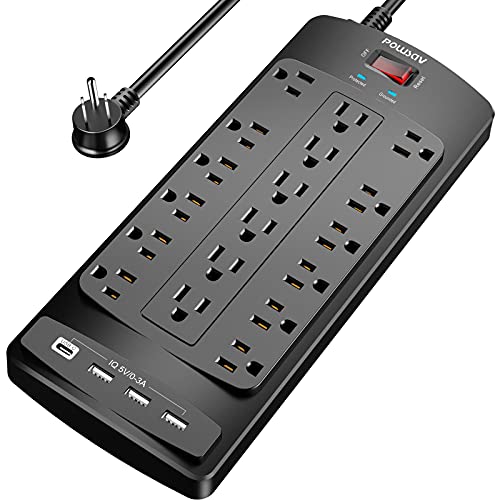
- 18 AC outlets for large setups
- 2,100-joule surge protection
- Six-foot cord with cable tie
Best For: Busy computer desks and gaming stations
Maximum Surge Rating

- 2,700-joule surge protection
- 12 AC outlets with two spaced outlets
- Four USB ports, including two USB-C
Best For: Home offices needing USB-C charging and strong surge protection
Best All-Around Pick – Anker 351 12-Outlet Power Strip
If you need power strips for computers that can handle a desk setup without taking over your workspace, the Anker 351 combines 12 AC outlets with USB charging and 2,100 joules of surge protection. Its spaced outlets and 5-foot cord suit home offices, bedside tables, and sofa-side tables.
Best For: Home-office desks and compact setups needing many outlets plus USB charging.
Pros:
- Provides 12 AC outlets, one USB-C port, and two USB-A ports.
- Includes a 20W USB-C port for fast charging compatible iPhones.
- Offers spaced outlets, mounting capability, and an 8-point safety system.
- Includes 2,100 joules of surge protection and a 5-foot cord.
Cons:
- The total USB output is shared and capped at 15W.
- The 5-foot cord may be limiting for desks or setups farther from the wall.
The Anker 351 is a balanced choice when you want substantial AC capacity, convenient USB charging, and a manageable footprint. Its shorter cord favors nearby outlets rather than large entertainment centers.
Best Long-Cord Value – Nuetsa 8-Outlet Surge Protector
For power strips for computers that need extra reach and built-in device charging, the Nuetsa provides eight AC outlets, four USB ports, and a 6-foot extension cord. Its 2,700-joule rating and overload protection make it a practical option for office, media, and home setups.
Best For: Computer workstations that need a longer cord and several USB charging ports.
Pros:
- Includes eight AC outlets and four USB ports, including one USB-C port.
- Provides 2,700 joules of surge protection with a protected indicator light.
- The 6-foot cord offers useful placement flexibility.
- ETL-certified construction includes overload protection and a flame-retardant shell.
Cons:
- The USB-C port does not support devices requiring 9–22V charging voltage.
- It has fewer AC outlets than some high-capacity alternatives.
This Nuetsa model is a sensible fit when cord length and USB availability matter more than maximum outlet count. The indicator light also makes it easy to confirm that surge protection is active.
Best for Large Setups – SUPERDANNY 22-Outlet Power Strip
Among power strips for computers, the SUPERDANNY stands out for unusually high capacity: 22 grounded AC outlets and six USB ports. Its widely spaced layout, 6.5-foot cord, and mounting hardware are designed for gaming rooms, media centers, and multi-device workstations.
Best For: Gaming, media, or office setups with many computers, monitors, chargers, and peripherals.
Pros:
- Offers 22 AC outlets and six USB ports, including one USB-C port.
- Widely spaced outlets help accommodate bulky adapters and reduce cord clutter.
- Includes four mounting keyholes, screws, and a 45-degree flat plug.
- Provides 2,100 joules of surge protection and supports up to 15A/1,875W.
Cons:
- Its large 11.65-by-6.37-inch body requires substantial desk or wall space.
- The side outlets cannot be rotated.
- USB charging is limited to the included USB-A and USB-C ports rather than additional AC adapters.
The SUPERDANNY is the strongest choice here for a crowded setup that would otherwise require multiple strips. Its size is the trade-off, but the outlet spacing and mounting options help keep a large system organized.
Best Heavy-Duty Protection – Belkin 12-Outlet Surge Protector
If protection and build quality are priorities when choosing power strips for computers, this Belkin model offers 12 AC outlets, a heavy-duty 8-foot cord, and a high 3,940-joule surge-protection rating. Widely spaced outlets and a safety indicator make it well suited to computer desks and equipment-heavy rooms.
Best For: Home offices and computer setups that need long reach and a high surge-protection rating.
Pros:
- Provides 12 AC outlets with 3,940 joules of surge protection.
- The 8-foot cord and angled three-prong plug help with flexible placement.
- Widely spaced outlets accommodate larger plugs and chargers.
- Includes a safety indicator, wall-mountable design, UL listing, and a $300,000 connected-equipment warranty.
Cons:
- It does not include USB charging ports.
- The 13-inch body may be larger than needed for a small desk.
- Its higher protection and warranty features may be unnecessary for basic setups.
The Belkin is a strong pick for users who want extensive AC capacity, long reach, and robust surge protection from an established brand. Choose it over USB-equipped models when dedicated AC outlets matter most.
Best Desk-Mounted Pick – Clamp-On USB-C Computer Power Station
For a tidy workstation, this is one of the more specialized power strips for computers. Its clamp-on design secures to a desk edge, while five AC outlets and USB charging ports keep computers, peripherals, and mobile devices within reach.
Best For: Home offices and desks where a semi-permanent, cable-organizing power station is preferred.
Pros:
- Desk clamp fits edges up to 1.96 inches thick.
- Provides five widely spaced AC outlets plus four USB-C and two USB-A ports.
- Offers 1,200 joules of surge protection and a six-foot flat-plug cord.
Cons:
- The clamp requires roughly 0.4–0.5 inches of clearance from the wall.
- Its 40W USB output is shared across the USB-C charging station.
- The mounted design is less portable than a conventional power strip.
This model stands out when desk organization matters as much as outlet capacity. Check your desk thickness and rear clearance before buying, then use it as a dedicated workstation charging hub.
Best Compact Value – 12-in-1 Computer Power Strip
This compact option gives computer users plenty of connections without taking over a desk. It combines eight widely spaced AC outlets with four USB ports, including two USB-C ports, making it useful for a monitor, accessories, and personal devices.
Best For: Home offices, dorm rooms, and desks that need many outlets in a relatively compact format.
Pros:
- Eight AC outlets and four USB ports can power up to 12 devices.
- Widely spaced outlets accommodate larger adapters with less blocking.
- Includes a five-foot braided cord, flat plug, wall-mounting holes, and overload protection.
Cons:
- Surge protection is rated at 1,080 joules, lower than some higher-capacity models.
- USB-C ports provide up to 5V/3A rather than the higher-voltage charging some devices require.
- USB power negotiation can briefly interrupt other ports when a device is connected or removed.
With a useful mix of AC and USB connections, this HANYCONY strip is a practical general-purpose choice for computer desks. Its wide spacing and mountable design are especially helpful when adapters would otherwise crowd one another.
Best High-Capacity Pick – 24-Outlet Computer Power Strip
When a computer setup includes numerous monitors, peripherals, chargers, and networking devices, this high-capacity strip offers substantial expansion. It has 24 AC outlets, four USB ports, a six-foot heavy-duty cord, and a 4,100-joule surge rating.
Best For: Large computer desks, gaming setups, offices, and shared work areas with many connected electronics.
Pros:
- Twenty-four AC outlets provide extensive capacity for computers and peripherals.
- Includes two USB-C and two USB-A charging ports with smart charging technology.
- Features 4,100 joules of surge protection, overload protection, and ETL certification.
Cons:
- The large outlet count may be unnecessary for a small or lightly equipped desk.
- The USB-C ports do not support devices requiring 9–22V charging.
- A 15A maximum current still applies despite the high number of outlets.
This QINLIANF model is designed for quantity and surge capacity rather than minimalism. It makes the most sense for dense setups, provided the combined load stays within the strip’s 15A rating.
Flexible Desk Setup – Long-Cord USB Power Strip
For power strips for computers in tight or hard-to-reach spaces, this Addtam model combines a 10-foot cord with widely spaced outlets and USB charging. Its flat, angled plug and wall-mounting design make it practical for desks, dorm rooms, and home offices.
Best For: Computer desks, dorm rooms, and setups that need extra cord reach or wall mounting.
Pros:
- 12 AC outlets with spacing designed for larger adapters.
- 10-foot extension cord with a flat, 45-degree plug for furniture-adjacent placement.
- Four USB ports, overload protection, and a mountable design.
Cons:
- USB charging is limited to 5V/2.4A per port and 3A total.
- Its 1,050-joule rating is lower than the other options in this roundup.
This is a space-conscious choice when outlet access and cable placement matter more than maximum surge capacity. The long cord and mounting hardware are especially useful for keeping a computer workstation organized.
High-Capacity Workstation – 18-Outlet Surge Protector
When a computer setup includes monitors, peripherals, chargers, and gaming equipment, this POWSAV model provides substantial connection capacity. It pairs 18 AC outlets with four USB ports, a 6-foot flat-plug cord, and 2,100 joules of surge protection.
Best For: Busy computer desks, gaming stations, and workstations with many connected devices.
Pros:
- 18 AC outlets provide the highest outlet count in this selection.
- 2,100 joules of surge protection with a protected indicator light.
- ETL listed, with overload protection and four USB ports.
- Includes cable ties for managing unused cord.
Cons:
- The 6-foot cord offers less reach than the 10-foot option.
- The larger 11.7-by-4.9-inch form may occupy more desk or wall space.
This is the strongest fit for users who want to power a large computer or gaming setup from one strip. Its abundant outlets reduce the need for extra adapters, while the flat plug and cable tie help keep the installation orderly.
Maximum Surge Rating – 12-Outlet USB-C Power Strip
This Teiobar model is a balanced option for power strips for computers, offering 12 AC outlets, four USB ports, and a 6-foot cord. Its 2,700-joule surge rating and two USB-C ports make it well suited to mixed computer, mobile, and office-device setups.
Best For: Home offices and computer setups that need USB-C charging alongside strong surge protection.
Pros:
- 2,700 joules provides the highest listed surge rating here.
- 12 AC outlets include two widely spaced positions for large adapters.
- Four USB ports include two USB-C ports with up to 3A output each.
- ETL listed with overload protection and a protected indicator light.
Cons:
- The 6-foot cord may be limiting when the outlet is far from the desk.
- It has fewer AC outlets than the 18-outlet model.
Choose this strip when surge capacity and newer USB-C charging are priorities. It offers enough AC connections for many office setups while accommodating bulky adapters and direct charging for compatible devices.
How We Picked the Best Power Strips for Computers
We focused on features that matter in real computer setups: surge-energy ratings, outlet count and spacing, cord length, plug design, USB charging, safety certifications, and practical installation options. A good power strip should provide enough capacity for a computer, monitor, speakers, networking equipment, chargers, and accessories without making the desk harder to manage.
Because needs vary, this list includes standard surge protectors, long-cord models, high-outlet strips, USB-C charging stations, and a desk-clamp design. Always check the product label and your equipment’s power requirements before connecting a high-load device.
Quick Comparison
| Best For | Look For | Why It Matters |
|---|---|---|
| Basic computer desk | 6–12 outlets and 1,000J or more | Handles common peripherals and offers basic surge protection |
| Large workstation | 18–24 outlets and widely spaced sockets | Supports multiple monitors, chargers, and accessories |
| USB charging | USB-A and USB-C ports | Reduces the need for separate phone and accessory adapters |
| Hard-to-reach wall outlet | Long cord and flat plug | Improves placement behind desks and furniture |
| Minimal desk clutter | Desk clamp or compact layout | Keeps sockets and charging ports within reach |
Key Buying Factors for Power Strips for Computers
Surge Protection and Electrical Capacity
Compare the joule rating as a general indicator of how much surge energy a protector can absorb. Higher ratings can be useful for larger setups, but no power strip replaces a properly grounded outlet or an uninterruptible power supply. Check the amperage and wattage limits, especially when connecting powered speakers, monitors, printers, or other high-draw equipment.
Outlet Layout and Spacing
Count every device you expect to connect, then leave a few open sockets for future additions. Widely spaced outlets are helpful for bulky adapters, while a compact layout may work better for standard plugs. Models with many outlets can be valuable for offices, streaming desks, and gaming setups, but they also require careful cable organization.
USB Ports, Cord Length, and Placement
USB-A ports remain useful for common cables, while USB-C ports can make charging newer phones and accessories more convenient. Confirm the total USB output rather than assuming every port delivers the same speed. A 6- to 10-foot cord and a flat wall plug can make a major difference when the desk is far from the outlet.
Safety and Convenience Features
Look for credible safety listings such as UL or ETL where available, along with an on/off switch, resettable breaker, indicator light, and clearly stated ratings. Keep the strip ventilated, avoid daisy-chaining power strips, and do not exceed its rated load.
Who Should Buy Which Power Strips for Computers?
Choose a standard 8- or 12-outlet model for a typical home office or student desk. Pick a high-outlet strip if you run several monitors, a desktop tower, speakers, networking gear, and multiple chargers. A long-cord flat-plug model suits furniture-heavy rooms, while a USB-C desk-mounted strip is best for people who want charging ports within easy reach. For sensitive or mission-critical computers, pair a surge protector with a UPS so equipment can keep running briefly during an outage and shut down safely.