Accurate color is essential when your home office doubles as a photo studio, video workspace, design desk, or print-production setup. The right calibration tool can reduce screen-to-screen variation and help your edits look more predictable.
This roundup compares ten options, from straightforward monitor colorimeters to advanced systems that profile printers, projectors, scanners, and cameras. Use the guide below to narrow the list by workflow, display type, budget, and required level of control.
Best 10 Color Calibration Tools for Home Offices Picks for 2026
Best Overall

- Fast, guided calibration
- Room-light monitoring
- Works with multiple displays
Best For: Home-office photographers and creators calibrating laptop and desktop monitors
Best Portable Option
Calibrite ColorChecker Display
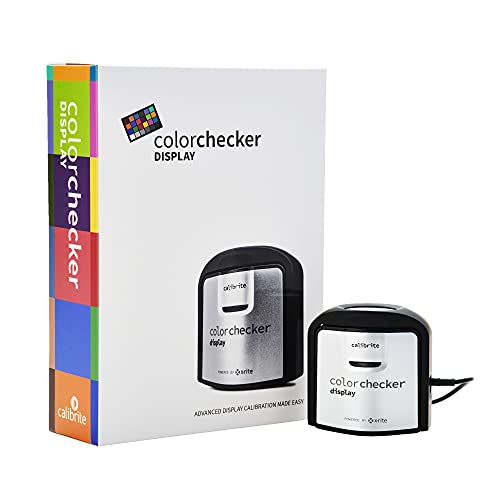
- Compact and self-contained
- Supports monitors and projectors
- Repeatable optical design
Best For: Mobile creators and home-office users profiling multiple display types
Best Entry-Level Speed

- Calibration in about 90 seconds
- Supports newer XDR displays
- Profiles up to three displays
Best For: Creators who want fast, uncomplicated screen calibration
Best Advanced Profiling
Calibrite ColorChecker Display Pro

- Uses ccProfiler or i1Profiler
- Repeatable cross-display profiling
- Supports projector and ambient-light work
Best For: Experienced creators with demanding monitor or projector workflows
Reliable Display Calibration

- Automated color and brightness calibration
- Supports multiple displays
- Includes quick ReCAL assistance
Best For: Home-office monitor calibration
Complete Color Management

- Profiles displays, printers, cameras, and scanners
- Uses adaptive iterative profiling
- Supports ambient-light print matching
Best For: Photography and print-focused home offices
Camera White Balance Control

- Includes 12% and 18% gray references
- Adds 18 color correction patches
- Includes stand and user guide
Best For: Camera white balance and photo editing
Easy Calibration Pick

- Guided 1 2 3 calibration workflow
- Supports up to two displays
- Includes before-and-after comparison
Best For: Home-office photographers and creators seeking simple monitor calibration
Portable Capture Reference

- Four targets for capture and profiling
- Supports DNG and ICC workflows
- Folding case with lanyard
Best For: Photographers and video creators needing consistent white balance and camera profiles
Best Overall – Datacolor Spyder X Pro
The Datacolor Spyder X Pro is a practical choice for home offices where accurate photo, design, or print colors matter. Its lens-based color engine, room-light monitoring, and guided workflow make it approachable for first-time users while supporting multiple monitors.
Best For: Home-office photographers and creators who want straightforward calibration across laptop and desktop displays.
Pros:
- Quick, single-click calibration with a guided wizard
- Supports multiple laptop and desktop monitors
- Includes room-light monitoring and automatic profile changing
- SpyderProof shows before-and-after results using your own images
Cons:
- Limited to monitor calibration rather than broader projector profiling
- Its advanced target options may be more than casual users need
For shoppers comparing color calibration tools for home offices, the Spyder X Pro balances ease of use with useful multi-monitor and ambient-light features. Its quick calibration process is especially convenient before editing sessions.
Best Portable Option – Calibrite ColorChecker Display
The Calibrite ColorChecker Display is a compact colorimeter for home offices that need consistent monitor or projector profiles without a bulky setup. Its self-contained design, intuitive ccStudio software, and integrated diffuser arm make it easy to move between workspaces.
Best For: Users who want a portable calibration tool for monitors, projectors, and occasional ambient-light measurements.
Pros:
- Compact, self-contained design for portability
- Software is described as intuitive and easy to use
- Optical design supports repeatable results across display types
- Built-in diffuser arm and tripod mount support projector profiling
Cons:
- Projector-focused mounting features may be unnecessary for monitor-only users
- The supplied notes provide fewer details about advanced profiling controls
This model stands out among color calibration tools for home offices when portability is important. It is particularly flexible for people who switch between a desk monitor, laptop, and projector.
Best Entry-Level Speed – Datacolor SpyderExpress
The Datacolor SpyderExpress is designed for creators who want a quick path to more trustworthy screen color. It supports current displays including Liquid Retina XDR screens and completes its stated calibration process in about 90 seconds, making it convenient for a busy home office.
Best For: Photo editors, graphic designers, and content creators seeking fast, simple calibration for up to three connected displays.
Pros:
- Three-step setup with a stated 90-second calibration time
- Supports Liquid Retina XDR displays, including the MacBook M4 mini-LED screen
- Can save profiles and calibrate up to three connected displays
- Optional software upgrades add features such as ambient-light adjustment and DevicePreview
Cons:
- OLED and advanced mini-LED support requires a software upgrade
- Several advanced features are positioned as optional upgrades
SpyderExpress is a strong fit for home-office users who prioritize speed and a simple workflow. It also offers a way to expand capabilities later without replacing the hardware.
Best Advanced Profiling – Calibrite ColorChecker Display Pro
The Calibrite ColorChecker Display Pro is suited to home-office workflows that call for more powerful profiling through ccProfiler or i1Profiler software. Its repeatable optical design and projector-oriented hardware make it a flexible option for users working across different display types.
Best For: Experienced photographers, designers, and creators who need consistent monitor or projector profiling.
Pros:
- Works with ccProfiler or i1Profiler software
- Designed for repeatable profiling on the same display and across display types
- Rotatable diffuser arm supports projector profiling and ambient-light measurement
- Integrated tripod mount adds flexibility for larger projection setups
Cons:
- Its advanced software may be more involved than beginners need
- Projector-profiling features can be unnecessary in a monitor-only home office
Among color calibration tools for home offices, the Display Pro makes the most sense when consistency and broader profiling flexibility outweigh the need for the simplest possible setup. It is a capable choice for more demanding color workflows.
Reliable Display Calibration – Spyder4Pro S4P100
For home offices that need dependable color calibration tools for home offices, the Datacolor Spyder4Pro provides automated color and brightness calibration for displays. Its full-spectrum sensor can calibrate multiple monitors, while the ReCAL feature simplifies repeat calibration as screen performance changes over time.
Best For: Home-office users calibrating one or more displays for more consistent color and brightness.
Pros:
- Automates color and brightness calibration.
- One sensor supports multiple displays.
- Double-shielded filters are designed for improved accuracy and long-term stability.
- ReCAL makes periodic recalibration quicker.
Cons:
- Designed for display calibration rather than printer, scanner, or camera profiling.
- Older fourth-generation hardware may offer a narrower workflow than newer all-in-one systems.
The Spyder4Pro is a focused choice when your priority is calibrating home-office monitors without needing broader color-management tools. Its automated workflow and recalibration assistant are particularly useful for maintaining consistency over time.
Complete Color Management – ColorChecker Studio
The Calibrite ColorChecker Studio is a comprehensive option among color calibration tools for home offices, covering displays and projectors as well as printers, paper, cameras, and scanners. Its PROFILER software uses adaptive iterative profiling, while ambient-light measurement helps with screen-to-print comparisons.
Best For: Photographers and creative professionals managing color from camera capture through editing, proofing, and printed output.
Pros:
- Profiles monitors, laptops, projectors, printers, paper, cameras, and scanners.
- Adaptive iterative profiling optimizes results for each display.
- Ambient-light measurement supports more reliable print matching.
- Includes a ColorChecker Classic Mini for custom camera profiling.
Cons:
- Its broader feature set may be more than needed for simple monitor calibration.
- Requires working with the included PROFILER software and multiple profiling steps.
Choose ColorChecker Studio if your home office doubles as a photo or print workspace. It is the most versatile option here, especially for users who need a connected workflow across capture, display, and output.
Camera White Balance Control – DKC-Pro Calibration Charts
These DKC-Pro charts offer a straightforward, camera-focused approach to color calibration tools for home offices. The set includes 12% and 18% gray references for white balance plus 18 color patches for digital correction in applications such as Adobe Photoshop and Lightroom.
Best For: Photographers who need portable reference charts for camera white balance and post-processing color correction.
Pros:
- Includes two 5-by-7-inch calibration cards.
- Provides both 12% and 18% gray references.
- Includes 18 color patches for digital color correction.
- Comes with a frame stand and user guide.
Cons:
- Does not directly calibrate a monitor, printer, scanner, or projector.
- Requires compatible editing software and a camera-based workflow.
The DKC-Pro set is a compact, practical companion for photographers rather than a replacement for a display colorimeter. It makes the most sense when accurate in-camera white balance and editing references are your main concerns.
Easy Calibration Pick – Display 123 Colorimeter
The Calibrite Display 123 is a straightforward choice among color calibration tools for home offices. Its guided Easy 1 2 3 software workflow helps photographers and creators correct common monitor color shifts without navigating complicated settings.
Best For: Home-office photographers and creators who want approachable calibration for one or two displays.
Pros:
- Guided workflow makes setup approachable.
- Supports calibration of up to two displays.
- Includes USB-C connectivity and an adjustable counterweight.
- Before-and-after viewing helps confirm the calibration result.
Cons:
- Supports only up to two displays.
- Offers fewer advanced controls than the Display Pro HL.
Choose the Display 123 when ease of use and dependable screen matching matter more than extensive profiling controls. It is a practical starting point for a compact creative workspace.
Portable Capture Reference – ColorChecker Passport Photo 2
The ColorChecker Passport Photo 2 is a portable addition to a home-office color workflow. Rather than calibrating a monitor, it provides four targets for white balance, exposure control, camera profiling, and enhancement during photo or video capture.
Best For: Photographers and video creators who need consistent capture references from location shoots through editing.
Pros:
- Four-target set covers white balance, exposure, and camera profiling.
- Supports DNG and ICC profiling workflows through Calibrite PROFILER.
- Folding protective case offers multiple positioning options.
- Compact case includes a lanyard for quick access.
Cons:
- It is a camera calibration reference, not a monitor colorimeter.
- Its benefits depend on incorporating reference shots into the workflow.
This kit complements monitor calibration tools for home offices by helping establish consistent color before images reach the editing screen. It is especially useful for projects spanning changing lighting conditions, cameras, or locations.
Advanced Display Control – Display Pro HL Colorimeter
The Calibrite Display Pro HL is the advanced option among these color calibration tools for home offices. Its high-luminance sensor measures displays up to 3000 nits and works with LCD, mini-LED, OLED, Apple XDR displays, and compatible projectors.
Best For: Professionals using bright, HDR-capable, OLED, or multi-monitor setups who need detailed calibration and validation controls.
Pros:
- Measures luminance up to 3000 nits for brighter modern displays.
- Provides Basic and Advanced PROFILER modes with adjustable white point, luminance, contrast ratio, and gamma.
- Includes profile validation, uniformity checks, flare correction, and Quick Check tools.
- Supports multiple monitors, custom presets, projectors, and custom patch sets.
Cons:
- Its advanced controls may be more than casual users need.
- Requires a separate USB-A adapter when using a USB-A connection.
The Display Pro HL is the strongest fit for demanding creative work and modern high-brightness panels. Its validation and multi-display features make it better suited to users who want to verify results rather than simply run a basic calibration.
How We Picked the Best Color Calibration Tools for Home Offices
We focused on tools that address the most common home-office color problems: inaccurate displays, inconsistent white balance, unpredictable prints, and difficult multi-device workflows. The selection includes dedicated monitor colorimeters, higher-end display profilers, complete color-management systems, and camera-focused targets.
We also considered ease of setup, compatibility with modern displays, portability, measurement range, and whether each tool is best suited to basic viewing accuracy or professional photo, video, and print work. Because the products serve different purposes, the most expensive option is not automatically the best choice for every user.
Quick Comparison
| Tool type | Best suited to | Typical advantage |
|---|---|---|
| Entry-level colorimeter | Everyday photo editing and office displays | Simple setup and lower cost |
| Advanced colorimeter | Photographers, designers, and video editors | More control and support for demanding displays |
| Spectrophotometer | Print, projector, scanner, and display workflows | Broader device profiling capabilities |
| Gray or color chart | Camera exposure and white-balance control | Portable, software-independent reference |
| Passport-style target | Traveling photographers and videographers | Compact camera color-management workflow |
Key Buying Factors for Color Calibration Tools for Home Offices
Display Compatibility
Check whether the device supports your monitor type, especially if you use a wide-gamut, HDR, OLED, mini-LED, laptop, or multiple-monitor setup. Advanced displays may benefit from newer sensors and software designed for higher brightness levels.
Calibration Versus Profiling
A monitor colorimeter measures and adjusts a display. A spectrophotometer can often profile additional devices, such as printers, projectors, and scanners. Choose the broader system only if your workflow uses those devices.
Software and Operating-System Support
Look for current software, clear instructions, and compatibility with your computer. A technically capable sensor is less useful if the workflow is difficult to repeat or does not support your operating system.
Camera and Print Requirements
Photographers may need a portable color target for consistent white balance and exposure, while print-focused users need device profiling rather than monitor calibration alone. These tools complement one another rather than serving as direct substitutes.
Who Should Buy Which Color Calibration Tools for Home Offices?
For basic home-office photo editing: Choose an entry-level monitor colorimeter with a guided workflow. It is usually the most practical improvement over relying on factory display settings.
For serious photographers and designers: Select an advanced colorimeter with broader display support and more calibration controls, particularly if you use wide-gamut or high-brightness screens.
For print studios and hybrid creative work: A complete spectrophotometer system makes sense when you need consistent results across displays, printers, projectors, or scanners.
For photographers working on location: A compact gray card or passport-style color target is easier to carry and helps establish repeatable exposure and white balance before files reach your editing monitor.