Managing a laptop or headless computer from another room—or another location—does not have to mean carrying a monitor and keyboard around. KVM over IP switches provide remote access to video, keyboard, and mouse controls, often working below the operating-system level for BIOS configuration and recovery.
We selected options ranging from compact plug-and-play devices to feature-rich systems for IT professionals, home labs, and multi-computer setups. The right choice depends on port count, video resolution, network access, power control, and how much setup you want to handle yourself.
Best 10 Kvm Over Ip Switches for Laptops Picks for 2026
Flexible Open-Source Pick

- HDMI and USB-C control
- 1080p/60Hz streaming
- Open-source with Wake-on-LAN
Best For: Laptop users and makers wanting customizable remote access
Production-Ready Raspberry Pi Solution

- 1080p and 1200p at 60Hz
- Ethernet, Wi-Fi, and cellular options
- Includes power and connection accessories
Best For: Remote PC and server management
PoE Homelab Favorite

- PoE with full-size HDMI
- BIOS/UEFI and virtual-media access
- No subscription required
Best For: Homelabs, Proxmox, and headless servers
Enterprise 4K Rackmount Option
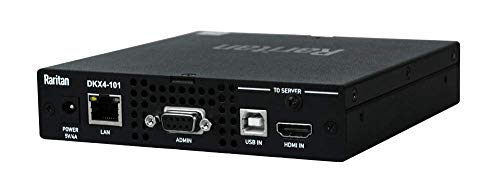
- Single-port 4K KVM-over-IP
- Rack-mount installation
- Ethernet and USB support
Best For: Dedicated rack-based remote infrastructure management
Pocket Pick

- Single USB-C connection for compatible devices
- Browser and app-based remote control
- Compact Wi-Fi 6 design with touchscreen
Best For: Family IT support, travel, and compatible USB-C laptops
Internet Access Pick
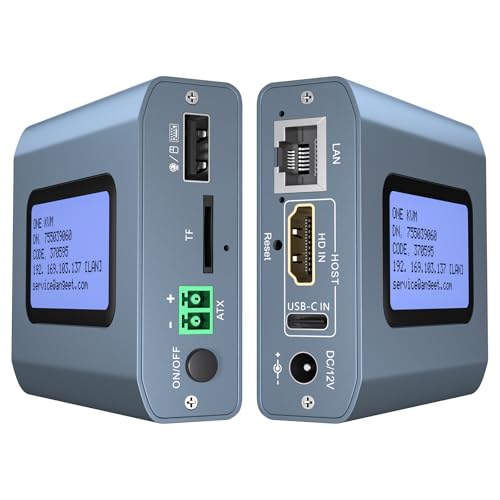
- 4K 60Hz remote video support
- Ethernet, browser, and app access
- ZeroTier for cross-network control
Best For: Remote work and mixed Windows, Mac, Linux, and Android setups
Multi-System Pick

- Four HDMI and four USB-C host connections
- PoE networking with USB-C power backup
- Rack-ready design with local touchscreen
Best For: Home labs and IT teams managing multiple systems
Best Flexible 2-Computer Pick

- Controls two computers over IP
- 4K60 video with synchronized audio
- ZeroTier and remote desktop power control
Best For: Remote workers and IT users managing two computers
Best for Network Resilience

- 5G/4G, Wi-Fi 6, and Ethernet failover
- 64GB eMMC for OS and recovery images
- Touchscreen and secure remote-access options
Best For: IT teams and labs needing resilient remote console access
Best Compact PoE Option

- PoE and USB-C dual power
- 4K streaming at 30FPS
- 32GB eMMC and remote BIOS reinstall
Best For: Single-computer and server management over compatible PoE networks
Flexible Open-Source Pick – JetKVM IP KVM
For shoppers comparing kvm over ip switches for laptops, the JetKVM is a compact option for remotely controlling a computer through HDMI and USB-C. It supports browser-based local access, optional cloud access, and Wake-on-LAN, while its 1080p/60Hz streaming and adjustable video quality suit different network conditions.
Best For: Laptop users, developers, and homelab enthusiasts who want flexible remote access and open-source customization.
Pros:
- Simple HDMI, USB-C, and Ethernet setup with browser access
- Supports Wake-on-LAN and remote recovery tasks such as BIOS or Safe Mode access
- Open-source Linux design with optional cloud access and expansion capabilities
- 1080p/60Hz video with stated 30–60ms latency
Cons:
- Cloud access is optional and requires using the JetKVM cloud dashboard
- USB-C video compatibility may require a DisplayPort or HDMI adapter
The JetKVM stands out when flexibility, customization, and laptop-friendly USB-C connectivity matter more than enterprise rack features.
Production-Ready Raspberry Pi Solution – PiKVM V4 Plus
The PiKVM V4 Plus is a turnkey choice among kvm over ip switches for laptops and other computers. It is designed for remote server or PC management and includes power, USB, Ethernet cables, and PCI brackets, with Ethernet, Wi-Fi, and optional cellular connectivity.
Best For: Users who want a feature-rich Raspberry Pi-based KVM with multiple connectivity options and a ready-to-use package.
Pros:
- Supports 1920×1080 and 1920×1200 at 60Hz
- Includes essential cables, power supply, and PCI brackets
- Offers Ethernet, Wi-Fi, and optional cellular connectivity
- Provides extra storage through an internal USB 3.0 slot
Cons:
- Optional external antenna and cellular connectivity may add setup requirements
- Its 12V power requirement may be less convenient for simple laptop setups
With broad resolution support and several network paths, the PiKVM V4 Plus is a strong fit for buyers seeking a complete, production-oriented remote management appliance.
PoE Homelab Favorite – Open-Source ArkKVM
This ArkKVM is aimed at homelab and headless-server users comparing kvm over ip switches for laptops and broader computer systems. It provides browser-based BIOS/UEFI control, 1080p/60Hz HDMI capture, PoE power, virtual-media support, and remote management without a required subscription.
Best For: Proxmox hosts, homelabs, and headless computers that need out-of-band access without installing software on the managed machine.
Pros:
- Remote BIOS/UEFI access remains useful when an operating system is frozen or unavailable
- PoE combines power and networking over one Ethernet cable
- Open-source Rust firmware is designed to be inspectable and auditable
- Includes 32GB eMMC storage, ISO or virtual-media mounting, and Wake-on-LAN
Cons:
- Remote power control requires an optional ATX expansion board
- Its feature set may be more than needed for basic laptop access
The ArkKVM is particularly compelling for technical users who want PoE convenience, open firmware, and recovery-level access without recurring fees.
Enterprise 4K Rackmount Option – Raritan Dominion KX IV-101
Raritan Dominion KX IV-101 Ultra High Performance 1-Port 4K KVM-Over-IP Switch
Check Price On AmazonThe Raritan Dominion KX IV-101 is a rack-mount, single-port KVM-over-IP switch for buyers who prioritize high-resolution remote infrastructure management. Its supplied specifications identify Ethernet connectivity, remote control, and support for Ethernet-enabled and USB devices.
Best For: Rack-based environments needing a dedicated one-port KVM-over-IP appliance with 4K positioning and a stated two-year warranty.
Pros:
- Designed as a 1-port 4K KVM-over-IP switch
- Rack-mount form factor suits structured equipment installations
- Uses Ethernet for remote connectivity and supports USB devices
- Includes a stated two-year warranty
Cons:
- Rack-mount design is less convenient for casual laptop or desktop use
- Only one port is specified, limiting multi-system expansion
- The supplied notes do not detail latency, browser features, or included cabling
The Dominion KX IV-101 makes the most sense when a purpose-built rack appliance and 4K capability are more important than portability or homelab-oriented extras.
Pocket Pick – Comet Q Portable Remote KVM
For buyers comparing kvm over ip switches for laptops, the GL.iNet Comet Q is a compact option built around USB-C. It carries video, audio, keyboard, and mouse data through one connection, then provides browser or app-based remote control without installing software on the target device.
Best For: Family IT support, travel, and remote access to compatible laptops or small computers.
Pros:
- Single USB-C connection simplifies setup on compatible DP Alt Mode devices.
- Supports remote wake-up for supported devices and browser-based access.
- Tailscale, ZeroTier, and two-factor authentication support add privacy-focused access options.
- Compact 70 x 70 x 22 mm design includes a status touchscreen and Wi-Fi 6.
Cons:
- USB-C DP Alt Mode compatibility is required.
- Remote power on/off is not specifically listed for this model.
- Remote image quality depends on available network bandwidth.
Comet Q stands out when portability and simple laptop connectivity matter most. Its single-cable design and secure remote-access options make it practical for support tasks, though compatibility should be checked before purchase.
Internet Access Pick – 4K Remote IP KVM
This 4K remote IP KVM is a practical choice among kvm over ip switches for laptops when Ethernet connectivity and broad operating-system support are priorities. It connects through HDMI and USB, supports browser or app access, and can control computers without additional drivers or software on the target system.
Best For: Remote work, home labs, and cross-platform access to laptops, desktops, and servers.
Pros:
- Supports remote control through Ethernet, a web interface, or the ONE KVM app.
- Works with Windows, macOS, Linux, and Android environments.
- Supports up to 4K at 60Hz with stated latency below 60 milliseconds.
- Built-in ZeroTier enables cross-network access without traditional port forwarding.
Cons:
- Remote power on/off applies to desktop computers, not laptops.
- ZeroTier requires an online upgrade.
- Setup requires separate HDMI, USB, Ethernet, and power connections.
Choose this model if you want a wired, 4K-capable remote KVM with flexible network access. Laptop users should note that its remote power-control feature is limited to desktop systems.
Multi-System Pick – Comet X Quad-Port Remote KVM
For a home lab or professional workspace, the GL.iNet Comet X is a four-port option among kvm over ip switches for laptops. It combines four HDMI inputs and four USB-C device ports with browser-based HTTPS access, local controls, PoE power, and rack-mount hardware.
Best For: IT professionals and home-lab users managing several laptops, desktops, or servers from one KVM.
Pros:
- Controls up to four host systems with front-panel, touchscreen, or web switching.
- PoE carries network and power through one Ethernet cable, with 5V USB-C backup.
- HDMI loop-out supports local display at up to 4K at 30Hz.
- Includes 64GB eMMC storage and 10-inch and 19-inch rack-mount brackets.
Cons:
- More hardware than needed for a single-laptop setup.
- Local HDMI loop-out is limited to 4K at 30Hz.
- Rack-oriented features can increase installation complexity for casual users.
Comet X is the strongest fit when multiple systems, local access, and organized rack installation are important. Its four-port layout and PoE support make it more scalable than portable single-host designs.
Best Flexible 2-Computer Pick – ONE-KVM 4K Remote KVM
For shoppers comparing kvm over ip switches for laptops and other computers, the ONE-KVM is a versatile choice when remote access to two HDMI-equipped hosts matters. It supports browser or app control, local switching, 4K video, and remote power control for compatible desktop PCs.
Best For: Remote workers and IT users managing two computers across a LAN or WAN.
Pros:
- Controls two computers remotely through a web interface or the ONE KVM app.
- Supports 3840×2160 at 60Hz, synchronized audio, and hardware H.264 encoding.
- Built-in ZeroTier can simplify cross-network access without manual port forwarding.
- LCD display shows the acquired IP address, while local switching is available by button or wired remote.
Cons:
- Requires a 12V power adapter and is not PoE-powered.
- Web access is listed for LAN use; WAN access requires the app or additional configuration.
- Remote power control is intended for desktop PCs with the required motherboard connection.
The ONE-KVM stands out for combining two-host switching, high-resolution output, app access, and remote power functions in one hardware solution. It is especially practical if you need flexibility across local and remote setups rather than a basic single-computer KVM.
Best for Network Resilience – Comet 5G RedCap Remote KVM
The GL.iNet Comet 5G RedCap is a premium option among kvm over ip switches for laptops, servers, and edge computers. Its 5G/4G, Wi-Fi 6, and Gigabit Ethernet connectivity provides automatic failover when a primary network is unavailable.
Best For: IT teams, MSPs, and home-lab users who need resilient remote console access.
Pros:
- Automatically switches among Ethernet, Wi-Fi 6, and 5G/4G connectivity.
- Provides browser-based access plus Tailscale and ZeroTier private remote-access options.
- 64GB eMMC storage supports OS images, ISOs, and recovery tools for remote deployment.
- Includes a 3.69-inch touchscreen and local Wi-Fi hotspot for nearby control.
Cons:
- Its advanced cellular and storage features may be more than needed for basic home use.
- Remote performance depends on the available network connection, despite the stated 30–60 ms online latency.
- The supplied notes do not specify a multi-computer switching capacity.
Choose the Comet 5G when staying connected during LAN or Wi-Fi outages is a priority. The touchscreen, local hotspot, secure access options, and image repository make it better suited to ongoing infrastructure management than occasional laptop switching.
Best Compact PoE Option – Comet PoE Remote KVM
The GL.iNet Comet PoE is a compact single-computer choice for buyers seeking kvm over ip switches for laptops, servers, or other compatible systems. Power over Ethernet, USB-C power, 4K streaming, and remote BIOS reinstall support make it useful for managed network installations.
Best For: Users remotely managing one computer or server where PoE simplifies installation.
Pros:
- Supports PoE and USB-C dual power options.
- Provides 4K video at 30 frames per second.
- Includes 32GB built-in eMMC for remote BIOS reinstall workflows.
- Offers Tailscale support and USB control for ATX and Fingerbot applications.
Cons:
- Supports a maximum of one device, so it cannot switch between multiple computers.
- 4K streaming is limited to 30FPS rather than 60FPS.
- Its PoE capability requires compatible Ethernet infrastructure.
This Comet model is a focused, space-saving solution when one-host access is enough. Its PoE support can reduce cabling, while built-in storage and remote BIOS reinstall capability add value for server rooms, offices, and unattended systems.
How We Picked the Best Kvm Over Ip Switches for Laptops
We focused on practical remote-management capabilities rather than treating every IP KVM as interchangeable. The products in this roundup span single-port and multi-port designs, compact travel-friendly units, open-source hardware, and professional-grade equipment. We considered remote BIOS access, browser-based control, video quality, connection options, security features, installation flexibility, and compatibility with laptops, desktops, servers, and headless systems.
We also looked for features that matter after installation: reliable network access, responsive input control, support for remote reboot or power management, and useful extras such as PoE, touchscreen controls, storage, webcam support, or cellular connectivity.
Quick Comparison
| Best for | What to prioritize | Ideal product type |
|---|---|---|
| Travel and occasional support | Small size, simple setup, USB power | Pocket or compact single-port KVM |
| Home labs and Proxmox systems | BIOS access, open software, flexible networking | Open-source or enthusiast-focused KVM |
| Several computers | Port count, switching, centralized management | Multi-port remote KVM |
| Business and IT operations | Security, reliability, 4K support, administration | Enterprise-grade KVM-over-IP system |
| Unreliable wired networks | Wi-Fi, cellular, or out-of-band connectivity | Wireless or 5G-enabled remote KVM |
Key Buying Factors for Kvm Over Ip Switches for Laptops
Video Resolution and Latency
Check the maximum supported resolution and refresh rate, especially if you need to work in a modern laptop’s native display mode. For BIOS work and troubleshooting, responsiveness is often more important than high refresh rates. Confirm that the device accepts the laptop’s HDMI or other video output and that the required adapter is included or available.
Remote Access and Security
Browser access is convenient, but secure remote connectivity matters more than convenience alone. Look for encrypted sessions, VPN or mesh-network support, strong authentication, and options such as Tailscale or ZeroTier. Avoid exposing an IP KVM directly to the public internet unless you understand its security settings and have protected the network properly.
Power and Recovery Features
A KVM switch can show and control a computer, but it may not automatically cut power or press a physical power button. If unattended recovery is important, check for wake-on-LAN, remote power control, ATX connections, or compatibility with a managed power device.
Ports, Cabling, and Installation
Count the computers you need to manage now and soon. Multi-port models can reduce clutter, while single-port units are usually easier to deploy. Also verify USB keyboard and mouse support, Ethernet or Wi-Fi requirements, PoE availability, cable length, and whether the unit needs external power.
Who Should Buy Which Kvm Over Ip Switches for Laptops?
Choose a compact single-port model if you mainly support one laptop, travel frequently, or want an emergency-access tool. Home-lab users should favor open-source or enthusiast-oriented hardware with broad BIOS, Linux, and virtual-machine compatibility. If you manage multiple systems, a quad-port or professional multi-port unit will be more convenient than repeatedly moving cables.
For business environments, prioritize vendor support, administration controls, predictable firmware updates, and enterprise security over the lowest price. Wireless and 5G models make sense where wired Ethernet is unavailable or a separate out-of-band path is valuable. Finally, if you only need to control a laptop while its operating system is running, a software remote-desktop tool may be cheaper; choose a KVM over IP when pre-boot access, BIOS configuration, or recovery from a failed operating system is essential.