Remote access is most useful when it works before the operating system loads. The best KVM over IP switches for desktops let you view the screen, control the keyboard and mouse, troubleshoot BIOS settings, and recover a machine from almost anywhere.
This roundup covers single-computer remotes, multi-port KVMs, PoE and wireless models, and HDMI-over-IP extenders. Compare resolution, refresh rate, network requirements, remote power features, and compatibility before choosing a setup for your desktop, workstation, server, or home lab.
Best 10 Kvm Over Ip Switches for Desktops Picks for 2026
Best All-Around Remote Control

- BIOS-level access without host software
- 4K video at 30Hz with H.264 encoding
- Remote audio and file transfer
Best For: Remote IT support and home labs
Best Production-Ready Option

- 1080p and 1200p video at 60Hz
- Open-source, production-grade platform
- Ethernet, Wi-Fi, and cellular connectivity
Best For: Server management and homelabs
Best PoE Remote KVM

- PoE and USB Type-C power options
- 4K streaming at 30fps
- Remote BIOS reinstall support
Best For: Single wired desktops and servers
Best Open-Source Value

- 1080p at 60fps with 30–60ms latency
- Local, cloud, and Wake on LAN access
- Open-source and customizable hardware
Best For: Developers and remote desktop recovery
Best Self-Hosted Pick
GL.iNet Comet X Quad-Port Remote KVM

- Controls up to four HDMI hosts
- PoE with 5V Type-C backup
- HTTPS access, touchscreen, and rack brackets
Best For: Home labs and IT users managing several desktops or servers
Best 4K60 Extender
OREI HDMI KVM Extender Over IP

- Delivers 4K 4:4:4 video at 60Hz
- Reaches up to 400 feet over Cat6
- Adds USB keyboard and mouse control
Best For: Long-distance desktop or PC extension with high-refresh 4K video
Best Remote Power Option
Remote KVM Over IP with ZeroTier
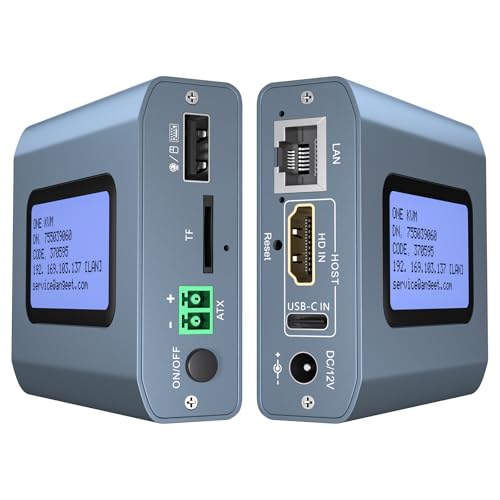
- 4K60 remote KVM access
- ZeroTier supports cross-network connectivity
- Remote power control for compatible desktops
Best For: Unattended desktop and server management from outside the local network
Best for Long-Distance KVM Extension

- 4K video extension up to 390 feet
- USB keyboard, mouse, and peripheral control
- Supports up to 16 extender pairs
Best For: Remote workstations and professional AV installations
Best for Two-Desktop Remote Access

- Remote control for two computers
- 4K at 60Hz with audio support
- Web, app, and local switching options
Best For: Home offices and IT management of two desktop PCs
Best for Failover and Recovery

- 5G, Wi-Fi 6, and Ethernet failover
- 4K remote management with HDMI loop-out
- 64GB storage for images and recovery tools
Best For: Critical remote systems and disaster recovery
Best All-Around Remote Control – GL.iNet Comet GL-RM1
The GL.iNet Comet GL-RM1 is a compact choice among kvm over ip switches for desktops when you need BIOS-level access without installing software on the controlled computer. It supports 4K video at 30Hz, remote audio, file transfer, and internet-based access for desktops, laptops, and servers.
Best For: Remote IT support, home labs, smart-home users, and managing computers that may need BIOS or operating-system maintenance.
Pros:
- Provides BIOS-level remote control for reboots, OS installation, and device management.
- Supports 3840×2160 video at 30Hz with H.264 hardware encoding and low latency.
- Works with laptops, desktops, servers, and other compatible computers without host-side software.
- Includes remote audio and file transfer features.
Cons:
- Supports only one connected device.
- PD adapters cannot be used.
- 4K output is limited to 30Hz.
Choose this model if broad compatibility and high-resolution remote access matter more than multi-device switching or high-refresh-rate video. Its small footprint and Tailscale support also suit flexible remote setups.
Best Production-Ready Option – PiKVM V4 Plus
The PiKVM V4 Plus is a production-grade Raspberry Pi-based option for kvm over ip switches for desktops, servers, and other USB- and Ethernet-equipped systems. It combines 1080p video at 60Hz, BIOS and UEFI compatibility, and multiple connectivity options in a turnkey package.
Best For: IT administrators and homelab users who want an open-source, ready-to-use remote KVM with Ethernet, Wi-Fi, and optional cellular connectivity.
Pros:
- Supports 1920×1080 and 1920×1200 video at 60Hz.
- Designed as a feature-rich, production-grade open-source KVM solution.
- Offers Ethernet, Wi-Fi, and cellular connectivity channels.
- Includes a power supply, USB and Ethernet cables, and PCI brackets.
Cons:
- Its 1080p-class resolution is lower than the 4K options in this roundup.
- Cellular connectivity requires the appropriate setup or optional hardware.
- The larger metal enclosure may be less convenient for compact desktop installations.
The PiKVM V4 Plus is a strong fit when reliability, open-source functionality, and connectivity flexibility are priorities. Its 60Hz support and extra HDMI outputs are particularly useful for BIOS and UEFI workflows.
Best PoE Remote KVM – GL.iNet Comet PoE GL-RM1PE
The GL.iNet Comet PoE GL-RM1PE is a practical pick among kvm over ip switches for desktops when simplified power delivery is important. It supports PoE and USB Type-C power, 4K streaming at 30fps, remote BIOS reinstalls, and a built-in 32GB eMMC.
Best For: Desktops and servers in wired network locations where PoE can reduce cable clutter and simplify remote deployment.
Pros:
- Supports PoE and USB Type-C dual power options.
- Provides 4K video streaming at 30fps.
- Supports remote BIOS reinstall workflows.
- Includes 32GB built-in eMMC and a USB interface for ATX or Fingerbot control.
Cons:
- Supports a maximum of one device.
- Requires Ethernet for its stated network connection.
- 4K streaming is limited to 30fps.
This model makes the most sense for a single remotely managed computer in a wired environment. PoE support is its key differentiator, while BIOS reinstall capability adds value for maintenance and recovery tasks.
Best Open-Source Value – JetKVM Over IP
The JetKVM is a flexible choice among kvm over ip switches for desktops, offering browser-based local access, optional cloud access, and Wake on LAN. Its 1080p at 60fps stream, 30–60ms latency, and open-source Linux foundation support responsive remote control and recovery work.
Best For: Tinkerers, developers, and desktop owners who want customizable remote access with multiple connection and power options.
Pros:
- Provides local browser access, optional cloud access, and Wake on LAN.
- Delivers 1080p at 60fps with H.264 encoding and stated 30–60ms latency.
- Supports several power methods, including USB-C and a separate 5V supply.
- Open-source Linux software and an expansion port enable customization.
Cons:
- Video resolution is limited to 1080p.
- Cloud access is optional and depends on using the JetKVM Cloud service.
- Advanced expansion features may require additional hardware or customization.
JetKVM stands out for flexibility rather than maximum resolution. It is especially appealing if you value open-source software, Wake on LAN, and the ability to extend the device for power control or serial-console tasks.
Best Self-Hosted Pick – GL.iNet Comet X Quad-Port Remote KVM
For home labs and small IT environments comparing kvm over ip switches for desktops, the GL.iNet Comet X stands out as a self-hosted four-port solution. It combines four HDMI inputs, browser-based HTTPS access, local controls, and PoE power in a rack-ready chassis.
Best For: Home labs, IT professionals, and users managing up to four desktop or server systems from one KVM.
Pros:
- Controls four hosts through HDMI and USB-C connections.
- Supports browser-based remote access over HTTPS without client software.
- Offers PoE power, 5V Type-C backup, a touchscreen, and included rack brackets.
- Provides 4K at 30Hz HDMI loop-out for local viewing.
Cons:
- Loop-out is limited to 4K at 30Hz rather than 60Hz.
- Its four-host design may be more than needed for a single desktop.
The Comet X is the most complete option here for multi-system management, especially where local control, rack mounting, onboard storage, and self-hosted remote access matter more than maximum display refresh rate.
Best 4K60 Extender – OREI HDMI KVM Extender Over IP
For buyers seeking kvm over ip switches for desktops with high-refresh video, the OREI EX-500-KVM is a practical HDMI and USB extender. It carries 4K 4:4:4 video at 60Hz over Cat6, while its receiver-side USB ports support keyboard and mouse control.
Best For: Extending one desktop’s display and USB controls up to 400 feet, with optional one-to-many networking.
Pros:
- Supports 4K 4:4:4 at 60Hz over Cat6.
- Extends HDMI and USB signals up to 400 feet or 120 meters.
- Supports point-to-point or one-to-many setups through a 1G network switch.
- Includes HDMI loop-out for a local display and automatic EDID/DDC management.
Cons:
- A 1G network switch is required for one-to-many operation and is sold separately.
- Optimal performance requires high-quality shielded Cat6 cable.
- Its USB support is limited to keyboard and mouse use through USB 1.1 ports.
The OREI is a strong fit when 4K60 quality and long-distance signal extension are the priorities. It is less of a multi-host desktop switch and more of a networked KVM extender kit.
Best Remote Power Option – Remote KVM Over IP with ZeroTier
Among kvm over ip switches for desktops, this remote KVM is aimed at internet-based access and hands-off computer administration. It supports 4K at 60Hz, web and app control, built-in ZeroTier connectivity, and motherboard-based remote power on/off for compatible desktop PCs.
Best For: Remote desktop and server administration where BIOS access, OS installation, and remote power control are important.
Pros:
- Supports remote control without additional host software or drivers.
- Provides 4K at 60Hz with claimed latency below 60 milliseconds.
- Includes ZeroTier for cross-network access without traditional port forwarding or VPN setup.
- Can remotely power compatible desktop computers on or off through the motherboard F_PANEL connection.
Cons:
- Remote power control applies to desktop computers, not laptops.
- App access requires logging into the device through a web browser and downloading the app.
- ZeroTier requires an online upgrade.
This model is especially appealing for remote troubleshooting and unattended desktops because it reaches the BIOS and supports power control. Buyers should confirm motherboard wiring needs and plan for the required network and cloud or ZeroTier setup.
Best for Long-Distance KVM Extension – 4K HDMI KVM Extender
For buyers comparing kvm over ip switches for desktops, the AV Access 4K HDMI USB KVM Extender is best understood as a long-distance extension system rather than a traditional multi-computer switch. It sends 4K video, audio, USB, and remote keyboard-and-mouse control up to 390 feet over Cat5e or better Ethernet cabling, including through an existing IP network.
Best For: Remote desktops, server rooms, control rooms, classrooms, and distributed workstations that need long-range USB and HDMI access.
Pros:
- Supports 4K at 30Hz and 1080p at 120Hz over up to 390 feet.
- Uses existing Ethernet infrastructure and supports up to 16 paired extender sets.
- Includes three USB 2.0 ports on the receiver for peripherals.
- Works with Windows, macOS, and Linux without additional drivers.
Cons:
- It extends one connected system rather than switching directly among multiple desktops.
- Requires separate transmitter and receiver units plus suitable Ethernet cabling.
- 4K operation is limited to 30Hz.
This is a practical choice when distance and installation flexibility matter more than local multi-PC switching. Its rack-friendly design, locking power connectors, and network-based deployment make it particularly suitable for professional installations.
Best for Two-Desktop Remote Access – 4K IP KVM Switch for 2 PCs
Among kvm over ip switches for desktops, the ONE-KVM 4K Remote KVM Switch is designed for remotely switching and controlling two computers. It provides browser and app access, local switching, 4K video support, and desktop power control through a network connection.
Best For: Remote workers, IT administrators, and users managing two desktop PCs across a LAN or WAN connection.
Pros:
- Controls and switches between two computers through a web interface or app.
- Supports 3840×2160 at 60Hz with reported latency below 60ms.
- Includes remote desktop power on/off support through motherboard connections.
- Built-in ZeroTier can simplify cross-network remote access without conventional port forwarding.
Cons:
- Requires a separate 12V power adapter and is not PoE-powered.
- App access supports LAN and WAN, while web access is listed for LAN use.
- Remote power control requires connecting the included Dupont cable to a desktop motherboard.
The LCD IP display, physical switching controls, browser access, and app support make this a versatile two-PC solution. It is a stronger fit for direct desktop management than for large multi-system installations.
Best for Failover and Recovery – Comet 5G Remote KVM
For advanced kvm over ip switches for desktops, the GL.iNet Comet 5G RedCap Remote KVM emphasizes resilient connectivity and recovery features. It can fail over among Gigabit Ethernet, Wi-Fi 6, and 5G/4G, while providing browser-based access, HDMI loop-out, and BIOS-level control.
Best For: Critical servers, branch devices, home labs, MSPs, and remote recovery scenarios where network redundancy is important.
Pros:
- Offers automatic multi-WAN failover across Ethernet, Wi-Fi 6, and 5G/4G.
- Supports low-latency remote access with H.264 hardware encoding and reported 30–60ms latency.
- Includes a 3.69-inch touchscreen for local status and control.
- Provides 64GB eMMC storage for OS images, ISOs, and recovery tools.
Cons:
- Its advanced connectivity and recovery features may be more than a basic desktop setup requires.
- 5G/4G failover depends on compatible cellular service and network availability.
- The supplied notes do not specify the number of computers it can switch between.
This model stands out for maintaining access when a primary network path fails. The combination of local hotspot control, remote browser access, storage for deployment images, and BIOS-level operation makes it especially useful for hands-off maintenance and disaster recovery.
How We Picked the Best Kvm Over Ip Switches for Desktops
We focused on the features that matter during real remote-support and administration tasks: reliable video capture, responsive keyboard and mouse control, pre-boot or BIOS access, network connectivity, installation requirements, and the ability to recover a computer without being physically present. We also separated true remote KVM devices from HDMI-over-IP extenders, since they serve different purposes.
Product specifications can vary by firmware, cable quality, host hardware, and network conditions. Confirm operating-system support, USB compatibility, power requirements, and the advertised video mode before purchasing.
Quick Comparison
- Best for a compact single desktop: Choose a small remote KVM with 4K output and BIOS control.
- Best for open-source flexibility: PiKVM-style hardware suits users comfortable with configuration and maintenance.
- Best for multiple computers: A multi-port model can reduce cable clutter and centralize access.
- Best for long-distance video extension: HDMI-over-IP extenders are designed to carry video and USB across structured cabling, but may not provide the same internet-ready management features.
- Best for difficult locations: PoE, Wi-Fi, 5G, or out-of-band networking can simplify deployment where standard Ethernet is inconvenient.
Key Buying Factors for Kvm Over Ip Switches for Desktops
Resolution, Refresh Rate, and Latency
4K support is useful for detailed desktops, but check the supported refresh rate. A 4K 30Hz device may be adequate for administration, while 4K 60Hz is preferable for smooth pointer movement and visual work. Low latency matters more than maximum resolution for interactive control.
Pre-Boot Access and USB Behavior
Look for explicit BIOS, UEFI, boot-menu, and operating-system installation support. Verify that the device presents keyboard and mouse inputs correctly to the host, particularly when using gaming peripherals, wireless receivers, webcams, or USB storage.
Remote Power and Networking
Remote KVM does not always equal remote power control. If a locked or crashed desktop must be restarted, choose a model with a compatible power-control accessory or use a separately managed PDU. Consider Ethernet stability, PoE availability, VPN support, ZeroTier or Tailscale integration, and whether direct internet exposure can be avoided.
Ports and Installation
Match HDMI, DisplayPort, USB, and audio requirements to the target computer. Multi-port units are convenient for several systems, while single-port devices are usually easier to install. For extenders, check cable category, maximum distance, switching method, and whether the transmitter and receiver require separate network infrastructure.
Who Should Buy Which Kvm Over Ip Switches for Desktops?
Home-lab owners should prioritize compact hardware, secure remote access, BIOS control, and easy recovery. IT professionals may prefer multi-port KVMs, remote power options, audit-friendly access, and dependable wired networking. Work-from-home users typically need a simple single-computer unit rather than a rack-style system. AV and classroom installers should focus on HDMI-over-IP distance, 4K 60Hz support, HDCP compatibility, and structured-cabling requirements. If cellular or wireless access is essential, compare the ongoing connectivity costs and signal quality before choosing a 5G or Wi-Fi model.