Wi-Fi is convenient, but a wired connection can deliver steadier speeds, lower latency, and fewer dropouts. The right Ethernet adapter makes it easy to add reliable networking to a laptop, desktop, tablet, or compatible gaming device.
We selected 10 options ranging from compact USB and USB-C gigabit adapters to faster 2.5GbE and 5GbE models. Use the guide below to match port type, network speed, compatibility, and intended workload to the adapter that fits best.
Best 10 Ethernet Adapters with Gigabit Speeds Picks for 2026
Best USB-A Pick
TRENDnet TU3-ETG Gigabit Adapter

- Up to 1Gbps Ethernet over USB 3.0
- Works with USB 2.0 and 1.1 ports
- Two-year warranty and compact design
Best For: USB-A Windows and Mac computers
Best Desktop Upgrade
TP-Link TX201 2.5Gb PCIe Network Card

- Up to 2.5Gbps wired networking
- Includes standard and low-profile brackets
- Supports Windows, Server, and Linux
Best For: Desktop PCs with an available PCIe slot
Best USB-C Value
UGREEN USB-C Gigabit Ethernet Adapter

- Up to 1000Mbps wired speeds
- Plug and play on many current systems
- Aluminum housing with status LED
Best For: USB-C laptops, tablets, phones, and handhelds
Best Compact Premium Pick

- Up to 1Gbps wired connection
- Lightweight aluminum design
- Braided cable and 18-month warranty
Best For: Portable USB-C laptop and tablet setups
Best Portable Pick
TP-Link UE306 Gigabit USB-A Adapter

- Up to 1000 Mbps over USB 3.0
- Works with Nintendo Switch and supported Windows/Linux devices
- Compact, foldable, and externally powered by USB
Best For: Travelers and Nintendo Switch users needing a compact wired connection
Best High-Speed Pick
Cable Matters 5Gb USB-C Ethernet Adapter

- Up to 5000 Mbps with compatible equipment
- Supports USB-C, USB4, and Thunderbolt devices
- Rugged aluminum body with braided cable
Best For: USB-C users handling large transfers or high-bandwidth networking
Best Upgrade Pick
UGREEN 2.5G USB-C Ethernet Adapter

- Supports up to 2.5Gbps wired networking
- Low-power RTL8156BG chipset for stable performance
- Aluminum body with reinforced ports and status lights
Best For: USB-C users upgrading from 1GbE to 2.5GbE
Reliable Gigabit Essential
StarTech USB 3.0 Ethernet Adapter
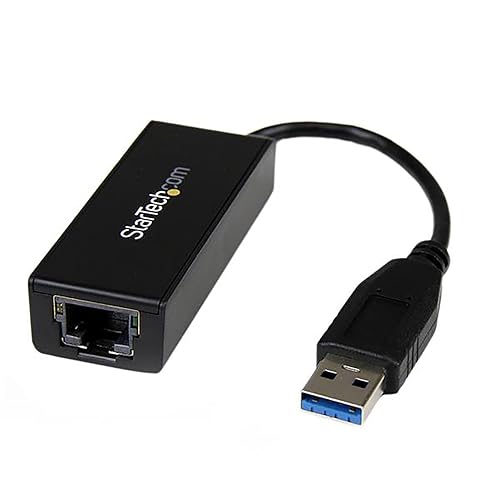
- Up to 1 Gbps over USB 3.0
- Supports Windows, macOS, Linux, and ChromeOS
- Includes VLAN, Wake on LAN, and jumbo-frame support
Best For: USB-A computers needing a dependable wired gigabit connection
High-Speed Upgrade Pick
UGREEN 2.5Gb USB Ethernet Adapter

- Supports speeds up to 2.5Gbps
- Aluminum housing with status indicators
- Compatible with Windows, macOS, ChromeOS, and Linux
Best For: USB-A systems paired with 2.5GbE networking equipment
USB-C 2.5GbE Choice
Acer USB-C 2.5Gb Ethernet Adapter

- Up to 2.5Gbps with compatible equipment
- Works with USB-C and Thunderbolt 3/4 devices
- Supports Windows, macOS, ChromeOS, Linux, iPadOS, and iOS
Best For: Modern USB-C devices needing fast wired network access
Best USB-A Pick – TRENDnet TU3-ETG Gigabit Adapter
For desktops, notebooks, and Mac computers with USB-A, the TRENDnet TU3-ETG is a practical choice among ethernet adapters with gigabit speeds. Its USB 3.0 connection supports up to 1Gbps networking, while the attached flexible cable and USB power make installation straightforward.
Best For: Adding or replacing an RJ45 port on a USB-A Windows or Mac computer.
Pros:
- Supports Gigabit Ethernet and Full Duplex 2Gbps transfer speeds.
- Compatible with USB 3.0, USB 2.0, and USB 1.1 ports.
- Includes broad Windows and macOS support plus a two-year warranty.
- Compact, USB-powered design with an attached 5-inch cable.
Cons:
- Uses USB-A rather than USB-C.
- Actual network performance depends on the connected network and USB port.
The TU3-ETG is a solid wired-network upgrade when you need a compact adapter for a traditional USB-A computer and want manufacturer support included.
Best Desktop Upgrade – TP-Link TX201 2.5Gb PCIe Network Card
The TP-Link TX201 is a PCIe option for desktop owners who need more than standard gigabit networking. It reaches up to 2.5Gbps, automatically negotiates with 1Gbps and 100Mbps networks, and includes both standard and low-profile brackets for different cases.
Best For: Upgrading a desktop PC for 2.5Gbps wired networking, gaming, or faster local transfers.
Pros:
- Supports speeds up to 2.5Gbps through 2.5G Base-T.
- Backward compatible with 1Gbps and 100Mbps connections.
- Includes QoS features for prioritized gaming performance.
- Supports Windows, Windows Server, and Linux, with Wake on LAN.
Cons:
- Requires an available PCIe slot and desktop installation.
- It may be more capability than needed for a standard gigabit network.
Choose the TX201 when your desktop and network infrastructure can take advantage of speeds beyond gigabit. The included low-profile bracket also makes it more flexible for compact tower builds.
Best USB-C Value – UGREEN USB-C Gigabit Ethernet Adapter
UGREEN’s USB-C adapter adds a wired RJ45 connection to modern laptops, tablets, phones, and handhelds. It supports up to 1000Mbps and offers plug-and-play operation on several current operating systems, making it a convenient pick among ethernet adapters with gigabit speeds.
Best For: USB-C devices that need a stable wired connection for work, streaming, gaming, or downloads.
Pros:
- Supports Gigabit Ethernet up to 1000Mbps and 10/100Mbps networks.
- Driver-free on Windows 11/10/8.1/8, macOS, Chrome OS, and Android.
- Compatible with USB-C and Thunderbolt 3/4 devices.
- Aluminum housing, status LED, and reinforced cable design.
Cons:
- Drivers are required for Windows XP/7/Vista and Linux.
- Requires a compatible USB-C or Thunderbolt port.
The UGREEN is a versatile everyday adapter for newer devices, especially if you value broad device compatibility and a compact aluminum enclosure.
Best Compact Premium Pick – Anker USB-C Gigabit Adapter
The Anker PowerExpand USB-C to Gigabit Ethernet Adapter provides a simple way to add wired networking to a USB-C device. It delivers speeds up to 1Gbps in a compact package, with an aluminum exterior and braided-nylon cable suited to portable setups.
Best For: Travelers and USB-C device owners who want a lightweight, polished gigabit adapter.
Pros:
- Supports stable connection speeds up to 1Gbps.
- Compact and lightweight for carrying with a laptop or tablet.
- Aluminum exterior and braided-nylon cable provide a premium build.
- Includes an 18-month warranty and customer service.
Cons:
- Requires a USB-C 3.0-compatible device.
- Provides one Ethernet port and no additional hub ports.
Anker’s adapter is a strong fit when portability and build quality matter as much as gigabit performance. It keeps the feature set focused on adding one wired Ethernet connection.
Best Portable Pick – TP-Link UE306 Gigabit USB-A Adapter
If you need ethernet adapters with gigabit speeds for a laptop, tablet, or Nintendo Switch, the TP-Link UE306 is a compact USB-A option. Its USB 3.0 connection supports up to 1000 Mbps, requires no external power, and offers plug-and-play setup on supported systems.
Best For: Travelers, Nintendo Switch users, and computers without a built-in RJ45 port.
Pros:
- Supports 10/100/1000 Mbps wired networking.
- Plug-and-play support for Nintendo Switch, Windows 11/10/8.1/8, and Linux.
- Compact foldable design with backward compatibility for USB 2.0 and 1.1.
- Backed by a manufacturer’s two-year warranty.
Cons:
- Uses USB-A rather than USB-C.
- Its maximum speed is lower than the multi-gigabit alternatives in this roundup.
The UE306 is a straightforward choice when dependable Gigabit Ethernet and broad practical compatibility matter more than advanced speeds. Its small size also makes it easy to keep in a laptop bag or gaming setup.
Best High-Speed Pick – Cable Matters 5Gb USB-C Ethernet Adapter
Among ethernet adapters with gigabit speeds, the Cable Matters USB-C model is aimed at users ready to move beyond standard Gigabit Ethernet. It supports up to 5Gbps when connected to a compatible USB-C port and network, making it suitable for demanding transfers, streaming, and gaming.
Best For: USB-C laptops, desktops, and tablets with 5GbE networking or high-bandwidth local transfers.
Pros:
- Supports network speeds up to 5000 Mbps with compatible hardware.
- Works across Windows, macOS, Linux, Chrome OS, and iOS as specified.
- Aluminum housing and braided cable support durability and heat dissipation.
- Compatible with USB-C, USB4, and Thunderbolt 3/4/5 devices.
Cons:
- Full 5Gbps performance requires a USB 3.2 Gen 2 or faster port and compatible network equipment.
- Older operating systems may need a driver, and Android devices are not supported.
- Includes a limited one-year warranty.
This adapter makes sense for a modern USB-C setup where ordinary Gigabit Ethernet could become a bottleneck. Check your computer’s port standard, operating system, and network hardware before expecting the advertised 5Gbps rate.
Best Upgrade Pick – UGREEN 2.5G USB-C Ethernet Adapter
The UGREEN 2.5G adapter is a practical middle ground for shoppers comparing ethernet adapters with gigabit speeds. It can upgrade a compatible USB-C computer from standard 1Gb networking to up to 2.5Gbps, provided the router, switch, and network support the faster connection.
Best For: USB-C laptop and tablet owners upgrading an existing Gigabit network to 2.5GbE.
Pros:
- Supports speeds up to 2.5Gbps for faster downloads, NAS access, and streaming.
- Uses the RTL8156BG chipset for low-power, stable operation according to the supplied notes.
- Aluminum construction, reinforced ports, and indicator lights add practical durability and visibility.
- Compatible with a range of laptops, tablets, smartphones, and Thunderbolt devices.
Cons:
- Reaching 2.5Gbps requires compatible routers, switches, cabling, and host hardware.
- USB-C compatibility and operating-system requirements should be checked before purchase.
- It provides less peak bandwidth than a 5GbE adapter.
Choose the UGREEN when you want a noticeable step up from Gigabit without jumping all the way to 5GbE. It is especially appealing for NAS users and newer USB-C systems with a 2.5Gb-capable network.
Reliable Gigabit Essential – StarTech USB 3.0 Ethernet Adapter
For dependable ethernet adapters with gigabit speeds, the StarTech USB31000S is a practical choice for adding a wired connection to a laptop, desktop, Chromebook, or compatible 2-in-1. Its USB 3.0 interface supports 10/100/1000 Mbps networking, making it a useful alternative to Wi-Fi.
Best For: Users who need a straightforward, widely compatible USB-A gigabit network adapter with business-friendly features.
Pros:
- Supports up to 1 Gbps on 10/100/1000 Mbps networks.
- Includes VLAN tagging, Wake on LAN, jumbo frames, Auto-MDIX, and Energy Efficient Ethernet.
- Works with Windows 7 and later, macOS 10.14 and later, supported Linux kernels, and ChromeOS.
- Includes status and activity LEDs plus a two-year warranty.
Cons:
- Uses USB Type-A rather than USB-C.
- Maximum supported speed is 1 Gbps, so it is not intended for 2.5GbE networks.
The StarTech adapter focuses on broad compatibility and useful network-management features rather than higher-than-gigabit performance. It is a solid fit when you want a dependable wired connection through a traditional USB-A port.
High-Speed Upgrade Pick – UGREEN 2.5Gb USB Ethernet Adapter
If you are comparing ethernet adapters with gigabit speeds but want room to move beyond 1 Gbps, the UGREEN USB to Ethernet Adapter supports up to 2.5Gbps. It can upgrade compatible older devices when paired with 2.5Gbps-capable networking equipment.
Best For: Users with a USB-A computer, 2.5GbE router or switch, and a need for faster file transfers, streaming, gaming, or NAS access.
Pros:
- Supports network speeds up to 2.5Gbps while also supporting gigabit and slower connections.
- Uses the RTL8156BG chip for lower power use, reduced heat, and stable operation.
- Aluminum housing and reinforced construction are designed for frequent plugging and unplugging.
- Compatible with Windows, macOS, ChromeOS, and Linux systems.
Cons:
- Full 2.5Gbps performance requires compatible 2.5Gbps network equipment.
- Not compatible with all Nintendo Switch, TV, Synology NAS, or Wii devices.
- Uses USB Type-A, which may require an adapter for USB-C-only devices.
UGREEN is the faster, more future-ready option in this group, but its benefits depend on the rest of your network supporting 2.5GbE. It makes the most sense for buyers upgrading from gigabit without replacing their USB-A computer.
USB-C 2.5GbE Choice – Acer USB-C 2.5Gb Ethernet Adapter
The Acer USB-C adapter is a strong option for newer laptops and mobile devices that lack a built-in Ethernet port. Among ethernet adapters with gigabit speeds, it goes further with up to 2.5Gbps performance, provided you use a USB-C 5Gbps-or-faster port, Cat6-or-better cable, and compatible 2.5G network equipment.
Best For: USB-C and Thunderbolt 3/4 devices that need fast wired networking for NAS work, gaming, streaming, or large file transfers.
Pros:
- Supports up to 2.5Gbps and also works with 1G, 100M, and 10M networks.
- Compatible with Windows, macOS, ChromeOS, Linux, iPadOS, and iOS.
- Aluminum housing helps with durability and heat dissipation.
- Braided cable and dual LEDs add flexibility and easy status checking.
Cons:
- Reaching 2.5Gbps requires a USB-C 5Gbps-or-faster port and suitable network hardware.
- Some older systems, including certain Windows 10, Windows 7, and Linux setups, may require a Realtek driver.
- It is designed for USB-C or Thunderbolt devices, not standard USB-A ports.
Acer’s adapter is the best match for modern USB-C hardware and offers broad device compatibility. Just verify your port, cable, and network equipment before expecting its full 2.5Gbps capability.
How We Picked the Best Ethernet Adapters with Gigabit Speeds
We focused on adapters that support at least gigabit Ethernet and cover the most useful connection types: USB-A, USB-C, and internal PCIe. The lineup includes straightforward plug-and-play models for everyday laptops, faster multi-gigabit adapters for compatible networks, and a PCIe card for desktop upgrades.
Our comparison also considers portability, operating-system and device compatibility, bus bandwidth, connector convenience, and whether the adapter suits demanding uses such as gaming, large file transfers, or high-speed internet plans.
Quick Comparison
| Adapter type | Typical best use | Speed class |
|---|---|---|
| USB 3.0 to Ethernet | Older laptops and desktops | 1GbE |
| USB-C to Ethernet | Modern laptops and tablets | 1GbE to 5GbE |
| PCIe network card | Desktop upgrades | 2.5GbE |
Key Buying Factors for Ethernet Adapters with Gigabit Speeds
Connection Type and Device Compatibility
Check whether your device has USB-A, USB-C, or an open PCIe slot. USB-C adapters are convenient for newer laptops, while USB-A models remain useful for older computers and some gaming devices. Confirm support for your operating system and hardware before buying.
Rated Network Speed
A gigabit adapter can support up to 1,000 Mbps under ideal conditions, but actual performance depends on your router, switch, Ethernet cable, internet plan, and computer. Choose 2.5GbE or 5GbE only if the rest of your network can use the extra bandwidth.
USB Bus Speed and Power
For gigabit and faster networking, USB 3.0 or USB-C connectivity is generally preferable to older USB 2.0. A bus-limited port can reduce throughput. If you plan to connect other peripherals, consider whether the adapter is a simple network dongle or includes a hub.
Portability and Build Quality
A compact adapter is ideal for travel and occasional use. Aluminum housings can improve durability and heat dissipation, while a permanently attached cable may be easier to carry but less replaceable than a detachable design.
Who Should Buy Which Ethernet Adapters with Gigabit Speeds?
- For everyday laptop use: Choose a compact USB-C or USB 3.0 gigabit adapter with broad plug-and-play support.
- For newer multi-gigabit networks: Select a 2.5GbE or 5GbE USB-C adapter, provided your computer and network equipment support the speed.
- For desktop upgrades: A PCIe 2.5GbE card is usually the cleanest choice when an internal expansion slot is available.
- For gaming devices: Look for confirmed console compatibility, stable drivers, and a gigabit connection rather than paying for speed your device cannot use.
- For travel: Prioritize a small, durable adapter with the connector already used by your laptop.
Finally, use a suitable Cat5e or better Ethernet cable and connect directly to a capable router or switch. That helps your adapter deliver the reliable wired performance it was designed to provide.