The best right-angle USB-C cables make charging and data connections easier in tight spaces. Their angled connectors can reduce cable strain, keep cords closer to a phone or laptop, and fit more neatly behind desks, consoles, and car dashboards.
This roundup compares 10 options across charging power, cable length, connector design, display support, CarPlay compatibility, durability, and pack value so you can choose the right cable for your setup.
Best 10 Right Angle USB C Cables Picks for 2026
Best Overall Value
AINOPE 60W Right Angle USB-C 2-Pack

- 60W PD/QC charging support
- Two 6.6-foot braided cables
- 90-degree design with 480Mbps data
Best For: Everyday USB-C charging across phones, tablets, and compatible laptops
Best for Monitors
Silkland 8K Right Angle USB-C Monitor Cable

- Video support up to 8K at 30Hz
- 20Gbps USB 3.2 Gen 2 data
- Up to 240W PD 3.1 charging
Best For: USB-C monitors, portable displays, and fast desk setups
Best Multi-Pack
Teeind 90-Degree USB-C Cable 4-Pack

- Four 6-foot braided cables
- 2.1A charging and 480Mbps syncing
- Color options for home, car, or sofa use
Best For: Multiple everyday charging locations and compatible USB-C phones
Best Long Cable
AINOPE 240W 10-Foot Right Angle USB-C Cable

- Extra-long 10-foot reach
- Up to 240W PD charging
- USB 2.0 data with 90-degree connector
Best For: Charging from distant outlets at home, work, or bedside
CarPlay-Ready Pick
6ft 60W Right-Angle USB-C Cable 2-Pack
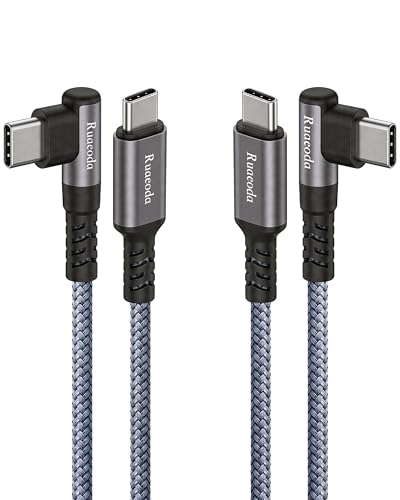
- Stable CarPlay and Android Auto data connection
- 60W charging with a case-friendly 90-degree plug
- Braided build with reinforced, long-life strain relief
Best For: Drivers, rugged phone cases, and flexible everyday charging
High-Power Pick
Anker 240W Right-Angle USB-C Cable 2-Pack

- 240W power rating for compatible USB-C devices
- Six-foot braided cables rated beyond 10,000 bends
- 24-month warranty and two-cable pack
Best For: USB-C laptop charging and long-reach setups
Compact Pick
SUNGUY 2ft 60W Right-Angle USB-C 2-Pack

- Compact two-foot length reduces cable clutter
- 60W PD charging and 480Mbps data transfer
- 90-degree plug suits gaming and bedside use
Best For: Close-range charging, travel, and compact setups
Premium Power Pick
UGREEN 240W Right-Angle USB-C Cable

- 240W PD 3.1 charging with E-Marker power negotiation
- 90-degree connector for gaming and tight spaces
- 6.6-foot braided cable with 480Mbps data transfer
Best For: High-power laptops, tablets, and gaming handhelds
Compact Value Pack
1ft Right-Angle USB-C Cables, 3-Pack

- Three 12-inch USB-C-to-USB-C cables
- Up to 65W PD charging and 480Mbps data
- Right-angle plugs on both ends
Best For: Power banks, hubs, and travel kits
Everyday Tight-Space Pick
3.3ft 60W Right-Angle USB-C Cable

- 3.3-foot cables suited to cars, stands, and desks
- 60W charging with 480Mbps data transfer
- Two-pack with braided construction and safety protection
Best For: Phones, tablets, vehicles, and gaming setups
Best Overall Value – AINOPE 60W Right Angle USB-C 2-Pack
If you need right angle USB C cables for everyday charging, the AINOPE 2-pack combines a space-saving L-shaped connector with 60W USB-C Power Delivery support. The 6.6-foot nylon-braided cables are suited to phones, tablets, and compatible laptops, while USB 2.0 transfer speeds cover routine syncing.
Best For: Everyday charging, gaming, and video watching with USB-C phones, tablets, and compatible laptops.
Pros:
- Supports up to 60W charging with PD 3.0 and QC 3.0 adapters.
- 90-degree design helps reduce bending and port strain during use.
- Includes two 6.6-foot braided cables rated for 40,000 bends.
- Offers up to 480Mbps data transfer.
Cons:
- USB-C to USB-C only; it does not connect to USB-A ports.
- USB 2.0 transfer speeds are not intended for high-speed video or storage workflows.
This is a practical pick when you want two long, durable right-angle USB-C cables for charging several modern devices. Just confirm that your charger has a USB-C output and that 60W meets your device’s needs.
Best for Monitors – Silkland 8K Right Angle USB-C Monitor Cable
For right angle USB C cables that also handle displays, the Silkland monitor cable offers USB 3.2 Gen 2 data, high-resolution video, and up to 240W charging. Its 5-foot length and 90-degree connector suit desk setups, portable monitors, hubs, and tight spaces.
Best For: USB-C monitor connections, portable displays, docking stations, and high-speed file transfers.
Pros:
- Supports up to 8K at 30Hz, 5K at 60Hz, and 4K at 144Hz on compatible devices.
- USB 3.2 Gen 2 supports data transfer speeds up to 20Gbps.
- Supports up to 240W charging with a compatible PD 3.1 charger.
- Braided construction and a right-angle design help with cable organization and durability.
Cons:
- Video output requires USB-C ports with DisplayPort Alt Mode.
- Performance depends on compatible monitors, devices, chargers, and protocols.
- Its 5-foot length may be short for some roomier setups.
This is the most capable option here for a USB-C display or high-speed data setup. It is a strong choice when you need more than charging, but compatibility checks are essential before relying on its advertised video and power capabilities.
Best Multi-Pack – Teeind 90-Degree USB-C Cable 4-Pack
The Teeind four-pack is a budget-friendly way to place right angle USB C cables around the home, car, bed, or sofa. Each 6-foot nylon-braided cable supports up to 2.1A charging and 480Mbps syncing, with colorful blue, black, magenta, and purple options.
Best For: Users who want several charging cables for older or midrange USB-C phones and convenient lounging setups.
Pros:
- Four 6-foot cables provide broad coverage around the home or car.
- 90-degree connectors are comfortable for gaming, reading, and watching videos while charging.
- Nylon braiding, aluminum housings, and a stated 8,000-plus bend rating add durability.
- Supports up to 480Mbps data transfer and 2.1A charging.
Cons:
- Charging performance is limited to 2.1A and depends on the charger and device.
- Only supports phone cases up to 0.06 inch around the port.
- USB-C to USB-C cables may not suit USB-A chargers without an adapter.
Choose this set when quantity and convenience matter more than high-wattage charging. It offers useful reach and comfortable angled connections, but users with newer fast-charging laptops or phones may prefer a higher-power cable.
Best Long Cable – AINOPE 240W 10-Foot Right Angle USB-C Cable
When outlet distance is the main issue, this 10-foot AINOPE cable provides extra reach while supporting up to 240W USB-C Power Delivery. Its right-angle connector is useful for charging from a desk, bed, or couch, but the cable is designed for charging and USB 2.0 data rather than high-speed display use.
Best For: Long-distance USB-C charging for phones, tablets, power banks, and compatible laptops.
Pros:
- 10-foot length reaches distant outlets more easily than standard cables.
- Supports PD 3.0, PD 3.1, and up to 240W charging with compatible equipment.
- 90-degree design helps make charging more comfortable in tight or seated spaces.
- Reinforced construction is rated for 40,000 bends and includes an E-Marker chip.
Cons:
- USB 2.0 data is limited to 480Mbps and does not support USB 3.0 or 4K video.
- It is USB-C to USB-C only.
- Charging through some phone cases requires a port opening no thicker than 5.5mm.
This cable makes sense for high-power charging where a short lead cannot reach the outlet. Do not choose it as a monitor cable or high-speed storage link; its main strength is long, flexible power delivery.
CarPlay-Ready Pick – 6ft 60W Right-Angle USB-C Cable 2-Pack
For drivers and everyday users comparing right angle usb c cables, this 6-foot, two-pack combines a case-friendly 90-degree plug with 60W charging and USB 2.0 data speeds. Its design is especially practical for car consoles, gaming, and charging devices while they are being used.
Best For: CarPlay and Android Auto connections, thick phone cases, and flexible everyday charging.
Pros:
- Supports Apple CarPlay and Android Auto with stable data transmission.
- 60W Power Delivery supports phones, tablets, and compatible laptops.
- Extended right-angle plug is designed to fit rugged cases and dust flaps.
- Aluminum-reinforced strain relief and nylon braiding are rated for over 20,000 bends.
Cons:
- 480Mbps data transfer is USB 2.0-level rather than high-speed USB 3.x.
- The 6-foot length may be more cable than needed for short desktop setups.
This is a strong all-around option when cable reach, car connectivity, and case clearance matter. Choose it over a shorter cable if you regularly route power around a vehicle or use devices from a distance.
High-Power Pick – Anker 240W Right-Angle USB-C Cable 2-Pack
Among right angle usb c cables, this Anker two-pack stands out for its 240W power rating and six-foot braided construction. The 90-degree connector helps reduce awkward bending, while compatibility with cases up to 3 mm adds convenience for many phones.
Best For: USB-C laptops and other compatible devices that can benefit from high-wattage charging and extra cable reach.
Pros:
- 240W charging rating provides substantial power capacity for compatible devices.
- Six-foot braided cable offers useful reach for desks and other setups.
- Rated to withstand more than 10,000 bends.
- Includes a 24-month warranty and supports charging and data transfer.
Cons:
- Not recommended for heavy or bulky cases; case compatibility is listed up to 3 mm.
- 480Mbps data transfer is limited to USB 2.0 speeds.
This is the better fit for buyers prioritizing maximum charging capacity and a recognized warranty over broad rugged-case clearance. Its 240W rating does not guarantee every device will charge at that level, so confirm your device’s requirements.
Compact Pick – SUNGUY 2ft 60W Right-Angle USB-C 2-Pack
If you want right angle usb c cables without excess slack, the SUNGUY two-pack uses a compact two-foot length and a 90-degree connector. It supports 60W Power Delivery and 480Mbps data transfer, making it suited to close-range charging and syncing.
Best For: Nightstands, gaming, bedside use, and compact desk or travel setups.
Pros:
- Short two-foot length helps minimize clutter in close-range setups.
- 60W PD supports compatible phones, tablets, and laptops.
- 90-degree design is convenient for gaming, reading, and watching videos while charging.
- Overmolded strain relief is designed for frequent plugging and unplugging.
Cons:
- Does not support video output.
- Two-foot length may be too short for vehicles or distant outlets.
- USB 2.0 data transfer is limited to 480Mbps.
This is a practical value choice when the charger and device are close together. Its compact length keeps cable management simple, but users who need monitor connectivity or extended reach should choose a different cable.
Premium Power Pick – UGREEN 240W Right-Angle USB-C Cable
If you need right angle usb c cables for a high-powered laptop, gaming handheld, or tablet, this 6.6-foot UGREEN cable is the most capable option here. It supports USB PD 3.1 charging up to 240W, while its 90-degree connector helps keep the cable flush against your device.
Best For: High-power USB-C laptops, gaming consoles, tablets, and users who want extra cable length.
Pros:
- Supports up to 240W charging with PD 3.1 EPR and an E-Marker chip.
- 90-degree connector is useful for gaming, tablet use, and crowded setups.
- Nylon braiding, aluminum housing, and a joint tested for more than 30,000 bends.
- Supports USB 2.0 data transfers up to 480Mbps.
Cons:
- USB 2.0 data speeds are limited to 480Mbps.
- It is a single 6.6-foot cable, so it may be excessive for compact setups.
This is the strongest choice when charging capacity matters most. Its right-angle build improves comfort and cable management, while the braided construction and safety monitoring add useful everyday durability.
Compact Value Pack – 1ft Right-Angle USB-C Cables, 3-Pack
HOTNOW USB C to USB C Cable Right Angle 1ft 3Pack, 12inch PD 65W Type C USB 2.0 Fast Charge Cord
Check Price On AmazonFor short-distance charging, these right angle usb c cables are designed to stay tidy around power banks and USB charging hubs. The three-pack includes 12-inch USB-C-to-USB-C cords rated for up to 65W charging, with right-angle connectors on both ends.
Best For: Power banks, charging hubs, travel kits, and compact cable-management setups.
Pros:
- Three short 1-foot cables are easy to carry and store.
- Supports up to 65W PD charging and USB 2.0 data transfer up to 480Mbps.
- Right-angle connectors on both ends work well in horizontal or tight arrangements.
Cons:
- The 1-foot length is too short for many desk or wall-charger setups.
- Does not support video output.
- Its 65W rating is lower than higher-power laptop charging requirements.
This three-pack makes sense when you want inexpensive, space-saving cables rather than maximum length or display connectivity. The short design is particularly practical for charging from a power bank or hub.
Everyday Tight-Space Pick – 3.3ft 60W Right-Angle USB-C Cable
These right angle usb c cables are a practical middle ground for phones, tablets, cars, stands, and gaming setups. The 3.3-foot USB-C-to-USB-C cords support up to 60W charging and 480Mbps data, while the 90-degree design helps prevent awkward bends in narrow spaces.
Best For: Tesla charging compartments, phone stands, Android Auto or CarPlay, and everyday mobile-device charging.
Pros:
- Useful 3.3-foot length for cars, stands, desks, and gaming.
- Supports 60W charging and data transfer up to 480Mbps.
- Two-pack provides a spare cable for separate locations.
- Braided nylon construction and built-in overcurrent, overvoltage, short-circuit, and overtemperature protection.
Cons:
- Not suitable for video output to monitors or projectors.
- 60W maximum output is below the needs of some high-powered laptops.
This pair is well suited to everyday charging where cable placement matters more than top-end power. The moderate length and angled plug make it especially useful in vehicle compartments, stands, and gaming positions.
How We Picked the Best Right Angle USB C Cables
We focused on the specifications that matter most in everyday use: USB-C connector angle, charging wattage, cable length, construction, compatibility, and pack size. The selection includes compact 1- and 2-foot cables, longer 6- and 10-foot options, multi-packs, and models designed for higher-power USB Power Delivery.
We also separated charging claims from data and video capabilities. A cable rated for 60W or 240W may still use USB 2.0 data speeds, while a display cable needs explicit support for the required resolution and refresh rate.
Quick Comparison
- Best for everyday charging: 60W braided multi-packs offer broad phone, tablet, and accessory compatibility.
- Best for high-power laptops: 240W USB-C cables provide more headroom for compatible USB PD 3.1 chargers and devices.
- Best for displays: Choose a cable that clearly lists support for your monitor’s resolution and refresh rate.
- Best for cars and short runs: A 1- to 6-foot right-angle cable can reduce dashboard clutter and work well with CarPlay.
- Best for compact spaces: Short cables keep power banks, handheld consoles, and bedside setups tidy.
Key Buying Factors for Right-Angle USB-C Cables
Charging Power
Match the cable rating to your charger and device. A 60W cable is suitable for many phones, tablets, and smaller laptops. For demanding laptops, look for a 100W or 240W rating, but remember that the charger and device must also support the higher power level.
Data and Display Support
Check the advertised data standard before buying. USB 2.0 cables are generally fine for charging but may be slow for file transfers and may not support video. For monitors, verify resolution, refresh rate, and whether the cable supports the needed DisplayPort Alt Mode features.
Length and Connector Clearance
Measure the distance between the port and your charger, console, phone mount, or monitor. Short cables minimize slack, while 6- to 10-foot cables work better for distant outlets. Confirm that the angled plug points in the direction your setup requires and leaves room for a protective case.
Build Quality and Value
Nylon braiding, reinforced strain relief, and a flexible connector can improve durability at frequently bent points. Multi-packs are useful for distributing cables around a home, office, or vehicle, but buy based on actual specifications rather than pack size alone.
Who Should Buy Which Right Angle USB C Cables?
Choose a 60W braided multi-pack if you need dependable everyday cables for phones, tablets, earbuds, and power banks. Pick a 240W model if you use a high-performance laptop or want extra charging capacity for future devices. A display-focused cable is the better choice for monitor connections because its video specifications are clearly stated.
For CarPlay, select a cable with a practical 3- to 6-foot length and a case-friendly angled connector. Short 1- to 2-foot cables suit power banks, handheld devices, and compact desks. If you are unsure, prioritize the correct length, connector direction, and charging rating first; those factors usually have the biggest effect on daily convenience.