Building a gaming setup across a room, office, or dedicated equipment space is easier when your monitor, keyboard, mouse, and gaming PC do not need to sit together. The best KVM extenders for gaming setups carry video and USB control over longer cable runs while preserving the resolution and refresh rate your games require.
This roundup compares ten HDMI KVM extender options across short copper runs, long-distance HDBaseT links, fiber, and IP-based systems. Use the guide below to match each design to your display, distance, peripherals, and installation goals.
Best 10 Kvm Extenders for Gaming Setups Picks for 2026
High-Refresh Pick

- 4K@60Hz 4:4:4 video support
- 1080p@240Hz and 2K@144Hz
- Four USB ports with one-way PoC
Best For: Competitive gaming and high-refresh remote PC setups
Long-Range Value

- 70m HDMI and USB extension
- 4K@60Hz with HDR support
- Loopout, EDID, and bi-directional PoC
Best For: Long-distance setups with a local display
HDBaseT Reach

- 400ft Ethernet extension range
- 4K@60Hz 4:4:4 and HDR support
- USB KVM with two-way IR
Best For: Very long cable runs and 4K60 gaming links
Extended Workstation Pick

- 100m 4K extension over one cable
- Four USB ports for remote control
- RS232, audio, EDID, and PoH support
Best For: Large-room gaming setups and remote workstations
Long-Range Fiber Power

- 4K@60Hz with uncompressed 18Gbps HDMI
- HDMI and USB extension over fiber
- Loop-out plus HDR and Dolby Vision support
Best For: Extreme-distance gaming and professional AV installations
Network-Friendly Flexibility

- Extends HDMI and USB over Cat5e–Cat7
- 4K@30Hz or 1080p@120Hz support
- Three receiver-side USB 2.0 ports
Best For: Ethernet-based remote gaming and workstation setups
4K60 Over Ethernet

- 4K 4:4:4 at 60Hz over Cat6
- Up to 400 feet of HDMI and USB extension
- Optional one-to-many network distribution
Best For: High-quality 4K60 gaming over a Cat6 connection
Long-Range 1080p Pick

- 1080p at 60Hz up to 120m over Cat5e/6/7
- HDMI loop-out for local monitoring
- USB limited to standard keyboard and mouse
Best For: Long-distance basic keyboard-and-mouse control
4K Performance Pick
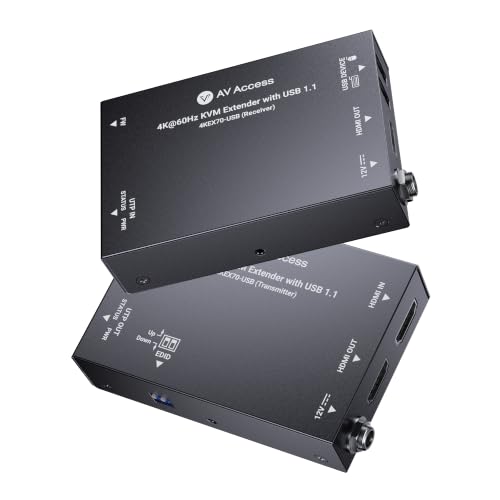
- 4K60 video with 4:4:4 chroma and HDR10
- USB and HDMI extension up to 230ft
- One-adapter PoC simplifies installation
Best For: High-resolution AV and gaming displays with standard controls
Scalable Network Pick

- 1080p60 extension up to 120m over Cat5/6/7
- Supports up to 32 transmitters and receivers
- Includes four-screen video-wall modes
Best For: Expandable multi-source and multi-display control rooms
High-Refresh Pick – AV Access 50m 4K KVM Extender
For gaming setups that need a remote PC connection without giving up smooth gameplay, this AV Access model combines 4K clarity with high-refresh support. It extends HDMI and USB control up to 50m over Ethernet, making it a practical choice for a quieter, cleaner desk.
Best For: Competitive gaming, high-frame-rate displays, home offices, and remote workstation control.
Pros:
- Supports 4K@60Hz 4:4:4, 1080p@240Hz, and 2K@144Hz.
- Provides four USB device ports for keyboard, mouse, storage, cameras, and other peripherals.
- One-way PoC lets the RX power both units, reducing cable clutter.
- Includes EDID management and balanced audio output for broader AV integration.
Cons:
- USB 2.0 limits peripheral bandwidth to 480Mbps.
- The maximum extension distance is 50m, shorter than some long-range alternatives.
- Balanced audio uses a Phoenix connector, which may require compatible equipment.
This is one of the stronger kvm extenders for gaming setups when refresh rate matters. Its combination of 1080p high-refresh support, 4K output, and full USB KVM control suits players who want responsive remote gaming without moving the PC closer to the display.
Long-Range Value – gofanco 70m 4K60 KVM Extender
The gofanco KVMHD20Ext-LT is a sensible option for kvm extenders for gaming setups that need more distance than a typical room-scale link. It carries HDMI video and USB keyboard-and-mouse control up to 70m over CAT6/7 cable, with near-zero-latency operation and a local HDMI loopout.
Best For: Long-distance gaming rooms, remote desktops, and setups needing a local display connection.
Pros:
- Extends HDMI and USB control up to 70m over CAT6/7.
- Supports 4K@60Hz YUV 4:4:4 plus HDR formats including HDR10+ and Dolby Vision.
- Bi-directional PoC allows either unit to power both devices.
- Includes EDID management and an HDMI loopout on the transmitter.
Cons:
- Requires good-quality CAT cable for reliable video performance.
- USB extension is specified for keyboard and mouse through two receiver ports.
- Dolby Atmos is not supported.
With its 70m range, 4K60 support, and loopout, this model is well suited to gaming spaces where the source PC and display are separated. It is especially attractive if simple installation and flexible power placement are more important than extensive USB expansion.
HDBaseT Reach – OREI 400ft 4K KVM Extender
For unusually long cable runs, the OREI UHD-EXB400-KVM brings HDMI video and USB KVM control to a 400ft HDBaseT link. Among kvm extenders for gaming setups, its long reach and broad HDMI 2.0b format support make it a fit for separated gaming rooms or larger installations.
Best For: Very long-distance gaming-console or PC connections using structured Ethernet cabling.
Pros:
- Provides up to 400ft of extension over Ethernet cabling.
- Supports 4K@60Hz 4:4:4, HDCP 2.2, HDR10+, Dolby Vision, and HLG.
- Includes USB 1.1 KVM support and two-way IR.
- Supports multichannel audio formats including LPCM 7.1, Dolby TrueHD, and DTS-HD.
Cons:
- The supplied notes do not specify high-refresh modes such as 1080p@240Hz.
- USB KVM is USB 1.1 rather than USB 2.0.
- The product listing provides fewer detailed installation and port specifications than the other options.
The OREI stands out primarily for distance. It is a strong candidate when the display and gaming source are far apart and 4K60 compatibility is sufficient, but high-refresh competitive gaming may favor a model with explicitly listed 120Hz-or-higher modes.
Extended Workstation Pick – AV Access 100m KVM Extender
This AV Access extender is designed for kvm extenders for gaming setups where the PC needs to sit far from the display and peripherals. It sends 4K video up to 100m over a single Cat6/6a/7 cable and adds four USB ports for remote workstation control.
Best For: Large-room gaming layouts, server-room-style PC placement, and remote desktop control up to 100m.
Pros:
- Offers up to 100m/330ft of 4K video extension.
- Supports 4K@60Hz 4:2:0 and 1080p@120Hz-ready signals.
- Four USB device ports support keyboards, mice, storage, cameras, and other peripherals.
- Adds RS232, analog stereo audio, EDID control, and one-way PoH.
Cons:
- 4K support is specified as 4:2:0 rather than 4:4:4.
- The notes do not list 144Hz or 240Hz gaming modes.
- It is a longer-range installation product, so it may be more capability than a short-room setup needs.
This model is a practical choice when distance and peripheral access are the priorities. Its 100m range and four-port USB expansion make it useful for a clean, remote gaming workstation, while 1080p@120Hz-ready support provides smoother motion than standard 60Hz at that resolution.
Long-Range Fiber Power – 10 km 4K KVM Extender
For gaming setups that place the PC or console far from the display, this fiber-based KVM extender delivers uncompressed 4K video and USB keyboard-and-mouse control over exceptionally long distances. It supports 4K at 60Hz, HDR formats, Dolby Vision, and HDMI loop-out for a local monitor.
Best For: Professional or enthusiast gaming setups requiring ultra-long-distance, low-latency 4K transmission over single-mode or OM4 fiber.
Pros:
- Extends HDMI and USB 1.1 up to 10 km over single-mode fiber, or up to 300 meters over OM4 multi-mode fiber.
- Supports uncompressed 4K@60Hz with 4:4:4 color, up to 18Gbps bandwidth, HDR10+, and Dolby Vision.
- HDMI loop-out supports a local display while the receiver provides remote keyboard-and-mouse control.
- Heavy-duty metal enclosure, plug-and-play installation, included brackets, and a one-year warranty.
Cons:
- Requires compatible fiber cabling, which is more specialized than standard Ethernet cable.
- USB KVM support is USB 1.1 rather than USB 2.0.
- Its professional long-distance feature set may be more than a typical home gaming setup needs.
This is the strongest option here for extreme-distance installations and uncompromised 4K image quality. Its fiber requirement and commercial-AV orientation make it less practical for ordinary room-to-room gaming, but ideal when distance and signal integrity are the priorities.
Network-Friendly Flexibility – 390 ft 4K KVM Extender
This AV Access model is a practical choice for gaming setups that can use existing Ethernet infrastructure. It extends HDMI, audio, and USB over Cat5e through Cat7 cabling, while its network capability supports remote control from a separate room or centralized equipment location.
Best For: Gamers and workstation users who want remote keyboard, mouse, or controller access over Ethernet at distances up to 390 feet.
Pros:
- Extends signals up to 120 meters over Cat5e, or up to 150 meters over Cat6, Cat6A, or Cat7 cable.
- Supports 4K@30Hz, 1080p@120Hz, 7.1-channel audio, and USB 2.0 peripherals.
- Can operate over an existing IP network and supports up to 16 extender sets using DIP-switch pairing.
- Three USB ports on the receiver accommodate peripherals such as gamepads, flash drives, or printers.
Cons:
- 4K output is limited to 30Hz, so high-refresh gaming is better suited to 1080p at 120Hz.
- Networked or multi-set installations require more configuration than a simple direct cable run.
- Longer 150-meter operation requires Cat6, Cat6A, or Cat7 cable.
Choose this extender when flexible Ethernet deployment matters more than 4K gaming at 60Hz. Its USB 2.0 ports, network support, and multi-system pairing make it especially useful for distributed gaming stations, offices, and equipment rooms.
4K60 Over Ethernet – Cat6 4K60 KVM Extender
For gaming setups seeking 4K at 60Hz without fiber, this OREI KVM extender sends HDMI and USB over shielded Cat6 cable up to 400 feet. It supports point-to-point operation and can expand to one-to-many distribution through a separate 1G network switch.
Best For: 4K gaming setups that need 60Hz performance, remote keyboard-and-mouse control, and optional multi-location distribution over Cat6.
Pros:
- Extends 4K 4:4:4 video at 60Hz up to 120 meters using high-quality shielded Cat6 cable.
- Provides USB 1.1 keyboard-and-mouse connectivity and one-way IR control from the receiver.
- Supports point-to-point or one-to-many configurations through a separate 1G network switch.
- HDMI loop-out, automatic EDID/DDC management, HDCP 2.2, and included IR cables support flexible installations.
Cons:
- A 1G network switch is required for one-to-many operation and is sold separately.
- USB support is limited to USB 1.1, making it intended primarily for keyboard and mouse control.
- The product specifies shielded Cat6 cable and advises against using flat cables.
This is a balanced pick for gamers who want 4K@60Hz over familiar Ethernet cabling. It offers more gaming-friendly refresh performance than the AV Access model, while its switch-dependent distribution features suit larger or multi-room setups.
Long-Range 1080p Pick – VPFET 120M HDMI KVM Extender
For shoppers comparing kvm extenders for gaming setups, the VPFET is a straightforward choice when long-distance 1080p HDMI transmission matters more than advanced gaming-peripheral support. It sends video and basic USB keyboard-and-mouse control up to 400 feet over Cat5e/6/7 cable and includes a useful HDMI loop-out.
Best For: Home theaters, classrooms, conference rooms, and remote monitor locations using a standard keyboard and mouse.
Pros:
- Extends 1080p video at 60Hz up to 120m/394–400ft over suitable Ethernet cable.
- HDMI loop-out allows local monitoring of the source signal.
- Plug-and-play operation with broad Windows, Mac, and Linux compatibility.
- Reset button and status indicators simplify troubleshooting.
Cons:
- USB support is limited to standard keyboards and mice; gaming peripherals and switches are not supported.
- Both transmitter and receiver require power; single-side powering is not supported.
The VPFET offers strong range and convenient local monitoring for basic remote-control applications. It is less suitable for a gaming setup that depends on specialized USB accessories, but it can work well with a conventional keyboard-and-mouse arrangement.
4K Performance Pick – AV Access 4K60 KVM Extender
Among kvm extenders for gaming setups, the AV Access model stands out for 4K60 video quality and HDR10 support. It carries HDMI video and USB 1.1 keyboard-and-mouse signals up to 230 feet over Cat6/6A/7 cable, making it a strong fit for modern displays and organized remote-control installations.
Best For: 4K home AV setups, media desks, conference systems, kiosks, and other installations where image quality and tidy cabling are priorities.
Pros:
- Supports 4K at 60Hz with 4:4:4 chroma and HDCP 2.3.
- Extends HDMI video and USB keyboard/mouse control up to 230 feet.
- Bi-directional PoC can power both units from one adapter.
- Passes Dolby Atmos, DTS:X, and PCM 7.1 audio.
Cons:
- USB functionality is specified for keyboard and mouse signals rather than broader gaming peripherals.
- Its 230-foot range is shorter than the 120m options in this roundup.
This is the most display-focused option of the three, pairing 4K60 output with installer-friendly mounting and one-adapter PoC. It makes sense for a high-resolution setup using a standard USB keyboard and mouse, but buyers needing wider peripheral compatibility should check the USB limitations carefully.
Scalable Network Pick – TESmart 1080p KVM Extender
For kvm extenders for gaming setups that may grow beyond one source and one display, the TESmart adds network-based flexibility. It extends 1080p video and USB keyboard-and-mouse control up to 393 feet over Cat5/6/7, while supporting point-to-multipoint operation, video-wall layouts, and up to 32 transmitters and 32 receivers.
Best For: Control rooms, monitoring systems, remote workstations, and multi-display environments using PCs or game consoles.
Pros:
- Extends 1080p at 60Hz up to 120m/393ft over a single Ethernet cable.
- Supports point-to-point and multipoint configurations through a router or network switch.
- Offers single-screen and four-screen video-wall modes.
- Works with PCs, game consoles, Blu-ray players, and media players without drivers.
Cons:
- Video output is limited to 1080p rather than 4K.
- Both transmitter and receiver require their own 12V power adapter.
- USB extension is specified for keyboard and mouse control.
The TESmart is the most expandable option here, especially when several sources or displays need centralized management. Its 1080p ceiling and standard keyboard-and-mouse USB support make it better suited to multi-screen control than to a premium 4K gaming station.
How We Picked the Best Kvm Extenders for Gaming Setups
We focused on the specifications that matter most in a real gaming installation: supported resolution and refresh rate, maximum transmission distance, cable type, USB functionality, signal reliability, and setup complexity. The selection includes models for competitive 1080p gaming, 4K at 60Hz, HDR-capable systems, and installations that need fiber or network-based distribution.
We also considered practical features such as loop-out ports, infrared control, Power over Cable, HDCP support, and compatibility with Cat5e, Cat6, Cat6a, or Cat7 wiring. Because KVM performance depends on the entire signal chain, advertised distance should be treated as a planning limit rather than a guaranteed result in every building.
Quick Comparison
| Best For | Look For |
|---|---|
| Competitive gaming | 1080p at 240Hz or 1440p at 144Hz support |
| Standard 4K gaming | 4K at 60Hz, 4:4:4 color, and suitable HDMI bandwidth |
| Long copper runs | HDBaseT or robust point-to-point Cat6 transmission |
| Very long installations | Fiber models rated for multi-kilometer distances |
| Shared network infrastructure | IP-based extenders with compatible switches and bandwidth |
| Simple desk-to-room extension | Plug-and-play transmitter and receiver kits with USB 2.0 |
Key Buying Factors for Kvm Extenders for Gaming Setups
Resolution, Refresh Rate, and Latency
Choose an extender that matches your highest gaming target, not merely your current desktop resolution. A 4K 60Hz model is appropriate for cinematic single-player games and general PC use, while esports players may need 1080p at 240Hz or 1440p at 144Hz. Check whether the specification supports your desired signal with the required chroma format and HDR mode. A KVM extender should not add noticeable control delay, but the source, display, cable, and network can still affect overall latency.
Distance and Cable Type
Measure the actual cable route, including vertical runs and bends. Cat6 or Cat6a is a sensible choice for most copper installations. HDBaseT systems generally suit dedicated point-to-point links, whereas IP models can use existing network cabling but may require managed switches, multicast support, or configuration. Fiber provides the greatest distance and electrical isolation, but it usually costs more and requires compatible transceivers or connectors.
USB, Audio, and Control Features
Confirm that the kit extends both keyboard and mouse, and check whether its USB implementation supports only HID devices or also storage and other peripherals. Look for loop-out if the source must remain connected to a local display. IR pass-through is useful when controlling source equipment remotely, while PoC can reduce the number of power adapters at the receiver.
Who Should Buy Which Kvm Extenders for Gaming Setups?
- Competitive PC gamers: Choose a high-refresh model that explicitly lists 1080p 240Hz or 1440p 144Hz support.
- 4K gaming and home theaters: Prioritize 4K 60Hz, HDR, 4:4:4 color, HDCP compatibility, and reliable USB extension.
- Separate-room gaming stations: Select a 100-meter-class Cat6 or HDBaseT kit after allowing margin for the cable route.
- Large homes, studios, and campuses: Consider fiber for maximum distance or IP when you need flexible routing across network infrastructure.
- Simple installations: Pick a point-to-point plug-and-play kit with clear distance ratings and included power supplies.
Before buying, verify HDMI connector versions, USB requirements, audio support, cable quality, and return compatibility with your graphics card and monitor. These checks prevent most surprises when installing Kvm Extenders for Gaming Setups.