Compact PCs, media cabinets, routers, and small-form-factor workstations have less room for airflow mistakes. The right fan can reduce heat without adding unnecessary noise or consuming valuable clearance.
This roundup compares 10 computer cooling fans for compact builds, from quiet 120mm PWM models to slim 80mm fans and convenient USB-powered options. Use the guide below to match fan size, power connection, airflow, and noise expectations to your setup.
Best 10 Computer Cooling Fans for Compact Builds Picks for 2026
Balanced 120mm Cooling

- 120mm pressure-optimized airflow
- 4-pin PWM speed control
- Up to 25.1 dB(A)
Best For: Compact PCs with 120mm mounts and PWM control
USB Twin-Pack Cooling

- Includes two 80mm fans
- 5V USB-powered operation
- Rated at 26 dBA
Best For: USB-powered compact builds and DIY cooling projects
Quiet 80mm Premium Cooling

- Designed for compact 80mm mounts
- 17.7 dB(A) maximum noise rating
- Includes a broad accessory kit
Best For: Quiet ITX, HTPC, NAS, and SFF systems
Plug-and-Play USB Cooling

- 120mm USB-powered fan
- 56.7 CFM stated airflow
- Includes guard and mounting hardware
Best For: Mini PCs, routers, consoles, and external electronics
Quiet Performance Pick

- 49.9 CFM airflow rating
- Low minimum RPM for quiet operation
- 80,000-hour rifle bearing rating
Best For: Standard 120mm desktop and gaming builds
USB Utility Pick
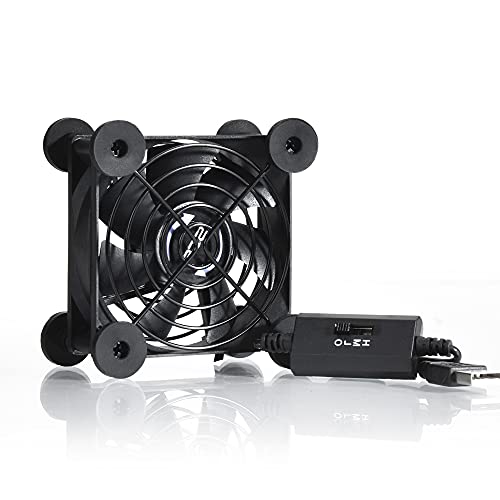
- 5V USB-powered design
- Three selectable speed settings
- Compact flat-or-upright housing
Best For: Small cabinets, routers, consoles, and USB-powered cooling
USB Desktop Cooler

- USB-powered, plug-and-play design
- Three-speed controller for flexible cooling
- Raised feet support airflow around devices
Best For: Mini PCs, routers, TV boxes, and other compact electronics
AC-Powered Airflow Fan
120mm Variable-Speed Muffin Fan

- AC plug enables standalone equipment cooling
- 700-2800 RPM variable-speed range
- Up to 95.8 CFM airflow
Best For: External ventilation for compact PCs, cabinets, servers, and consoles
Balanced 120mm Cooling – Noctua NF-P12 redux-1700 PWM
For builders seeking computer cooling fans for compact builds, the Noctua NF-P12 redux-1700 PWM offers a strong balance of airflow, static pressure, and noise control in a standard 120mm frame. Its 4-pin PWM connection lets a compatible motherboard adjust fan speed automatically.
Best For: Compact desktops that need capable case, radiator, or CPU-cooler airflow with motherboard-based speed control.
Pros:
- Pressure-optimized design suits CPU coolers, radiators, and chassis ventilation.
- 1700 RPM maximum speed provides performance headroom when temperatures rise.
- Rated at up to 25.1 dB(A), with a 150,000-hour MTTF and six-year warranty.
Cons:
- Requires a compatible 4-pin PWM fan header for automatic speed control.
- The 120mm frame may not fit especially small cases designed for 80mm fans.
This is a practical choice when a compact build has room for a full-size 120mm fan and needs more than basic ventilation. Its streamlined package keeps the focus on the core fan rather than a large accessory bundle.
USB Twin-Pack Cooling – AITRIP 80mm USB Fans
The AITRIP two-pack is a flexible option for computer cooling fans for compact builds when USB power is more convenient than an internal motherboard header. Each 80mm fan uses a 5V USB connection and can also suit DIY projects, printers, radiators, or small enclosures.
Best For: Compact setups, external cooling projects, and devices that provide USB power but lack standard PC fan headers.
Pros:
- Two 80mm fans are included for paired intake and exhaust or separate projects.
- USB connection simplifies installation with compatible 5V power sources.
- Compact 25mm-thick frame and 26 dBA rated noise level suit many small spaces.
Cons:
- USB power does not provide the motherboard-based PWM control of a 4-pin PC fan.
- Hydraulic-bearing life rating is lower than the premium Noctua alternatives in this roundup.
Choose this kit when straightforward USB connectivity and the included second fan matter most. It is especially useful for compact or improvised cooling arrangements where standard internal wiring is inconvenient.
Quiet 80mm Premium Cooling – Noctua NF-A8 PWM
The Noctua NF-A8 PWM is tailored to computer cooling fans for compact builds that use 80mm mounts, including HTPC, ITX, and small-form-factor cases. Its 4-pin PWM connection supports automatic speed adjustment across a broad 450–2200 RPM range.
Best For: Quiet compact PCs, NAS devices, and other systems where an 80mm replacement or chassis fan must deliver controlled airflow.
Pros:
- 80mm format fits many compact cases and small electronics enclosures.
- Maximum 17.7 dB(A) noise rating supports quiet operation.
- Includes anti-vibration mounts, screws, extension cable, Y-cable, and a low-noise adaptor.
Cons:
- Its 80mm size moves less air than a comparable 120mm fan.
- Requires a compatible 4-pin PWM header for full automatic speed control.
Among compact-build options, this model stands out when low noise and a complete installation kit are priorities. The included accessories also make it easier to adapt the fan to tight or unusual layouts.
Plug-and-Play USB Cooling – 120mm 5V USB Case Fan
This 120mm USB model is a convenient choice for computer cooling fans for compact builds and external electronics. It draws 5V power through USB, includes a protective net and mounting hardware, and is designed for devices such as mini PCs, routers, consoles, and home-theater equipment.
Best For: Compact systems and electronics that need simple USB-powered airflow without an internal PC fan connection.
Pros:
- 120mm frame delivers a stated 56.7 CFM of airflow at 1500 RPM.
- USB connection and 55cm cable make setup straightforward.
- Includes a protective net, foot columns, mounting screws, and nuts.
Cons:
- Sleeve bearing is less premium than the bearings used in some alternatives.
- USB power limits compatibility with systems requiring standard 12V motherboard fan headers.
- Supplied notes identify three speed settings, but do not specify how they are selected.
This fan makes the most sense for external or semi-enclosed cooling where easy USB power is more important than motherboard integration. Its included hardware helps position it around routers, media equipment, and compact computer setups.
Quiet Performance Pick – Pure Wings 3 120mm PWM Fan
For computer cooling fans for compact builds that still have room for a standard 120mm fan, the be quiet! Pure Wings 3 emphasizes airflow, low minimum RPM, and straightforward PWM control. Its 1,600 RPM top speed and 49.9 CFM airflow rating suit everyday desktop and gaming configurations.
Best For: Quiet desktop or gaming PCs using a standard 120mm fan mount.
Pros:
- Seven airflow-optimized blades support up to 49.9 CFM of airflow.
- 4-pin PWM control allows low minimum RPM operation for quieter use.
- Rifle bearing is rated for an 80,000-hour operating lifetime.
- Frame outlet is designed for performance on radiators.
Cons:
- At 25.5 dB, it is not the quietest option listed at maximum operation.
- Its standard 25mm-thick format may not fit especially space-constrained layouts.
- This is a single-fan package.
The Pure Wings 3 is a sensible choice when your compact build accepts a conventional 120mm fan and you want a balance of airflow, PWM flexibility, and long rated bearing life without added lighting.
USB Utility Pick – Quiet 80mm Three-Speed Fan
This 80mm USB fan is a practical option for computer cooling fans for compact builds, small cabinets, routers, and console setups where a motherboard fan header may not be available. It runs from 5V USB power and includes a three-speed controller for adjusting noise and airflow.
Best For: Small electronics cabinets, routers, game consoles, and compact setups with USB power.
Pros:
- USB power works with compatible consoles, audiovisual equipment, and other devices.
- Three speed settings let you choose between noise and airflow.
- Low-speed operation is rated at 21 dB.
- Compact 3.64-by-3.64-by-1.81-inch housing can sit flat or upright.
Cons:
- The 2-pin USB design does not provide motherboard PWM control.
- Its 33 CFM airflow rating is lower than the listed 120mm options.
- It is an external utility fan rather than a conventional internal case fan.
Choose this model when flexibility and USB convenience matter more than standard PC integration. The included grill, shockproof feet, and manual speed control make it particularly useful for targeted cooling around small devices.
Slim RGB Pick – NO-12015-XT-ARGB 120mm Fan
For computer cooling fans for compact builds with limited clearance, the ID-COOLING NO-12015-XT-ARGB uses a slim 15mm-thick 120mm format. PWM control spans 500 to 2,000 RPM, while the 5V 3-pin addressable RGB connection adds lighting for compatible motherboards.
Best For: ITX, HTPC, low-profile cooler, and other space-restricted builds needing a slim 120mm fan.
Pros:
- 15mm thickness helps save space compared with conventional 120mm fans.
- PWM range of 500–2,000 RPM supports adjustable noise and airflow.
- Rated airflow reaches 54.6 CFM.
- 5V 3-pin ARGB can synchronize with a compatible motherboard.
Cons:
- ARGB requires a compatible 5V 3-pin motherboard connection.
- Maximum listed noise reaches 31.2 dB(A).
- This is a single-fan package.
The NO-12015-XT-ARGB is the most purpose-built option here for tight internal layouts. Its slim profile addresses clearance problems while retaining PWM control, useful airflow, and optional synchronized lighting.
USB Desktop Cooler – 120mm USB Cooling Fan
For compact builds and small electronics, this 120mm USB fan offers simple tabletop cooling without a dedicated internal fan header. It connects to a USB port, includes three speed settings, and can sit beneath or above compatible devices such as mini PCs, routers, TV boxes, and game consoles.
Best For: USB-powered cooling for compact electronics, mini PCs, routers, and TV boxes.
Pros:
- Three-speed control lets you balance airflow and noise.
- USB plug-and-play power works with many electronic devices.
- Raised stainless steel feet help provide space for air intake or exhaust.
- Dual-ball bearings are rated for a service life exceeding 50,000 hours.
Cons:
- It is an external tabletop fan rather than an internal case fan.
- The feet require manual installation, even though no tools are needed.
- Its 5V USB design is intended for modest device cooling rather than high-output PC airflow.
This is a practical choice when you need flexible cooling for a compact setup and want simple USB power with manual speed adjustment. Its external format makes placement easy, but it is not a replacement for a standard motherboard-connected case fan.
Slimline Case Fan – Thermalright TL-8015W 80mm
The Thermalright TL-8015W is a useful option for computer cooling fans for compact builds where standard fan thickness is a problem. Its 80 x 80 x 15mm slim profile fits tighter spaces, while 4-pin PWM control allows compatible motherboards to adjust speed according to system temperature.
Best For: Slim PC cases, radiators, and CPU cooler setups with limited clearance.
Pros:
- 15mm thickness helps accommodate cramped compact-build layouts.
- 4-pin PWM control supports automatic motherboard speed adjustment.
- Provides up to 28.4 CFM of airflow at 2200 RPM.
- Vibration-damping pads and S-FDB V2 bearings are designed for quieter, durable operation.
Cons:
- The 80mm size may provide less total airflow than a larger fan.
- Its 23.3 dBA rating and 2200 RPM maximum may still be audible at higher speeds.
- PWM speed control requires a compatible 4-pin motherboard connection.
Choose this fan when clearance is the primary constraint. It combines a genuinely slim frame with PWM control and can serve as a case, radiator, or supplemental CPU-cooler fan in a compact system.
AC-Powered Airflow Fan – 120mm Variable-Speed Muffin Fan
This 120mm variable-speed fan is aimed at compact equipment cooling when an AC outlet is more convenient than a motherboard connection. It includes a controller, supports speeds from 700 to 2800 RPM, and can provide up to 95.8 CFM for ventilation around PCs, servers, DVRs, routers, game consoles, and other equipment.
Best For: External ventilation of compact computer equipment, cabinets, servers, and entertainment devices.
Pros:
- Variable-speed controller allows adjustment for cooling demand and noise.
- AC plug simplifies power when no suitable PC fan header is available.
- Up to 95.8 CFM provides substantial airflow for external ventilation.
- Dual-ball bearings are rated for a 50,000-hour lifespan.
Cons:
- Its 120V AC-plug format is less convenient for an internally mounted PC fan.
- The fan is rated below 41 dB, so maximum-speed operation may be noticeable.
- It uses a 2-pin connection and may not integrate with motherboard fan monitoring or PWM control.
This model makes the most sense as an external cooling solution for a compact enclosure or equipment cabinet. Its broad speed range and high maximum airflow are useful, but the AC-powered design favors standalone ventilation over tidy internal PC installation.
How We Picked These Computer Cooling Fans for Compact Builds
We focused on fans suited to restricted spaces and unusual cooling projects, including small PC cases, media cabinets, routers, receivers, 3D printers, and DIY enclosures. The selection covers common 120mm and 80mm formats, plus slim 15mm designs for situations where standard 25mm fans will not fit.
We also considered the practical differences between four-pin PWM fans, three-pin or fixed-speed models, and USB-powered fans. Noise claims, speed control, installation flexibility, power requirements, and intended use all matter when choosing a fan for a compact build.
Quick Comparison
| Best For | Recommended Type | What to Prioritize |
|---|---|---|
| Quiet desktop PC | 120mm PWM fan | Low-noise operation and motherboard control |
| Very limited clearance | 15mm slim fan | Fan thickness, static pressure, and mounting depth |
| Router or media cabinet | USB-powered fan | Simple 5V power and convenient placement |
| Small enclosure or 3D printer | 80mm fan | Available mounting points and airflow direction |
| Server or workshop cooling | Variable-speed AC fan | Power compatibility, control, and safety |
Key Buying Factors for Compact Builds
Size and Thickness
Measure the opening and the clearance behind it before ordering. A 120mm fan generally moves more air at lower noise than an 80mm model, but compact enclosures may only accept smaller or 15mm-thick fans. Confirm both the frame dimensions and screw-hole spacing.
Power and Speed Control
Four-pin PWM fans can adjust speed through a compatible motherboard or fan controller. USB models run from a 5V USB port and are convenient for routers, TV boxes, and cabinets, but they may offer less integrated control. AC-powered fans require extra care: verify voltage, plug type, and safe installation before use.
Airflow, Static Pressure, and Noise
Open vents favor airflow-focused fans, while filters, heatsinks, radiators, and narrow grilles benefit from stronger static pressure. A higher maximum RPM can improve cooling but may increase noise. For a living-room system, prioritize a controllable fan and a lower-speed operating range rather than maximum speed alone.
Installation and Direction
Check whether the fan includes the correct screws, adapters, controller, or USB lead for your project. Install intake fans where they can draw cool air and exhaust fans where warm air leaves the enclosure. Keep cables away from the blades and leave enough room for unrestricted intake and exhaust.
Who Should Buy Which Computer Cooling Fans for Compact Builds?
Choose a quiet 120mm PWM model for a compact desktop that has a motherboard header and room for a standard fan. Pick an 80mm fan when the case or device has smaller mounting points. A slim 120mm or 80mm model is the better fit when a 25mm frame would interfere with a cooler, side panel, or cable bundle.
USB fans are the simplest choice for routers, receivers, consoles, TV boxes, and other devices without a conventional PC fan header. For larger cabinets or workshop applications, a variable-speed model can provide more flexible cooling, but confirm its electrical requirements and install it securely. Whichever style you choose, match the fan to the enclosure’s available space, power source, and acceptable noise level before buying.