Choosing the right display pair can make everyday work faster, cleaner, and more comfortable. The best business monitors for dual monitor setup balance screen quality, connectivity, ergonomics, and desk space without adding unnecessary cost.
Below, we focus on practical options for office teams, remote workers, and hybrid setups, plus the accessories and specs that matter most when you’re building a productive dual-screen workstation.
Best 10 Business Monitors for Dual Monitor Setup Picks for 2026
Video Conference Ready Business Pick
ASUS BE24EQK 24" Business Monitor

- Built-in webcam, mic array, and speakers
- 24-inch frameless IPS with wide viewing angles
- Eye Care features help reduce fatigue
Best For: Remote work and video meetings in a clean dual-monitor setup
Dual Screen Bundle Value Pick

- Two matching 24-inch Full HD monitors included
- Dual monitor stand and cables are in the box
- 75Hz refresh rate supports smoother daily use
Best For: Buyers who want a complete dual-monitor bundle ready to set up
Portable Dual-Display Travel Pick
ASUS ZenScreen MB169CK Portable Monitor

- 15.6-inch Full HD anti-glare display
- Single USB-C keeps setup simple on the go
- Kickstand and auto-rotate support flexible use
Best For: Mobile professionals who want a lightweight second screen for travel
Budget Office Upgrade Pick
Samsung 24" S30GD Essential Monitor

- 24-inch IPS panel with slim bezels
- 100Hz refresh rate improves smoothness
- Eye Saver Mode and flicker reduction
Best For: Everyday office setups that need a clean, modern secondary display
Portable Dual-Screen Travel Pick

- 14-inch FHD IPS display with 100% sRGB
- USB-C plug-and-play for Mac and Windows
- Lightweight design for travel and remote work
Best For: Traveling professionals and laptop users needing a fast second screen
Large Borderless Desktop Option
Samsung 32-inch Business Monitor

- 32-inch FHD screen with three-sided borderless design
- 75Hz, FreeSync, and Game Mode for smoother visuals
- Eye Saver Mode and Flicker Free for daily comfort
Best For: Desktop workstations that need a large, clean dual-monitor companion
Space-Saving Desk Mount
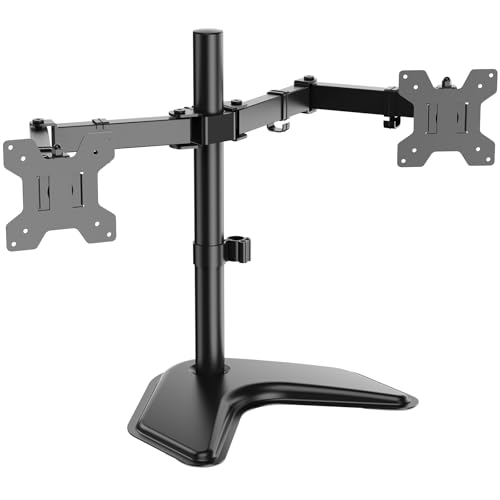
- Holds two monitors up to 27 inches and 22 lbs each
- Full motion adjustment with tilt, swivel, and rotation
- Free-standing V-base helps stabilize the desk setup
Best For: Users who want a stable, adjustable dual-monitor mount for an ergonomic workspace
Portable Dual-Screen Companion
KOORUI 15.6 inch Portable Monitor

- 1080p IPS portable second screen
- USB-C and Mini HDMI connectivity
- Lightweight 1.37 lb travel design
Best For: Mobile professionals who need a compact second display
Ready-Made Office Pair
Packard Bell airFrame Dual Monitor Workstation

- Two 21.5-inch 1080p monitors included
- VESA mount with tilt adjustment
- HDMI and VGA connectivity
Best For: Small desks and users who want an easy dual-monitor bundle
Matched Business Display Pair
ViewSonic VA2456A-MHD_H2 24 Inch Dual Pack

- Two 24-inch 1080p IPS monitors
- 120Hz refresh rate with thin bezels
- HDMI, DisplayPort, and VGA inputs
Best For: Desk users wanting a clean matching dual-monitor setup
Video Conference Ready Business Pick – ASUS BE24EQK 24" Business Monitor
If you’re comparing business monitors for dual monitor setup, the ASUS BE24EQK is a strong pick for a work-first desk because it combines a 24-inch Full HD IPS panel with an integrated webcam, mic array, and stereo speakers. That makes it especially practical for video calls, online training, and everyday office work without adding extra peripherals.
Best For: Remote workers, hybrid teams, and anyone who wants a clean dual-monitor desk with built-in conferencing tools.
Pros:
- Built-in 2MP adjustable Full HD webcam, mic array, and stereo speakers reduce desktop clutter.
- Frameless 24-inch IPS panel with 178b0 viewing angles is well suited to side-by-side monitor layouts.
- ASUS Eye Care with flicker-free and low blue light support is useful for long work sessions.
- DisplayPort and HDMI connectivity makes it easy to add to an office setup.
Cons:
- 60Hz refresh rate is basic compared with faster business or hybrid monitors.
- Only one HDMI port is listed, so connectivity may be limited for some setups.
- Built-in camera and speakers add convenience, but not everyone needs those extras.
This monitor makes the most sense when you want a dependable office display that also handles calls and meetings on its own. For a dual-screen workstation focused on productivity, it offers a tidy, all-in-one approach.
Dual Screen Bundle Value Pick – KS Doublesight 2×24" Monitors
KS Doublesight Displays 2 Full HD 24” Monitors Dual Monitor Stand (1920 x 1080), 75Hz
Check Price On AmazonFor buyers focused on business monitors for dual monitor setup, this KS Doublesight package is designed to solve the whole problem at once. It includes two 24-inch Full HD monitors plus a dual stand, so you can build a matched side-by-side workstation without shopping for separate pieces.
Best For: Offices, home workstations, and users who want a ready-made dual-monitor bundle with minimal setup.
Pros:
- Includes two 24-inch 1080p monitors and a dual monitor stand in one package.
- 75Hz refresh rate offers smoother everyday movement than standard 60Hz office displays.
- Full HD resolution on both screens supports side-by-side multitasking.
- Bundle includes HDMI cables and power accessories, which simplifies setup.
Cons:
- VA panels are not as color-accurate as some IPS-based business monitors.
- Listed brightness is modest at 250 cd, which may limit use in very bright rooms.
- Shipping restriction excludes Pennsylvania.
This is the most straightforward option if you want matched displays and a stand in the box. It trades premium individual features for convenience, making it a practical choice for productivity-focused dual-screen work.
Portable Dual-Display Travel Pick – ASUS ZenScreen MB169CK Portable Monitor
If you need business monitors for dual monitor setup beyond the office, the ASUS ZenScreen MB169CK is built for portability. Its 15.6-inch Full HD anti-glare panel, single USB-C connection, and lightweight body make it easy to add a second screen when traveling, working from cafes, or squeezing productivity into a small space.
Best For: Remote workers, digital nomads, and laptop users who need a travel-friendly second screen.
Pros:
- USB-C plug-and-play setup keeps cable clutter low.
- 15.6-inch anti-glare IPS display is ideal for portable productivity.
- 360-degree kickstand and tripod socket add flexible positioning.
- Auto-rotate and eye care features support long document and code sessions.
Cons:
- Smaller 15.6-inch screen is less spacious than a full-size desktop monitor.
- Designed for portability rather than a permanent desk setup.
- May not match the visual impact of larger business displays.
For mobile workers, this is a smart way to create a dual-screen workflow wherever you land. It favors convenience, light weight, and simple connectivity over desktop-style size.
Budget Office Upgrade Pick – Samsung 24" S30GD Essential Monitor
The Samsung S30GD is a solid choice for business monitors for dual monitor setup when you want a simple, modern office screen with better-than-basic motion handling. Its 24-inch IPS panel, 100Hz refresh rate, and slim bezel design make it a practical match for a tidy productivity desk.
Best For: Office workers and mixed-use users who want a clean, affordable-looking second monitor with a smoother refresh rate.
Pros:
- 24-inch IPS panel delivers consistent color and viewing angles.
- 100Hz refresh rate is smoother than typical office monitors.
- Eye Saver Mode and flicker reduction help during long work sessions.
- Ultra-thin borders give it a modern look for side-by-side screens.
Cons:
- Tilt-only stand limits ergonomic adjustment.
- Only one HDMI port is listed.
- 250 brightness is adequate, but not especially high.
This monitor is a sensible upgrade if you want a simple second display that feels a little faster and cleaner than the most basic office options. It balances productivity-friendly features with a straightforward design.
Portable Dual-Screen Travel Pick – 14-inch FHD Extender for Work
If you’re building business monitors for dual monitor setup, this 14-inch portable screen extender is a practical option for coding, dashboards, trading, and other detail-heavy work. It delivers 1080p IPS clarity, 100% sRGB color, and plug-and-play USB-C setup, making it easy to add a second screen without a complicated install.
Best For: Business travelers, remote workers, developers, and analysts who want a lightweight second display for laptop-based workflows.
Pros:
- 14-inch FHD 1080p IPS panel with 100% sRGB color accuracy
- USB-C plug-and-play design for macOS and Windows laptops
- One-cable power and video transmission for fast setup
- Anti-glare eye-care screen with low blue light support
Cons:
- Best suited to laptops in the 13 to 17.3-inch range
- Portable format offers less workspace than a full-size desktop monitor
- Designed as a companion display, not a primary large-screen monitor
For a mobile second-screen solution, this extender is strongest when you need quick setup, good color accuracy, and compact portability. It also adds useful extras like a cooling-focused rear structure and LED ambient ring light for extended work sessions.
Large Borderless Desktop Option – Samsung 32-inch Business Monitor
Among business monitors for dual monitor setup, this 32-inch Samsung model is a strong desktop choice if you want a large, clean-looking display with easy alignment beside a second screen. Its three-sided borderless design helps multi-monitor layouts look seamless, while the 75Hz refresh rate and eye-care features support long workdays.
Best For: Office desks, home workstations, and users who want a large companion monitor for a polished dual-screen layout.
Pros:
- 32-inch FHD display with a three-sided borderless design
- 75Hz refresh rate for smoother everyday viewing
- AMD FreeSync and Game Mode for reduced tearing and better visual handling
- Eye Saver Mode and Flicker Free technology for more comfortable extended use
Cons:
- FHD resolution on a 32-inch panel is less sharp than higher-resolution alternatives
- Standout size may be more than some compact desks can handle
- Designed as a general business/multimedia monitor rather than a specialty color display
This is a sensible pick if you want a large, simple monitor that fits neatly into a dual-display workspace. The borderless look and comfortable eye-care features make it especially easy to use alongside another monitor for daily productivity.
Space-Saving Desk Mount – WALI Dual Monitor Stand
If your goal is a cleaner business monitors for dual monitor setup, this WALI dual stand is about improving placement, comfort, and desk space rather than adding screens. It supports two monitors up to 27 inches, gives you full motion adjustment, and uses a free-standing V-base for stability on a wide range of desks.
Best For: Anyone who already owns two compatible monitors and wants a stable, adjustable mount for a more ergonomic desk layout.
Pros:
- Supports two monitors up to 27 inches and 22 lbs per arm
- Full motion adjustment with tilt, swivel, and 360-degree rotation
- Free-standing V-base helps provide stable support without clamp mounting
- Raises usable desktop space for a more organized workstation
Cons:
- Requires VESA-compatible monitors with 75x75mm or 100x100mm patterns
- Does not include displays, only the stand
- Best fit is limited to monitors within the stated size and weight range
For buyers focused on ergonomics and workspace efficiency, this stand is a practical finishing piece for a dual-monitor desk. It helps position screens more comfortably and keeps the setup looking neat without taking over the desk.
Portable Dual-Screen Companion – KOORUI 15.6 inch Portable Monitor
If you’re looking for business monitors for dual monitor setup on the go, this KOORUI 15.6-inch portable display is built to add screen space without adding much weight. With a 1080p IPS panel, USB-C and Mini HDMI connectivity, and a slim 1.37 lb design, it works well as a quick second screen for laptops in home offices, coworking spaces, and travel setups.
Best For: Remote workers, students, and business professionals who need a lightweight second display for mobile productivity.
Pros:
- Full HD 1080p IPS panel with 178° viewing angles for clear, consistent visuals
- Lightweight 1.37 lb build makes it easy to carry in a backpack or laptop bag
- USB-C and Mini HDMI inputs support flexible plug-and-play connections
- Dual speakers and multiple display modes add versatility for work and entertainment
Cons:
- 15.6-inch size is best for portability, not a large desktop workspace
- Glossy screen finish may not suit every lighting environment
- Single-monitor unit means you still need your primary display to complete a dual setup
This is a practical choice if portability matters more than screen size. It gives business users an easy way to extend a laptop into a dual-screen workflow almost anywhere.
Ready-Made Office Pair – Packard Bell airFrame Dual Monitor Workstation
For business monitors for dual monitor setup, this Packard Bell workstation is aimed at users who want a matched pair without piecing together separate displays. The two 21.5-inch Full HD screens include a VESA mount, tilt adjustment, HDMI/VGA connectivity, and a 75Hz refresh rate, making it a straightforward option for productive home or office use.
Best For: Users who want a compact, matched dual-monitor office setup with flexible mounting.
Pros:
- Includes two 21.5-inch Full HD monitors for an instant dual-screen workspace
- VESA mount and tilt adjustment help with ergonomic positioning
- 75Hz refresh rate and 5ms response time provide smooth everyday visuals
- HDMI and VGA inputs offer broad compatibility with common devices
Cons:
- Smaller 21.5-inch screens may feel limited for users who prefer larger displays
- Glossy finish may not be ideal in bright environments
- Best suited to productivity and light gaming rather than demanding visual work
This is a convenient all-in-one option if you want a clean two-monitor arrangement for office tasks. It balances flexibility and simplicity, especially for desks where space and setup time matter.
Matched Business Display Pair – ViewSonic VA2456A-MHD_H2 24 Inch Dual Pack
If you want business monitors for dual monitor setup with a more traditional desk-friendly size, this ViewSonic dual pack is a strong fit. Each 24-inch IPS monitor delivers 1080p resolution, a 120Hz refresh rate, thin bezels, and flexible HDMI, DisplayPort, and VGA inputs, so it is well suited to home offices and office desks that need a polished two-screen layout.
Best For: Office users and multitaskers who want a dual pack of 24-inch monitors with modern connectivity.
Pros:
- Two 24-inch Full HD IPS monitors create a balanced dual-screen workstation
- 120Hz refresh rate and 4ms response time support smooth everyday use
- Thin bezels and matte screens help keep the setup clean and practical
- HDMI, DisplayPort, and VGA inputs make it easy to connect to many devices
Cons:
- Sold as head-only monitors, so stands or mounts must be provided separately
- At 250 nits, brightness is solid but not especially high
- Dual-pack format may be more than some single-user setups need
This ViewSonic bundle is a smart pick when you want a matching pair that feels ready for real work. The 24-inch size and flexible ports make it especially appealing for tidy, productive desk setups.
How We Picked These Business Monitors for Dual Monitor Setup
We focused on screens and accessories that fit real work environments: clear 1080p or better resolution, reliable HDMI/DisplayPort or USB-C connectivity, IPS or similarly wide-view panels, and stands or mounts that support comfortable viewing over long hours. For Business Monitors for Dual Monitor Setup, consistency matters as much as raw specs, so we also considered bezel size, desk footprint, and whether the products are easy to integrate into existing workstations.
Quick Comparison: What Matters Most
If you want a simple office pair, 24-inch IPS monitors usually offer the best balance of text clarity and desk efficiency. If you need more screen real estate, 32-inch models can reduce window switching but require more desk space and a stronger arm or stand. Portable monitors are best when your dual-screen setup needs to move with you, while dual-pack bundles and monitor stands are the easiest route for standardized office deployment.
Key Buying Factors for Business Monitors for Dual Monitor Setup
Screen Size and Resolution
For most work tasks, 24-inch Full HD remains the sweet spot. It gives enough room for documents, spreadsheets, and browser tabs without forcing excessive scaling. Larger screens can help with multitasking, but only if your desk depth and viewing distance support them comfortably.
Panel Type and Eye Comfort
IPS panels are usually preferred for shared workspaces because they offer better off-angle viewing and more consistent color. If employees spend long hours at the desk, look for flicker-free design, low blue light features, and tilt or height adjustments to reduce strain.
Connectivity and Compatibility
Check for HDMI, DisplayPort, and USB-C based on your laptop or desktop hardware. In a dual-monitor office setup, simple connectivity saves time during installation and reduces the need for adapters.
Mounting and Desk Organization
A good stand or monitor arm can improve posture and reclaim valuable space. For shared desks or open offices, VESA compatibility is a major advantage because it makes future changes easier.
Who Should Buy Which Business Monitors for Dual Monitor Setup?
If you want a straightforward office pair for general productivity, choose 24-inch IPS monitors with slim bezels. If you travel or work between locations, portable monitors are the most flexible option. If your priority is a cleaner, more ergonomic desk, invest in a stable dual monitor stand or arm and pair it with compatible flat-panel displays. For teams buying in bulk, dual-pack monitor bundles can be the most efficient value play.
In short, the best Business Monitors for Dual Monitor Setup are the ones that fit your workspace, your laptop connections, and the way your team actually works every day.