If you want a cleaner workspace and fewer adapters, business monitors with USB-C docking can simplify almost everything. One cable can handle display output, laptop charging, and in some cases networking and peripherals.
Below, we focus on practical office-ready options for everyday productivity, hybrid work, and multi-monitor setups. The goal is to help you pick a monitor that fits your desk, laptop, and workflow without overbuying.
Best 10 Business Monitors with USB C Docking Picks for 2026
Office-Ready Docking Display
ASUS 24" USB-C Docking Monitor

- 96W USB-C docking and charging
- RJ45, USB hub, HDMI, and DP out
- 120Hz IPS with adjustable stand
Best For: Small offices and hybrid desks needing one-cable docking
Compact Docking Hub

- Single-cable USB-C connection
- Supports up to three displays
- Small 5 x 5 inch footprint
Best For: Laptop users needing a compact multi-display dock
Ultrawide Productivity Pick
ViewSonic VG3456CA 34" Docking Monitor
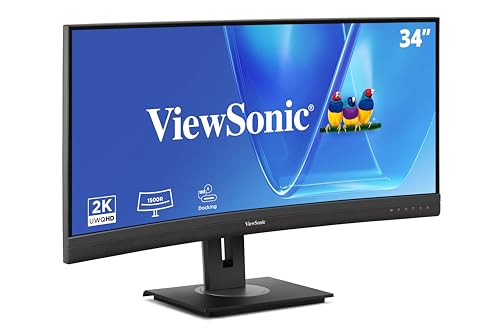
- 34-inch curved ultrawide WQHD panel
- 100W USB-C docking with RJ45
- 100Hz refresh and ergonomic stand
Best For: Professionals wanting a wide docking monitor for daily work
Value QHD Choice
Dell S2722DC 27" USB-C Monitor

- 65W USB-C single-cable connection
- 27-inch QHD panel with speakers
- Height, pivot, swivel, and tilt adjustments
Best For: Office users wanting a simple QHD USB-C monitor
Renewed Docking Bundle
HP USB-C Dock g5 120W Dual-Monitor Kit

- Supports up to three displays
- 120W power adapter included
- Gigabit Ethernet and video cables bundled
Best For: HP and USB-C laptop users who want a compact multi-display dock
Webcam Docking Ultrawide
Philips 34E1C5600HE 34" USB-C Dock Monitor

- 3440 x 1440 ultrawide with USB-C docking
- Built-in 5MP webcam, mic, and speakers
- Up to 65W USB-C power delivery
Best For: Remote work and business users who want an all-in-one docking monitor
Office Docking Ultrawide
ViewSonic VG3420C 34" USB-C Office Monitor

- 34-inch curved 3440 x 1440 IPS panel
- USB-C docking with 60W power delivery
- USB hub, HDMI, DisplayPort, and speakers
Best For: Productivity-focused users who want a versatile ultrawide docking monitor
Ultrawide Docking Powerhouse

- 49-inch curved Dual QHD ultrawide workspace
- USB-C docking with up to 90W charging
- 120Hz panel with DisplayHDR 400 support
Best For: Power users who want a huge single-screen productivity hub
Versatile Office Docking Display

- 27-inch IPS screen with wide viewing angles
- USB-C docking with up to 65W charging
- RJ45 LAN, HDMI, DisplayPort, and USB hub
Best For: Hybrid workers needing a larger, well-connected office monitor
Office-Ready Docking Display – ASUS 24" USB-C Docking Monitor
If you want business monitors with usb c docking in a compact size, this ASUS 24-inch model is built to simplify a laptop setup without taking over the desk. The USB-C port handles data, video, and up to 96W charging in one cable, while the built-in RJ45, USB hub, and DisplayPort out add flexibility for a more permanent workstation.
Best For: Small offices, hybrid workers, and desk setups that need one-cable docking plus ethernet.
Pros:
- USB-C docking with up to 96W power delivery for laptop charging
- RJ45, USB hub, HDMI, and DisplayPort out for flexible office connectivity
- 120Hz IPS panel with frameless design for smoother everyday use
- Ergonomic stand with height, swivel, tilt, and pivot adjustments
Cons:
- 24-inch 1080p screen is smaller than many productivity-focused alternatives
- Best suited to users who want docking convenience more than large-screen workspace
This is a strong choice if your priority is a tidy business monitor with usb c docking and wired network support. It offers a practical mix of comfort, connectivity, and easy laptop integration for daily office work.
Compact Docking Hub – HP USB-C Dock G5
For buyers pairing business monitors with usb c docking setups, this HP USB-C Dock G5 is the kind of compact hub that keeps a desk organized. It connects through a single USB-C cable, supports up to three displays, and adds charging, networking, and data connectivity without much footprint.
Best For: Laptop users who want a small, simple dock for multi-display office setups.
Pros:
- Single-cable USB-C docking for charging, data, and peripherals
- Supports up to three displays for productivity setups
- Compact 5 x 5 inch footprint helps reduce desk clutter
- Works with HP and non-HP USB-C or Thunderbolt laptops
Cons:
- It is a dock, not a monitor, so you still need a separate display
- Best value comes only if you need multiple ports and display expansion
This is a practical dock for users who already have a monitor and want a cleaner workstation. Its main strength is turning a compatible laptop into a more connected office setup with minimal cable mess.
Ultrawide Productivity Pick – ViewSonic VG3456CA 34" Docking Monitor
If you want business monitors with usb c docking and a lot more screen space, this 34-inch ViewSonic ultrawide is aimed at productivity first. The curved WQHD panel, 100Hz refresh rate, 100W USB-C charging, and RJ45 port make it a strong one-cable option for home or office work.
Best For: Professionals who want a wide, curved workspace with docking and wired networking.
Pros:
- 34-inch 3440 x 1440 ultrawide display for more workspace
- 100W USB-C docking plus RJ45 for fewer cables
- 1500R curved IPS screen with 100Hz refresh rate
- Ergonomic stand with tilt, swivel, and height adjustment
Cons:
- Large footprint and 20.7-pound weight need more desk space
- Overkill if you only need a basic single-monitor office setup
This ViewSonic is a strong productivity monitor for users who value screen width as much as docking convenience. It combines a spacious ultrawide layout with the kind of connectivity that can replace a separate dock for many workstations.
Value QHD Choice – Dell S2722DC 27" USB-C Monitor
This Dell 27-inch model is a straightforward option for business monitors with usb c docking when you want a clean desk and a sharp QHD workspace. The USB-C connection carries power, video, audio, and data at once, and the 65W power delivery is enough for many everyday laptops.
Best For: Office users, students, and programmers who want a simple USB-C monitor with QHD resolution.
Pros:
- USB-C single-cable connection with 65W power delivery
- 27-inch QHD panel offers more workspace than 1080p displays
- Height, swivel, pivot, and tilt adjustments improve comfort
- Built-in speakers and quick-access USB-A port add convenience
Cons:
- No RJ45 ethernet or full docking hub features
- 75Hz refresh rate is modest compared with faster office monitors
The Dell S2722DC is a balanced pick for users who want docking-style simplicity without extra complexity. It focuses on the basics well: good resolution, clean connectivity, and an ergonomic stand for all-day work.
Renewed Docking Bundle – HP USB-C Dock g5 120W Dual-Monitor Kit
If you want business monitors with usb c docking support, this HP USB-C docking bundle is built for a simple single-cable setup across compatible HP and non-HP USB-C or Thunderbolt laptops. It supports up to three displays, adds wired networking, and includes the cables needed to get a dual-monitor desk running with less clutter.
Best For: HP users and mixed USB-C laptop setups that need a compact dock for multiple displays and Ethernet.
Pros:
- Supports up to three displays for a flexible multi-monitor workspace
- 120W adapter and USB-C power port help consolidate charging and connectivity
- Includes HDMI, DisplayPort, USB-C cables, and Gigabit Ethernet
- Compact 4.8 x 4.8 x 1.8-inch design saves desk space
Cons:
- Compatibility depends on USB-C or Thunderbolt support
- Best fit is centered on supported HP and similar laptops
- Renewed item may not appeal to buyers wanting brand-new hardware
This is a practical docking option if your priority is turning a compatible laptop into a cleaner business workstation. The included power and video connections make it a straightforward choice for users who want a dock-centric monitor setup.
Webcam Docking Ultrawide – Philips 34E1C5600HE 34" USB-C Dock Monitor
This Philips option fits business monitors with usb c docking setups where you want the display and conferencing gear built in. The 34-inch 21:9 ultrawide panel runs at 3440 x 1440, delivers USB-C docking with up to 65W power delivery, and adds a 5MP webcam, noise-canceling mic, and speakers for a cleaner remote-work desk.
Best For: Remote workers and office users who want an ultrawide monitor with built-in webcam and single-cable docking.
Pros:
- 34-inch 3440 x 1440 ultrawide screen supports side-by-side productivity
- USB-C docking with up to 65W power delivery simplifies laptop charging
- Built-in 5MP webcam, noise-canceling mic, and speakers are ideal for calls
- 100Hz refresh rate and height adjustment add everyday comfort
Cons:
- USB-C power delivery tops out at 65W, which may not suit every laptop
- Curved glossy panel may not be preferred by all office users
- Primarily tuned for business and productivity rather than pure gaming
For a workspace that needs fewer accessories and more built-in functionality, this Philips monitor is very efficient. It combines docking, conferencing, and ultrawide multitasking in one display.
Office Docking Ultrawide – ViewSonic VG3420C 34" USB-C Office Monitor
If you are comparing business monitors with usb c docking, the ViewSonic VG3420C is a strong productivity pick with a 34-inch 3440 x 1440 curved IPS panel and integrated connectivity. It supports 60W USB-C power delivery, includes HDMI and DisplayPort inputs, and adds an integrated USB hub plus dual 2.5W speakers for a tidy office setup.
Best For: Office and home-office users who want an ultrawide docking monitor with broad connectivity and ergonomic adjustability.
Pros:
- 34-inch ultrawide curved IPS display offers plenty of workspace
- USB-C connection carries data, video, audio, and up to 60W power
- Integrated USB hub, HDMI, and DisplayPort expand connection options
- Adjustable stand and 98% DCI-P3 color support improve comfort and clarity
Cons:
- USB-C power delivery is 60W, so higher-wattage laptops may need extra power
- Built-in speakers are basic at 2.5W each
- Large ultrawide footprint needs adequate desk space
This ViewSonic monitor is a well-balanced docking display for users who want fewer cables without sacrificing input flexibility. It stands out as a practical all-in-one office screen for multitasking and daily work.
Compact USB-C Docking Monitor – ASUS 23.8” VA24ECPSN
If you want a straightforward option among business monitors with usb c docking, the ASUS VA24ECPSN is built to simplify a desk setup without adding clutter. Its USB-C connection handles display signal and data while also delivering up to 65W charging, and the built-in RJ45 port makes it easy to keep a wired network connection in the same hub.
Best For: Small offices, home workstations, and laptop users who want a simple all-in-one docking display.
Pros:
- USB-C docking with up to 65W laptop charging
- Includes RJ45 LAN, DisplayPort, HDMI, and USB hub connectivity
- Ergonomic stand with tilt, swivel, pivot, and height adjustment
- Eye Care features include flicker-free and low blue light technologies
Cons:
- 1080p resolution may feel basic for users wanting more workspace
- 75Hz refresh rate is modest compared with faster office displays
This is a practical docking monitor for everyday business use, especially if you value one-cable convenience and wired networking. It focuses on flexibility and comfort rather than premium resolution, which makes it a sensible pick for standard productivity tasks.
Ultrawide Docking Powerhouse – Samsung 49” S95UA
For buyers comparing business monitors with usb c docking, the Samsung S95UA stands out as a monitor-and-docking-station-in-one. Its 49-inch 32:9 curved panel offers a huge Dual QHD workspace, while USB-C supports up to 90W charging and helps reduce cable clutter on busy desks.
Best For: Power users, multitaskers, and office setups that need a massive single-display workspace.
Pros:
- Massive 49-inch 32:9 curved Dual QHD screen for multitasking
- USB-C docking with up to 90W charging
- Multiple inputs including DisplayPort, 2 HDMI ports, USB, and USB-C
- 120Hz refresh rate and DisplayHDR 400 support
Cons:
- Very large footprint may overwhelm smaller desks
- Priced and sized for users who truly need an ultrawide setup
This model is designed to replace a multi-monitor arrangement with one expansive screen and a cleaner connection setup. If your workday revolves around spreadsheets, timelines, dashboards, or heavy multitasking, it offers a compelling business-focused ultrawide solution.
Versatile Office Docking Display – ASUS 27” VA27ECPSN
If you need business monitors with usb c docking for a more comfortable everyday office setup, the ASUS VA27ECPSN offers a larger 27-inch workspace with the same practical one-cable approach. USB-C delivers video, data, and up to 65W laptop charging, and the built-in RJ45 port helps keep your laptop connected to wired Ethernet through the monitor.
Best For: Office workers, hybrid employees, and users who want a roomy docking monitor with strong connectivity.
Pros:
- 27-inch IPS panel with wide 178° viewing angles
- USB-C docking with up to 65W power delivery
- RJ45 LAN, DisplayPort, HDMI, and USB hub support
- Ergonomic stand with tilt, swivel, pivot, and height adjustment
Cons:
- 1080p resolution is workable, but not especially sharp at 27 inches
- 75Hz refresh rate is suitable for office use, not performance-focused work
Overall, this is a balanced docking monitor for users who want a larger screen than a 24-inch model without giving up desk simplicity. It combines broad connectivity, ergonomic flexibility, and Eye Care features in a straightforward business-friendly package.
How We Picked the Best Business Monitors with USB C Docking
We prioritized Business Monitors with USB C Docking that make daily work easier, not just more feature-rich on paper. Key factors included USB-C power delivery, image quality for office tasks, ergonomic adjustability, screen size, dock features like Ethernet or extra ports, and compatibility with common business laptops.
We also looked for models that support real-world productivity needs such as long writing sessions, spreadsheets, video calls, and shared workspaces. That means balanced performance, dependable connectivity, and practical designs that reduce desk clutter.
Quick Comparison
For compact desks, 24- to 27-inch full HD or QHD displays are usually the easiest fit. If you want more room for side-by-side windows, 34-inch ultrawide models can improve multitasking without needing a dual-monitor setup. Large curved ultrawide and super-ultrawide screens are best for users who want maximum workspace from a single display.
Docking-focused features matter just as much as size. Higher USB-C wattage helps charge laptops reliably, while Ethernet, built-in speakers, webcams, and KVM-style convenience features can replace extra desk accessories.
Key Buying Factors for Business Monitors with USB-C Docking
Power Delivery
Check how much power the monitor can send through USB-C. Lightweight laptops may only need modest charging, but many business notebooks perform better with 65W or more. If you use a work laptop with a larger screen or more demanding hardware, higher wattage is worth prioritizing.
Resolution and Screen Size
Full HD is fine for basic office work on smaller screens, but QHD or ultrawide QHD is better for multitasking. Higher resolution improves text clarity and gives you more room for documents, timelines, and browser tabs.
Docking Features
Look for Ethernet, USB hub ports, and easy upstream connectivity if you want the monitor to function as a true dock. These features can reduce the need for separate adapters and help keep a laptop setup portable.
Ergonomics and Eye Comfort
Height adjustment, tilt, swivel, and pivot support make it easier to work comfortably throughout the day. Eye-care features such as flicker-free operation and low blue light can also help during long office sessions.
Who Should Buy Which Business Monitors with USB C Docking?
If you need the simplest possible single-cable setup, choose a model with strong USB-C power delivery and integrated docking basics. If your workday revolves around multitasking, consider an ultrawide screen for more flexible window management.
For shared offices or conference-friendly use, extras like a webcam, microphone, or RJ45 port may be more valuable than raw display specs. For compact home offices, a smaller ergonomic display can offer the best balance of comfort, cost, and desk space.
In short, the best choice depends on how much charging power, workspace, and dock functionality you want from one monitor. Match the screen size and connectivity to your laptop and your daily workflow, and you’ll get the most value from Business Monitors with USB C Docking.