Finding the right display for remote meetings is easier when the camera, microphone, and speakers are already built in. A good conferencing monitor can reduce desk clutter while making everyday video calls look and sound more professional.
In this roundup, we focused on practical office-ready options that balance image quality, webcam performance, adjustability, and value for business use.
Best 10 Business Monitors with Built in Webcam Picks for 2026
Large-Format Conferencing Monitor
ASUS 27-inch Video Conference Monitor

- 27-inch Full HD IPS display
- Adjustable 2MP webcam with mic array
- Swivel, pivot, and height adjustments
Best For: Business users who want a roomy conferencing monitor with built-in camera and speakers
USB-C Conferencing Choice
LG 24BP75CP-B USB-C Conferencing Monitor

- Pop-up full-HD webcam with mic
- USB-C with up to 65W charging
- IPS panel with eye-comfort features
Best For: Hybrid workers who want a compact all-in-one monitor with USB-C charging
Smooth 100Hz Conference Monitor
ASUS BE249QFK 24-inch Video Conferencing Monitor

- Full HD webcam, mic array, and speakers
- 100Hz IPS panel with 99% sRGB
- Ergonomic stand with wide adjustments
Best For: Users who want a compact business monitor with a built-in camera and smoother motion
High-End Hybrid Work Pick
HP Series 5 Pro 24-inch USB-C Conferencing Monitor

- 5MP pop-up webcam with AI noise reduction
- 4 speakers and built-in microphone array
- 100Hz IPS panel with 4-way adjustability
Best For: Hybrid workers who want a premium all-in-one conferencing monitor
Editor’s Pick
ASUS 24-inch Business Webcam Monitor

- Integrated 2MP adjustable webcam
- Mic array with stereo speakers
- 24-inch 1080p IPS Eye Care display
Best For: Remote work and simple video conferencing
Conference Pro
ViewSonic 24-inch Windows Hello Webcam Monitor

- 5MP IR webcam with privacy shutter
- Windows Hello facial recognition support
- Height-adjustable 24-inch IPS display
Best For: Secure video meetings and ergonomic office setups
Value Hybrid
SKitphrati 23.8-inch 120Hz Webcam Monitor

- Adjustable 3MP webcam with mic array
- 120Hz refresh rate and 1ms response time
- HDMI, DisplayPort, VGA, and USB inputs
Best For: Work, meetings, and occasional gaming
Premium QHD Conferencing Pick
CUNPU 27 Inch Monitor with Built-in 5MP 2K Webcam

- 5MP 2K webcam with stereo mic and speakers
- 27-inch QHD panel with 120Hz refresh rate
- Height, swivel, pivot, and tilt adjustments
Best For: Remote professionals who want a larger QHD screen with integrated video tools
Budget-Friendly 27-Inch Meeting Monitor
SKitphrati 27'' Business Webcam Monitor

- Built-in adjustable 3MP webcam and mic array
- 27-inch IPS panel with 120Hz refresh rate
- HDMI, DisplayPort, VGA, and USB 2.0 ports
Best For: Offices and home workers who want an affordable all-in-one conference monitor
Compact Vertical Workstation Choice
CUNPU 24 Inch Monitor with Built-in 5MP 2K Webcam
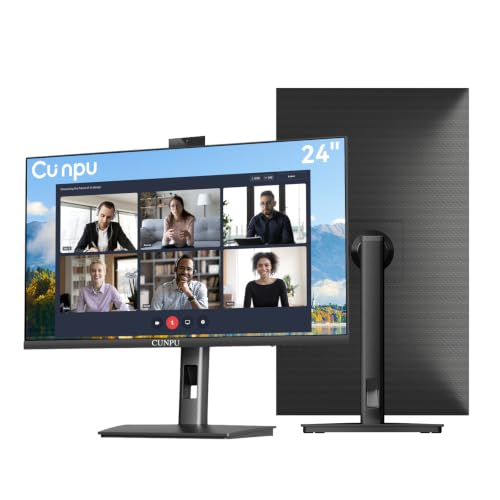
- 5MP 2K webcam with stereo mic and speakers
- 24-inch IPS display with 120Hz via HDMI
- Height, swivel, pivot, and tilt adjustments
Best For: Smaller workspaces and business users who want integrated conferencing features
Large-Format Conferencing Monitor – ASUS 27-inch Video Conference Monitor
If you want business monitors with built in webcam features in a larger desktop format, this ASUS 27-inch model is built for straightforward video meetings and everyday office work. It combines a Full HD IPS panel, adjustable camera, microphone array, and stereo speakers, while also offering a flexible stand and broad connectivity for mixed work setups.
Best For: Teams and solo professionals who want a 27-inch conferencing monitor with strong ergonomics and flexible ports.
Pros:
- Built-in adjustable 2MP webcam, mic array, and stereo speakers for conferencing
- 27-inch IPS Full HD panel with wide viewing angles
- Height, tilt, swivel, and pivot adjustments for comfortable positioning
- Includes HDMI, DisplayPort, VGA, USB upstream, and audio connections
Cons:
- 1080p resolution is solid, but not as sharp as higher-resolution office displays
- Webcam is adjustable, but the specs emphasize conferencing rather than advanced imaging features
- Single HDMI and USB port limits on-monitor expandability
This is a practical all-in-one business monitor if you value screen size and flexibility over premium resolution. It is especially appealing for offices that need an integrated webcam setup without adding separate peripherals.
USB-C Conferencing Choice – LG 24BP75CP-B USB-C Conferencing Monitor
For shoppers comparing business monitors with built in webcam hardware, this LG model stands out as an efficient 24-inch office display with a pop-up camera and USB-C convenience. It is aimed at day-to-day professional use, pairing an IPS FHD panel with built-in speakers, a microphone, and a single-cable USB-C setup that can also charge compatible devices.
Best For: Hybrid workstations that need a compact conferencing monitor with USB-C and 65W charging.
Pros:
- Built-in full-HD pop-up webcam with enhanced security
- Built-in microphone and speakers for video meetings
- USB-C connectivity with up to 65W charging
- IPS panel with Flicker Safe and Reader Mode for comfort
Cons:
- 24-inch size may feel small for users who prefer larger multitasking displays
- 75Hz refresh rate is fine for office use, but not a standout feature
- Brightness and contrast are positioned for work, not high-end visual performance
This LG monitor makes sense if you want a neat, workspace-friendly conferencing display that reduces cable clutter. The pop-up webcam and USB-C power delivery are its most practical business advantages.
Smooth 100Hz Conference Monitor – ASUS BE249QFK 24-inch Video Conferencing Monitor
This ASUS option fits well in the business monitors with built in webcam category if you want a compact screen that still emphasizes smooth motion and conferencing features. It combines a Full HD webcam, mic array, stereo speakers, and a 100Hz IPS display, making it a capable pick for office use, online meetings, and mixed productivity tasks.
Best For: Professionals who want a 24-inch conferencing monitor with a faster 100Hz refresh rate.
Pros:
- Integrated Full HD webcam, mic array, and stereo speakers
- 100Hz refresh rate for smoother motion than standard office monitors
- 99% sRGB coverage for more color-rich viewing
- Ergonomic stand with tilt, swivel, pivot, and height adjustment
Cons:
- 24-inch Full HD sizing may be tight for users who want more screen space
- Single HDMI port limits simple direct connections
- Focus is on conferencing and general use rather than advanced display extras
As a practical office display, this model balances conferencing tools with a smoother-than-average panel. It is a good fit for users who want a built-in webcam monitor that still feels comfortable for everyday work.
High-End Hybrid Work Pick – HP Series 5 Pro 24-inch USB-C Conferencing Monitor
Among business monitors with built in webcam options, this HP Series 5 Pro is the most feature-rich pick here for hybrid work. It pairs a 5MP pop-up webcam, AI noise reduction mics, and four speakers with a USB-C conferencing-friendly design, making it well suited to users who spend a lot of time on calls and want a polished desk setup.
Best For: Hybrid professionals who want a high-end conferencing monitor with a sharper 5MP webcam.
Pros:
- 5MP pop-up tiltable webcam with AI noise reduction mics
- 4x 3W down-firing speakers for built-in audio
- 100Hz IPS display with 178-degree viewing angles
- 4-way adjustability plus 150 mm height adjustment
Cons:
- 24-inch 1080p panel may be modest for users seeking a larger workspace
- Premium conferencing focus may be more than some basic office users need
- Included dock may be useful, but adds complexity if you only want a simple monitor
This HP model is a strong fit when image quality, call clarity, and ergonomics all matter. If you want a monitor that feels purpose-built for modern video collaboration, it has the most advanced conferencing setup in this group.
Editor’s Pick – ASUS 24-inch Business Webcam Monitor
If you want business monitors with built in webcam for everyday meetings and remote work, the ASUS BE24EQK keeps things straightforward: a 24-inch Full HD IPS panel, an integrated 2MP adjustable webcam, and built-in mic array and speakers. It is designed for telecommuting, online learning, and video conferencing without adding extra peripherals to your desk.
Best For: Remote workers and office users who want a simple all-in-one monitor for video calls.
Pros:
- Built-in 2MP adjustable Full HD webcam for video conferencing
- Mic array with beamforming and echo cancellation for clearer voice pickup
- 24-inch 1080p IPS panel with 178° viewing angles and frameless design
- Eye Care features with TÜV Rheinland-certified flicker-free and low blue light support
Cons:
- 60Hz refresh rate is basic compared with higher-refresh office displays
- Single included webcam USB cable means setup depends on wired connections
The ASUS BE24EQK is a practical pick if your priority is dependable conferencing hardware built into a standard business monitor. It focuses on the essentials rather than extra features, which makes it a solid fit for workstations that need a clean and simple setup.
Conference Pro – ViewSonic 24-inch Windows Hello Webcam Monitor
For shoppers comparing business monitors with built in webcam, the ViewSonic VG2441V stands out because it combines a 5MP IR webcam, built-in microphone, speakers, and Windows Hello support in one 24-inch Full HD IPS display. It is built for smoother video conferencing and also adds advanced ergonomics plus flexible USB-C, HDMI, and DisplayPort connectivity.
Best For: Teams and professionals who want stronger conferencing features and convenient Windows Hello sign-in.
Pros:
- 5MP IR webcam with privacy shutter and 5-degree tilt adjustment
- Windows Hello-certified camera for password-free facial recognition sign-in
- Built-in microphone and speakers for all-in-one meeting use
- Height, swivel, rotate, and tilt adjustments for better desk ergonomics
Cons:
- 24-inch 1080p panel is standard rather than higher-resolution
- Some users may not need the added Windows Hello hardware
The VG2441V is the most feature-rich conferencing option here, especially if secure sign-in and easier daily meeting workflows matter. It is a strong pick for office setups where the monitor needs to do more than just display content.
Value Hybrid – SKitphrati 23.8-inch 120Hz Webcam Monitor
If you want business monitors with built in webcam that can also handle some light gaming, the SKitphrati 23.8-inch model blends conferencing tools with faster motion handling. It includes a built-in adjustable 3MP webcam, mic array, and dual speakers, plus a 120Hz refresh rate and 1ms response time for smoother everyday use.
Best For: Users who want an all-in-one monitor for office work, meetings, and occasional gaming.
Pros:
- Built-in adjustable 3MP webcam with mic array and dual speakers
- 120Hz refresh rate and 1ms response time for smoother motion
- 23.8-inch frameless IPS panel with 178° viewing angles
- Multiple inputs including DisplayPort, HDMI, VGA, and USB
Cons:
- Native resolution is listed as 1920×1080, but the details label it as HD+
- Glossy screen finish may be less ideal in bright environments
This is the most hybrid-friendly option in the group, offering conferencing features without giving up a faster refresh rate. It makes sense for buyers who want one display that can serve both work and casual gaming duties.
Premium QHD Conferencing Pick – CUNPU 27 Inch Monitor with Built-in 5MP 2K Webcam
If you want a business monitor with built in webcam that can handle daily calls and desk work in one device, this CUNPU 27-inch model is built around that use case. It combines a 5MP 2K webcam, stereo mic, and speakers with a 27-inch QHD panel, so it can reduce desk clutter while still delivering sharper-than-1080p image quality for work and video meetings.
Best For: Remote professionals who want a larger QHD screen with integrated video conferencing tools.
Pros:
- Built-in 5MP 2K webcam, stereo microphone, and speakers in one monitor
- 2560 x 1440 QHD resolution with 120Hz refresh rate and 99% sRGB
- Ergonomic stand with height, swivel, pivot, and tilt adjustments
- Pop-up camera design adds privacy when the webcam is not in use
Cons:
- May be more monitor than needed if you only need basic 1080p office use
- Designed as a business-focused display, so it is less specialized for gaming-first setups
Overall, this is the strongest all-in-one option in the group if you value a sharper QHD workspace and want the webcam, mic, and speakers built directly into the display. It is especially practical for home offices and conference-heavy desks where simplicity matters.
Budget-Friendly 27-Inch Meeting Monitor – SKitphrati 27'' Business Webcam Monitor
This business monitor with built in webcam is aimed at straightforward video conferencing and everyday office use. The SKitphrati 27-inch model pairs a built-in adjustable 3MP webcam, mic array, and speakers with a 1080p IPS panel and 120Hz refresh rate, making it a practical choice when you want an integrated meeting setup without moving up to a higher-resolution screen.
Best For: Offices and home workers who want an affordable all-in-one conference monitor with broad connectivity.
Pros:
- Built-in adjustable 3MP webcam with microphone array
- 27-inch IPS display with 1080p resolution and 120Hz refresh rate
- Integrated stereo speakers help avoid extra desktop audio gear
- Multiple ports including HDMI, DisplayPort, VGA, and USB 2.0
Cons:
- 1080p resolution is less sharp than QHD alternatives
- Webcam is 3MP rather than the higher-resolution 5MP options
This model makes sense if compatibility and simplicity matter more than premium resolution. It offers a solid set of conferencing essentials, so it fits well in mixed-device office environments where older and newer connections both need to work.
Compact Vertical Workstation Choice – CUNPU 24 Inch Monitor with Built-in 5MP 2K Webcam
If you want a smaller business monitor with built in webcam for a tighter desk setup, this 24-inch CUNPU option keeps the same all-in-one conferencing idea in a more compact footprint. It combines a built-in 5MP 2K webcam, stereo mic, and speakers with a 24-inch 1080p IPS display, making it a good fit for spreadsheets, presentations, and frequent video calls.
Best For: Smaller workspaces and business users who want integrated conferencing features in a compact monitor.
Pros:
- Built-in 5MP 2K webcam, stereo microphone, and speakers
- 24-inch IPS panel with 1080p resolution and 120Hz refresh rate via HDMI
- Ergonomic stand supports height, swivel, pivot, and tilt adjustments
- Pop-up camera design adds privacy when the webcam is not needed
Cons:
- 1080p resolution is not as sharp as QHD models
- VGA is limited to 75Hz, so the higher refresh rate depends on HDMI
This is the most space-conscious choice here, while still giving you the convenience of built-in conferencing hardware. It is especially appealing if you want a monitor that can move between office tasks and video meetings without adding separate peripherals.
How We Picked the Best Business Monitors with Built in Webcam
We prioritized displays that make daily conferencing easier, not just monitors with a camera attached. The best options combine reliable 1080p or better panels, usable webcam quality, clear audio input, and stands that support proper posture during long work sessions.
We also looked for business-friendly features such as USB-C connectivity, DisplayPort and HDMI support, VESA mounting, height adjustment, privacy-friendly webcam designs, and panels that suit office tasks beyond video calls.
Quick Comparison
Most Business Monitors with Built in Webcam fall into two practical groups: compact 24-inch models for standard desks and 27-inch models for users who want more screen space or a larger conferencing presence. Some emphasize simple plug-and-play convenience, while others add higher-resolution webcams, Windows Hello support, or stronger speakers for all-in-one meeting setups.
If your team spends most of the day in spreadsheets, documents, and video meetings, a 24-inch FHD display is usually the most balanced choice. If you want more room for multitasking or prefer a more premium meeting display, 27-inch models can be a better fit.
Key Buying Factors for Business Monitors with Built-In Webcam
Webcam Quality
Look for at least 1080p video for clear meetings, and consider 2MP, 3MP, or 5MP cameras if image sharpness matters. Features like adjustable camera angles, IR sensors, or Windows Hello can improve both usability and security.
Audio Performance
Built-in microphones and speakers are convenient, but quality varies widely. For frequent meetings, choose monitors with microphone arrays and stereo speakers that are strong enough for conference calls without requiring extra accessories.
Panel Size and Resolution
For most office users, 24-inch Full HD monitors offer a good mix of clarity and desk efficiency. A 27-inch screen can be better for split-screen work, side-by-side documents, or users who want a more immersive workspace.
Ergonomics and Connectivity
Height adjustment, tilt, swivel, and VESA mounting make a big difference over time. USB-C docking support is especially useful if you want one cable for laptop charging, display output, and peripherals.
Who Should Buy Which Business Monitors with Built in Webcam?
If you want the simplest setup for remote work or hybrid meetings, choose a monitor that combines webcam, mic, and speakers in one frame. If your priority is maximum value, look for a basic FHD model with the right stand adjustments and enough camera quality for professional calls.
Teams that run frequent presentations, training sessions, or client meetings should lean toward higher-end Business Monitors with Built in Webcam features, better microphones, and stronger connectivity. Power users and multitaskers may prefer larger 27-inch models, while compact home offices often benefit from a clean 24-inch all-in-one design.