Choosing the right router can make or break day-to-day productivity, especially as more teams rely on cloud apps, video calls, and connected devices.
These WiFi 7 routers for business are selected for speed, coverage, wired flexibility, and practical features that matter in real office environments.
Best 10 Wifi 7 Routers for Business Picks for 2026
Business Power Pick
TP-Link Tri-Band BE9700 WiFi 7 Router

- Tri-band Wi-Fi 7 with 10G and 2.5G ports
- Supports up to 120 devices
- Covers up to 2,600 sq. ft. with HomeShield and VPN
Best For: Small offices and advanced home offices needing multi-gig wired speed
Budget Mesh Choice
Amazon eero 7 Dual-Band Wi-Fi 7 Router
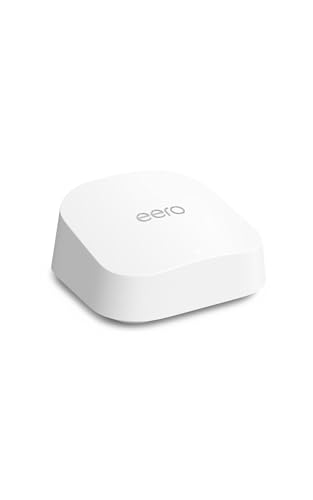
- Dual 2.5 GbE ports with up to 2.5 Gbps plans
- Supports 120+ devices across 2,000 sq. ft.
- TrueMesh software for stable coverage and easy expansion
Best For: Small offices that want simple mesh coverage and easy setup
Travel Security Pick
GL.iNet Slate 7 Wi-Fi 7 Travel Router

- Compact Wi-Fi 7 travel router with dual 2.5G ports
- Touchscreen controls VPN, AdGuard, and status
- OpenWrt firmware with OpenVPN and WireGuard support
Best For: Business travelers who need secure portable networking
Office Value Pick
TP-Link BE6500 Dual-Band WiFi 7 Router

- Wi-Fi 7 with MLO, Multi-RUs, and 4K-QAM
- Dual 2.5Gbps ports plus three 1 Gbps LAN ports
- Covers up to 2,400 sq. ft. and 90 devices
Best For: Small offices that want a practical Wi-Fi 7 upgrade with mesh support
Business-Ready Dual-WAN Pick

- Up to 3.6 Gbps dual-band Wi-Fi 7
- Dual-WAN and USB LTE/5G tethering
- AiProtection Pro security tools
Best For: Small offices needing flexible uptime and stronger security
Compact Multi-Port Office Choice
TP-Link Archer BE230 Wi-Fi 7 Router

- Wi-Fi 7 with MLO and 4K-QAM
- 2x2.5G plus 3x1G Ethernet ports
- Supports up to 60 devices
Best For: Small offices needing wired ports and easy mesh expansion
Mesh Coverage for Larger Spaces
Amazon eero 7 Wi-Fi 7 Mesh Router

- Three-pack covers up to 6,000 sq. ft.
- Supports 120+ devices and 2.5 Gbps plans
- TrueMesh software improves reliability
Best For: Multi-room offices needing broad, simple mesh coverage
Expandable Mesh Coverage
TP-Link Deco 7 BE25 WiFi 7 Mesh System

- Up to 6,600 sq. ft. coverage
- Supports over 150 devices
- 2.5G ports with wired backhaul
Best For: Large workspaces needing simple, scalable whole-area Wi-Fi
Higher-Capacity Standalone Router
NETGEAR Nighthawk RS150 WiFi 7 Router

- Up to 5.0 Gbps Wi‑Fi 7 speeds
- Supports up to 80 devices
- 2.5 Gig internet port
Best For: Busier small offices that need more device capacity
Business Power Pick – TP-Link Tri-Band BE9700 WiFi 7 Router
If you’re comparing wifi 7 routers for business, the Archer BE600 stands out for high-capacity wireless performance and multi-gig wired flexibility. Its tri-band Wi-Fi 7 design, 10G and 2.5G ports, and support for up to 120 devices make it a strong fit for busy offices, shared workspaces, or home offices with heavy traffic.
Best For: Small businesses or work-from-home setups that need multi-gig wired access, broad coverage, and support for lots of devices.
Pros:
- Tri-band Wi-Fi 7 with MLO, Multi-RUs, 4K-QAM, and up to 320 MHz channels
- 1x 10 Gbps WAN/LAN port, 1x 2.5 Gbps WAN/LAN port, and 3x 2.5 Gbps LAN ports
- Covers up to 2,600 sq. ft. and supports up to 120 devices
- Includes HomeShield security, VPN support, and EasyMesh compatibility
Cons:
- Coverage and device capacity are sized for larger homes/small offices rather than enterprise networks
- Security and VPN features may be more than some basic setups need
For buyers who want a business-friendly router with serious wired throughput and strong Wi-Fi 7 features, the BE600 offers a compelling balance of speed, security, and expandability. It is especially attractive if your network includes multi-gig internet or several bandwidth-hungry users.
Budget Mesh Choice – Amazon eero 7 Dual-Band Wi-Fi 7 Router
The eero 7 is a practical entry point for wifi 7 routers for business when you want simple deployment, reliable coverage, and easy expansion. With dual 2.5 GbE ports, support for internet plans up to 2.5 Gbps, and mesh-friendly software, it suits small offices that value stability over advanced networking knobs.
Best For: Small businesses or office teams that want a straightforward Wi-Fi 7 router with mesh expansion and easy setup.
Pros:
- Supports internet plans up to 2.5 Gbps with two auto-sensing 2.5 GbE ports
- Coverage up to 2,000 sq. ft. and support for 120+ devices
- TrueMesh, TrueRoam, and TrueChannel help maintain a reliable connection
- Backward compatible with previous eero generations and eero Built-in devices
Cons:
- Dual-band design offers less band variety than tri-band competitors
- Feature set is simpler than more advanced business-focused routers
If your priority is dependable whole-network coverage and an easy path to expansion, the eero 7 is a sensible choice. It is best for businesses that want a low-friction Wi-Fi 7 upgrade rather than a highly configurable network platform.
Travel Security Pick – GL.iNet Slate 7 Wi-Fi 7 Travel Router
The GL.iNet Slate 7 is a niche but useful option in the wifi 7 routers for business category if you travel often and need secure connectivity on the road. Its compact size, dual 2.5G Ethernet ports, touchscreen controls, and built-in VPN support make it a strong companion for hotel rooms, cruises, RV trips, and business travel.
Best For: Traveling professionals who need a pocket-size Wi-Fi 7 router with VPN tools and quick on-device controls.
Pros:
- Wi-Fi 7 dual-band design with 2.5G WAN and 2.5G LAN ports
- Touchscreen lets you scan QR codes, monitor speed, and toggle VPN or AdGuard
- OpenWrt 23.05 firmware supports customization and plugins
- Pre-installed OpenVPN and WireGuard with support for 30+ VPN providers
Cons:
- Travel router design is not meant to replace a full office router
- VPN speeds vary, with listed maximums lower than core router throughput
For frequent travelers, the Slate 7 delivers a rare mix of portability and business-minded security features. It is less about whole-office coverage and more about keeping your devices connected and protected wherever work takes you.
Office Value Pick – TP-Link BE6500 Dual-Band WiFi 7 Router
The TP-Link BE400 is a balanced pick for wifi 7 routers for business when you want modern features without stepping up to a premium tri-band model. With dual-band Wi-Fi 7, dual 2.5Gbps ports, support for up to 90 devices, and EasyMesh compatibility, it fits smaller offices and mixed-use work environments well.
Best For: Small offices and remote-work setups that need a capable Wi-Fi 7 router with multi-gig ports and mesh expandability.
Pros:
- Wi-Fi 7 features include MLO, Multi-RUs, and 4K-QAM
- Dual 2.5Gbps ports plus three 1 Gbps LAN ports for wired devices
- Covers up to 2,400 sq. ft. and supports up to 90 devices
- EasyMesh support, HomeShield security, and VPN client/server support
Cons:
- Dual-band design is less flexible than tri-band alternatives
- Maximum device count is lower than some larger-capacity models
Overall, the BE400 is a practical middle-ground router for businesses that need strong performance and useful security features without overbuying. It offers the essentials most small teams need, plus a clean upgrade path through EasyMesh.
Business-Ready Dual-WAN Pick – ASUS RT-BE58U WiFi 7 Router
The ASUS RT-BE58U is a practical pick for wifi 7 routers for business if you want faster wireless, flexible internet failover options, and built-in security in a compact dual-band design. It reaches up to 3.6 Gbps, supports multi-link operation for steadier connections, and adds dual-WAN plus USB-based 4G LTE/5G tethering for more resilient uptime.
Best For: Small offices, home offices, and teams that want a Wi-Fi 7 router with stronger security and flexible WAN options.
Pros:
- Wi-Fi 7 dual-band router with speeds up to 3600 Mbps
- Multi-link operation for more stable, efficient data transfers
- Dual-WAN support plus USB port for 4G LTE and 5G tethering
- AiProtection Pro and one-tap security scan for commercial-grade protection
Cons:
- Dual-band design only, so it does not add a 6 GHz band
- Best suited to smaller deployments rather than large enterprise networks
Overall, this model stands out when reliability matters as much as raw speed. For business users who want Wi-Fi 7 features, VPN compatibility, and a security-focused feature set, it offers a balanced mix of performance and practical network control.
Compact Multi-Port Office Choice – TP-Link Archer BE230 Wi-Fi 7 Router
The TP-Link Archer BE230 is a useful option in wifi 7 routers for business when you need a cost-conscious dual-band router with strong wired connectivity and support for many devices. It combines Wi-Fi 7 features like MLO and 4K-QAM with 2×2.5G plus 3x1G ports, making it a solid fit for small offices that want faster LAN handoff and simple management.
Best For: Small businesses and workspaces that need multiple wired ports, EasyMesh support, and coverage for many devices.
Pros:
- Wi-Fi 7 with MLO, Multi-RUs, and 4K-QAM
- 2×2.5G plus 3x1G ports for wired flexibility
- Covers up to 2,000 sq. ft. and supports up to 60 devices
- EasyMesh, HomeShield, VPN, and private IoT features
Cons:
- Dual-band design does not support 6 GHz
- Wireless top speed is lower than some higher-tier Wi-Fi 7 routers
This router makes sense if your priority is practical coverage and connectivity options rather than maximum wireless bandwidth. For a business environment with lots of endpoints and a need for easy setup, it delivers a well-rounded feature mix.
Mesh Coverage for Larger Spaces – Amazon eero 7 Wi-Fi 7 Mesh Router
The Amazon eero 7 is aimed at businesses or shared work environments that want wifi 7 routers for business with simple mesh coverage and reliable whole-building performance. This 3-pack supports internet plans up to 2.5 Gbps, includes two auto-sensing 2.5 GbE ports per unit, and uses eero’s TrueMesh, TrueRoam, and TrueChannel software to help keep connections on track.
Best For: Multi-room offices, small teams, and workspaces that need broad mesh coverage and easy expansion.
Pros:
- Three-node mesh system covers up to 6,000 sq. ft.
- Supports up to 120+ devices
- Two auto-sensing 2.5 GbE ports and up to 2.5 Gbps internet plans
- TrueMesh, TrueRoam, and TrueChannel help maintain reliable connections
Cons:
- Dual-band design, so there is no 6 GHz band
- Best suited to users who value mesh simplicity over advanced router customization
If your office needs wide coverage more than complex networking controls, this eero system is a strong contender. It focuses on dependable whole-space Wi-Fi 7 performance, making it a practical choice for keeping many users connected across a larger area.
Expandable Mesh Coverage – TP-Link Deco 7 BE25 WiFi 7 Mesh System
If you need wifi 7 routers for business-style coverage across a large office, studio, or multi-room workspace, the TP-Link Deco 7 BE25 is built around scale and stability. It combines Wi‑Fi 7 with mesh networking, 2.5G wired backhaul support, and AI-driven roaming to keep devices connected as people move around the space.
Best For: Teams or workspaces that need broad, expandable coverage for many devices with simple centralized app management.
Pros:
- Covers up to 6,600 sq. ft. and supports over 150 devices.
- Wi‑Fi 7 mesh with 2.5G ports and wired backhaul for stronger node-to-node traffic handling.
- AI-Roaming and a single network name help keep connections seamless across the space.
- Includes VPN support, HomeShield security features, and app-based setup and management.
Cons:
- Requires at least two Deco units to use wireless/wired backhaul features.
- Router requires a separate modem.
- Dual-band design may be less flexible than tri-band systems in heavy traffic environments.
This is a strong fit when coverage, expandability, and easy administration matter more than having a standalone router. The mesh design and 2.5G connectivity make it especially practical for distributed spaces that need consistent performance.
Small Office Wi‑Fi 7 – NETGEAR Nighthawk RS90 WiFi 7 Router
For smaller offices or home-office setups shopping for wifi 7 routers for business use, the NETGEAR Nighthawk RS90 offers a straightforward standalone option. It delivers dual-band Wi‑Fi 7 speeds, a 2.5 Gig internet port, and support for up to 50 devices, making it a practical fit when you want modern performance without moving to a mesh system.
Best For: Small offices, home offices, or workspaces that need a simple router with multi-gig internet support.
Pros:
- Wi‑Fi 7 dual-band speeds up to 3.6 Gbps.
- Covers up to 2,000 sq. ft. and supports up to 50 devices.
- Includes a 2.5 Gig internet port and four Gigabit LAN ports.
- Offers WPA3 security, NETGEAR Armor, Smart Connect, and guest WiFi.
Cons:
- Router only; requires a separate modem.
- Coverage may be limited in larger or multi-story spaces.
- Some ISP gateway or fiber setups may need extra configuration.
The RS90 is a good pick if you want a business-friendly router with strong security and easy setup, but don’t need mesh coverage. Its multi-gig port and modest footprint make it best for focused, smaller deployments.
Higher-Capacity Standalone Router – NETGEAR Nighthawk RS150 WiFi 7 Router
If you’re comparing wifi 7 routers for business and want a step up in speed and client capacity, the NETGEAR Nighthawk RS150 is aimed at busier environments. It delivers dual-band Wi‑Fi 7 speeds up to 5.0 Gbps, supports up to 80 devices, and includes a 2.5 Gig internet port for faster service plans.
Best For: Busier small offices or shared workspaces that need higher device capacity and faster wireless throughput.
Pros:
- Wi‑Fi 7 speeds up to 5.0 Gbps.
- Supports up to 80 devices and covers up to 2,250 sq. ft.
- 2.5 Gig internet port supports multi-gig cable or fiber plans.
- Compact design with high-performance antennas and WPA3 security.
Cons:
- Router only; does not include a built-in modem.
- A separate cable modem is required for coax-based internet service.
- Still a dual-band design, so very dense networks may want mesh instead.
The RS150 is the most capable standalone option in this set for a small business that needs more headroom for devices and throughput. It balances speed, coverage, and a small footprint without adding mesh complexity.
How We Picked These Wifi 7 Routers for Business
We focused on office-ready value: multi-gig Ethernet, strong wireless throughput, support for many devices, and features that help businesses stay online during busy workdays. We also favored models with mesh options, VPN support, dual-WAN or USB networking where useful, and coverage claims that fit small offices through larger multi-room spaces.
Quick Comparison
For a compact office, a single-router option with 2.5G ports may be enough. For larger floors, retail spaces, or teams spread across rooms, a mesh system is usually the safer choice. If your business depends on secure remote access, prioritize models with VPN support and stable CPU performance. If you have fiber or multi-gig internet, make sure the router has at least one 2.5G or 10G port so your WAN speed is not bottlenecked.
Key Buying Factors for Wifi 7 Routers for Business
Coverage and Layout
Coverage claims are a starting point, not a guarantee. Open-plan offices are easier to cover than spaces with thick walls, metal shelving, or several enclosed rooms. Mesh systems can reduce dead zones and roaming issues when employees move between areas.
Wired Ports and Internet Speed
Multi-gig ports matter more than many buyers expect. A 2.5G WAN port is a strong baseline for small business internet plans, while 10G is better for higher-end connections or future-proofing. Extra LAN ports help connect desktops, printers, access points, and local storage without needing a separate switch right away.
Device Capacity and Stability
Look for routers rated for many devices if your office has phones, laptops, cameras, and smart equipment all sharing the network. A stronger processor and enough RAM can help maintain responsiveness when multiple people are on calls, syncing files, or transferring large documents at the same time.
Security and Remote Work Features
Business buyers should pay attention to VPN support, guest networking, and management tools. These features are especially useful for remote access, contractor connectivity, and separating employee traffic from visitor devices.
Who Should Buy Which Wifi 7 Routers for Business?
If you run a small office and want the simplest upgrade, choose a single-router model with dual 2.5G ports and solid device support. If your business spans multiple rooms or a larger footprint, a mesh system is the better fit. If you travel often or need a portable secure connection, a compact travel router can be useful alongside your main office setup. For teams that rely heavily on VPNs, wired backbones, or future bandwidth growth, pick one of the more advanced router-only models with stronger port selection and higher speed headroom.
In short, the best choice depends less on raw speed claims and more on matching the router to your office size, internet plan, and connectivity needs. The right WiFi 7 router should keep your network fast, stable, and easy to scale as your business grows.