Choosing the right display can make hybrid meetings feel far more organized, interactive, and productive. The best digital whiteboards for Microsoft Teams do more than show content—they help teams brainstorm, annotate, share wirelessly, and stay engaged in the same room or across locations.
In this roundup, we focus on practical features that matter in real meeting spaces, from touch responsiveness and camera quality to system compatibility, mounting flexibility, and room size.
Best 10 Digital Whiteboards for Microsoft Teams Picks for 2026
Teams-Ready Hybrid Hub
55-inch Avocor Windows Collaboration Display

- Certified for Microsoft Teams and whiteboard sessions
- 4K UHD with 20-point touch input
- Built-in camera, speakers, and USB-C
Best For: conference rooms and hybrid workspaces
Pro Meeting Canvas
NearHub Max 55 Interactive Whiteboard

- Native Microsoft Teams and Zoom Rooms certification
- Windows 11 Pro with 16GB RAM and 256GB SSD
- 4K camera, 8 mics, and 40-point touch
Best For: IT-managed conference rooms and classrooms
EDLA Classroom Board
55-inch Android 14 Smart Whiteboard
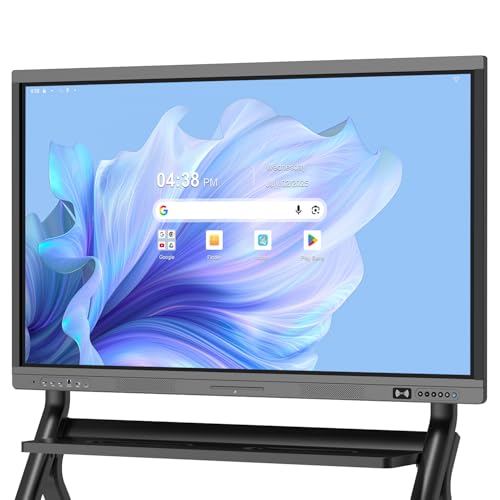
- Google EDLA-certified with OTA updates
- 4K anti-glare touchscreen with 20-point touch
- Wireless screen sharing plus HDMI and QR sharing
Best For: schools and hybrid rooms using Google-based collaboration
Windows 11 Teams Collaboration Board
55-inch Windows 11 Smart Board
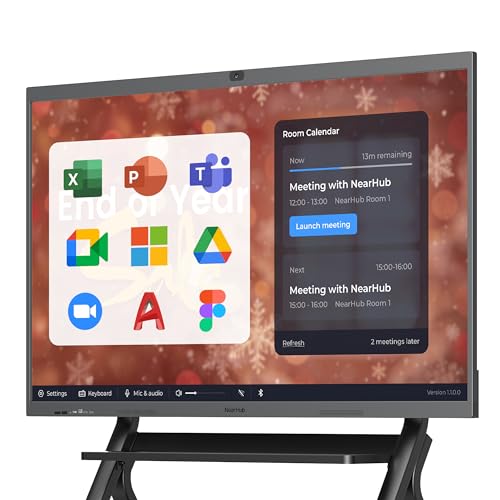
- Native Windows 11 OPS with Teams support
- Built-in 4K camera, 8 mics, and speakers
- 20-point 4K touch with Intune management
Best For: Teams-heavy teams that want a Windows-based all-in-one meeting board
Android 13 Shared Meeting Board
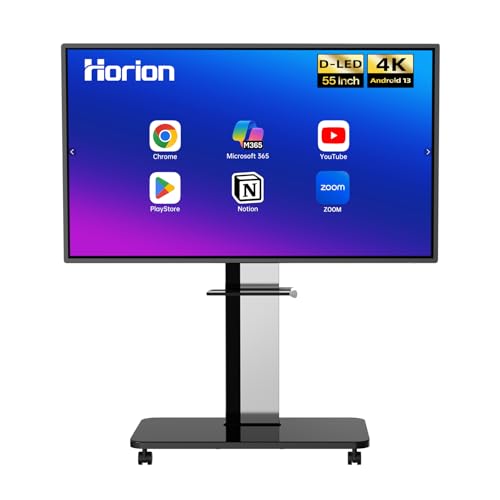
- Teams-compatible with wireless screen sharing
- 40-point anti-glare touch display
- Android 13 with Google Play and Wi-Fi 5
Best For: Schools and offices needing a simple Teams-ready board with casting
App-Rich Hybrid Collaboration Board

- 250+ apps with Microsoft 365 support
- Cloud whiteboard with instant save and share
- Wi-Fi 6 and fleet management for IT teams
Best For: Hybrid teams that want an app-rich board centered on whiteboarding and sharing
Dual-System Smartboard
55" 4K Interactive Board with Windows Option

- Android 11 with optional Windows 10 OPS support
- 55" 4K UHD display with 178° viewing angle
- Split-screen sharing for up to 4 devices
Best For: Offices and classrooms needing flexible dual-system collaboration
AI Collaboration Board
55" Android 14 Smart Board with Camera

- Native 4K display with Android 14 system
- Up to 60 touch points for collaborative work
- Built-in 48MP camera and microphone
Best For: Business teams needing an all-in-one meeting display
Teams-Ready Hybrid Hub – 55-inch Avocor Windows Collaboration Display
If you want digital whiteboards for Microsoft Teams that feel purpose-built for meetings, this Avocor 55-inch collaboration display is a strong fit. It’s certified for Microsoft Teams, supports whiteboard sessions, and adds 4K visuals, 20-point touch, and built-in conferencing hardware for a cleaner room setup.
Best For: Conference rooms, classrooms, and hybrid teams that want a Teams-certified interactive display with built-in camera and speakers.
Pros:
- Certified for Microsoft Teams with built-in whiteboard session support.
- 4K UHD screen with 20-point touch for finger, pen, and palm interaction.
- Integrated wide-angle camera and speakers simplify video meetings.
- USB-C connectivity and OPS slot support flexible workstation upgrades.
Cons:
- Only one HDMI port and one USB port may limit peripheral-heavy setups.
- No built-in TV tuner, so it is focused on collaboration rather than entertainment.
Overall, this is a practical pick for buyers who want a streamlined Microsoft Teams display with collaboration features already built in. It’s designed to keep meeting rooms and learning spaces simple, responsive, and ready for whiteboarding.
Dual-System Collaboration Board – Android 13 and Windows 11 Smart Board
This smart board is built for teams that need flexible digital whiteboards for Microsoft Teams and other meeting tools, thanks to its dual-system design. Android 13 handles everyday use, while the optional Windows 11 OPS PC supports professional software when you need a more desktop-like workflow.
Best For: Offices, classrooms, and team spaces that want a dual-OS whiteboard with strong touch performance and remote collaboration tools.
Pros:
- Dual-system setup with Android 13 and optional Windows 11 OPS support.
- 4K display with 40-point multi-touch for shared writing and brainstorming.
- Remote whiteboard collaboration works without login for easier sharing.
- Dual 20W speakers and meeting tools like timers and voting add utility.
Cons:
- The product details note a 55-inch display in the feature text, so size information should be double-checked.
- Windows 11 use depends on adding the optional OPS PC.
For buyers who want a versatile interactive board with both app-based simplicity and Windows compatibility, this model covers a lot of ground. Its collaboration features make it useful for brainstorming, teaching, and meeting-room use.
Pro Meeting Canvas – NearHub Max 55 Interactive Whiteboard
For digital whiteboards for Microsoft Teams in serious meeting environments, the NearHub Max 55 is built around full Windows 11 Pro performance and native Teams certification. It combines a 4K touch display, an AI-assisted 4K camera, and an 8-mic array with enterprise management features for a more complete collaboration setup.
Best For: Business teams, classrooms, and IT-managed spaces that need a Windows-based whiteboard with native Microsoft Teams support.
Pros:
- Native Microsoft Teams certification with full Windows 11 Pro desktop apps.
- Includes a 4K AI camera, auto-framing, speaker tracking, and 8 microphones.
- 40-point 4K touch display with low-latency inking for collaborative work.
- Supports cloud auto-save, wireless casting, and Microsoft Intune management.
Cons:
- More enterprise-focused than a basic plug-and-play whiteboard.
- Optional mobile stand is sold separately.
This model stands out if you want a whiteboard that behaves more like a full Windows collaboration workstation than a simple display. It is especially appealing when Microsoft Teams, room audio, and centralized IT control all matter.
EDLA Classroom Board – 55-inch Android 14 Smart Whiteboard
This 55-inch board is a practical choice for buyers comparing digital whiteboards for Microsoft Teams alongside Android-based collaboration screens. While it is centered on Google EDLA certification rather than Teams certification, it offers strong cross-device sharing, anti-glare 4K touch, and a feature set that works well for office and classroom collaboration.
Best For: Offices, schools, and hybrid rooms that want an Android-based whiteboard with secure app access and easy screen sharing.
Pros:
- Google EDLA certification with access to Google Play Store and Google Drive.
- Android 14 with 8GB RAM and 128GB storage for smooth performance.
- 4K anti-glare touchscreen with 20-point multi-touch and ±1mm touch accuracy.
- Wireless screen sharing, HDMI input, and QR sharing for current-page notes.
Cons:
- It is not listed as Microsoft Teams certified.
- Standing bracket is sold separately.
Buyers who want a secure Android whiteboard with broad device compatibility will find a lot to like here. It’s a solid collaboration screen, especially when Google services and flexible sharing matter more than native Teams integration.
Windows 11 Teams Collaboration Board – 55-inch Windows 11 Smart Board
If you want digital whiteboards for microsoft teams that behave more like a full Windows workstation than a limited appliance, the NearHub S Pro is built for that job. Its built-in Windows 11 OPS PC supports Teams, Office, Zoom, and other desktop apps, while the 4K touch display, camera, microphones, and speakers make it a strong all-in-one meeting device for hybrid rooms.
Best For: Teams-focused businesses that want a Windows-based board with built-in conferencing hardware and IT control.
Pros:
- Native Windows 11 OPS with 12th Gen Core i5, 16GB RAM, and 128GB storage
- Built-in 4K camera, 8 microphones, and dual front speakers for video meetings
- 4K UHD touchscreen with 6ms latency and up to 20 touchpoints
- Supports Microsoft Intune, Azure AD, and Okta for centralized management
Cons:
- Mobile stand is optional and not included
- At 55 inches, it may be best suited to smaller rooms rather than large conference spaces
The NearHub S Pro stands out if you want one board that can run full desktop workflows and handle meetings without extra add-ons. It is especially compelling for organizations that care about Teams compatibility, security, and enterprise deployment.
Android 13 Shared Meeting Board – 55-inch 4K Digital Whiteboard
The HORION 55-inch is a practical pick for digital whiteboards for microsoft teams when you want a simple shared display with wireless casting and built-in audio. It runs Android 13 with Google Play, supports Teams and Zoom, and adds 4-way split-screen collaboration plus touchback control so users can present and interact without complicated setup.
Best For: Classrooms and offices that want a straightforward Teams-compatible board with wireless sharing and an easy Android ecosystem.
Pros:
- 4K anti-glare 40-point touchscreen with under 30ms latency
- Wireless screen sharing from iPhone, Mac, Windows, and Android devices
- Supports Teams and Zoom, plus 4-way split-screen collaboration
- Android 13, Google Play, Wi-Fi 5, and Bluetooth 5.2
Cons:
- External cameras and microphones are sold separately
- Not as conference-ready out of the box as models with built-in camera arrays
This model makes sense if your team already has conferencing peripherals and mainly needs an interactive board for meetings, teaching, and screen sharing. Its value is in the combination of large-format touch, privacy-friendly add-on conferencing, and a stable Android platform.
App-Rich Hybrid Collaboration Board – 55-inch 4K Smart Board
For teams comparing digital whiteboards for microsoft teams, the Vibe S1 is a flexible option that keeps the workflow app-centered rather than hardware-heavy. Its Chromium-based VibeOS supports Microsoft 365 and other familiar tools, while the cloud whiteboard, annotation features, and split-screen layout make it useful for meetings, brainstorming, and classroom presentation work.
Best For: Teams that want an app-rich collaborative board with cloud whiteboarding and strong remote-sharing features.
Pros:
- Open ecosystem with 250+ apps and support for Microsoft 365
- Cloud-based whiteboard with infinite canvas and instant save/share
- 4K UHD display with split-screen presentation and annotation tools
- Wi-Fi 6, Bluetooth 5.2, and enterprise fleet management support
Cons:
- Uses Chromium OS rather than native Windows for desktop app workflows
- Touch response is 10-point infrared, not a higher-touch-count Windows board
The Vibe S1 is best when collaboration software matters more than built-in conferencing hardware. It offers a polished mix of whiteboarding, app access, and IT control for hybrid teams that work across devices.
Dual-System Smartboard – 55" 4K Interactive Board with Windows Option
If you’re comparing digital whiteboards for Microsoft Teams, this 55-inch smart board stands out for teams that want flexibility between Android and Windows workflows. Its 4K display, 20-point touch support, and split-screen sharing make it a practical fit for meetings, classrooms, and collaborative sessions.
Best For: Offices and classrooms that want a dual-system interactive board with strong presentation and collaboration features.
Pros:
- Android 11 plus optional Windows 10 OPS support for broader workflow compatibility
- 55″ 4K UHD panel with 178° viewing angle for clearer shared viewing
- Supports up to 4 devices in split-screen sharing, with one-touch shortcuts for whiteboard, screenshots, and input switching
- Google Play access and built-in video conference support for meetings and teaching
Cons:
- Windows 10 functionality depends on an optional OPS PC
- Board only, so mounting and setup planning are still required
- Best suited to users who need an all-in-one display rather than a lightweight portable solution
Overall, this board is a strong choice if you want an interactive display that can handle collaborative work without forcing you into a closed ecosystem. It offers a useful balance of display quality, touch interaction, and conferencing support.
Conference-Ready Horion Board – 55" 4K Smart Board with Camera
For buyers shopping for digital whiteboards for Microsoft Teams-style collaboration, this Horion 55-inch smart board is built around multi-user interaction and remote sharing. It combines a 4K anti-glare display, 40-point touch, and built-in conference camera support for meeting spaces that need both whiteboarding and video.
Best For: Conference rooms, classrooms, and hybrid teams that want a touch board with built-in camera support.
Pros:
- 4K UHD panel with 3.2mm AG anti-glare glass for clearer viewing in bright rooms
- Supports up to 40 touch points for collaborative writing and drawing
- Built-in Android 13 plus external OPS support for Windows mode
- Includes remote whiteboard collaboration, true 4K wireless mirroring, and dual 20W speakers
Cons:
- Windows mode requires a separate OPS purchase
- Conference camera is included in this bundle, which may be more than some buyers need
- Feature depth may be best suited to organized meeting spaces rather than casual use
This is a versatile option if you want interactive whiteboarding and conferencing in one setup. Its strong touch support and remote collaboration tools make it especially practical for hybrid meetings and shared presentations.
AI Collaboration Board – 55" Android 14 Smart Board with Camera
If you want digital whiteboards for Microsoft Teams-style presentations with a more modern feature set, this Plus 55-inch board is built for office collaboration. It pairs a native 4K display with Android 14, high touch-point support, and a built-in AI-assisted camera and microphone for interactive communication.
Best For: Business teams and offices that want an all-in-one smart board with camera and microphone support.
Pros:
- Native 4K UHD display with wide viewing angles for presentations
- Android 14 with 8GB RAM and 256GB storage for standalone use
- Up to 60 touch points with pen tip recognition for detailed collaboration
- Includes a 48MP camera and microphone for teaching, meetings, and presentations
Cons:
- OPS expansion is optional and sold separately if additional computing is needed
- Features are geared toward office and business use, so it may be more than a simple annotation board
- Installation support is location-dependent
This model is a good pick when you want a single display to handle collaboration, content sharing, and video communication. The built-in camera and microphone give it an edge for teams that run frequent meetings or instruction sessions.
How We Picked the Best Digital Whiteboards for Microsoft Teams
We looked for boards that fit real Microsoft Teams workflows, with emphasis on collaboration, video meeting readiness, display clarity, and setup simplicity. Priority went to models with strong touch performance, reliable 4K visuals, integrated audio/video options, and business-friendly operating systems. We also considered whether the board suits conference rooms, classrooms, and hybrid workspaces without requiring a complicated tech stack.
Quick Comparison
As you compare Digital Whiteboards for Microsoft Teams, think in terms of room size and use case. Some models are better as all-in-one conference devices with built-in camera and microphone systems, while others are better as flexible smart displays that pair with separate peripherals. Windows-based boards tend to fit Microsoft-first environments especially well, while Android-based options can still work smoothly when Teams usage is centered on screen sharing, whiteboarding, and connected meeting hardware.
Key Buying Factors for Digital Whiteboards for Microsoft Teams
Teams Compatibility and Workflow
Confirm how the board joins meetings, shares content, and supports collaboration tools. The smoothest experience usually comes from systems designed for Microsoft environments or from boards that integrate cleanly with Teams Rooms hardware and software.
Display Size and Resolution
For small huddle rooms, 55-inch boards are often the sweet spot. Larger meeting rooms may benefit from a 65-inch display. A 4K panel helps text, diagrams, and spreadsheets stay crisp, especially when participants sit farther away.
Touch, Annotation, and Whiteboarding
Touch accuracy matters more than many buyers expect. Look for fast, multi-point touch and low-lag inking so teams can write naturally during live meetings. If brainstorming is a major use case, prioritize boards with strong whiteboarding tools and smooth palm rejection.
Camera, Microphone, and Speakers
If the board will handle hybrid meetings on its own, built-in video and audio hardware can reduce clutter and simplify setup. In larger rooms, external conferencing gear may still deliver better pickup and coverage, so balance convenience with room acoustics.
Operating System and Expandability
Windows-based boards are a strong fit for Microsoft-heavy organizations, while dual-system models can offer more flexibility across apps and workflows. Check memory, storage, and connectivity if you plan to run collaboration apps, wireless casting, or cloud tools regularly.
Who Should Buy Which Digital Whiteboards for Microsoft Teams?
If you want the most straightforward Microsoft-first setup, choose a Windows-based option. If your space is a classroom or flexible meeting room, a dual-system or Android-powered board may be a better value. For hybrid conference rooms, an all-in-one model with camera and microphones is usually the most practical choice. For teams that prioritize brainstorming and shared editing, focus on touch performance and annotation tools first, then compare the rest of the hardware.
Overall, the best choice depends on whether you need a simple presentation screen, a true collaboration hub, or a full meeting-room centerpiece. Matching the board to your room size and Microsoft Teams workflow will matter more than chasing the most features on paper.