Choosing business routers for multiple devices is less about raw speed and more about stability, coverage, and the ability to keep many users online at once.
In this roundup, we focus on routers that can handle busy workspaces, multi-WAN failover, VPN access, and modern multi-gig connections without creating bottlenecks.
Best 10 Business Routers for Multiple Devices Picks for 2026
Multi-WAN Business Gateway

- Up to 4 WAN ports for load balancing
- WireGuard, OpenVPN, IPsec, Zerotier support
- IP/MAC/URL filtering and device control
Best For: small offices needing multi-WAN routing and VPN control
Wi-Fi 7 Coverage Router
NETGEAR Nighthawk RS140 Wi-Fi 7 Router

- Wi-Fi 7 speeds up to 5.0 Gbps
- Supports up to 80 devices
- 2.5 Gig internet port for faster service
Best For: large homes or small teams needing fast Wi-Fi and high device capacity
Wired Multi-WAN VPN Router
TP-Link ER605 V2 Gigabit VPN Router

- Up to 3 WAN ports plus USB WAN backup
- Strong VPN support for SMB networks
- Advanced firewall and filtering features
Best For: small businesses needing wired failover and VPN-heavy networking
High-Capacity Wi-Fi 6 Router

- Wi-Fi 6 up to 6 Gbps with 8 streams
- Dual 2.5G ports plus four 1G ports
- Supports over a hundred devices
Best For: power users and small offices needing speed, flexibility, and high device support
Enterprise Edge Router
Cisco C1111-8P 8-Port Dual WAN Router

- 8-port wired design for office devices
- Dual WAN with 1 Gbps transfer rate
- High firewall security and enterprise Wi‑Fi support
Best For: Small offices needing a secure wired router with dual-WAN flexibility
High-Device Wi‑Fi 7 Router
GL.iNet Flint 3 Tri-Band 9 Gbps

- Tri-band Wi‑Fi 7 with up to 9 Gbps speeds
- Handles over a hundred devices
- Five 2.5G ports plus VPN support
Best For: Busy networks that need high wireless speed and lots of device capacity
Multi-WAN Business Router

- 2× 2.5G ports and 10 Gigabit ports
- Load balances across up to 11 WAN ports
- VPN and security features for business networks
Best For: Wired offices needing multi-WAN balancing and advanced VPN/security tools
Wi-Fi 7 Performance Pick
GL.iNet Flint 3e Wi-Fi 7 Router

- Wi‑Fi 7 up to 6.5 Gbps
- Supports 100+ devices
- WireGuard/OpenVPN up to 680 Mbps
Best For: Busy homes or small teams needing fast Wi‑Fi and VPN support
Managed Business Core
NETGEAR PR60X Dual WAN Pro Router
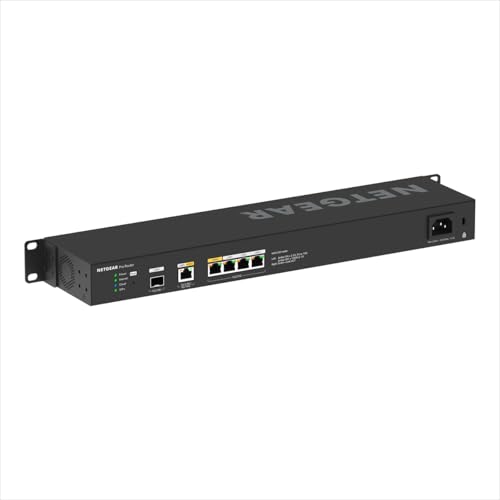
- Dual WAN with failover/load balancing
- 10G, multi-gig, and 10G SFP+ ports
- Up to 32 VLANs with Insight management
Best For: Small businesses needing reliable wired networking and remote management
Tri-Band Capacity Choice
TP-Link Archer AXE75 WiFi 6E Router

- Tri-band Wi‑Fi 6E up to 5400 Mbps
- 6 GHz band with OFDMA for more devices
- 2.5 Gbps WAN port and HomeShield support
Best For: Multi-device homes or small offices wanting easy Wi‑Fi 6E expansion
Multi-WAN Business Gateway – Cudy R700 Gigabit VPN Router
If you need business routers for multiple devices and multiple internet lines, the Cudy R700 is built around that job. It offers up to 4 WAN ports, load balancing, and a mix of VPN and filtering tools that fit a small office looking for a compact wired gateway.
Best For: Small offices that want multi-WAN failover, VPN support, and straightforward network control.
Pros:
- Supports up to 4 WAN ports to help optimize bandwidth across multiple lines
- Includes WireGuard, OpenVPN, IPsec, PPTP, L2TP, and Zerotier support
- Load balancing distributes traffic by bandwidth proportion across WAN ports
- Offers IP/MAC/URL filtering and device control for employee access rules
Cons:
- Wired-only design, so it is not a Wi-Fi router
- Plastic case rather than metal despite the compact desktop form
- Best suited to small business networking rather than home wireless coverage
The R700 is a practical pick if your priority is resilient wired connectivity, not wireless extras. For offices that need flexible WAN setup and built-in VPN options, it covers the core business routing features well.
Wi-Fi 7 Coverage Router – NETGEAR Nighthawk RS140 Wi-Fi 7 Router
The NETGEAR Nighthawk RS140 is aimed at households or offices that need fast wireless performance rather than a wired multi-WAN setup. For buyers comparing business routers for multiple devices, its value is in handling up to 80 devices with Wi-Fi 7 speeds and a 2.5 Gig internet port.
Best For: Large homes or small workspaces that want Wi-Fi 7 speed, broad coverage, and support for many connected devices.
Pros:
- Wi-Fi 7 speeds up to 5.0 Gbps for demanding wireless use
- Covers up to 2,250 sq. ft. and supports up to 80 devices
- 2.5 Gig internet port supports multi-gig service plans
- Sleek smaller footprint with high-performance antennas
Cons:
- Router only, so it does not include a built-in cable modem
- No multi-WAN or VPN feature set in the supplied notes
- Separate modem may be needed for cable or fiber internet service
This is a strong wireless-first choice when device count and speed matter most. If your setup depends on Ethernet WAN balancing or VPN-heavy office routing, another model may fit better.
Wired Multi-WAN VPN Router – TP-Link ER605 V2 Gigabit VPN Router
The TP-Link ER605 V2 is a wired option made for users who want business routers for multiple devices, multiple WAN links, and solid security controls. It combines up to 3 WAN ports with USB WAN backup and a broad VPN feature set, making it a practical gateway for small office networks.
Best For: SMBs that need wired multi-WAN routing, VPN support, and security features in one compact router.
Pros:
- Up to 3 WAN ports help optimize bandwidth through one device
- USB WAN support allows 4G/3G modem backup
- Supports up to 20 LAN-to-LAN IPsec, 16 OpenVPN, 16 L2TP, and 16 PPTP connections
- Includes advanced firewall policies, DoS defense, and IP/MAC/URL filtering
Cons:
- Wired router design, so it does not provide Wi-Fi coverage on its own
- USB WAN depends on a compatible 4G/3G modem
- Best fit is office routing, not a general home wireless setup
For a business gateway, this model balances WAN flexibility, backup connectivity, and security in a straightforward package. It is especially appealing if you want a dependable wired router with strong VPN support.
High-Capacity Wi-Fi 6 Router – GL.iNet Flint 2 MT6000 Router
The GL.iNet Flint 2 is a fast Wi-Fi 6 router that also works well when business routers for multiple devices need strong wired capacity and VPN performance. With dual 2.5G ports, pre-installed OpenWrt, and support for over a hundred devices, it is built for users who want flexibility and serious throughput.
Best For: Power users, gaming setups, and small offices that want high device capacity, 2.5G ports, and OpenWrt flexibility.
Pros:
- Wi-Fi 6 speeds up to 6 Gbps with 8-stream performance
- Dual 2.5G ports plus four 1G ports for fast wired connections
- OpenVPN and WireGuard speeds up to 900 Mbps and 880 Mbps
- Supports over a hundred devices and includes AdGuard Home support
Cons:
- Firmware update is recommended immediately after setup
- May be more router than needed for basic internet sharing
- Focuses on advanced features rather than simple plug-and-play use
Flint 2 stands out when you want speed, multi-device headroom, and a router platform you can extend. It is a strong fit for advanced users who value performance tuning and VPN capability.
Enterprise Edge Router – Cisco C1111-8P 8-Port Dual WAN Router
Cisco C1111-8P 1100 Series 8-Port Dual WAN Ethernet Integrated Services Router (Renewed)
Check Price On AmazonIf you need business routers for multiple devices in a wired office environment, the Cisco C1111-8P is built for straightforward network segmentation and dual-WAN flexibility. It offers 8 ports, 1 Gbps data transfer, and a high firewall security level, making it a practical fit for small business or enterprise deployments that prioritize stable Ethernet connectivity.
Best For: Small businesses or enterprise teams that want a wired, security-focused router with dual-WAN support.
Pros:
- 8-port design supports multiple wired devices
- Dual WAN and 1 Gbps transfer rate suit business networking needs
- High firewall security level with WPA/WPA2 enterprise support
- Wi‑Fi 6 capability adds modern wireless compatibility
Cons:
- Renewed unit, so condition may vary from new stock
- Single-band wireless spec is less flexible than dual- or tri-band models
- 90-day limited warranty is shorter than many new business routers
Overall, this is a solid choice if your priority is dependable wired routing, security, and enough ports for office devices rather than the latest all-wireless feature set.
High-Device Wi‑Fi 7 Router – GL.iNet Flint 3 Tri-Band 9 Gbps
For business routers for multiple devices, the GL.iNet Flint 3 is aimed at busy homes, work setups, and high-density networks that need fast wireless performance. Its tri-band Wi‑Fi 7 design, 5 x 2.5G ports, and support for over a hundred devices make it well suited to offices that want strong throughput for streaming, video calls, and everyday shared connectivity.
Best For: Teams or power users who need a fast Wi‑Fi 7 router with lots of device capacity.
Pros:
- Tri-band Wi‑Fi 7 with up to 9 Gbps wireless speed
- Supports over a hundred devices for dense networks
- Five 2.5G ports improve wired flexibility
- OpenVPN and WireGuard speeds up to 680 Mbps
Cons:
- Performance depends on firmware updates and network conditions
- Some features are geared more toward advanced users
- Coverage is rated up to 2,000 square feet, which may not suit every larger space
This is a strong pick if you want modern Wi‑Fi 7 speed, lots of device headroom, and useful tools like AdGuard Home and parental controls in one router.
Multi-WAN Business Router – Omada ER7412-M2 Multi-Gig VPN
Omada ER7412-M2, Multi-Gigabit VPN Router | Quad-core, 2X 2.5G Ports, 1x USB 3.0 Port
Check Price On AmazonThe Omada ER7412-M2 is a strong fit for business routers for multiple devices when you need extensive wired capacity and multi-WAN load balancing. With 2.5G WAN/LAN ports, 10 Gigabit WAN/LAN ports, and load balancing across up to 11 WAN ports, it is designed for offices that want to maximize multi-line broadband and keep traffic moving efficiently.
Best For: Businesses that need a high-port-count wired router with advanced VPN and WAN load balancing.
Pros:
- 2× 2.5G ports plus 10 Gigabit WAN/LAN ports for broad wired support
- Load balancing on up to 11 WAN ports
- Strong VPN options including WireGuard, OpenVPN, SSL, and IPSec
- Includes DoS/DDoS protection, DPI, and IPS/IDS security tools
Cons:
- Wired-only design may not suit offices needing built-in Wi‑Fi
- More advanced feature set may be unnecessary for simple setups
- Best value depends on having multi-line broadband or many connected devices
If your priority is routing many wired clients with strong security and multi-WAN control, this Omada model is built for that job.
Wi-Fi 7 Performance Pick – GL.iNet Flint 3e Wi-Fi 7 Router
If you want business routers for multiple devices without giving up fast wireless performance, the GL.iNet Flint 3e is built for dense usage. Its Wi‑Fi 7 feature set, strong VPN speeds, and support for over a hundred devices make it a practical choice for busy homes, small offices, and power users who need stable everyday connectivity.
Best For: Busy households or small teams that need high device capacity, fast VPN access, and Wi‑Fi 7 speeds.
Pros:
- Wi‑Fi 7 with up to 6.5 Gbps and ultra-low latency for streaming, gaming, and video calls
- WireGuard and OpenVPN speeds up to 680 Mbps for strong remote access performance
- Supports over a hundred devices, making it well suited to crowded networks
- Includes AdGuard Home support and Bark parental controls for added network management
Cons:
- Coverage is listed at up to 2,500 square feet, so larger spaces may need extra hardware
- VPN speed depends on your ISP, server location, and service provider
- Advanced features may be more than basic users need
This is a strong all-around pick if your priority is modern wireless performance and heavy device support in one router. It leans more toward advanced home or small business use than simple plug-and-play networking.
Managed Business Core – NETGEAR PR60X Dual WAN Pro Router
For business routers for multiple devices, the NETGEAR PR60X focuses on dependable wired performance, remote management, and network segmentation. With dual WAN failover, multi-gig and 10G ports, plus Insight cloud management, it is aimed at small and medium businesses that need stable connectivity and easier administration.
Best For: Small businesses that want dual-WAN reliability, multi-gig wired throughput, and cloud-managed networking.
Pros:
- Dual WAN with failover and load balancing for more reliable connectivity
- 10G/Multi-Gig ports plus a 10G SFP+ port for high-speed wired setups
- Supports up to 32 VLANs for better traffic separation and security
- Insight cloud management helps with remote administration from anywhere
Cons:
- It is a wired router, so it is designed to work with access points for Wi‑Fi coverage
- Insight management includes a 1-year subscription
- Best value is in business deployments rather than casual home use
This router makes sense when network uptime, segmentation, and managed control matter more than consumer extras. It is especially useful in environments that already use access points and need a solid backbone for many connected devices.
Tri-Band Capacity Choice – TP-Link Archer AXE75 WiFi 6E Router
If you are shopping for business routers for multiple devices and want a simpler path to higher wireless capacity, the TP-Link Archer AXE75 is a practical tri-band option. Its 6 GHz band, OFDMA support, and strong memory and CPU specs are geared toward smoother multitasking for homes or smaller offices.
Best For: Multi-device households or small offices that want tri-band Wi‑Fi 6E with easy expansion through OneMesh.
Pros:
- Tri-band Wi‑Fi 6E with up to 5400 Mbps total throughput
- 6 GHz band and OFDMA help improve responsiveness when many devices are active
- 2.5 Gbps WAN port adds faster wired internet support
- Supports VPN server/client, WPA3, and TP-Link HomeShield security features
Cons:
- HomeMesh expansion depends on using a compatible OneMesh extender
- It is still a consumer router, not a full managed business platform
- LAN ports are rated at 1 Gbps rather than multi-gig throughout
This model balances speed, device capacity, and security well for users who need more than a basic router. It is a good fit when you want stronger wireless handling without moving into enterprise-class hardware.
How We Picked the Best Business Routers for Multiple Devices
For Business Routers for Multiple Devices, the best options balance throughput, wired port count, WAN flexibility, VPN support, and management features. We also favored models that make sense for small offices, growing teams, and mixed wired-wireless networks.
Priority went to routers with multi-gig ports, dual-WAN or multi-WAN support, VLAN options, strong firewall features, and reliable platform management. That matters more than headline wireless speed alone when multiple employees, printers, phones, and access points are all sharing the same network.
Quick Comparison
If you need the simplest setup, a wired VPN router with load balancing is often the most practical choice. If you need wireless coverage built in, tri-band Wi-Fi 7 or Wi-Fi 6E models can improve capacity in dense environments. For managed offices, cloud-managed or SDN-compatible routers are easier to scale and monitor.
Fast Takeaways
Choose multi-WAN when uptime matters. Choose multi-gig when file transfers, backups, or local server traffic are heavy. Choose stronger VPN support if remote staff regularly connect back to the office. Choose a management platform if IT needs centralized control.
Key Buying Factors for Business Routers for Multiple Devices
Capacity: Look beyond maximum wireless speed. A router can advertise fast Wi-Fi and still struggle if its CPU, memory, or port layout cannot keep up with many simultaneous connections.
Wired connectivity: More Ethernet ports, dual 2.5G ports, or 10G uplinks can make a major difference for switches, NAS devices, workstations, and access points.
WAN redundancy: Multi-WAN, failover, and load balancing help keep the business online when one internet link fails or gets congested.
Security and remote access: Firewall controls, VLANs, and VPN protocols such as IPsec or WireGuard are especially useful for hybrid teams and branch offices.
Management: Cloud dashboards and controller-based systems are worth paying for if you expect to add users, segment traffic, or troubleshoot often.
Who Should Buy Which Business Routers for Multiple Devices?
Small offices: A wired VPN router with dual- or multi-WAN support is usually the best value if you already have separate access points.
Growing teams: Look for multi-gig ports and better management tools so the network can expand without constant upgrades.
Performance-focused users: If you also want strong wireless for meeting rooms or open offices, consider Wi-Fi 7 or Wi-Fi 6E options with higher capacity.
IT-managed environments: Choose models with centralized control, VLANs, and advanced security so Business Routers for Multiple Devices can be monitored and segmented efficiently.