The best capture cards make it easier to stream gameplay, record footage, or use a camera as a high-quality webcam. The right choice depends on your console, target resolution, connection type, and whether you need passthrough for a low-latency gaming display.
This roundup covers internal and external capture cards for modern consoles, PCs, cameras, and budget streaming setups, including options for 1080p, 1440p, 4K passthrough, and higher-end workflows.
Best 10 Capture Cards Picks for 2026
Best Premium Capture Card

- 4K60 capture with HDR10 support
- 1440p120 and 1080p240 passthrough
- USB-C with analog audio input
Best For: Modern console streaming and HDR gameplay capture
Best Versatile USB Capture Card

- 4K30 input with 2K30 or 1080p60 output
- USB-A and USB-C interfaces
- Supports Windows, macOS, Linux, and mobile devices
Best For: Flexible multi-device streaming and recording
Best Internal Capture Card

- 8K60 passthrough and 4K60 HDR10 capture
- HDMI 2.1 with VRR support
- Designed for Windows PCIe and dual-PC setups
Best For: High-end desktop streaming and dual-PC broadcasting
Best Capture Card With Loop-Out

- 4K30 input and 4K30 HDMI loop-out
- 2K30 or 1080p60 USB capture
- USB-A and USB-C with plug-and-play setup
Best For: Console streaming with real-time display monitoring
Best Overall

- 1080p60 capture and true passthrough
- Ultra-low-latency Instant Gameview
- Unlimited and Flashback Recording
Best For: Console gamers streaming or recording in 1080p60
Best Budget-Friendly Pick
Guermok 4K USB3.0 Capture Card

- Up to 4K input and 1080p60 output
- Plug-and-play with no external power
- Broad OS, device, and software compatibility
Best For: Portable streaming, recording, meetings, and teaching
Best for Camera Streaming

- Connects DSLR and mirrorless cameras to computers
- Supports 1080p60 and 4K60 capture
- Low latency for synced video and audio
Best For: Creators using cameras for streaming, calls, or recording
Premium HDR Pick
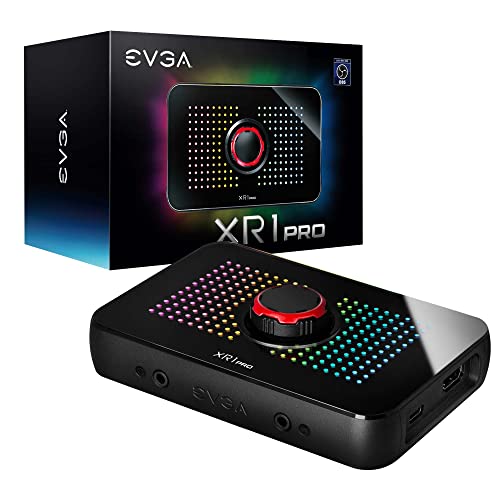
- 1440p60 or 4K30 capture
- 1440p144 and 4K60 HDR passthrough
- Built-in mixer and control dial
Best For: HDR gaming setups and advanced Windows streaming
Versatile Plug-and-Play Pick
Acer USB 3.0 HDMI Capture Card

- 4K input with 1080p60 output
- Built-in mic input for commentary
- USB-A and USB-C support
Best For: Beginners and creators using varied devices or platforms
Budget High-Frame-Rate Pick

- 1080p60 or 1440p30 capture
- 4K60 input and loop-out
- Mic input plus USB-A/USB-C cable
Best For: Console gamers wanting affordable 4K passthrough
Best Premium Capture Card – Elgato 4K S
The Elgato 4K S is a strong choice among capture cards for console players who want 4K60 recording, high-frame-rate passthrough, and HDR10 support in a compact USB-C design. It works with current PlayStation, Xbox, and Switch 2 setups, while its analog audio input can capture chat or commentary.
Best For: Console streamers and creators who want high-quality external capture with HDR and high-refresh-rate passthrough.
Pros:
- Captures video at up to 4K60 with crisp detail and vivid colors.
- Supports 1440p120 or 1080p240 passthrough for smoother gameplay.
- Includes HDR10 support, near-zero latency, and a 3.5mm analog audio input.
- Compatible with Windows 11, macOS 13 or later, and USB-C iPadOS devices.
Cons:
- The listed capture resolution is 1080p, despite support for 4K60 capture in the feature description.
- Requires a relatively recent computer or Apple device and USB 3.0 Type-C connectivity.
The 4K S stands out for flexible high-frame-rate passthrough and HDR features, making it a versatile premium option for modern console capture setups.
Best Versatile USB Capture Card – UGREEN 2K HDMI Capture Card
The UGREEN 2K HDMI capture card is a practical option for streaming gameplay, camera footage, and mobile content. These capture cards accept up to 4K input while providing 2K30 or 1080p60 output, and the included USB-A and USB-C interfaces make it easier to connect with different computers, tablets, and phones.
Best For: Multi-device streamers who need broad operating-system compatibility and flexible USB connectivity.
Pros:
- Supports 4K30 input, 2K30 output, and 1080p60 capture.
- Offers both USB-A and USB-C connections for modern and legacy devices.
- Works with Windows, macOS, Linux, and compatible phones or tablets.
- Supports popular software including OBS Studio, XSplit, QuickTime Player, and PotPlayer.
Cons:
- Only supports unidirectional HDMI input to USB output.
- iPadOS devices require iPadOS 17 or later, and console HDCP must be disabled.
- Does not provide HDMI loop-out for a separate low-latency display connection.
With dual USB connector options and broad software support, this UGREEN model is well suited to varied streaming workflows, especially when 2K output is sufficient.
Best Internal Capture Card – Elgato 4K Pro
The Elgato 4K Pro is an internal PCIe capture card built for demanding desktop setups. Among capture cards, it is particularly suited to dual-PC broadcasting and high-refresh-rate gaming, with HDMI 2.1 connectivity, 8K60 passthrough, 4K60 capture, and VRR support.
Best For: Desktop streamers and dual-PC users who want high-end HDMI 2.1 passthrough and smooth gaming playback.
Pros:
- Provides 8K60 passthrough and 4K60 HDR10 capture according to the listed features.
- Supports HDMI 2.1 and recording up to 1080p240.
- Includes VRR passthrough for smoother visuals without screen tearing.
- Works with OBS, Streamlabs, Twitch Studio, Zoom, Teams, and other streaming apps.
Cons:
- Requires a Windows 10 computer with an available PCIe slot.
- Its internal installation is less portable than an external USB capture card.
- The listed video capture resolution is 1080p, so buyers should verify the desired capture mode.
The 4K Pro is a specialized choice for powerful desktop systems rather than portable streaming. Its HDMI 2.1 and VRR features make it attractive for high-refresh-rate gaming and advanced broadcast setups.
Best Capture Card With Loop-Out – UGREEN 4K Loop Out
The UGREEN 4K Loop Out is a useful choice for capture-card buyers who want to monitor gameplay on a display while recording through USB. It accepts 4K30 HDMI input and supports 4K30 loop-out, while recording up to 2K30 or 1080p60 through USB 3.0.
Best For: Gamers and streamers who need real-time HDMI loop-out monitoring with flexible USB-A and USB-C recording.
Pros:
- Supports 4K30 input and 4K30 HDMI loop-out for real-time monitoring.
- Records up to 2K30 or 1080p60 through USB 3.0.
- Provides both USB-A and USB-C interfaces and requires no external power.
- Compatible with Windows, macOS, Linux, and Android systems.
Cons:
- It does not support 4K recording; 4K is limited to input and loop-out.
- PS4 and PS5 use requires HDCP to be turned off.
- It is not compatible with Fire TV Stick, and iPhones cannot serve as data acquisition devices.
The loop-out connection is this model’s main advantage, allowing local display monitoring while recording. It is a sensible fit for console streaming when 2K or 1080p capture is adequate.
Best Overall – Elgato HD60 S
The Elgato HD60 S is a strong all-around choice among capture cards for console players who want dependable 1080p60 recording and streaming. Its true passthrough and ultra-low-latency Instant Gameview help keep gameplay responsive while footage is saved to a computer.
Best For: Console gamers streaming or recording PS5, PS4, Xbox, or PC gameplay in 1080p60.
Pros:
- Captures gameplay at 1080p60.
- True HDMI passthrough is designed for zero-lag play.
- Supports unlimited recording to a hard drive and Flashback Recording.
- Works with OBS, Twitch, YouTube, Windows, and Mac.
Cons:
- Capture resolution is limited to 1080p.
- Windows users need a compatible 64-bit system with specified processor and graphics requirements.
Choose the HD60 S if smooth console passthrough and established streaming features matter more than 4K capture. It is especially practical for creators building a straightforward 1080p workflow.
Best Budget-Friendly Pick – Guermok 4K USB3.0 Capture Card
The Guermok is a flexible option for buyers seeking compact capture cards with broad device compatibility. It accepts input up to 4K at 30Hz and outputs up to 1080p at 60Hz or 2K at 30Hz through USB 3.0, making it suitable for basic streaming, recording, meetings, and teaching.
Best For: Portable streaming and recording across consoles, cameras, computers, and mobile-compatible setups.
Pros:
- Supports up to 4K@30Hz input and 1080p@60Hz output.
- Plug-and-play design requires no additional drivers or external power.
- Includes USB 3.0 and USB-C connectivity options.
- Compatible with Windows, Mac, Linux, Android, OBS, Zoom, Twitch, and YouTube.
Cons:
- Requires capture software and cannot directly cast to a monitor or TV.
- Uses one-way HDMI-to-USB transmission; USB-C-to-HDMI conversion may lose signal.
- Audio setup in OBS may require restarting the software.
This Guermok model suits users who value portability and wide compatibility. Use a USB 3.0 port whenever possible to help maintain the stated bandwidth and resolution.
Best for Camera Streaming – Elgato Cam Link 4K
The Elgato Cam Link 4K is designed for creators who want to use a DSLR, mirrorless camera, camcorder, action camera, or iPhone as a computer camera. Among capture cards, it stands out for camera-focused workflows, supporting 1080p60 and 4K60 capture with ultra-low latency.
Best For: Streamers, presenters, and video creators upgrading computer video with a compatible camera.
Pros:
- Turns compatible cameras into high-quality computer webcams.
- Supports 1080p60 and up to 4K60 capture.
- Ultra-low latency helps keep video and audio synchronized.
- Works with OBS, Zoom, Discord, PC, Mac, and iPad.
Cons:
- Requires a compatible camera for the intended workflow.
- Uses USB 3.0 and HDMI, so the setup depends on available ports and camera output.
- Some listed 4K features require the latest Cam Link 4K model.
Pick the Cam Link 4K when image quality from a dedicated camera is the priority. Its compact design and low-latency operation make it a practical bridge between camera gear and streaming software.
Premium HDR Pick – EVGA XR1 Pro
The EVGA XR1 Pro is one of the more capable capture cards for gamers who want high-resolution recording alongside smooth, high-refresh-rate passthrough. It supports 1440p capture at 60fps, 4K capture at 30fps, and HDR passthrough for compatible setups.
Best For: PC and console streamers who want HDR passthrough, an integrated audio mixer, and a control dial.
Pros:
- Captures up to 1440p at 60fps or 4K at 30fps.
- Supports 1440p at 144Hz and 4K at 60Hz HDR passthrough.
- Includes a built-in audio mixer, control dial, and customizable ARGB lighting.
- OBS-certified plug-and-play setup with no driver installation required.
Cons:
- Requires a USB 3.1 interface.
- Its 4K capture mode is limited to 30fps.
- Its feature set may be more than casual users need.
The XR1 Pro stands out when passthrough performance and hands-on audio control matter as much as recording quality. It is a strong fit for serious streamers using Windows, though its USB 3.1 requirement should be confirmed before purchase.
Versatile Plug-and-Play Pick – Acer USB 3.0 HDMI Capture Card
The Acer USB 3.0 HDMI Capture Card is a practical choice among capture cards for recording or streaming 1080p video at 60Hz from consoles, cameras, and computers. Its 4K input, USB Type-A and Type-C connectivity, and built-in mic input make it flexible for everyday setups.
Best For: Beginners, mobile creators, teachers, and gamers who need broad device and software compatibility.
Pros:
- Accepts 4K input and outputs 1080p at 60Hz.
- Includes a 3.5mm mic input for commentary and voice recording.
- Works with Windows, macOS, Linux, Android, OBS, XSplit, VLC, and major streaming platforms.
- Plug-and-play design requires no extra drivers or external power.
Cons:
- Capture resolution is limited to 1080p or 720p.
- USB 3.0 is required for USB 3.0 operation.
- The listed warranty is one year.
This Acer model emphasizes convenience and compatibility rather than high-end capture resolutions. It is a sensible option for straightforward 1080p streaming, especially if you value mic connectivity and support for both USB-A and USB-C.
Budget High-Frame-Rate Pick – XIIXMASK HDMI Capture Card
The XIIXMASK HDMI Capture Card offers useful performance for gamers looking for affordable capture cards with 4K passthrough. It captures 1080p at 60fps or 1440p at 30fps, while its dual USB-A/USB-C cable and mic input support flexible streaming setups.
Best For: Console gamers and casual streamers who want 1080p60 capture with 4K60 loop-out.
Pros:
- Supports 4K 60Hz HDMI input and up to 4K 60Hz loop-out.
- Captures 1080p at 60fps or 1440p at 30fps.
- Includes USB-A and USB-C connectivity through the supplied cable.
- Offers a 3.5mm mic input for live commentary.
Cons:
- Mic input does not record party chat.
- OBS must be restarted after audio setup to restore sound output.
- The supplied details list Windows as the minimum system requirement despite broader compatibility claims.
With 4K60 loop-out and 1080p60 capture, this model covers the core needs of many console streaming setups. Buyers should pay attention to the audio setup note and confirm operating-system compatibility before relying on it for a specific workflow.
How We Picked These Capture Cards
We selected these Capture Cards based on the features that matter most in real streaming and recording setups: supported input and capture resolutions, passthrough capability, connection standard, latency, software compatibility, audio handling, and ease of installation. The list includes internal PCIe models for desktop PCs, portable USB options, camera interfaces, and more affordable choices for straightforward 1080p streaming.
Resolution labels can be confusing, so distinguish between input, passthrough, and capture. A card may accept a 4K signal and pass it to your display while recording at 1080p. That can still be ideal for smooth console gaming, but it is not the same as recording native 4K video.
Quick Comparison
- Best for high-end PC setups: Elgato 4K Pro, an internal card with high-resolution passthrough and desktop-focused performance.
- Best for modern console streaming: Elgato 4K S, designed for current PlayStation, Xbox, and Switch 2 workflows.
- Best for camera input: Elgato Cam Link 4K, which connects compatible DSLR, mirrorless, camcorder, and action cameras.
- Best for 1080p value: UGREEN, Guermok, acer, and XIIXMASK USB models, depending on the passthrough and connection features you need.
- Best for advanced streaming controls: EVGA XR1 Pro, with HDR passthrough, OBS certification, and built-in audio-oriented features.
Key Buying Factors for Capture Cards
Capture and Passthrough Resolution
Choose a card based on what you want recorded, not only the signal it accepts. For most livestreams, 1080p at 60 frames per second remains a practical target. If you play at 1440p or 4K, look for matching passthrough support so your gaming display does not need to drop resolution.
External USB or Internal PCIe
External USB Capture Cards are portable, simple to install, and suitable for laptops and multiple computers. Internal PCIe cards can offer a cleaner permanent setup and may provide stronger performance, but they require a compatible desktop motherboard and an available slot.
Latency, Refresh Rate, and HDR
Passthrough should be effectively latency-free for competitive play. Check supported refresh rates at your intended resolution, especially if you use 120Hz gaming. HDR support is also worth confirming because some cards pass HDR to the display but capture SDR, while others have more limited compatibility.
Inputs, Outputs, and Software
Most models use HDMI, but cameras may require clean HDMI output and uninterrupted power. Verify USB 3.0 or faster connectivity, operating-system support, OBS compatibility, and whether the card includes a headphone, microphone, or line-in connection if you plan to mix audio through the device.
Who Should Buy Which Capture Cards?
Choose an internal Elgato 4K Pro if you are building a dedicated desktop streaming or recording PC. Pick an external Elgato 4K S, EVGA XR1 Pro, or HD60 S when console capture and convenient setup are the priority. Camera creators should start with Cam Link 4K, provided their camera offers clean HDMI output.
For casual streaming, remote teaching, or recording occasional gameplay, the UGREEN, Guermok, acer, and XIIXMASK models can cover the basics without the cost or installation requirements of premium hardware. Before buying, match the card’s maximum capture rate to your computer, streaming software, and upload bandwidth so its headline specifications translate into a smooth finished stream.