Choosing the right commercial screen is about more than resolution. Brightness, runtime, software support, and installation flexibility all affect how well your message performs in the real world.
Below, we’ve narrowed the field to 10 commercial digital signage displays that fit common business needs, from compact menu boards to large-format 4K screens and plug-and-play media players.
Best 10 Commercial Digital Signage Displays Picks for 2026
All-in-One 4K Signage Pick
AG Neovo DS4351U 43-inch 4K signage display

- 4K UHD panel with 500-nit brightness
- USB signage, Wi-Fi, LAN, Bluetooth, and HDMI support
- 24/7 operation with portrait and landscape mounting
Best For: Businesses wanting an all-in-one 43-inch signage screen for continuous use
Remote-Managed 43-Inch Option
Samsung QET 43-inch 4K commercial display

- Crystal 4K processor with UHD resolution
- Built-in MagicINFO Lite Player and server support
- 3-year onsite warranty with 16/7 operation
Best For: Retail, business, and education teams needing easy playback and remote management
Best Signage Player Companion
Amazon Signage Stick 4K media player

- Auto-launches CMS apps in kiosk mode
- Easy mobile-app setup and multi-location management
- Wi-Fi 6E, secure boot, and encrypted storage
Best For: Businesses that need a simple 4K signage player for existing displays
Large-Format Signage Choice
Samsung QE50T 50-inch 4K commercial display

- 50-inch 4K UHD screen with non-glare panel
- Built-in media player with HDMI and USB support
- Portrait/landscape mounting with 3-year warranty
Best For: Businesses wanting a larger 50-inch signage display with simple playback
Countertop Menu Board Pick
18.5" Digital Signage Display, 700 Nits

- 700 nits brightness for commercial indoor visibility
- Free lifetime Cloud CMS with remote scheduling
- Desktop stand supports landscape or portrait use
Best For: Small business counters and reception desks
Large Format Wall Display Choice
50" Digital Signage Display 1000-Nit 4K UHD

- 50-inch 4K UHD display with 178° viewing angle
- 1000 nits and 24/7 loop playback for busy spaces
- Android-based CMS supports remote scheduling and edits
Best For: Large wall-mounted signage in restaurants and retail
Trusted Commercial Brand Option
Samsung 43-Inch BE43T-H Pro TV
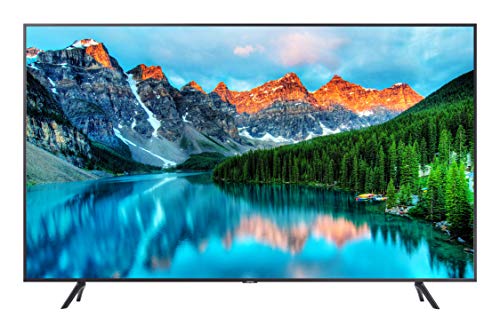
- 43-inch 4K Crystal UHD commercial display
- Samsung Pro TV app supports easy mobile content creation
- 16/7 operation with HDMI, USB, Wi-Fi 5, and Bluetooth
Best For: Brands wanting simple business signage from Samsung
Brightest Menu-Board Pick
40-inch 4K 1000-nit commercial signage display
- 1000-nit brightness with 4K UHD clarity
- Free CMS supports scheduling and remote edits
- 2-6 zone split-screen layout for mixed content
Best For: Restaurants and retail spaces needing a bright, vertical signage screen
Best Collaboration Display
32-inch Samsung QMR-A business signage display

- 500-nit FHD panel with 24/7 commercial use
- Built-in MagicINFO and Tizen simplify playback
- Knox and Webex support add workplace flexibility
Best For: Corporate spaces that need signage plus conferencing-friendly features
Large-Format Presentation Choice
55-inch Samsung QB55R 4K commercial signage display

- 55-inch 4K UHD screen with Dynamic Crystal Color
- Built-in Wi-Fi, Bluetooth, and media player
- 3-year onsite warranty for business use
Best For: Large indoor spaces that need a bigger 4K signage display
All-in-One 4K Signage Pick – AG Neovo DS4351U 43-inch 4K signage display
If you want commercial digital signage displays that can handle round-the-clock use while still delivering sharp visuals, the AG Neovo DS4351U is built around that need. Its 43-inch 4K UHD panel, 500-nit brightness, and matte finish make it a practical fit for business environments where content needs to stay clear and professional.
Best For: Businesses needing an all-in-one 43-inch signage screen with strong brightness, flexible mounting, and built-in content tools.
Pros:
- 4K UHD resolution with 500 nits of brightness for crisp, high-impact content
- Supports USB signage, wireless screen sharing, web browsing, and app-based content management
- Built for 24/7 operation with portrait and landscape mounting options
- Offers HDMI, LAN, Wi-Fi, Bluetooth, and multiple USB connections
Cons:
- Portrait playback may have limitations when using wireless screen sharing
- Brightness is solid, but lower than some higher-lumen signage displays
- Designed for business use, so it may be more screen than needed for simple playback
Overall, this is a well-rounded commercial display for teams that want built-in flexibility without adding extra hardware. The scheduling tools and 24/7 design make it especially useful for ongoing promotions, lobby content, or internal communications.
Remote-Managed 43-Inch Option – Samsung QET 43-inch 4K commercial display
The Samsung QET Series is a strong choice in commercial digital signage displays when you want a polished 43-inch screen with built-in content playback and centralized control. Its Crystal 4K processor, UHD resolution, and slim bezel are aimed at businesses that need content to look clean and easy to manage.
Best For: Retail, business, and education settings that need simple playback plus remote display management.
Pros:
- Crystal 4K processor and UHD resolution for detailed, lifelike imagery
- Integrated MagicINFO Lite Player for on-demand or pre-scheduled content
- MagicINFO server support enables remote monitoring and management
- 3-year onsite commercial warranty and 16/7 operation rating
Cons:
- 300-nit brightness is lower than some higher-brightness signage options
- Only 2 HDMI ports and 1 USB port, so connectivity is more limited
- Designed for 16/7 use rather than full-time 24/7 operation
In practice, this display is best for organizations that value dependable software support and remote oversight more than maximum brightness. The slim design and built-in player make it easy to deploy in multi-screen environments.
Best Signage Player Companion – Amazon Signage Stick 4K media player
The Amazon Signage Stick is a practical add-on for commercial digital signage displays when you need a small, business-focused 4K media player instead of a full screen. It auto-launches your CMS in kiosk mode, supports setup through a free mobile app, and is built for unattended operation.
Best For: Businesses that already have displays and want an easy-to-manage 4K signage player.
Pros:
- Auto-launches CMS apps in kiosk mode for unattended playback
- Easy setup with the free Amazon Signage app
- Works with leading CMS providers and supports automatic CMS updates
- Includes Wi-Fi 6E, quad-core processing, secure boot, and encrypted storage
Cons:
- CMS subscription is required for supported software platforms
- It is a media player, not a display, so it must be paired with a screen
- Best suited for businesses already using signage software workflows
This is a smart choice if your main need is simplifying playback and remote management rather than replacing the screen itself. The compact format and mobile setup tools make it easy to roll out across multiple locations.
Large-Format Signage Choice – Samsung QE50T 50-inch 4K commercial display
For buyers comparing commercial digital signage displays, the Samsung QE50T stands out as a larger 50-inch option with straightforward playback and a clean, business-friendly design. It combines 4K UHD resolution, a non-glare panel, and a built-in media player for organizations that want a simple commercial screen.
Best For: Businesses needing a 50-inch 4K signage display with easy input options and portrait or landscape mounting.
Pros:
- 50-inch 4K UHD panel with a non-glare finish and 300 nits of brightness
- Built-in media player with HDMI and USB content playback options
- 3-side bezel-less design looks clean in commercial spaces
- Supports portrait or landscape mounting and includes a 3-year commercial warranty
Cons:
- 300-nit brightness may be modest in very bright environments
- 16/7 operation is less than full 24/7 signage use
- Connectivity is functional but limited to two HDMI inputs and one USB port
This model makes sense when size and simplicity matter more than advanced signage extras. The larger screen format and reliable commercial rating make it a solid fit for lobbies, retail floors, and internal messaging.
Countertop Menu Board Pick – 18.5" Digital Signage Display, 700 Nits
If you need compact commercial digital signage displays for a checkout counter, reception desk, or café counter, this 18.5-inch option is built for practical day-to-day use. It combines 700 nits of brightness, 24/7 business operation support, and built-in CMS tools so you can update menus, promotions, and announcements without extra software hassle.
Best For: Restaurants, cafés, salons, hotel receptions, and retail counters that need a small, bright signage screen.
Pros:
- Built-in lifetime free Cloud CMS for remote playlist and content management
- 700 nits brightness and 24/7 commercial operation support
- Landscape or portrait setup on the included desktop stand
- HDMI, LAN, TF card, and USB connectivity for flexible content updates
Cons:
- 18.5-inch screen may be too small for larger rooms or distant viewing
- 720P HD panel is less detailed than higher-resolution signage displays
This is a strong fit if you want an easy-to-manage countertop signage screen that focuses on visibility and convenience. The included CMS and plug-and-play options make it easier to keep content fresh, while the compact form factor keeps it suitable for tight spaces.
Large Format Wall Display Choice – 50" Digital Signage Display 1000-Nit 4K UHD
For larger commercial digital signage displays, this 50-inch screen is aimed at businesses that want a big, bright wall-mounted presentation. It brings 4K UHD resolution, 1000-nit brightness, and a slim frameless design, making it suitable for menus, promotional loops, and multi-zone content in visible public spaces.
Best For: Restaurants, retail stores, and venues that want a large wall-mounted signage screen with 4K clarity.
Pros:
- 50-inch 4K UHD panel with wide 178° viewing angle
- 1000-nit brightness and 24/7 continuous loop playback
- Ultra-slim, ultra-narrow bezel design for tiled or minimalist installations
- Built-in Android system with complimentary CMS for remote scheduling and bulk edits
Cons:
- Wall-mount design is less flexible for countertop or mobile use
- Larger size may be more than some small businesses need
This model is a good choice when screen presence matters as much as content management. Its combination of 4K detail, high brightness, and multi-zone layout support makes it well suited to busy environments that need polished, professional signage.
Trusted Commercial Brand Option – Samsung 43-Inch BE43T-H Pro TV
If you want commercial digital signage displays with a familiar brand name and simple setup, this 43-inch Samsung Pro TV is built around business use. It offers 4K Crystal UHD, 250 nits of brightness, and the Samsung Pro TV app for creating content from a phone or tablet, with commercial-grade operation rated for 16/7 use.
Best For: Businesses that want a 43-inch commercial display with easy app-based content creation and a trusted brand.
Pros:
- 4K Crystal UHD resolution for sharp, detailed content
- Samsung Pro TV app lets you create content on a phone or tablet
- Commercial-grade 16/7 operating support
- HDMI, USB, RF, Wi-Fi 5, and Bluetooth connectivity
Cons:
- 250 nits brightness is lower than many dedicated signage displays
- Consumer streaming apps need an external media player
This is a practical option if you value a straightforward, recognizable business display over signage-specific extras. It works well for controlled indoor settings where 4K image quality and easy content updates matter more than maximum brightness.
Brightest Menu-Board Pick – 40-inch 4K 1000-nit commercial signage display
If you need commercial digital signage displays for a bright, high-traffic setting, this 40-inch Canlarriz screen is built around visibility and scheduling flexibility. Its 1000-nit brightness, 4K UHD resolution, and ultra-slim frameless design make it a strong fit for menus, notices, and promotional loops where readability and clean presentation matter.
Best For: Restaurants, retail entrances, and other business spaces that need a bright vertical display with remote content control.
Pros:
- 1000-nit panel with 4K UHD resolution for clear viewing in busy environments
- Free CMS software supports remote scheduling, bulk edits, and brightness control
- Flexible multi-zone layout can split the screen into 2-6 content areas
- Android 11 with pre-installed Google Play Store for simple plug-and-play use
Cons:
- Wall bracket is included, but ceiling mounting requires a separate bracket
- Only one HDMI port, which may limit wired source options
- At 13 kg, it is not the lightest option for frequent repositioning
This model stands out if your priority is bright, scheduled signage with built-in content tools rather than a basic screen. The long 30,000-hour lifespan and 24/7 durability claims also make it better suited to continuous business use than a typical TV.
Best Collaboration Display – 32-inch Samsung QMR-A business signage display
Among commercial digital signage displays, this 32-inch Samsung QMR-A is a polished choice for businesses that want dependable signage plus meeting-room features. It combines a slim, symmetrical design with 500-nit brightness, built-in MagicINFO playback, and Samsung Workspace support for cloud access and secure PC control.
Best For: Corporate lobbies, meeting spaces, and retail locations that want a clean-looking 24/7 display with integrated content tools.
Pros:
- Slim, symmetrical design and clean cable management for a tidy installation
- Built-in MagicINFO player and Tizen 4.0 simplify content management without a PC
- Samsung Workspace secured by Knox adds wireless cloud access and control features
- Cisco Webex certified, making it useful in collaboration environments
Cons:
- FHD resolution is lower than 4K models in this roundup
- 500-nit brightness is solid, but not as punchy as the 1000-nit option here
- 32-inch size may feel compact for larger lobby or directory applications
This is the most balanced option if you want signage that can also support conferencing and secure workspace access. It is especially appealing when reliability, brand reputation, and simplified deployment matter as much as the display itself.
Large-Format Presentation Choice – 55-inch Samsung QB55R 4K commercial signage display
If your priority is a larger canvas for commercial digital signage displays, the 55-inch Samsung QB55R delivers a 4K UHD image with Dynamic Crystal Color and intelligent upscaling. It is designed for business use with built-in Wi-Fi, Bluetooth, and an embedded media player, so it can serve as a clean all-in-one signage solution.
Best For: Larger business spaces, education settings, and customer-facing areas that need a 55-inch 4K signage screen.
Pros:
- 55-inch 4K UHD panel with Dynamic Crystal Color for sharp, vivid visuals
- Built-in Wi-Fi and Bluetooth support wireless control and content sharing
- System-on-chip design with embedded media player reduces reliance on extra hardware
- 3-year onsite warranty and Cisco WebEx room kit compatibility add peace of mind
Cons:
- 350-nit brightness is lower than the brighter signage options in this roundup
- Heavier at 39.9 pounds, so installation handling matters more
- Best suited to controlled indoor spaces rather than very bright environments
The QB55R makes sense when screen size and presentation quality matter more than extreme brightness. It is a practical fit for larger rooms where you want a professional-looking display that can handle both signage and business communication.
How We Picked the Best Commercial Digital Signage Displays
We focused on the features that matter most in daily business use: panel quality, brightness, operational rating, software options, connectivity, warranty coverage, and overall value. We also favored models that suit common deployment scenarios such as retail promotions, restaurant menus, lobby messaging, and multi-screen rollouts.
Quick Comparison of the 10 Picks
The lineup includes a mix of all-in-one displays, higher-brightness storefront screens, compact menu-board formats, and a dedicated 4K signage player. That makes it easier to match the display to the environment instead of forcing one screen to do every job.
As a general rule, choose 24/7-rated or 16/7-rated Commercial Digital Signage Displays for extended operation, and look for 500 nits or more if the screen will compete with bright indoor lighting. For window-facing or very bright spaces, 700 to 1000 nits is usually the safer choice.
Key Buying Factors for Commercial Digital Signage Displays
Brightness and Visibility
Brightness is one of the biggest differences between consumer TVs and business signage. Lower-nit models can work well in controlled indoor settings, while higher-nit screens are better for restaurants, retail floors, and front windows where ambient light is a challenge.
Resolution and Screen Size
4K is ideal for most large-format signage because text, logos, and product images stay sharp at typical viewing distances. Smaller displays can still perform well in Full HD when the content is simple, such as menus, schedules, or wayfinding.
Operating Schedule and Reliability
Check whether the display is rated for 16/7 or 24/7 use. If the screen will run all day, every day, prioritize commercial-grade thermal design and long warranty support over consumer-style extras.
Software and Content Management
Some Commercial Digital Signage Displays include built-in software, while others rely on external media players or CMS tools. If you need remote updates across multiple locations, software compatibility may matter more than the panel itself.
Connectivity and Installation
HDMI is standard, but Wi-Fi, LAN, USB, and built-in speakers can simplify setup. Consider mounting orientation, cable access, and whether the screen will be used in portrait or landscape mode before buying.
Who Should Buy Which Commercial Digital Signage Displays?
Retail and hospitality teams should lean toward brighter 4K displays if content must stand out in busy spaces. Restaurants and cafés often benefit from compact, high-nit menu-board screens. Offices, meeting areas, and internal messaging boards can usually choose moderate-brightness models with strong software support. If you only need a simple content source for existing screens, a signage player may be the smartest purchase of all.
In short, the best choice depends on where the screen will live, how long it will run, and how often your content changes. Match those three factors first, and the right display becomes much easier to identify.