Choosing the right time clock can save hours of payroll cleanup and help prevent buddy punching. For small teams, the best option is usually the one that fits your workflow with the least friction.
In this roundup, we focus on fingerprint time clocks for employees that balance ease of use, accuracy, and cost—whether you want a standalone unit, app control, or cloud-connected reporting.
Best 10 Fingerprint Time Clocks for Employees Picks for 2026
Standalone Privacy-First Pick
HapAttend H3 Fingerprint Time Clock

- No WiFi required; data stays local
- No monthly fees or software installation
- Auto-calculates employee hours
Best For: Small businesses wanting an offline biometric clock
Flexible Badge-and-Fingerprint Option

- Supports fingerprint, badge, and PIN punches
- No monthly fees or punch cards needed
- Standalone device with USB payroll transfer
Best For: Teams that need multiple punch-in methods in one device
Cloud-Connected Payroll Pick
uAttend RE2000 Biometric Time Clock
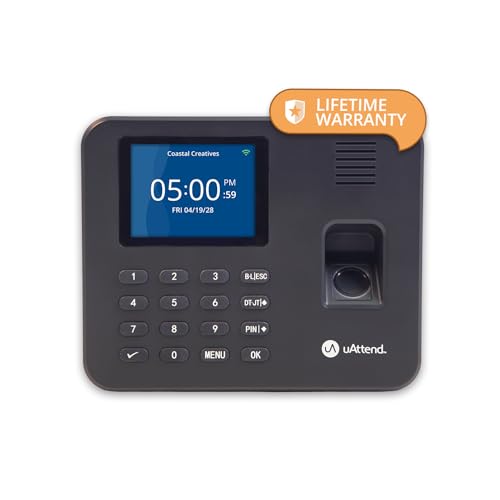
- Fingerprint plus PIN punching for accuracy
- Cloud dashboard and mobile app access
- Month-to-month subscription required
Best For: Owners who want cloud reporting and payroll-ready exports
App-Controlled Shift Manager

- Fingerprint/PIN with 0.5-second recognition
- Supports overnight shifts and auto reports
- No monthly fees; app sync uses local network
Best For: Businesses managing flexible shifts and local app control
Cloud-Connected Biometric Pick
uAttend JR2000 for Small Business

- Cloud-based attendance with real-time access
- Fingerprint, RFID, and PIN support
- Reporting plus automatic cloud backups
Best For: Small businesses wanting a connected biometric time clock
Standalone No-Fee Pick
NGTeco Fingerprint & PIN Clock

- Standalone use with no WiFi or software
- USB export with Excel-ready reports
- Supports 500 users and 50,000 punches
Best For: Businesses that want simple local time tracking without monthly fees
Multi-Biometric Security Pick
Face, Palm & Fingerprint Clock

- Face, palm, fingerprint, PIN, and RFID options
- Cloud reporting with WiFi or LAN connectivity
- Alerts, geo-fencing, and job tracking tools
Best For: Teams that want high-security attendance tracking with cloud features
Cloud Remote Attendance
NGTeco Cloud Time Clock for Small Business

- Remote app and web portal access
- Fingerprint plus RFID check-in
- 2000mAh battery backup for outages
Best For: Small businesses wanting cloud attendance with no core monthly fee
Standalone Privacy-First Pick – HapAttend H3 Fingerprint Time Clock
If you want fingerprint time clocks for employees without monthly fees or network setup, this standalone HapAttend unit keeps everything local and straightforward. It auto-calculates hours, supports multiple languages, and is designed for small businesses that prefer a secure, offline workflow.
Best For: Small businesses that want a no-WiFi, no-subscription fingerprint time clock with local data storage.
Pros:
- No WiFi required, with local data transfer via USB
- No monthly fees and no software installation needed
- Automatically calculates employee working hours
- Supports English, Spanish, German, French, and Italian
Cons:
- No network connectivity for cloud-based access
- Setup is simple, but it may still require following the tutorial
This is a practical choice if privacy and simplicity matter more than app access or cloud tools. It fits offices, factories, hotels, schools, and restaurants that want dependable time tracking with minimal ongoing cost.
Flexible Badge-and-Fingerprint Option – Acroprint BioTouch Time Clock
For fingerprint time clocks for employees that also support badge and PIN entry, the Acroprint BioTouch offers a flexible standalone setup with no monthly fee. It is built to reduce buddy punching, track attendance details, and simplify payroll transfers through USB.
Best For: Businesses that want a self-contained time clock with fingerprint, badge, and PIN options.
Pros:
- Fingerprint, RFID proximity badge, and PIN clock-in support
- No monthly fees, paper punch cards, or ink required
- Standalone operation with no software installation needed
- USB transfer supports payroll processing and setup materials
Cons:
- Does not include cloud connectivity features
- Designed as a tabletop unit rather than a more connected system
This model is a solid fit if you want straightforward time capture and flexible employee sign-in methods without recurring software costs. It emphasizes accuracy and device-based management over advanced online dashboards.
Cloud-Connected Payroll Pick – uAttend RE2000 Biometric Time Clock
If you want fingerprint time clocks for employees that combine biometric punch-in with cloud access, the uAttend RE2000 is built for small business time tracking. It adds offline storage, mobile app tools, and payroll-ready exports, making it useful when you want more control over attendance data.
Best For: Small businesses that want cloud-connected time tracking with fingerprint security and payroll tools.
Pros:
- Fingerprint plus PIN helps reduce time theft and buddy punching
- Cloud dashboard shows hours, breaks, overtime rules, and job codes
- Mobile app lets owners approve timecards and run reports remotely
- Offline storage and lifetime data storage support record keeping
Cons:
- Requires a month-to-month subscription
- Needs WiFi or Ethernet for cloud features and sync
This is a strong fit if you want a more connected system than a basic standalone clock. It trades a subscription for easier reporting, remote oversight, and payroll integration.
App-Controlled Shift Manager – NGTeco Fingerprint Time Clock
NGTeco Time Clock for Small Business, APP Control | 2.4GHz WiFi, No Monthly Fees
Check Price On AmazonFor fingerprint time clocks for employees with app control and flexible shift handling, the NGTeco model is geared toward small businesses that need accurate attendance without extra monthly fees. It supports overnight shifts, quick fingerprint recognition, and real-time sync on the same local network.
Best For: Small businesses that want app-based attendance management with no monthly fees.
Pros:
- Supports fingerprint and PIN clock-in with fast 0.5-second recognition
- Handles flexible shifts, including overnight schedules
- Auto-calculates work hours and exports timesheets by email or USB
- Includes data backup protection during power outages
Cons:
- App sync requires the same local network
- Top app features may add setup complexity compared with offline-only models
This model suits businesses that want more scheduling flexibility than a basic punch clock can offer. It balances biometric speed, report automation, and local app control while keeping monthly fees at zero.
Cloud-Connected Biometric Pick – uAttend JR2000 for Small Business
If you want fingerprint time clocks for employees that also handle RFID and PIN entry, the uAttend JR2000 is built for small business attendance tracking with a cloud-based workflow. It focuses on real-time access, easy setup, and payroll support, so managers can keep tabs on time data from anywhere while maintaining a cleaner process for attendance and reporting.
Best For: Small businesses that want a cloud-connected time clock with biometric, RFID, and PIN options.
Pros:
- Cloud-based attendance system with real-time access from any device
- Supports fingerprint, RFID, and PIN time tracking
- Includes reporting tools for attendance trends, productivity, and labor costs
- Automatic cloud backups help protect employee data
Cons:
- Requires a low-cost subscription for full cloud features
- Not a no-fee standalone clock
- Best fit for teams that want connected software rather than offline-only use
Overall, the JR2000 is a strong choice if you want a more modern attendance system with flexible access and payroll-friendly reporting. It is especially useful when cloud management matters more than avoiding subscriptions.
Standalone No-Fee Pick – NGTeco Fingerprint & PIN Clock
For buyers comparing fingerprint time clocks for employees, the NGTeco model stands out for true standalone operation with no WiFi or software required. It is designed for quick setup and simple data export, making it a practical fit for businesses that want accurate punch records without monthly fees or a cloud subscription.
Best For: Small businesses that want a no-subscription fingerprint clock with easy USB export.
Pros:
- Works standalone with no WiFi or complex software setup
- USB export includes ready-to-use Excel reports
- Supports up to 500 users and 50,000 punch records
- Internal backup helps preserve punches during power loss
Cons:
- No cloud access or mobile app features
- Tabletop design may not suit every workspace
- Focused on punch logging rather than advanced workforce management
If you want a straightforward time clock that keeps attendance tracking local, this is the most no-frills option in the group. It prioritizes affordability, durability, and simple payroll export over software-heavy features.
Multi-Biometric Security Pick – Face, Palm & Fingerprint Clock
This option goes beyond basic fingerprint time clocks for employees by combining fingerprint, face, palm, PIN, and RFID tracking in one system. It is aimed at businesses that want stronger verification, cloud reporting, and mobile-friendly controls, along with tools that help reduce time theft and simplify payroll-related tasks.
Best For: Small businesses that want multiple biometric options and cloud-based punch tracking.
Pros:
- Multiple authentication methods, including face, palm, fingerprint, PIN, and RFID
- WiFi or LAN connectivity sends punches to the cloud
- Mobile app support adds remote monitoring convenience
- Includes alerts, job tracking, CSV exports, and geo-fencing features
Cons:
- Requires a subscription after the 30-day free trial
- More feature-heavy than a basic standalone punch clock
- Best for teams that will use cloud and app tools regularly
For businesses that want more than a simple fingerprint reader, this model offers one of the broadest feature sets in the roundup. It is best suited to teams that value security, remote visibility, and automated attendance management.
Cloud Remote Attendance – NGTeco Cloud Time Clock for Small Business
If you want fingerprint time clocks for employees with remote visibility, this NGTeco cloud model is built for small business attendance tracking without monthly fees. It combines fingerprint and RFID check-in with app and web access, so managers can review real-time clock-ins, generate reports, and manage shifts without being tied to the office.
Best For: Small businesses that want cloud access, fingerprint check-in, and no recurring fee for core attendance tracking.
Pros:
- Remote access through mobile app and web portal for real-time attendance management.
- Fingerprint and RFID check-in with upgraded scanning for quick punches.
- Dual-band 2.4GHz/5GHz WiFi for more stable connectivity.
- 2000mAh backup battery helps keep it running during outages.
Cons:
- Full employee app features require a separate TimeEntrix subscription.
- Only includes 10 RFID cards in the box.
Overall, this is a practical pick if you want a cloud-connected attendance device that keeps the basics simple while adding remote management and backup power. It’s strongest for teams that value fingerprint punches, real-time reporting, and straightforward setup.
Multi-Mode Punch Clock – NGTeco APP Time Clock for Small Business
Among fingerprint time clocks for employees, this NGTeco unit stands out for its 4-in-1 check-in options and simple app-based management. It supports face, fingerprint, RFID, and PIN entry, making it a flexible fit for teams that want to reduce buddy punching and keep attendance records digital.
Best For: Businesses that want multiple verification methods and easy shift management without recurring fees.
Pros:
- 4 verification modes: face, fingerprint, RFID card, and PIN.
- Free app control for real-time attendance, shift edits, and report exports.
- Offline recording saves punches when network access is weak or intermittent.
- Supports up to 200 employees and is designed for multiple business types.
Cons:
- App control requires the same local network.
- Core strengths are local management rather than true remote cloud access.
This is a strong all-around option if you want more than just fingerprint scanning and prefer a punch clock that can handle varied workflows. Its combination of four check-in methods, offline capture, and no monthly fee makes it easy to justify for growing teams.
Cloud 4-in-1 Attendance – NGTeco Cloud Time Clock for Small Business
If your search for fingerprint time clocks for employees also includes cloud reporting and broader check-in options, this NGTeco TC1 is a well-rounded choice. It supports face, fingerprint, RFID, and PIN punches, while cloud software and app access make it easy to review attendance data, manage shifts, and store records securely.
Best For: Small teams that want cloud-connected attendance tracking with multiple punch options and flexible scheduling.
Pros:
- 4-in-1 check-in modes: face, fingerprint, RFID, and PIN.
- Cloud access with real-time punch data, auto reports, and web-browser viewing.
- Customizable shift types including fixed, rotating, split, and flexible.
- Supports up to 200 users, 30,000 logs, and offline sync when network returns.
Cons:
- Full employee app features require a separate TimeEntrix subscription.
- Core cloud features are focused on attendance rather than broader HR tools.
This model is a smart fit if you want secure cloud storage, flexible scheduling, and multiple ways for employees to clock in. It’s especially useful for businesses that need a balance of accuracy, offline reliability, and remote access.
How We Picked the Best Fingerprint Time Clocks for Employees
We prioritized Fingerprint Time Clocks for Employees that are practical for real-world business use: simple setup, reliable biometric punch-in, clear attendance tracking, and a sensible total cost of ownership. We also looked at whether a model works well for small offices, retail shops, restaurants, and growing teams.
Where relevant, we favored systems with no monthly fees for buyers who want predictable costs, and cloud options for managers who need remote access, reports, or payroll support.
Quick Comparison
Standalone models are usually the best fit if you want a straightforward clock-in station with minimal ongoing cost. Cloud-connected systems are better when you need multi-location visibility, remote management, or easier attendance exports. Multi-method devices that add PIN, RFID, face, or palm recognition can be a smart choice for mixed-use environments and backup login options.
Key Buying Factors for Fingerprint Time Clocks for Employees
Fees and Software
Some systems work without monthly fees, while others rely on subscriptions for cloud storage, reporting, or payroll integrations. Decide early whether you want lower upfront complexity or more software features over time.
Employee Count and Growth
Make sure the device supports your current headcount and leaves room to expand. Small-business units can be a great value, but fast-growing teams may benefit from cloud dashboards and easier user management.
Connectivity and Access
If you only need a clock at the front desk, a standalone device may be enough. If managers need to monitor attendance from different locations, look for Wi-Fi, app control, or remote access features.
Backup Punch Methods
Fingerprints are the main event, but PIN, RFID, or face recognition can help when a fingerprint won’t scan reliably. Backup methods reduce downtime and keep shifts moving.
Reporting and Payroll Workflow
Look for exportable reports, automatic hour calculation, and attendance summaries that make payroll easier. The best systems reduce manual corrections, not create new ones.
Who Should Buy Which Fingerprint Time Clocks for Employees?
If you want the simplest and lowest-maintenance option, choose a standalone fingerprint clock with no monthly fees. If you manage employees across sites or want real-time oversight, a cloud-connected model is the better fit. Businesses that need flexibility should consider a 4-in-1 or multi-biometric system so they can adapt as policies and staffing change.
For most buyers, the best Fingerprint Time Clocks for Employees are the ones that match your payroll process, your budget, and how hands-on you want management to be. Start with the features you truly need, then choose the simplest system that covers them well.