Building a high-performance PC often requires more than a standard mid-tower can provide. The best full-tower computer cases give you extra room for E-ATX motherboards, large graphics cards, multiple storage drives, custom cooling, and easier cable management.
We selected 10 full-tower options for different priorities, including airflow-focused gaming, workstation expansion, NAS storage, dual-chamber layouts, included fans, and distinctive materials. Use the buying guide below to narrow the list by compatibility, cooling needs, and budget.
Best 10 Full Tower Computer Cases Picks for 2026
Best for Extreme Cooling

- Supports up to three 360mm radiators
- Fits up to 12 120mm fans
- Includes three 140mm AirGuide fans
Best For: Large, high-performance ATX builds
Best for Expandable Storage

- Holds up to 13 hard drives
- Supports E-ATX through Mini-ITX
- Includes four 120mm fans
Best For: Storage-heavy gaming and workstation builds
Best for NAS and AI Servers

- Supports up to 11 HDDs or 13 SSDs
- Offers 11 external 5.25-inch bays
- Fits E-ATX boards and 400mm cards
Best For: DIY NAS, AI server, and media-server builds
Best for Portable Gaming Builds
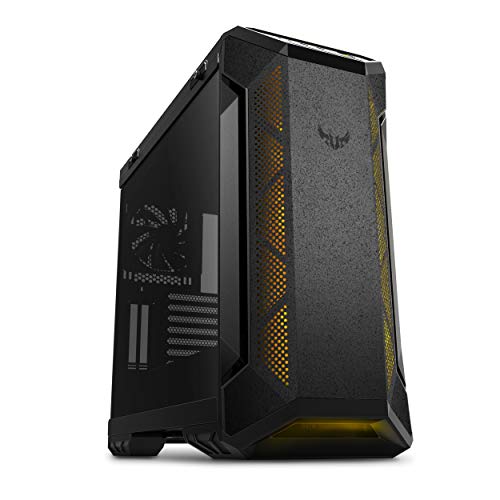
- Supports E-ATX boards and 420mm GPUs
- Ready for dual 360mm radiators
- Includes sturdy carry handles
Best For: Transportable, liquid-cooled gaming systems
High-Airflow Flagship

- Six PWM fans included with support for up to 12
- 420mm and 360mm radiator support
- 90-degree PSU mount and CPU/GPU temperature display
Best For: High-performance E-ATX gaming and workstation builds
Design-Focused Dual-Chamber Build

- Exotic wood and seamless tempered-glass panels
- Supports thick 360mm radiators in three positions
- Accommodates E-ATX boards and GPUs up to 440mm
Best For: Showcase builds with custom cooling
Flexible Cooling Choice

- E-ATX-compatible dual-chamber layout
- Supports thick 360mm radiators in three locations
- Fans are not included
Best For: Custom liquid-cooled builds and showcase PCs
Ready-to-Run RGB Pick
darkFlash DY470 Full-Tower Case

- Four PWM ARGB fans included
- Fits 410mm GPUs and dual 360mm radiators
- Dual-chamber design with vertical GPU support
Best For: RGB gaming builds with large hardware
Best Included Fans

- Three ARGB PWM fans included
- Supports E-ATX and eight expansion slots
- Designed for thick 360mm radiators in three positions
Best For: E-ATX gaming PCs needing included RGB airflow
Best for Extreme Cooling – CORSAIR 7000D Airflow
For ambitious builds, the CORSAIR 7000D Airflow is one of the most capable full tower computer cases in this lineup. Its high-airflow steel panels, spacious interior, and extensive radiator support make it a practical choice for powerful hardware and custom cooling systems.
Best For: Enthusiasts building high-performance ATX systems with multiple radiators and demanding cable-management needs.
Pros:
- Supports up to three simultaneous 360mm radiators or two 420mm radiators.
- Accommodates up to 12 120mm or seven 140mm fans.
- Includes three 140mm AirGuide fans and a PWM fan repeater.
- RapidRoute cable management provides a hidden channel and 30mm of space behind the motherboard.
Cons:
- Its 41.2-pound weight and large dimensions may be difficult to move.
- The extensive capacity may be more than a conventional ATX build requires.
The 7000D Airflow is a strong pick when cooling headroom, component space, and organized wiring matter more than compactness. It is particularly well suited to elaborate liquid-cooled builds.
Best for Expandable Storage – DARKROCK Classico Max
The DARKROCK Classico Max is a storage-focused option among full tower computer cases. It supports E-ATX through Mini-ITX motherboards, offers room for up to 13 drives, and includes mesh panels plus 360mm radiator support for balanced expansion and cooling.
Best For: Builders who need extensive local storage alongside flexible motherboard and GPU configurations.
Pros:
- Supports up to 10 3.5-inch HDDs and three 2.5-inch SSDs.
- Compatible with E-ATX, ATX, Micro-ATX, and Mini-ITX motherboards.
- Provides three vertical slots for vertical GPU mounting.
- Includes four pre-installed 120mm fans and supports a top-mounted 360mm radiator.
Cons:
- Hard-drive cages must be removed to install an E-ATX motherboard.
- Its seven expansion slots offer less conventional expansion than some larger cases.
The Classico Max stands out for storage-heavy gaming, media, and workstation systems. It is a practical fit when drive capacity is a higher priority than maximum radiator or expansion-slot support.
Best for NAS and AI Servers – Rosewill Thor NAS
The Rosewill Thor NAS is a specialized choice among full tower computer cases, designed around dense storage and professional infrastructure. Its E-ATX compatibility, large drive capacity, external 5.25-inch bays, and USB 3.2 Gen Type-C connectivity suit NAS, AI server, workstation, and media-server projects.
Best For: DIY NAS systems, AI servers, media hubs, and workstations requiring high-density storage.
Pros:
- Supports up to 11 3.5-inch HDDs or 13 2.5-inch SSDs.
- Provides 11 external 5.25-inch drive bays for additional expansion.
- Supports E-ATX motherboards and expansion cards up to 400mm long.
- Includes a 140mm PWM fan, dust filter, hot-swap support, and USB 3.2 Gen Type-C.
Cons:
- Only one fan is listed as included, so additional cooling may be needed for demanding hardware.
- The chassis is focused on server and storage applications rather than gaming-oriented features.
The Thor NAS is best evaluated as an infrastructure chassis rather than a conventional gaming case. Its drive capacity and expansion flexibility make it compelling for data-intensive builds, provided you plan the cooling setup carefully.
Best for Portable Gaming Builds – ASUS TUF Gaming GT501
The ASUS TUF Gaming GT501 combines an E-ATX-capable interior with gaming-focused cooling and transport features. Although listed as a mid-tower, it offers full-tower-style room for large graphics cards, dual 360mm radiators, and a tempered-glass side panel.
Best For: Gamers who want a large, liquid-cooling-ready case that is easier to transport between setups.
Pros:
- Supports E-ATX motherboards and graphics cards up to 420mm.
- Ready for top- or front-mounted 360mm radiators and a rear 140mm radiator.
- Includes RGB front fans and a rear 140mm PWM fan.
- Woven-cotton carry handles support transport of systems up to 65 pounds.
Cons:
- It is classified as a mid-tower rather than a full tower.
- The supplied details list six internal bays, fewer than storage-focused alternatives.
- The product details are inconsistent about the included fan count.
The GT501 is a sensible choice for a gaming system that needs substantial cooling and component clearance without giving up portability. Its handles and liquid-cooling support are the main differentiators.
High-Airflow Flagship – Antec Flux Pro
The Antec Flux Pro is a feature-rich option for builders comparing full tower computer cases for E-ATX systems, demanding cooling setups, and extensive storage. It combines six included PWM fans with support for up to 12 fans, dual-radiator compatibility, and a distinctive walnut wood front panel.
Best For: Enthusiasts building high-performance E-ATX PCs with advanced air or liquid cooling needs.
Pros:
- Includes six PWM fans and supports up to 12 fans total.
- Supports simultaneous installation of 420mm and 360mm radiators.
- Offers an innovative 90-degree PSU mount and CPU/GPU temperature display.
- Provides up to 10 internal bays and eight expansion slots.
Cons:
- Its 29-pound weight and large full-tower dimensions may be difficult to move.
- The premium material mix and extensive features may be more than basic builds require.
With strong cooling capacity, flexible mounting, and generous expansion space, the Flux Pro is suited to ambitious workstation or gaming builds. Its included fans also reduce the need for immediate cooling upgrades.
Design-Focused Dual-Chamber Build – Antec C8 Wood
The Antec C8 Wood is a visually distinctive choice among full tower computer cases, pairing an exotic wood front panel with seamless tempered-glass front and side panels. Its dual-chamber layout and support for multiple thick 360mm radiators make it a practical foundation for a clean, custom-cooled E-ATX build.
Best For: Builders prioritizing presentation, dual-chamber organization, and flexible radiator placement.
Pros:
- Features a wooden front panel with seamless tempered-glass front and side panels.
- Supports three 140mm fans or two 160mm fans on the top and bottom.
- Can accommodate thick 360mm radiators on the top, bottom, and side simultaneously.
- Supports GPUs up to 440mm and E-ATX motherboards.
Cons:
- Fans are not included, so additional cooling hardware is required.
- It has only three internal bays, limiting traditional storage expansion.
The C8 Wood stands out when appearance and cooling flexibility matter equally. Because it arrives without a full fan package, budget for compatible fans or radiators when planning the build.
Mesh-Cooled Feature Build – darkFlash AIR NOVA
The darkFlash AIR NOVA offers a strong airflow-focused layout for shoppers considering full tower computer cases, although its specifications list it as a mid-tower chassis. It includes seven PWM ARGB fans, six-sided ventilation, dual 360mm radiator support, vertical GPU mounting, and compatibility with back-connect motherboards.
Best For: Gaming builders who want included RGB cooling, flexible GPU presentation, and a clean cable-management layout.
Pros:
- Six-sided ventilation is designed to maximize airflow.
- Includes seven PWM ARGB fans.
- Supports two 360mm radiators and radiators up to 420mm.
- Includes a vertical GPU mount and supports back-connect motherboards.
Cons:
- The listing identifies it as a mid-tower rather than a full tower.
- It has seven expansion slots and one listed USB 3.0 port.
- Its one-year warranty is shorter than the two-year warranties listed for the Antec models.
The AIR NOVA is a compelling airflow and feature package for compatible E-ATX, ATX, or M-ATX builds. Verify your motherboard, radiator, and graphics-card requirements carefully, especially if you specifically need a true full-tower case.
Flexible Cooling Choice – Antec C8 Full-Tower Case
The Antec C8 is a full tower computer case designed for builders who want extensive cooling flexibility and a clean dual-chamber layout. Its E-ATX support, tempered-glass front and side panels, and room for thick 360mm radiators make it suitable for high-performance systems, but remember that fans are not included.
Best For: Custom builds prioritizing radiator capacity, airflow planning, and a panoramic showcase design.
Pros:
- Supports E-ATX, ATX, Micro-ATX, and ITX motherboards.
- Can accommodate up to 10 fans and thick 360mm radiators on the top, bottom, and side.
- Dual-chamber design includes tempered-glass front and side panels.
- Includes an aluminum VGA holder and supports up to eight expansion slots.
Cons:
- Fans are not included, adding to the build cost.
- Its cooling flexibility may be more than a basic system needs.
The C8 is a strong platform for a carefully planned air- or liquid-cooled build. Choose it if you want maximum layout flexibility and are comfortable selecting and installing your own fans.
Ready-to-Run RGB Pick – darkFlash DY470 Full-Tower Case
The darkFlash DY470 is a full tower computer case for gaming builds that want lighting, included airflow, and a spacious interior. It combines four PWM ARGB fans, a dual-chamber design, panoramic angled glass, and support for large GPUs and dual 360mm radiators.
Best For: Gamers and content creators who want included RGB fans, a roomy build area, and vertical GPU support.
Pros:
- Includes four PWM ARGB fans.
- Supports GPUs up to 410mm and up to two 360mm radiators.
- Dual-chamber layout supports vertical GPU mounting and ATX back-mounted motherboards.
- Includes a bottom dust filter and cable-management features such as Velcro straps.
Cons:
- Supports ATX motherboards rather than E-ATX according to the supplied specifications.
- Has a one-year warranty, shorter than some competing options.
With four included fans and a roomy, visually focused layout, the DY470 reduces the number of extra parts needed for a gaming build. It is especially appealing if RGB presentation and large-component compatibility matter as much as expansion space.
Best Included Fans – Antec C8 ARGB Full-Tower Case
The Antec C8 ARGB is a full tower computer case that pairs a dual-chamber, full-view design with three pre-installed ARGB PWM fans. It supports E-ATX motherboards, thick 360mm radiators in multiple positions, and modern showcase components such as large graphics cards.
Best For: Builders who want E-ATX support, included ARGB airflow, and a tempered-glass presentation without sourcing initial case fans separately.
Pros:
- Includes two 160mm reverse ARGB PWM fans and one 140mm ARGB PWM fan.
- Supports E-ATX, ATX, Micro-ATX, and Mini-ITX motherboards.
- Accommodates thick 360mm radiators on the top, bottom, and side simultaneously.
- Features seamless tempered-glass front and side panels plus a VGA holder.
Cons:
- The supplied details list air cooling as the cooling method, so builders should verify liquid-cooling fit before purchasing.
- The listed dimensions and weight may require substantial desk or floor space.
The C8 ARGB is a practical upgrade over a bare case if you want lighting and initial airflow included. Its E-ATX compatibility and radiator capacity also leave plenty of room for ambitious builds.
How We Picked the Best Full Tower Computer Cases
We evaluated these Full Tower Computer Cases by looking at the features that matter most in large, demanding builds: motherboard support, graphics-card clearance, radiator capacity, drive bays, airflow design, included fans, cable-management space, and overall layout. We also considered whether each chassis is better suited to gaming, workstation use, storage-heavy systems, or showcase builds.
Because specifications and included accessories can vary by configuration or retailer, verify current dimensions, fan counts, radiator limits, and front-panel connectivity before ordering.
Quick Comparison
| Best For | What to Look For |
|---|---|
| High-airflow gaming | Mesh panels, several included fans, and support for large radiators |
| Custom water cooling | Flexible radiator mounting, pump space, and generous interior clearance |
| Workstations | E-ATX compatibility, expansion room, and strong CPU and GPU cooling |
| NAS or storage servers | Numerous 3.5-inch bays, hot-swap options, and accessible drive mounting |
| Quiet or clean builds | Controlled fan layouts, protected cable paths, and solid panels where appropriate |
| Showcase systems | Tempered glass, dual-chamber layouts, lighting support, and distinctive finishes |
Key Buying Factors for Full-Tower Computer Cases
Motherboard and Component Compatibility
Confirm support for your motherboard size, especially if you are using E-ATX. Check graphics-card length and thickness, CPU-cooler height, power-supply length, and the clearance remaining after installing front radiators or drive cages.
Cooling and Airflow
A large chassis is not automatically well ventilated. Mesh fronts and multiple intake fans generally benefit high-wattage CPUs and GPUs, while radiator support matters for liquid cooling. Check whether fans are included; a case sold without fans may require a meaningful additional budget.
Storage and Expansion
Choose a storage-focused chassis if you need several hard drives or SSDs. For a gaming build, prioritize GPU clearance and cooling over unused drive bays. Also review vertical GPU support, PCIe expansion room, and whether the required brackets or riser cable are included.
Layout, Noise, and Usability
Dual-chamber designs can simplify cable management and improve presentation, but they may increase size and weight. Look for removable panels, accessible dust filters, front USB-C, practical cable channels, and enough space behind the motherboard tray.
Who Should Buy Which Full Tower Computer Cases?
Choose an airflow-oriented model if you are installing a powerful gaming GPU, a high-end processor, or an all-in-one liquid cooler. A chassis with included PWM fans can be the better value when you want a ready-to-build system.
For professional workloads, large rendering projects, or expansion cards, prioritize E-ATX support and unobstructed internal space. Storage-heavy users should focus on the Rosewill NAS-oriented design or any model whose drive capacity matches the number and size of drives you plan to install.
If appearance is central to your build, consider a glass-sided or dual-chamber case, including options with wood accents or ARGB lighting. Finally, measure your desk, doorway, and workspace before buying: full-tower cases offer valuable capacity, but their larger footprint can be difficult to accommodate.