A dependable switch can turn a crowded or inconsistent wired network into a faster, cleaner, and more flexible setup. The right choice depends on port speed, port count, management features, and how much room you need for future upgrades.
We selected 10 high-speed network switches ranging from compact 2.5Gbps desktop models to managed 10Gbps and 16-port options for demanding home and small-business networks.
Best 10 High Speed Network Switches Picks for 2026
Best Multi-Gig Upgrade
TP-Link TL-SG108S-M2 8-Port 2.5G Switch

- Eight 2.5Gbps RJ45 ports
- Up to 40Gbps switching capacity
- Fanless, plug-and-play design
Best For: Home offices, gaming, NAS, and 2.5G Wi-Fi setups
Best 10G Rackmount Option
MikroTik CRS312-4C+8XG-RM 10G Switch

- 12-port 10G network switch
- Copper Ethernet and SFP+ interfaces
- Metal 1U rackmount chassis
Best For: Rack-mounted servers, workstations, and 10G networks
Best Managed Gigabit Value
TP-Link TL-SG108E Easy Smart Switch
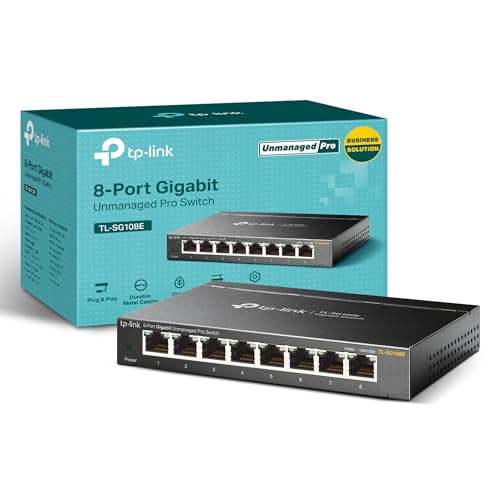
- Eight Gigabit Ethernet ports
- VLAN, QoS, and IGMP support
- Metal desktop or wall-mount design
Best For: Small offices and managed Gigabit home networks
Best Quiet Gaming Switch
BrosTrend 8-Port 2.5G Unmanaged Switch

- Eight 2.5Gbps RJ45 ports
- Up to 40Gbps switching capacity
- Fanless plug-and-play operation
Best For: Gaming, home offices, NAS, and entertainment systems
Managed Gigabit Expansion

- 16 Gigabit Ethernet ports
- Two SFP+ ports
- Managed metal switch design
Best For: Larger wired networks needing port capacity and SFP+ expansion
Silent 2.5G Home Upgrade

- Eight 2.5Gbps RJ45 ports
- Plug-and-play unmanaged operation
- Fanless metal design with 24-month warranty
Best For: Quiet home and small-office multi-gigabit upgrades
Compact Multi-Gig Value

- Five 2.5-Gigabit ports
- Up to 25Gbps switching capacity
- Fanless metal desktop/wall-mount design
Best For: Small networks needing a few silent 2.5Gbps connections
Best 2.5Gb Upgrade

- Five 2.5Gbps RJ45 ports
- Plug-and-play unmanaged setup
- Fanless metal design
Best For: Multi-gigabit home networks and gaming setups
Best for Larger Networks
NETGEAR 16-Port Gigabit Switch

- Sixteen 1Gbps Ethernet ports
- Plug-and-play installation
- Quiet, energy-efficient metal housing
Best For: Expanding home and office wired networks
Best Feature-Rich Gigabit Pick
TP-Link TL-SG116 16-Port Switch
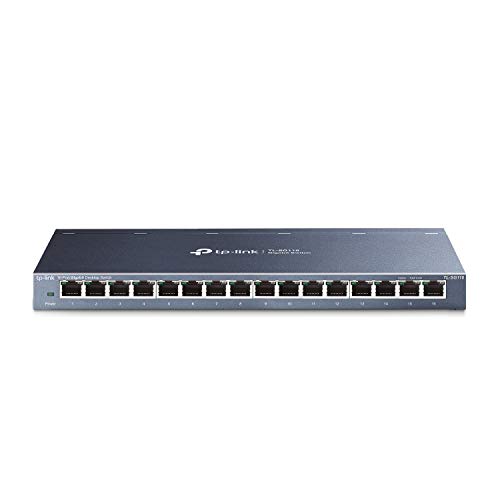
- Sixteen Gigabit RJ45 ports
- QoS and IGMP Snooping support
- Quiet fanless metal case
Best For: Gigabit networks needing basic traffic optimization
Best Multi-Gig Upgrade – TP-Link TL-SG108S-M2 8-Port 2.5G Switch
The TP-Link TL-SG108S-M2 is a practical choice for high speed network switches when you want eight wired 2.5Gbps connections without replacing existing Cat5e cabling. Its unmanaged design, auto-negotiation, and fanless operation make it well suited to straightforward home and small-office upgrades.
Best For: Home offices, gaming setups, NAS connections, 2.5G Wi-Fi access points, and LAN parties.
Pros:
- Eight 2.5Gbps ports provide up to 40Gbps of switching capacity.
- Auto-negotiates between 100Mbps, 1Gbps, and 2.5Gbps devices.
- Fanless design supports quiet operation.
- Desktop or wall-mount installation and a three-year warranty add flexibility.
Cons:
- Unmanaged operation does not provide VLAN, QoS, or monitoring controls.
- Plastic construction may feel less substantial than a metal switch.
Choose this model if you want an easy path to multi-gig wired networking and do not need advanced network management. It offers broad compatibility and quiet operation in a compact format.
Best 10G Rackmount Option – MikroTik CRS312-4C+8XG-RM 10G Switch
MikroTik CRS312-4C+8XG-RM – Network Switch L3, 10G, Ethernet (100/1000/10000), 1U, White
Check Price On AmazonThe MikroTik CRS312-4C+8XG-RM is aimed at users comparing high speed network switches for a more demanding wired environment. It combines 10G Ethernet support with SFP+ connectivity in a metal 1U rackmount form factor, making it a better fit for structured networks than casual plug-and-play installations.
Best For: Rack-mounted networks, servers, workstations, and users needing 10G Ethernet and SFP+ interfaces.
Pros:
- Supports 100Mbps, 1Gbps, and 10Gbps Ethernet connections.
- Provides 12 ports, including Ethernet and SFP+ interfaces.
- Metal 1U rackmount construction suits equipment-room installations.
- Wide listed operating temperature range from 1°C to 70°C.
Cons:
- Its rack-oriented design may be excessive for a basic home network.
- The supplied notes list no warranty.
- SFP+ ports may require additional compatible networking hardware.
This is the strongest fit here for a 10G-focused network that needs rackmount hardware and a mix of copper and SFP+ connections. It is less appealing if you only need a simple desktop switch.
Best Managed Gigabit Value – TP-Link TL-SG108E Easy Smart Switch
The TP-Link TL-SG108E offers useful management features for buyers who need more control than a basic switch provides. While its eight ports are Gigabit rather than 2.5G or 10G, VLAN support, QoS, IGMP snooping, link aggregation, and monitoring make it a practical option for organized home and small-office networks.
Best For: Small offices, segmented home networks, surveillance or multicast traffic, and users who want basic web-managed controls.
Pros:
- Eight 10/100/1000Mbps RJ45 ports expand wired connectivity.
- Supports VLANs, QoS, IGMP snooping, port mirroring, and loop prevention.
- Metal housing with shielded ports supports desktop or wall-mounted use.
- Includes cable diagnostics and link aggregation features.
Cons:
- Gigabit ports are slower than the multi-gig and 10G alternatives.
- Management features require more setup than an unmanaged switch.
Pick the TL-SG108E when network organization matters more than maximum throughput. Its feature set makes it a capable value choice for users who need VLANs and traffic controls on a Gigabit network.
Best Quiet Gaming Switch – BrosTrend 8-Port 2.5G Unmanaged Switch
The BrosTrend 8-Port 2.5G Switch is a straightforward option for high speed network switches in gaming, entertainment, and home-office setups. All eight RJ45 ports support 2.5Gbps, and the fanless enclosure keeps installation simple and quiet without requiring software.
Best For: Gaming PCs, consoles, NAS devices, workstations, smart TVs, and home offices needing several 2.5G connections.
Pros:
- Eight 2.5Gbps ports deliver up to 40Gbps of switching capacity.
- Plug-and-play operation requires no software installation.
- Fanless design supports quiet use during demanding tasks.
- Compact enclosure supports desktop or wall mounting.
Cons:
- Unmanaged operation does not include VLAN or traffic-management features.
- Plastic construction may be less durable than a metal chassis.
This model makes sense for users who want multiple 2.5G copper connections at home without the complexity of SFP+ hardware. It is best suited to simple networks where silent operation and easy setup are priorities.
Managed Gigabit Expansion – MikroTik CSS318-16G-2S+in
MikroTik CSS318-16G-2S+in Managed Network Switch, 16 Gigabit Ethernet Ports, 2 SFP+ Ports
Check Price On AmazonThe MikroTik CSS318-16G-2S+in is a practical choice when high speed network switches need to support many wired devices. It provides 16 Gigabit Ethernet ports plus two SFP+ ports in a metal case, with managed-switch functionality for more controlled network deployments.
Best For: Offices, server areas, and network setups that need numerous Gigabit connections with SFP+ expansion.
Pros:
- Offers 16 Gigabit Ethernet ports for broad device connectivity.
- Includes two SFP+ ports for compatible fiber or high-speed uplink equipment.
- Managed switch design suits networks requiring more control than plug-and-play hardware.
- Metal housing and a listed upper temperature rating of 70 °C support demanding environments.
Cons:
- Its listed data transfer rate is 1000 Mbps, below the 2.5Gbps speeds of the other switches here.
- It has no stated warranty in the supplied specifications.
- A managed switch may be more functionality than a simple home network requires.
Choose the CSS318-16G-2S+in if port count and SFP+ connectivity matter more than multi-gigabit RJ45 speeds. It is the most expansion-oriented option in this group, while its 16-port layout makes it suitable for larger wired networks.
Silent 2.5G Home Upgrade – UGREEN 8-Port 2.5Gb Switch
For a straightforward upgrade to high speed network switches, the UGREEN 2.5Gb Switch combines eight 2.5Gbps RJ45 ports with automatic speed detection. Its unmanaged, plug-and-play design is aimed at users connecting NAS devices, gaming PCs, consoles, and WiFi 6 or 6E routers without configuration.
Best For: Homes and small offices upgrading several devices to 2.5Gbps with minimal setup and silent operation.
Pros:
- Eight ports support speeds up to 2.5Gbps and automatically adapt to 100M, 1G, or 2.5G connections.
- Plug-and-play unmanaged operation requires no software or configuration.
- Fanless design provides silent operation, while the metal housing and ventilation support heat management.
- Supports desktop or wall placement and includes a 24-month UGREEN warranty service.
Cons:
- As an unmanaged switch, it does not provide the network controls associated with managed models.
- It uses RJ45 ports only, with no SFP+ connectivity listed.
- The compact eight-port layout may not suit larger installations needing more wired connections.
The UGREEN is a well-balanced pick for a quiet multi-gigabit home or office network. It is especially convenient when you want 2.5Gbps capability across several devices without dealing with switch configuration.
Compact Multi-Gig Value – TP-Link TL-SG105S-M2
The TP-Link TL-SG105S-M2 is a compact option among high speed network switches, offering five 2.5-Gigabit ports and up to 25Gbps of switching capacity. Auto-negotiation supports 100Mbps, 1Gbps, and 2.5Gbps links, making it suitable for mixed-speed devices and quick network upgrades.
Best For: Small offices, gaming setups, NAS connections, and home networks that need a few 2.5Gbps ports.
Pros:
- Five 2.5-Gigabit ports provide up to 25Gbps of switching capacity.
- Auto-negotiation supports 100Mbps, 1Gbps, and 2.5Gbps devices.
- Fanless operation keeps the switch silent for home or office use.
- Metal casing and desktop/wall-mounting design offer flexible placement.
Cons:
- Five ports provide less capacity than the eight- and 16-port alternatives.
- Its unmanaged design offers no advanced configuration features.
- No SFP+ ports are listed for fiber or dedicated uplink use.
The TL-SG105S-M2 makes sense when you want multi-gigabit performance in a small footprint. Its five-port design keeps the setup simple, while auto-negotiation helps it fit into networks containing a mix of older and newer Ethernet hardware.
Best 2.5Gb Upgrade – UGREEN 2.5Gb 5-Port Switch
For homes and small offices upgrading to high speed network switches, the UGREEN 2.5Gb Switch offers five multi-gigabit ports for connecting NAS devices, gaming PCs, and WiFi 6/6E routers. Its unmanaged plug-and-play design requires no software or configuration.
Best For: Users who want a compact, quiet 2.5Gb network upgrade for desktops, gaming setups, or home NAS equipment.
Pros:
- Five RJ45 ports support speeds up to 2.5Gbps and automatically adapt to 100Mbps, 1Gbps, or 2.5Gbps connections.
- Metal housing, heatsinks, thermal pads, and ventilation support stable extended-use performance.
- Fanless operation, LED indicators, non-slip feet, and desktop or wall placement offer flexible installation.
Cons:
- Only five ports are available.
- It is an unmanaged switch, so advanced configuration features are not included.
This is a strong choice when your network devices support multi-gigabit Ethernet and you want a straightforward speed increase without adding configuration work.
Best for Larger Networks – NETGEAR 16-Port Gigabit Switch
The NETGEAR GS316v3 is a practical option among high speed network switches when you need many wired connections at once. It provides 16 auto-negotiating Gigabit Ethernet ports and works with existing Cat5e or Cat6 cables.
Best For: Homes, offices, and workspaces that need to connect numerous desktops, laptops, printers, or other Ethernet devices.
Pros:
- Sixteen 1Gbps Ethernet ports expand wired network capacity.
- Plug-and-play operation requires no software installation or configuration.
- Fanless metal housing supports quiet operation and desktop or wall-mounted placement.
- IEEE 802.3az energy-efficient operation helps reduce power consumption.
Cons:
- Ports support Gigabit speeds rather than 2.5Gbps multi-gigabit connectivity.
- The supplied notes specify compatibility for use in the U.S. and Canada only.
Choose this model when port count matters more than multi-gigabit speeds. Its simple setup and quiet, flexible enclosure make it well suited to expanding an established Gigabit network.
Best Feature-Rich Gigabit Pick – TP-Link TL-SG116 16-Port Switch
The TP-Link TL-SG116 combines 16 Gigabit ports with traffic-management features, making it a useful choice among high speed network switches for homes and small offices. Auto-negotiation, Auto MDI/MDIX, and plug-and-play setup keep installation straightforward.
Best For: Users who need 16 wired Gigabit connections plus QoS and IGMP Snooping for prioritizing voice, video, or other network traffic.
Pros:
- Sixteen 10/100/1000Mbps RJ45 ports expand network capacity.
- Port-based 802.1p/DSCP QoS and IGMP Snooping support traffic optimization.
- Fanless metal construction enables quiet desktop or wall-mounted operation.
- Energy-efficient technology is designed to reduce power consumption.
Cons:
- Maximum listed data transfer rate is 1Gbps per port.
- As a plug-and-play unmanaged switch, it does not provide broader managed-switch configuration.
This TP-Link model is a good fit for a larger Gigabit network where quiet operation and basic traffic prioritization are more important than 2.5Gbps speeds.
How We Picked the Best High Speed Network Switches
We focused on switches that suit common upgrade paths, including faster internet connections, gaming PCs, Wi-Fi access points, network-attached storage, workstations, and office devices. The selection includes five-port and eight-port multi-gig switches, larger 16-port gigabit models, and managed switches with SFP+ or 10Gbps connectivity.
We also considered practical installation details such as fanless or quiet operation, metal construction, desktop or rack compatibility, plug-and-play setup, VLAN support, and the ability to expand a network later.
Quick Comparison
| Best For | Recommended Type | What to Prioritize |
|---|---|---|
| Small multi-gig setup | 5-port 2.5Gbps switch | Compact size and low cost |
| Gaming or home office | 8-port 2.5Gbps switch | Fanless operation and enough spare ports |
| Large wired network | 16-port gigabit switch | Port density and simple deployment |
| Advanced home lab or business | Managed 10Gbps switch | VLANs, monitoring, uplink options, and configuration control |
Key Buying Factors for High-Speed Network Switches
Port Speed and Compatibility
Choose 2.5Gbps ports if your computers, access points, NAS, or internet service can exceed 1Gbps. A 10Gbps switch is more appropriate for high-speed file transfers, virtualization, professional media work, or a fast backbone. Gigabit remains sufficient for printers, smart-home devices, cameras, and ordinary office equipment.
Port Count and Expansion
Count every device that will connect by Ethernet, then leave at least one or two spare ports. Five-port switches suit small setups, while eight-port models offer more flexibility without taking much space. Choose 16 ports when replacing an older switch or wiring several rooms.
Managed Versus Unmanaged
Unmanaged switches are the simplest option: connect the cables and start using the network. Managed models add features such as VLANs, traffic controls, monitoring, link aggregation, and more precise troubleshooting. These capabilities are valuable for home labs, offices, and networks with separate guest, work, or surveillance segments.
Uplinks, Noise, and Installation
Check whether the switch has SFP+ ports, faster uplinks, or interchangeable copper connections if you plan to build a 10Gbps backbone. Fanless designs are preferable beside a desk or in a media cabinet; rack-mount models make more sense in a structured network closet. Also verify cable quality: Cat5e can support some 2.5Gbps installations, while 10Gbps may require Cat6 or better depending on cable length and conditions.
Who Should Buy Which High Speed Network Switches?
Choose a five-port 2.5Gbps model for a compact desktop, gaming station, or small NAS setup. An eight-port 2.5Gbps switch is the better all-around upgrade for a busy home network. Select a 16-port gigabit model when port capacity matters more than multi-gig speed. For VLANs, centralized control, monitoring, or 10Gbps expansion, choose a managed MikroTik model and be prepared to spend more time configuring it.