Choosing the right office lock is about more than convenience. The best keypad smart locks for office use should balance controlled access, simple code management, and dependable security without creating headaches for staff.
This roundup focuses on practical options for front doors, private offices, and shared workspaces, with an eye toward easy installation, user-friendly access, and features that fit real business needs.
Best 10 Keypad Smart Locks for Office Picks for 2026
Office keypad handle lock
Code-only handle lock with passage mode

- 20 passcodes plus one-time codes
- Auto-lock and passage mode
- No app, Wi-Fi, or Bluetooth
Best For: Small offices and shared rooms needing simple code access
Connected office deadbolt
Keypad deadbolt with app and voice control

- Keypad, app, voice, and auto-unlock
- Remote sharing and notifications
- Requires 2.4 GHz Wi-Fi
Best For: Offices that want remote access control and smart integration
Keypad office knob lock
Backlit keypad knob with backup keys

- 20 user codes and one-time guest codes
- Auto-lock adjustable from 5 to 99 seconds
- Quick install with screwdriver
Best For: Small offices and interior doors needing simple keypad access
Biometric office privacy lock
Fingerprint keypad lock for indoor office doors

- Five unlock methods including fingerprint
- App manages one-time and timed codes
- Indoor electronic deadlock for privacy
Best For: Indoor offices and private rooms needing flexible access and privacy
Office-Ready Keypad Deadbolt
TEEHO TE001 Keyless Entry Deadbolt
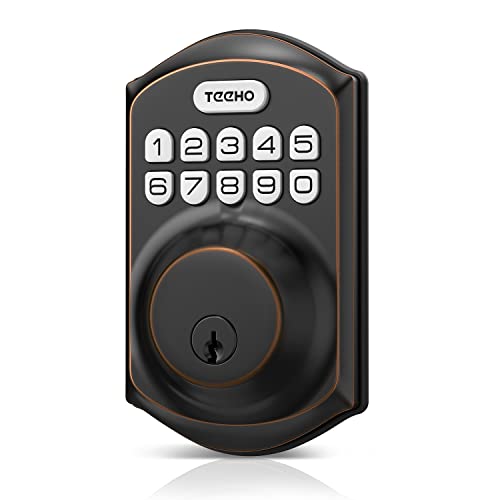
- 20 user codes plus one-time guest PIN
- Auto-lock, one-touch lock, and backlit keypad
- IP54 rating, low-battery alert, and backup keys
Best For: Offices and storage doors needing simple PIN-based access
Smart Access With Handle
Kucacci Fingerprint Keypad Lock

- Fingerprint, keypad, app, key fob, and key access
- App tools for admins, codes, e-keys, and logs
- DIY install with AES256 encryption
Best For: Shared offices that need flexible access control
Handle-Style Office Keypad Lock

- 20 PIN codes plus one-time guest codes
- Passage mode for high-traffic office access
- Anti-peep keypad, break-in detection, and backup keys
Best For: Shared offices needing a handle lock with keypad entry
Wi-Fi Convenience Pick

- Built-in Wi-Fi with no bridge required
- Physical buttons for durable keypad use
- Auto-lock and wrong-try protection
Best For: Offices needing app control without extra hardware
Standalone Code Entry Pick
Nyboer Keypad Door Lock with Handle

- No app or Wi-Fi required
- Up to 20 custom codes plus one-time codes
- Includes backup keys and auto-lock
Best For: Offices that want simple keypad access only
Biometric Connected Pick

- Built-in Wi-Fi with app control and no hub
- 0.3-second fingerprint unlock
- Supports multiple PIN code types
Best For: Offices wanting biometric and remote access control
Office keypad handle lock – Code-only handle lock with passage mode
If you want keypad smart locks for office use without dealing with apps, Wi‑Fi, or Bluetooth, this handle lock is a straightforward option. It focuses on code-based entry, quick DIY installation, and simple access sharing, which makes it practical for busy workspaces, back rooms, and small offices that need controlled entry.
Best For: Small offices, staff entrances, and shared rooms that need code access without connected features.
Pros:
- Stores up to 20 4–8 digit passcodes, including temporary one-time codes.
- Auto-lock and passage mode help with office hours and frequent entry periods.
- Backlit keypad, low battery alerts, and 8–12 month battery life support daily use.
- Easy DIY install in about 15 minutes on most standard US and Canadian wooden doors.
Cons:
- No app, Wi-Fi, or Bluetooth support for remote management.
- Uses 4 AA batteries, which are not included.
- Best suited to wooden doors rather than every door type.
This is a practical pick if your office mainly needs dependable keypad access and simple local control. The passage mode and temporary codes are especially useful for repeated employee traffic or short-term visitors.
Connected office deadbolt – Keypad deadbolt with app and voice control
For keypad smart locks for office settings that need more control than a basic code lock, this Yale deadbolt adds app access, voice assistant support, and auto-unlock features. It is a stronger fit when you want to manage entry remotely, share access from a phone, and keep doors locked automatically after use.
Best For: Offices that want keypad entry plus app-based access management and smart home integration.
Pros:
- Multiple unlock options include keypad, app, voice assistant, and Auto-Unlock.
- Can share access, receive notifications, and lock or unlock remotely through the Yale Access App.
- Auto-Lock uses DoorSense once the door is closed.
- Installs with a screwdriver on most standard US entry doors.
Cons:
- Requires 2.4 GHz Wi-Fi and is limited to the U.S. and Canada.
- It is a deadbolt, so it may not suit users specifically wanting a handle lock.
- Smart features depend on app and connected-device use.
This model makes sense if your office needs smarter access control than a standalone keypad can offer. It balances code entry with remote management, which is helpful for owners, managers, or teams handling frequent access changes.
Keypad office knob lock – Backlit keypad knob with backup keys
If you need keypad smart locks for office doors in a compact knob style, this Yamiry model keeps the setup simple. It offers code entry, backup keys, and auto-lock in a design that should work well for offices, back rooms, and other spaces where quick local access matters more than app control.
Best For: Small offices or interior doors that need an easy-to-use keypad knob with local access.
Pros:
- Supports 20 user codes plus one-time guest codes.
- Backlit keypad, low battery indicator, and anti-prying code features add convenience.
- Auto-lock can be set from 5 to 99 seconds or disabled.
- Installs in under 15 minutes with just a screwdriver.
Cons:
- Knob format may be less preferred than a deadbolt or handle for some office entry doors.
- Backup keys are included, but no remote management is highlighted in the notes.
- Uses 4–8 digit codes only, so setup stays basic.
This is a good no-fuss option when you want code entry and quick installation without extra complexity. For offices that mainly need convenient local access, its keypad and auto-lock features cover the essentials.
Biometric office privacy lock – Fingerprint keypad lock for indoor office doors
Among keypad smart locks for office use, this Foxgard model stands out because it combines keypad access with fingerprint entry, app control, and IC cards. It is a practical choice for indoor office doors where you want flexible access methods and a built-in electronic deadlock for added privacy.
Best For: Indoor offices, private rooms, and shared workspaces that need multi-method access and privacy control.
Pros:
- Offers five unlock methods: fingerprint, keypad code, app, IC card, and mechanical key.
- Supports one-time and timed codes through the app.
- Includes auto-lock, delayed lock, and anti-peep keypad entry.
- Electronic deadlock adds privacy for common-user-only access.
Cons:
- Remote access and voice control need the Foxgard Gateway, sold separately.
- Designed for indoor use rather than outdoor entry.
- Uses 4 AA batteries, which are not included.
This lock is a strong fit when an office needs both convenience and tighter privacy than a basic keypad can provide. The fingerprint and keypad combination makes everyday access flexible, while the deadlock mode helps control who can enter a restricted room.
Office-Ready Keypad Deadbolt – TEEHO TE001 Keyless Entry Deadbolt
If you want keypad smart locks for office use without adding app setup or extra complexity, the TEEHO TE001 keeps things straightforward. It offers up to 20 user codes, a one-time guest PIN, auto-lock, and a backlit keypad, making it a practical fit for controlled access points like a side office door, storage room, or shared workspace.
Best For: Offices, storage rooms, and other spaces that need simple keypad access with temporary codes.
Pros:
- Supports 20 user codes plus a one-time code for guests or service visits
- Auto-lock and one-touch lock add convenience for busy office routines
- Anti-peep password, low-battery alert, and IP54 weather resistance improve everyday reliability
- Easy screwdriver installation and includes 2 backup keys
Cons:
- No app or smart-home connectivity
- Only fits 2-1/8" door holes, so compatibility needs checking first
- Deadbolt-only design may not suit doors that need a handle set
For offices that mainly need dependable PIN access rather than full smart features, the TE001 is a solid low-friction option. Its code management and auto-lock functions cover the basics well, but buyers should confirm door sizing before ordering.
Smart Access With Handle – Kucacci Fingerprint Keypad Lock
For keypad smart locks for office environments that also need flexible access methods, the Kucacci lock goes beyond basic entry. It combines keypad, fingerprint, app, key fob, key, Wi-Fi, and voice control options, so it can work well for offices that want multiple ways to manage entry and user access.
Best For: Offices, home offices, and shared workspaces that want keypad access plus app-based management and fingerprint entry.
Pros:
- Multiple unlock methods, including fingerprint, passcode, app, key fob, key, Wi-Fi, and voice control
- App management lets you authorize admins, create codes, share e-keys, and track records
- Easy DIY installation with a screwdriver and no drilling required
- AES256 encryption and lifetime free app access add value for ongoing use
Cons:
- Wi-Fi and voice control require a separate gateway purchase
- More features mean more setup than a basic keypad deadbolt
- Designed for standard door sizing, so compatibility still needs checking
This is the most feature-rich option in the group, especially if office access needs to be shared, tracked, and changed often. It makes sense when you want keypad convenience, but also want fingerprint and app controls for tighter day-to-day management.
Handle-Style Office Keypad Lock – TEEHO TE004 Keypad Door Lock
If your office door needs a keypad smart lock with a built-in handle, the TEEHO TE004 is a practical choice. It supports up to 20 PIN codes, one-time access codes, auto-lock, passage mode, and backup keys, which makes it useful for offices, home offices, and other shared spaces where entry needs can change throughout the day.
Best For: Offices, shared rooms, and storage areas that benefit from a handle lock with keypad access.
Pros:
- Supports 20 user codes and one-time codes for visitors or service providers
- Passage mode can disable auto-lock during frequent traffic periods
- Anti-peeping password and break-in detection add security for office use
- Includes backlit keypad, auto-lock, and 2 backup keys
Cons:
- Battery-powered only, so battery checks still matter
- No app or remote smart-home control listed
- Handle design may not fit every office door style preference
The TE004 stands out if you want the convenience of a handle combined with dependable keypad access. Its passage mode is especially useful for offices with frequent in-and-out movement, while the temporary code feature keeps guest access manageable.
Wi-Fi Convenience Pick – eufy C30 Keypad Deadbolt
If you want keypad smart locks for office use with remote control and simple setup, the eufy Security Smart Lock C30 is built around convenience. Its built-in Wi-Fi means no bridge is required, and the app can handle access management, real-time notifications, and event history from anywhere.
Best For: Offices or shared entries that want app-based control without adding a hub.
Pros:
- Built-in Wi-Fi lets you manage the lock remotely with no bridge required.
- Physical buttons offer a more durable, error-resistant keypad option than touchscreens.
- Auto-lock, voice control support, and wrong-try protection add everyday convenience and security.
- Easy 15-minute DIY installation with no drilling required on most standard deadbolts.
Cons:
- Batteries are not included.
- Battery life is listed at up to 5 months, so replacements will be part of routine upkeep.
Overall, this is a practical choice if your office wants keypad access plus remote management in a straightforward deadbolt format. The combination of built-in Wi-Fi, physical buttons, and app controls makes it easy to oversee day-to-day entry.
Standalone Code Entry Pick – Nyboer Keypad Door Lock with Handle
For keypad smart locks for office spaces that do not need an app or Wi-Fi, the Nyboer Keypad Door Lock with Handle keeps things simple. It uses on-keypad controls for settings, supports multiple 4-8 digit passwords, and includes one-time temporary codes for visitors.
Best For: Offices, rentals, and interior or exterior doors where simple code access is enough.
Pros:
- No app or Wi-Fi needed, with settings adjusted directly on the keypad.
- Supports up to 20 custom codes plus one-time temporary passwords for visitors.
- Includes 2 mechanical keys for emergency backup access.
- Auto-lock, passage mode, and one-touch locking add flexible everyday use.
Cons:
- Does not offer remote app control or Wi-Fi connectivity.
- Battery life is listed at 8-12 months, so battery checks are still needed.
This lock makes sense when your office wants straightforward keypad entry with minimal setup and no connected features to manage. Its code options and backup keys make it a practical fit for shared-use doors.
Biometric Connected Pick – Philips WiFi Keypad Lock Set
If your office needs keypad smart locks for office entry with more than just PIN codes, the Philips WiFi Keypad Door Lock adds app control, voice assistant support, and fingerprint unlock. It connects directly to 2.4GHz Wi-Fi with no hub required, so you can manage access and check status from the Philips Home Access App.
Best For: Offices that want remote control, fingerprint access, and flexible code sharing.
Pros:
- Built-in Wi-Fi works without a hub or bridge.
- Fingerprint unlock is rated at 0.3 seconds for fast access.
- Supports permanent, one-time, periodic, and recurring PIN codes.
- Includes auto-lock, voice assistant compatibility, and a matching handle set.
Cons:
- Auto-lock is off by default and must be turned on in the app.
- Batteries are not included, and the lock is designed for standard 1.5V alkaline batteries only.
- Wi-Fi performance depends on staying within 33 ft of the router with limited obstacles.
This is the most feature-rich option in the group for offices that want both keypad entry and biometric access. It’s especially useful when you need to manage different access types for staff, guests, or service visits from one app.
How We Picked the Best Keypad Smart Locks for Office
We looked for Keypad Smart Locks for Office settings that offer dependable keyless entry, manageable user codes, strong basic security ratings, and installation paths that won’t require a full door replacement. We also favored models with useful backup access and clear day-to-day operation for busy teams.
Quick Comparison
In general, deadbolt-style models are a better fit for main office entries, while handle and knob designs can work well for internal rooms, private offices, and lower-traffic doors. Wi-Fi models add remote control and monitoring, but code-only locks can be simpler and easier to maintain when you just need straightforward access management.
Key Buying Factors for Keypad Smart Locks for Office
Access Control
Look for locks that support multiple user codes, temporary codes, or one-time access if vendors, cleaners, or contractors need occasional entry. The easier it is to add or remove codes, the better the lock will work in a changing office environment.
Security and Durability
For exterior doors, prioritize ANSI-grade hardware, auto-lock features, and weather resistance. For interior office doors, choose a lock with solid build quality and a keypad that is easy to use but not too sensitive to accidental presses.
Connectivity
Wi-Fi and app control can be useful for managers who want remote changes or entry logs. If your office does not need remote administration, a non-connected lock may reduce setup complexity and ongoing maintenance.
Installation and Power
Many keypad locks are designed for DIY installation, but check door thickness, backset compatibility, and battery life before buying. A lock that fits standard commercial-style doors with minimal adjustment is usually the safest choice.
Who Should Buy Which Keypad Smart Locks for Office?
If you need simple shared access for a small team, choose a code-only lock with multiple passcodes and auto-lock. If you manage a front entrance or receive frequent visitors, pick a model with stronger security features and temporary code support. If remote oversight matters, a Wi-Fi-enabled option is worth the extra cost. For private offices or internal rooms, a keypad handle or knob lock may be the most practical and budget-friendly choice.