A home office may feel more secure than a shared workplace, but laptops remain vulnerable to opportunistic theft, especially near doors, windows, or common areas. A laptop locking cable adds a practical layer of physical security when you need to step away.
These 10 laptop locking cables for home offices cover common Kensington-style slots, newer Nano and Dell N17 slots, adhesive anchor systems, combination locks, keyed designs, and adjustable desk mounts.
Best 10 Laptop Locking Cables for Home Offices Picks for 2026
Best Combination Lock
Kensington T-Bar Standard Cable Lock

- Resettable four-digit combination
- Six-foot carbon-steel cable
- Fits standard Kensington slots
Best For: Home-office devices with standard Kensington security slots
Best Adhesive-Mount Kit
AboveTEK Laptop and Tablet Lock

- Includes two adhesive anchor sets
- Six-foot galvanized steel cable
- Works with laptops, tablets, and phones
Best For: Devices without built-in security slots
Best for Thin Laptops
Kensington Nano Combination Lock

- Designed for Nano security slots
- Slim head keeps laptops stable
- Resettable four-digit combination
Best For: Thin laptops with compatible Nano slots
Best Keyed Option
Kensington T-Bar Standard Keyed Lock

- Six-foot carbon-steel cable
- Pivoting head for easier access
- Anti-pick tubular keyed lock
Best For: Standard Kensington-slot devices where keyed security is preferred
Flexible Device Protection
Laptop and Tablet Security Cable Kit

- Includes keyed lock, two keys, and two adhesive plates
- 6.6-foot, 5 mm steel cable
- Supports standard slots and non-slot devices
Best For: Home offices securing laptops, tablets, and shared electronics
Universal Slot Coverage
Kensington 3-in-1 Combination Lock

- Supports standard, nano, and wedge slots
- Resettable four-digit combination
- Six-foot carbon steel cable
Best For: Mixed-brand laptop setups using compatible security slots
Portable Keyed Security
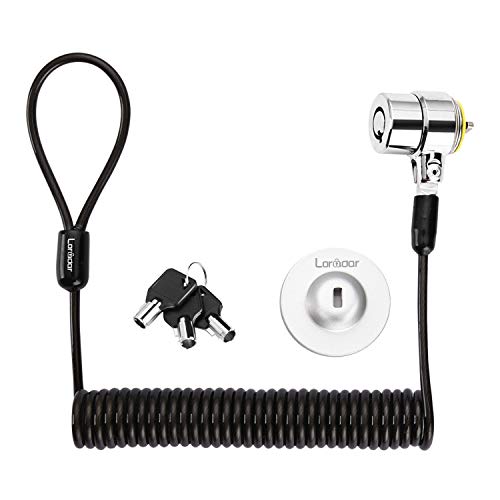
- 6.2-foot retractable cable with compact recoil
- Includes three keys and an adhesive anchor plate
- Works with 3 x 7 mm slots and selected non-slot devices
Best For: Compact home-office setups needing flexible keyed security
Dell Wedge-Slot Protection
Kensington N17 Combination Lock

- Made for Dell and Alienware wedge slots
- Resettable 4-wheel combination lock
- 6-foot carbon steel cable
Best For: Dell and Alienware laptops with compatible wedge slots
Keyed K-Slot Security

- Fits compatible built-in K-slots
- Includes two keys
- 4.6-foot PVC-jacketed steel cable
Best For: K-slot-equipped laptops and other electronics
Adjustable Desk-Mount Security
AboveTEK Laptop Locking Station

- Fits 12- to 16-inch laptops
- Includes 78.7-inch cable
- Adjustable viewing and dual lock clips
Best For: Laptops needing a slot-free adjustable locking station
Best Combination Lock – Kensington T-Bar Standard Cable Lock
For home offices using laptops or other equipment with a standard Kensington security slot, this combination lock provides a practical way to anchor devices to a desk or another fixed structure. Its resettable four-digit code avoids the need to manage a key.
Best For: Home-office laptops and peripherals with a standard Kensington T-Bar slot, excluding many newer Dell and Alienware devices.
Pros:
- Six-foot cut-resistant carbon-steel cable offers flexible anchoring.
- Resettable four-wheel combination provides 10,000 possible codes.
- Push-button design supports one-handed engagement.
- Works with compatible laptops, monitors, desktops, docking stations, and projectors.
Cons:
- Not compatible with Dell or Alienware devices using a Noble or wedge-style slot.
- Requires a compatible Kensington standard-size security slot.
This is a straightforward choice among laptop locking cables for home offices when convenience matters more than carrying a key. Confirm the slot type before ordering, especially for Dell models from 2016 onward.
Best Adhesive-Mount Kit – AboveTEK Laptop and Tablet Lock
The AboveTEK kit is a flexible option for laptop locking cables for home offices when a device lacks a built-in security slot. Its adhesive anchor plates attach to suitable flat surfaces and the included key-operated cable can secure laptops, tablets, and phones.
Best For: Multiple mobile devices or laptops without integrated security slots, provided the mounting surface is suitable for the included adhesive anchors.
Pros:
- Includes two adhesive sticker and anchor-plate sets for multiple devices.
- Six-foot galvanized steel cable supports movement while secured.
- Key-operated stainless-steel lock is designed for straightforward installation.
- Broadly intended for tablets, smartphones, laptops, and notebooks.
Cons:
- Adhesive anchors depend on a clean, suitable flat surface and proper installation.
- Key operation requires keeping track of the included keys.
This kit stands out for adding a mounting point to compatible devices rather than relying on a Kensington slot. It is useful for varied home-office equipment, but the adhesive attachment should be considered carefully before relying on it for valuable hardware.
Best for Thin Laptops – Kensington Nano Combination Lock
This Kensington lock is designed for thin laptops with a Nano-size security slot, making it a focused option among laptop locking cables for home offices. The slim lock head helps the device remain flat while the cable anchors it to a desk or table.
Best For: Thin laptops equipped with a compatible Nano security slot.
Pros:
- Five-foot carbon-steel cable resists cutting attempts and includes a protective sleeve.
- Slim lock head is designed to support a stable, flat laptop position.
- Resettable four-wheel combination offers 10,000 possible codes.
- Pivoting head and rotating cable help preserve access to nearby ports.
Cons:
- Only suitable for devices with a compatible Nano-size security slot.
- Five-foot cable is shorter than some six-foot alternatives.
Choose this model when your laptop specifically uses a Nano slot and has limited clearance around the locking point. Checking the slot dimensions beforehand is important because standard and Nano slots are not interchangeable.
Best Keyed Option – Kensington T-Bar Standard Keyed Lock
For home-office users who prefer a physical key, this Kensington keyed lock uses T-Bar technology and a six-foot carbon-steel cable to secure compatible equipment to a fixed structure. The pivoting lock head is intended to improve access on thinner devices.
Best For: Laptops, monitors, desktops, and other equipment with a standard Kensington security slot when keyed access is preferred.
Pros:
- Six-foot carbon-steel cable with plastic sheath resists cutting attempts.
- Pivoting 10mm lock head supports accessibility on thin laptops.
- Patented hidden-pin technology supports the anti-pick tubular lock.
- Works with compatible laptops, displays, docking stations, projectors, and other devices.
Cons:
- Not compatible with newer Dell devices using a wedge lock slot.
- Some HP models and Chromebooks use a Nano slot instead.
- Keyed operation requires storing and carrying the key.
This is a solid fit for buyers who want a traditional keyed solution and broad compatibility with standard Kensington slots. Verify the device’s technical specifications first, particularly for newer Dell, HP, and Chromebook models.
Flexible Device Protection – Laptop and Tablet Security Cable Kit
For home offices that need laptop locking cables for home offices with broader device compatibility, this kit combines a keyed 5 mm steel cable with two adhesive anchor plates. It can secure equipment with a standard 3 x 7 mm slot or devices such as tablets and phones without a built-in slot.
Best For: Home offices, shared workstations, and users securing both slot-equipped and non-slot electronics.
Pros:
- Includes two keys and two self-adhesive anchor plates.
- 6.6-foot cable provides flexibility around desks, table legs, and monitor arms.
- Works with laptops, monitors, tablets, phones, POS devices, and other electronics.
- Compact 7.4-ounce design is convenient for portable use.
Cons:
- Adhesive plates require clean, dry surfaces and waiting time before use.
- Keyed operation requires keeping track of the included keys.
This is a versatile choice when a home office includes several types of electronics. The adhesive anchors add flexibility, but proper installation and curing time are important for dependable everyday use.
Universal Slot Coverage – Kensington 3-in-1 Combination Lock
This Kensington model is a strong fit for home offices seeking laptop locking cables for home offices without worrying about a device’s slot shape. Its interchangeable lock tips support standard, nano, and wedge-shaped security slots, while the resettable four-number combination avoids the need for a physical key.
Best For: Home-office users with laptops from different brands or generations who prefer combination access.
Pros:
- Fits standard, nano, and wedge-shaped laptop security slots.
- Resettable four-digit dial provides 10,000 possible combinations.
- Six-foot carbon steel cable has a protective plastic sheath.
- Unused lock tips remain attached by a tether for convenient storage.
Cons:
- Designed for devices with compatible security slots rather than adhesive mounting.
- At 8.3 ounces, it is slightly heavier than some compact keyed options.
For a mixed-device home office, the interchangeable tips help reduce compatibility concerns. The combination system is also convenient when multiple people need access, provided the code is stored securely.
Portable Keyed Security – Retractable Cable Lock Kit
For shoppers comparing laptop locking cables for home offices, this portable keyed kit offers a retractable design and a 6.2-foot reach. It fits devices with 3 x 7 mm security holes and includes an adhesive anchor plate for compatible tablets, phones, and other devices without a built-in slot.
Best For: Home-office users who want a compact keyed lock for laptops, monitors, tablets, or phones.
Pros:
- Includes three keys and a traceable lock-and-key number.
- Retractable cable extends to about 6.2 feet and recoils to roughly four inches.
- Supports laptops, monitors, tablets, phones, and Mac mini setups with suitable mounting.
- Stainless-steel lock head and TPU-coated twisted steel cable provide a compact design.
Cons:
- Many listed laptop models require the adhesive anchor plate.
- Apple MacBooks without a compatible security slot may not work with the lock directly.
- Anchor adhesion requires surface preparation and up to 48 hours for maximum pressure strength.
The retractable format is useful when desk space is limited or the cable needs to travel between work areas. Check your device’s security-slot shape carefully, and plan for the anchor plate when direct insertion is not supported.
Dell Wedge-Slot Protection – Kensington N17 Combination Lock
Kensington N17 Dell Laptop Computer Lock, Combination Security Locking Cable (K68008WW) Black
Check Price On AmazonFor Dell and Alienware owners comparing laptop locking cables for home offices, the Kensington N17 is a purpose-built option for devices with a wedge-type security slot. Its resettable combination lock and six-foot carbon steel cable provide convenient everyday tethering without requiring a key.
Best For: Dell and Alienware laptops with compatible wedge lock slots.
Pros:
- Fits Dell and Alienware laptops with wedge-type lock slots.
- Resettable four-wheel combination offers 10,000 possible codes.
- Six-foot cut-resistant carbon steel cable anchors to desks or other fixed structures.
- Push-button engagement supports one-handed attachment.
Cons:
- Designed for wedge slots rather than standard K-slots.
- Combination locks require remembering the set code.
The N17 is a strong match when your Dell laptop has the required slot and you prefer keyless access. Confirm the laptop’s slot shape before buying.
Keyed K-Slot Security – Manhattan Laptop Lock
The Manhattan Laptop Lock is a straightforward choice for laptop locking cables for home offices when your device has a standard K-slot. Its keyed design, two included keys, and 4.6-foot steel cable make it practical for desks, shared workspaces, and other fixed anchors.
Best For: K-slot-equipped laptops, monitors, projectors, and other compatible electronics.
Pros:
- Works with devices that have a built-in K-slot security opening.
- Includes two keys for convenient access.
- Steel cable has a transparent PVC jacket to help reduce scratches.
- All-metal lock body uses diecast zinc alloy construction.
Cons:
- The 4.6-foot cable is shorter than some alternatives.
- Requires a compatible K-slot on the device.
This is a simple keyed solution for a conventional laptop security slot. Check both the device slot and the available distance to your preferred desk or furniture anchor.
Adjustable Desk-Mount Security – AboveTEK Laptop Locking Station
For shoppers seeking laptop locking cables for home offices without relying on a built-in security slot, the AboveTEK Locking Station combines an adjustable laptop holder with a two-meter cable. It accommodates 12- to 16-inch laptops and adds adjustable viewing angles for a more structured desk setup.
Best For: MacBook, Surface, Chromebook, and other 12- to 16-inch laptops needing an adjustable locking station.
Pros:
- Fits laptops from 12 to 16 inches, with adjustable arms for different widths.
- Includes a 78.7-inch cable and mounting options for desk attachment.
- Pivot hinge adjusts from 45° to 125° for flexible viewing.
- Dual lock clips accommodate different laptop thicknesses.
Cons:
- Bulkier than a cable-only laptop lock.
- Compatibility depends on the laptop’s size, width, and thickness.
- The station adds setup requirements compared with a simple slot lock.
The AboveTEK is best when you want both physical laptop positioning and tethering. Its wider compatibility is useful for laptops without a standard security slot, but verify dimensions before purchase.
How We Picked These Laptop Locking Cables for Home Offices
We selected products across the main security-slot and attachment styles used by modern laptops, tablets, monitors, and MacBooks. The lineup includes combination and keyed locks, standard T-Bar and Nano-compatible designs, Dell N17 compatibility, adhesive anchor plates, retractable cables, and folding desk mounts. We also considered cable length, resettable codes, included keys, installation requirements, portability, and whether a lock can work with more than one device type.
Before buying, confirm your laptop’s security-slot format. A standard T-Bar lock may not fit a Nano or Dell N17 slot, while adhesive-anchor products can work with devices that lack a built-in slot but require a clean, suitable mounting surface.
Quick Comparison
| Lock type | Best for | Main advantage | Watch for |
|---|---|---|---|
| Combination | Shared or family home offices | No key to store | Code management |
| Keyed | Consistent personal use | Simple, familiar operation | Keep a spare key secure |
| Universal or adhesive anchor | Devices without compatible slots | Broader device compatibility | Attachment and surface limits |
| Desk mount or station | Permanent workstation setups | More structured physical protection | Less portable and may need careful installation |
Key Buying Factors
Slot Compatibility
Check whether your laptop uses a standard Kensington T-Bar slot, Kensington Nano slot, Dell N17 slot, or no built-in slot at all. The lock must match the opening; cable strength cannot compensate for an incompatible head.
Cable Length and Construction
A 4.6- to 6-foot cable usually makes it easier to reach a heavy desk leg or fixed anchor point. Carbon-steel cables are common, but the locking head and anchor point are equally important. Choose a cable that routes neatly without creating a tripping hazard.
Combination Versus Keyed Operation
Combination locks are convenient for households, hot desks, and situations where multiple authorized users need access. Keyed locks can be quicker and predictable for one owner, provided you store the keys safely. Resettable combinations are useful when you want to change access later.
Anchoring and Installation
Attach the cable to something genuinely fixed, such as a heavy desk frame or a properly installed anchor. Adhesive plates are convenient for compatible surfaces, but follow the manufacturer’s cleaning, placement, and curing instructions. A cable attached to a lightweight or movable object offers limited protection.
Who Should Buy Which Laptop Locking Cables for Home Offices?
Choose a standard Kensington combination cable if your laptop has a T-Bar slot and you want key-free everyday security. A keyed T-Bar model is a straightforward choice for a single-user desk. For newer thin laptops, look at Nano-compatible or Dell N17-specific Kensington options. If your device lacks a security slot, consider an adhesive-anchor kit or a locking station, while checking the manufacturer’s compatibility and surface requirements first.
For users securing several device types, a universal 3-in-1 or broader adhesive system may be the most flexible option. A retractable cable suits portable use, whereas a desk-mounted station is better for a semi-permanent home office. In every case, treat a laptop cable as a theft deterrent—not a substitute for strong passwords, device encryption, tracking, and sensible room security.