A laptop mount can reclaim valuable desk space while raising your screen to a more comfortable viewing height. For compact workstations, the right arm should balance a small footprint with dependable support and easy adjustment.
We compared 10 laptop mounts for small desks across compatibility, adjustability, mounting style, weight capacity, and value to help you find a practical fit for your setup.
Best 10 Laptop Mounts for Small Desks Picks for 2026
Best Overall
HUANUO Adjustable Laptop and Monitor Arm
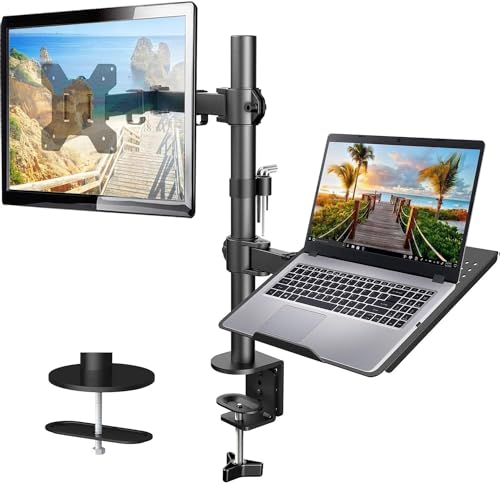
- Ventilated 14 x 12-inch laptop tray
- Supports laptops or 13-32-inch VESA monitors
- Adjustable arm with cable management
Best For: Small desks needing flexible laptop and monitor support
Best for Larger Laptops
WALI Adjustable Laptop Desk Mount

- Supports laptops up to 17 inches and 22 pounds
- Detachable plate works with monitors
- Includes C-clamp and grommet mounts
Best For: Larger notebooks and flexible two-in-one setups
Best for Cooling
HUANUO 2-in-1 Laptop Desk Mount

- Tray has 240 ventilation holes
- Converts from laptop tray to monitor mount
- Supports devices up to 22 pounds
Best For: Compact desks where airflow and versatility matter
Best Range of Motion

- Wide tilt, swivel, and rotation adjustment
- Fits laptops up to 17 inches
- Drill-free C-clamp or grommet mounting
Best For: Frequently repositioned laptops and monitors
Compact Ergonomic Value
Suptek Single Laptop Desk Mount

- Detachable tray fits laptops up to 15.6 inches
- Converts for use with 13- to 27-inch monitors
- Includes clamp and grommet bases
Best For: Compact notebooks and convertible desk setups
Heavy-Duty Versatility

- Fits laptops up to 17 inches or monitors up to 32 inches
- Supports up to 19.8 pounds depending on setup
- Ventilated tray with anti-slip pads and straps
Best For: Larger laptops and convertible high-capacity setups
Best Flexible Combo
VIVO Adjustable Monitor and Laptop Mount

- Supports laptops up to 17 inches and monitors up to 32 inches.
- Offers articulated tilt, swivel, rotation, and height adjustment.
- Uses a C-clamp or optional grommet with integrated cable clips.
Best For: Small desks needing a versatile laptop-and-monitor setup
Best Ergonomic Range

- Supports laptops up to 17 inches or monitors up to 34 inches.
- Arm extends 18.1 inches and reaches 17.5 inches high.
- Ventilated tray includes anti-slip pads, guard, and Velcro straps.
Best For: Small desks requiring broad height and reach adjustment
Best Quick-Access Design
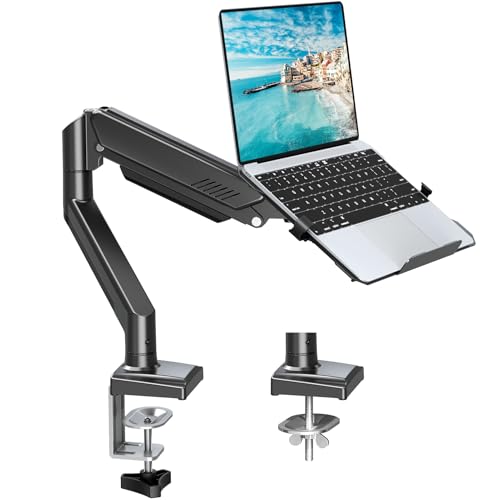
- Quick-release tray includes a locking tab for stability.
- Supports 2.2–22 pounds and laptops up to 17 inches.
- Provides broad articulation, cable management, and two mounting options.
Best For: Multitaskers who frequently reposition or remove a laptop
Best Overall – HUANUO Adjustable Laptop and Monitor Arm
The HUANUO HNCM2 is a versatile choice for laptop mounts for small desks, combining a ventilated laptop tray with support for a VESA monitor. Its articulating arm helps move the laptop upward and out of the main work area while integrated cable management keeps the setup organized.
Best For: Small desks that need a flexible laptop-and-monitor mounting solution.
Pros:
- 14 x 12-inch ventilated tray fits laptops and helps promote airflow.
- Supports laptops or 13- to 32-inch VESA monitors up to 22 pounds.
- Offers tilt, swivel, rotation, height adjustment, and C-clamp or grommet installation.
Cons:
- Mounting hardware is intended for wooden desks.
- Angle-adjustment screws need to be tightened securely.
With broad adjustment options and a five-year warranty, this HUANUO mount is a strong all-around pick when a small desk needs both flexibility and reclaimed surface space.
Best for Larger Laptops – WALI Adjustable Laptop Desk Mount
For shoppers comparing laptop mounts for small desks, the WALI M00LP stands out with support for notebooks up to 17 inches and 22 pounds. Its detachable, height-adjustable plates also let you use the arm with a compatible monitor instead of a laptop.
Best For: Users with larger laptops who want a dual-purpose desk mount.
Pros:
- Fits laptops up to 17 inches and supports up to 22 pounds.
- Includes both C-clamp and grommet mounting options.
- Provides height adjustment, tilt, swivel, rotation, extension, and retraction.
Cons:
- The laptop tray measures 14 x 11 inches, so larger devices should be checked for fit.
- Its adjustment range is more limited in tilt than some alternatives, at plus or minus 15 degrees.
The WALI is a practical choice for a compact workspace where a larger notebook needs to be elevated, while the detachable plates add useful monitor-mounting flexibility.
Best for Cooling – HUANUO 2-in-1 Laptop Desk Mount
The HUANUO HNCM16 is designed for laptop mounts for small desks where airflow matters. Its tray includes 240 ventilation holes, and the removable tray allows the arm to switch between a laptop holder and a VESA monitor mount.
Best For: Laptop users who prioritize ventilation and easy device switching.
Pros:
- Ventilated 13.8 x 11.8-inch tray fits laptops up to 17 inches.
- Tray removes to support 15- to 32-inch VESA monitors up to 22 pounds.
- Includes cable-management clips and C-clamp or grommet mounting options.
Cons:
- Mounting options are specified for wood desks.
- Tray dimensions should be compared with the laptop before purchase.
The HNCM16 is a particularly adaptable option for a small workstation: it clears space beneath the laptop, promotes airflow through its perforated tray, and can be converted for monitor use.
Best Range of Motion – VIVO Single Laptop Desk Mount
The VIVO STAND-V001L is a useful option among laptop mounts for small desks when positioning flexibility is the priority. Its arm offers broad tilt adjustment, full rotation, height adjustment along a 17-inch pole, and drill-free C-clamp or grommet mounting.
Best For: Users who frequently reposition a laptop or monitor during the workday.
Pros:
- Fits laptops up to 17 inches and supports up to 22 pounds.
- Offers plus or minus 90-degree tilt, 180-degree swivel, and 360-degree rotation.
- Supports C-clamp or grommet installation on surfaces up to the listed thickness limits.
Cons:
- It has a three-year warranty, shorter than some alternatives here.
- The tray and arm dimensions may require careful placement on very compact desks.
With a ventilated tray, detachable cable clips, and extensive articulation, the VIVO mount suits small workspaces where ergonomic positioning and easy repositioning are more important than a minimalist fixed setup.
Flexible Desk-Saving Pick – UPGRAVITY Laptop Desk Mount
For shoppers comparing laptop mounts for small desks, the UPGRAVITY mount combines a detachable ventilated tray with a full-motion arm. It supports laptops up to 17 inches or VESA-compatible monitors up to 32 inches, helping raise your screen while leaving more room on the desktop.
Best For: Small-desk users who want to switch between a laptop and monitor setup.
Pros:
- Supports laptops up to 17 inches and monitors up to 32 inches with 75x75mm or 100x100mm VESA patterns.
- Offers 90-degree tilt, 180-degree swivel, 360-degree rotation, and height adjustment.
- Includes both clamp and grommet mounting options, plus cable clips for tidier wiring.
- Ventilated tray supports airflow and holds up to 17.6 pounds.
Cons:
- The tray is relatively compact at 11.8 by 10.4 inches, so check your laptop’s dimensions.
- Monitor use requires a compatible VESA mounting pattern.
This is a versatile option when desk space is limited and you want one arm that can accommodate either a notebook or external display. Its two mounting methods also make it easier to adapt to different small-desk layouts.
Compact Ergonomic Value – Suptek Single Laptop Desk Mount
The Suptek single-arm mount is a practical choice among laptop mounts for small desks, especially if you want an adjustable setup without giving up the option to use the arm with a monitor. Its detachable tray fits notebooks up to 15.6 inches, while the arm supports compatible displays from 13 to 27 inches.
Best For: Smaller laptops and users who want a laptop tray that can convert to a monitor arm.
Pros:
- Detachable tray lets the arm work with either a laptop or a VESA monitor.
- Supports 13- to 27-inch monitors and laptops up to 15.6 inches.
- Provides 180-degree arm swivel, 360-degree screen rotation, 90-degree tilt, and 400mm of height adjustment.
- Includes C-clamp and grommet bases for desks 10-80mm thick.
Cons:
- The laptop tray is not specified for notebooks larger than 15.6 inches.
- Monitor compatibility is limited to screens with 75x75mm or 100x100mm VESA mounting holes.
With a smaller supported laptop size than some alternatives, the Suptek is best matched to compact notebooks. Its detachable tray and straightforward mounting choices make it useful when a small desk needs to serve different work configurations.
Heavy-Duty Versatility – MOUNT PRO Laptop Arm Mount
If you need laptop mounts for small desks that can handle a larger notebook or monitor, the MOUNT PRO arm offers a broad compatibility range. Its removable tray supports laptops up to 17 inches, while removing the tray makes room for 13- to 32-inch VESA-compatible monitors.
Best For: Users who want a higher-capacity, convertible laptop-or-monitor arm.
Pros:
- Supports laptops up to 17 inches and monitors from 13 to 32 inches.
- Rated for loads from 4.4 to 19.8 pounds, depending on the setup.
- Offers -45- to 90-degree tilt, 180-degree swivel, 360-degree rotation, and height adjustment up to 16.9 inches.
- Ventilated tray includes anti-slip pads and Velcro straps, with clamp and grommet mounting options.
Cons:
- The tray should not be rotated to a vertical position, according to the product guidance.
- Monitor use requires a 75x75mm or 100x100mm VESA pattern.
- Its higher capacity may be more than necessary for a lightweight laptop-only setup.
The MOUNT PRO stands out for users who want one mount to accommodate both a sizable laptop and a larger external monitor. Its tray security features and broad adjustment range are useful when reclaiming surface area is a priority.
Best Flexible Combo – VIVO Adjustable Monitor and Laptop Mount
If you need laptop mounts for small desks that can also support a separate display, the VIVO STAND-V002C combines a ventilated laptop tray with an adjustable monitor arm. Its clamp or optional grommet installation helps keep the desktop clear while supporting laptops up to 17 inches and monitors from 13 to 32 inches.
Best For: Small-desk users who want to alternate between a laptop and a VESA-compatible monitor.
Pros:
- Supports laptops up to 17 inches and monitors up to 32 inches.
- Offers tilt, swivel, rotation, and height adjustment for flexible positioning.
- Includes C-clamp and optional grommet mounting, plus cable clips.
- Backed by a 3-year manufacturer warranty.
Cons:
- The monitor requires compatible 75x75mm or 100x100mm VESA mounting holes.
- The desk must be no more than 10.2 cm thick for the listed mounting setup.
This is a practical space-saving choice when you want one mount to handle either a laptop or monitor. Its monitor size range and multiple adjustment options add flexibility, while the vented tray is useful for elevated laptop use.
Best Ergonomic Range – HUANUO 2-in-1 Laptop Mount
For laptop mounts for small desks with generous positioning range, the HUANUO 2-in-1 mount supports a laptop tray or a VESA monitor. The arm extends up to 18.1 inches, reaches up to 17.5 inches high, and mounts with either a C-clamp or grommet to help free valuable desk space.
Best For: Users who want substantial height and reach adjustment for a laptop or monitor workstation.
Pros:
- Supports laptops up to 17 inches or monitors from 13 to 34 inches.
- Provides ±45° tilt, ±90° swivel, and 360° rotation.
- Includes a ventilated tray with anti-slip pads, a bottom guard, and Velcro straps.
- Pre-assembled arm and VESA plate simplify installation.
Cons:
- The counterbalanced arm may rise when the laptop is removed.
- Monitor use requires compatible 75x75mm or 100x100mm VESA holes.
HUANUO stands out when ergonomic reach matters as much as compactness. The cooling tray and retention features help secure a notebook, while the removable tray lets the mount transition to monitor duty.
Best Quick-Access Design – MOUNTUP 2-in-1 Laptop Arm
The MOUNTUP 2-in-1 arm is a useful option among laptop mounts for small desks when you frequently move a notebook in and out of the tray. It supports 14- to 17-inch laptops or monitors up to 32 inches, with a locking tab, broad articulation, and clamp or grommet mounting.
Best For: Multitaskers who want quick laptop removal and extensive screen-position adjustment.
Pros:
- Tray design allows quick laptop insertion and removal with a locking tab.
- Supports 2.2 to 22 pounds and laptops up to 17 inches or monitors up to 32 inches.
- Offers broad tilt, swivel, rotation, and up to 21.2 inches of extension.
- Includes cable management and C-clamp or grommet mounting options.
Cons:
- The listed maximum height-adjustment measurement is incomplete in the supplied specifications.
- Laptop support is specified for 14- to 17-inch models, rather than smaller notebooks.
This mount focuses on convenience and movement. Its locking tray and extensive articulation suit changing work positions, while the two mounting methods make it adaptable to many desk setups.
How We Picked the Best Laptop Mounts for Small Desks
We focused on mounts that attach directly to a desk and support laptops up to about 17 inches, with several options also accommodating monitors from 13 to 34 inches. The selected models were evaluated for desk-space efficiency, range of motion, tray design, installation flexibility, and stated weight limits.
Because compact desks vary widely, we included both straightforward laptop arms and 2-in-1 mounts that can hold a laptop beside or instead of a VESA monitor. C-clamp and grommet-compatible designs are represented where noted, giving shoppers more ways to work around limited desktop space.
Quick Comparison
| Best For | What to Look For |
|---|---|
| Small desks with one screen | Compact single-arm mount with a stable laptop tray |
| Laptop-and-monitor setups | 2-in-1 arm with VESA support and adequate load capacity |
| Flexible positioning | Full-motion adjustment, including tilt, swivel, and height changes |
| Easy installation | Compatible C-clamp or grommet hardware and sufficient desk clearance |
Key Buying Factors for Laptop Mounts for Small Desks
Desk Space and Mounting Method
Measure the rear edge of your desk before buying. A C-clamp needs open clearance and a solid desktop, while a grommet mount requires an existing hole or a suitable opening. Check the arm’s footprint and avoid placing the clamp over fragile, beveled, or unusually thin surfaces.
Laptop Size and Weight
Confirm both the tray dimensions and the mount’s weight rating. A listing may support a 17-inch notebook but still be a poor fit for a wide chassis, thick gaming laptop, or device with a heavy charger attached. Keep the laptop centered on the tray and within the stated capacity.
Adjustability and Stability
Look for height adjustment, tilt, and side-to-side movement if you frequently switch between sitting and standing positions. More articulation is useful, but a fully extended arm can flex more under load. A sturdy clamp and properly tightened joints matter as much as the number of adjustment points.
Monitor Compatibility
If you plan to add a monitor, verify its VESA pattern, screen-size range, and weight. Dual-purpose mounts can save space, but they require enough desk depth and a base strong enough to handle the combined load.
Who Should Buy Which Laptop Mounts for Small Desks?
Choose a basic laptop-only arm if your priority is freeing space and raising one notebook. Pick a 2-in-1 mount if you want to pair the laptop with a monitor or switch between the two. Shoppers who regularly reposition their setup should prioritize full-motion joints, while stationary workstations may benefit more from a simpler, sturdier design.
For especially shallow desks, favor a short arm and compact clamp. For heavier laptops or monitor combinations, choose the model with the most appropriate verified capacity rather than relying only on its advertised screen-size range.