The right monitor wall mount can free up desk space, improve viewing comfort, and make a multi-screen workstation feel more organized. This roundup compares 10 options for single, dual, and triple-monitor setups, including full-motion arms and fixed mounting designs.
Before buying, verify your monitor’s size, weight, VESA pattern, wall type, and the mount’s adjustment range. Those details determine whether installation is straightforward and whether the mount will remain stable over time.
Best 10 Monitor Wall Mounts Picks for 2026
Best Full-Motion Choice
WALI Single Monitor Wall Mount

- Supports screens up to 34 inches and 22 pounds
- Full motion with tilt, swivel, extension, and rotation
- Includes 10-year warranty coverage
Best For: Flexible single-monitor setups with larger displays
Best Universal Option
Pipishell Full-Motion Monitor Wall Mount

- Fits 13- to 43-inch screens up to 44 pounds
- Supports VESA patterns from 75x75mm to 200x200mm
- Works on wood studs, concrete, or brick
Best For: Large monitors, TVs, and mixed-use displays
Best Dual-Screen Pick

- Supports two monitors up to 27 inches each
- Adjustable 16- to 28.5-inch screen spacing
- Includes cable management and 10-year protection
Best For: Dual-monitor workstations on concrete or brick walls
Best Low-Profile Design
VIVO Single Monitor Wall Mount

- Supports 17- to 32-inch screens up to 17.6 pounds
- Sits just 5.1cm from the wall
- Provides height adjustment and 360° rotation
Best For: Clean, close-to-wall single-monitor installations
Best Dual-Monitor Pick
MOUNT PRO Dual Monitor Wall Mount

- Holds two 17- to 32-inch monitors
- Full-motion adjustment with 21.6-inch extension
- Includes cable management and wall hardware
Best For: Dual-monitor home office setups needing flexible positioning
Best Single-Monitor Pick

- Supports one 17- to 32-inch monitor
- Retracts to 4 inches from the wall
- 360-degree rotation and height adjustment
Best For: Single-monitor offices, gaming, and streaming setups
Best Triple-Monitor Pick
WALI Triple Monitor Wall Mount

- Supports three monitors up to 32 inches
- Telescoping arms suit larger screen layouts
- Allows horizontal or vertical monitor placement
Best For: Triple-screen offices, gaming rooms, and studios
Best Compact Full-Motion Pick
IWORKBOARD Small Monitor Wall Mount

- Supports 13–31-inch screens and up to 33 pounds
- Provides tilt, swivel, and 360° rotation
- Includes 10-year support and installation hardware
Best For: Small displays needing flexible positioning
Best Ergonomic Adjustment
VIVO MOUNT-V001G Monitor Wall Mount
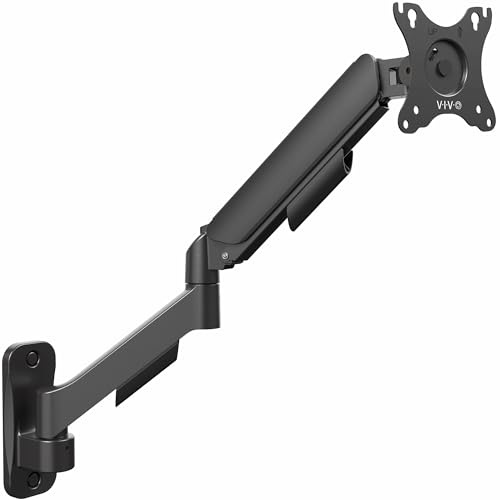
- Fits screens up to 32 inches and 19.8 pounds
- Spring-assist arm supports ergonomic height adjustment
- Includes cable-management covers
Best For: Standard monitors requiring frequent repositioning
Best Full-Motion Choice – WALI Single Monitor Wall Mount
For shoppers comparing monitor wall mounts, the WALI GSWM001 is a flexible single-screen option for 13- to 34-inch monitors. Its full-motion arm supports tilt, swivel, rotation, and extension, helping you reclaim desk space while positioning the display comfortably.
Best For: Users who want broad adjustment range and support for larger single monitors.
Pros:
- Supports monitors up to 34 inches and 22 pounds.
- Offers +70°/-45° tilt, ±90° swivel, 360° rotation, and up to 19.3 inches of extension.
- Works with 75x75mm and 100x100mm VESA patterns.
- Includes mounting hardware and 10-year warranty coverage.
Cons:
- Compatibility is limited to 75x75mm or 100x100mm mounting patterns.
- The larger adjustment range may be more than needed for a basic fixed setup.
This is a strong all-around pick when you want a single monitor wall mount with substantial movement and ergonomic positioning options.
Best Universal Option – Pipishell Full-Motion Monitor Wall Mount
The Pipishell PISF1 stands out among monitor wall mounts for its broad VESA compatibility and support for both monitors and TVs. It fits 13- to 43-inch screens up to 44 pounds and provides adjustable viewing angles for work or entertainment.
Best For: Buyers who need a versatile mount for a large monitor, TV, or Echo Show display.
Pros:
- Supports 13- to 43-inch screens weighing up to 44 pounds.
- Accommodates VESA patterns from 75x75mm through 200x200mm.
- Provides +9°/-11° tilt, up to 90° swivel, 360° rotation, and 14.59 inches of extension.
- Can be installed on a single wood stud, concrete, or brick wall.
Cons:
- Maximum swivel angle varies with screen size.
- Its 2.7-inch retracted depth may not suit buyers seeking the lowest-profile mount.
Choose this model when screen-size flexibility and high weight capacity matter more than a monitor-only design.
Best Dual-Screen Pick – WALI Dual Monitor Wall Mount
Among monitor wall mounts, the WALI 012ARM is designed for users who want two screens without using desk stands. Its horizontal dual-arm layout supports two monitors up to 27 inches each while helping organize cables and clear workspace.
Best For: Dual-monitor workstations, monitoring stations, and streaming setups.
Pros:
- Holds two monitors up to 27 inches and 22 pounds per arm.
- Adjustable spacing accommodates 16 to 28.5 inches between mounting plates.
- Supports 75x75mm and 100x100mm VESA patterns.
- Includes integrated cable management and 10-year protection.
Cons:
- Mounts to concrete or brick walls only, according to the supplied specifications.
- Tilt and swivel movement can be more limited when wall mounted.
- It is intended for screens no larger than 27 inches.
This is the most appropriate choice here for a two-screen arrangement, provided your wall type and monitor dimensions meet its requirements.
Best Low-Profile Design – VIVO Single Monitor Wall Mount
The VIVO MOUNT-VW01A is a compact option among monitor wall mounts, sitting just 5.1cm from the wall. It supports 17- to 32-inch monitors up to 17.6 pounds and adds height adjustment for ergonomic positioning.
Best For: Users who prioritize a neat, close-to-wall installation with simple height adjustment.
Pros:
- Fits 17- to 32-inch monitors weighing up to 17.6 pounds.
- Offers 16cm of height adjustment through its sliding mechanism.
- Supports ±10° tilt, 20° swivel, and 360° rotation.
- Mounts to wood studs or drywall and sits only 5.1cm from the wall.
Cons:
- Supports only 75x75mm and 100x100mm VESA patterns.
- Hardware for monitors with curved or recessed backs is not included.
- Its 17.6-pound capacity is lower than some larger full-motion mounts.
For a clean, space-saving installation, the VIVO is a practical pick as long as your monitor’s weight, VESA pattern, and back design are compatible.
Best Dual-Monitor Pick – MOUNT PRO Dual Monitor Wall Mount
If you want two screens without sacrificing desk space, this MOUNT PRO model is one of the more flexible monitor wall mounts to consider. It supports 17- to 32-inch displays, offers broad positioning adjustments, and is designed for wood-stud or solid-concrete walls.
Best For: Dual-monitor home office setups that need extensive positioning flexibility and cable organization.
Pros:
- Supports two monitors weighing 4.4 to 19.8 pounds each, with 75x75mm or 100x100mm VESA patterns.
- Provides tilt, swivel, rotation, extension up to 21.6 inches, and weight-adjustable spring-arm movement.
- Includes integrated cable management and hardware for wood studs and solid concrete.
Cons:
- It is limited to two monitors rather than a triple-screen arrangement.
- Installation requires appropriate wall construction; the included concrete anchor should not be used in drywall or wood.
With its dual-screen capacity and full-motion adjustment range, this mount suits users who want an ergonomic workspace while keeping both monitors easy to reposition.
Best Single-Monitor Pick – monTEK Full Motion Wall Mount
For a single display, the monTEK spring-arm mount combines a broad adjustment range with a compact profile. Among monitor wall mounts, it stands out for retracting to about four inches from the wall while still extending up to 21.7 inches when you need a closer viewing position.
Best For: Single-monitor work, gaming, studio, or streaming setups that need smooth adjustment and a tidy desk.
Pros:
- Fits 17- to 32-inch monitors weighing 4.4 to 19.8 pounds with 75x75mm or 100x100mm VESA holes.
- Offers tilt, swivel, 360-degree rotation, and a 9.84-inch height adjustment range.
- Retracts close to the wall and includes integrated cable management plus a quick-release VESA plate.
Cons:
- A VESA adapter is required separately if the monitor lacks compatible mounting holes.
- It should not be mounted to drywall alone.
This is a practical choice when you need one stable, adjustable screen and want the option to pull it forward for use or tuck it back against the wall afterward.
Best Triple-Monitor Pick – WALI Triple Monitor Wall Mount
If your workspace depends on three screens, the WALI 013ARM provides a dedicated wall-mounted arrangement for monitors up to 32 inches. Its telescoping arms can extend for larger displays or slide together for a cleaner, more flush-to-wall setup.
Best For: Triple-monitor home offices, gaming rooms, studios, and other dedicated work areas.
Pros:
- Holds three monitors up to 32 inches and 15.4 pounds each, using 75x75mm or 100x100mm VESA patterns.
- Supports tilt, swivel, rotation, and either horizontal or vertical monitor placement.
- Telescoping arms improve fit and stability, while included cable clips help organize cords.
Cons:
- Its 15.4-pound-per-monitor limit is lower than some dual-monitor options.
- Two people are recommended for positioning and aligning the mount during installation.
The WALI is a strong fit for users who need three screens on the wall and value adjustable arm spacing, though its lower weight limit makes checking each monitor’s specifications especially important.
Best Compact Full-Motion Pick – IWORKBOARD Small Monitor Wall Mount
For shoppers comparing monitor wall mounts for a small display, this IWORKBOARD model combines broad 13–31-inch compatibility with flexible positioning. It supports 75x75mm and 100x100mm VESA patterns, holds up to 33 pounds, and is designed for single wood studs, concrete, or brick walls.
Best For: Small monitors or TVs where full-motion adjustment and a compact wall profile matter.
Pros:
- Offers ±15° tilt, 180° swivel, and 360° rotation.
- Extends from approximately 2.34 inches to 15.9 inches for viewing and connection access.
- Includes installation hardware, instructions, and 10-year product support.
Cons:
- Limited to 75x75mm and 100x100mm VESA patterns unless extension brackets are obtained.
- Should not be installed on drywall alone.
Choose this mount when you want a sturdy, highly adjustable option for a smaller screen and have a suitable stud, concrete, or brick mounting surface.
Best Ergonomic Adjustment – VIVO MOUNT-V001G Monitor Wall Mount
Among monitor wall mounts for standard-size displays, the VIVO MOUNT-V001G stands out for its spring-assist arm and ergonomic adjustment range. It fits monitors up to 32 inches and 19.8 pounds with 75x75mm or 100x100mm VESA patterns.
Best For: Users who want easy height adjustment and extensive screen articulation from a wall-mounted monitor.
Pros:
- Spring-assist arm counterbalances the monitor for ergonomic height adjustment.
- Provides +90° to -90° tilt, 180° swivel, and 360° rotation.
- Includes cable-management covers and hardware for wood-stud or concrete/brick installation.
Cons:
- Supports up to 19.8 pounds, less than some mounts in this roundup.
- Not intended for drywall-only installation.
This is a practical choice for a standard VESA monitor when smooth height adjustment, broad articulation, and tidier cable routing are priorities.
Best Slim-Profile Design – Suptek Full-Motion Monitor Wall Mount
This Suptek mount is a versatile option for shoppers seeking monitor wall mounts that can sit close to the wall yet extend for easier viewing. It supports compatible 13–34-inch monitors or TVs up to 30 inches, up to 33 pounds, and VESA patterns of 75x75mm or 100x100mm.
Best For: Bedrooms, gaming rooms, and other spaces where a slim profile and long extension are useful.
Pros:
- Offers 360° rotation, 180° swivel, and ±20° tilt.
- Extends up to 400mm while maintaining a slim wall-facing profile.
- Includes integrated cable-concealment panels and installation materials.
Cons:
- Compatibility is limited to 75x75mm and 100x100mm VESA patterns.
- The listed maximum supported screen size is 32 inches, despite compatibility notes mentioning screens up to 34 inches.
Consider the Suptek when you need substantial extension for viewing-angle changes but also value a clean, close-to-wall appearance when the screen is pushed back.
How We Picked These Monitor Wall Mounts
We focused on mounts that cover the most common home-office, gaming, and productivity needs. Selection criteria included supported screen sizes, maximum weight capacity, VESA compatibility, range of motion, monitor count, and the practical value of the design. Models were also compared for adjustability, installation flexibility, and suitability for different desk layouts.
Because monitor specifications vary widely, treat the listed limits as requirements rather than suggestions. A mount should support your complete monitor setup with comfortable headroom, not merely meet the screen’s weight on paper.
Quick Comparison
| Setup | Typical Options | Best For |
|---|---|---|
| Single monitor | WALI, VIVO, monTEK, Suptek, or compact full-motion models | General office work, gaming, and limited desk space |
| Dual monitors | WALI Dual or MOUNT PRO Dual | Multitasking and side-by-side productivity |
| Triple monitors | WALI Triple | Trading, content creation, and immersive gaming |
| TV-sized or heavier screens | Pipishell full-motion mount | Large displays, media areas, or Echo Show installations |
Key Buying Factors for Monitor Wall Mounts
Screen Size and Weight
Check both the diagonal size and weight of every display, including the stand if it will remain attached. Multi-monitor arms often have a lower per-screen limit than single mounts. Choose a model that leaves margin for heavier panels or future upgrades.
VESA Compatibility
Most computer monitors use 75x75mm or 100x100mm VESA patterns, while larger displays may use patterns up to 200x200mm. Confirm the hole spacing on the back of your screen before ordering. A size rating alone does not guarantee compatibility.
Motion and Positioning
Full-motion arms are useful when you need tilt, swivel, rotation, or pull-out adjustment. Spring-arm designs can make frequent repositioning easier, while simpler brackets may be preferable when the screen will stay in one position.
Wall and Installation Requirements
Identify whether you will mount into studs, masonry, or another surface. Use suitable hardware and check clearance for cables, ports, and ventilation. A stud-mounted installation is generally preferable for heavier screens or multi-monitor assemblies.
Workspace and Cable Management
Measure the wall area and viewing distance before buying. Monitor mounts can improve desk space, but wide dual and triple arrangements still need room for alignment. Look for integrated cable-routing features if a clean appearance matters.
Who Should Buy Which Monitor Wall Mounts?
Choose a single-monitor mount if you want a cleaner desk or better ergonomic positioning. VIVO, WALI, monTEK, and Suptek options suit common 13- to 34-inch screens, depending on the exact model and your VESA pattern. A compact full-motion mount is useful where flexibility and close-wall placement matter most.
Choose the WALI Dual or MOUNT PRO Dual when two screens are central to your workflow. Compare their per-monitor capacity with your display weights, then confirm that the arm spacing fits your preferred viewing angle. The WALI Triple is the logical choice for three-screen setups, provided each display stays within its lower per-screen limit.
For larger or heavier flat and curved screens, the Pipishell model offers a broader size and weight range, but verify its 200x200mm maximum VESA pattern and wall strength carefully. Whichever model you choose, prioritize compatibility and secure installation over maximum articulation or the lowest price.