If your team folds letters, invoices, or mailers in volume, the right machine can save hours and reduce fatigue. The best paper folding machines with automatic feeding make repetitive jobs faster, cleaner, and more consistent.
Below, we break down ten strong options for offices, schools, churches, and mailrooms, with a focus on capacity, speed, paper compatibility, and fold versatility.
Best 10 Paper Folding Machines with Automatic Feeding Picks for 2026
Editor’s Pick
Martin Yale P7500 Automatic Feed Tabletop Folder

- Automatic feed table holds 50 sheets
- Up to 4,000 folded sheets per hour
- Supports letter, half, Z-fold, and double parallel folds
Best For: Small offices and mailrooms needing easy batch folding
High-Capacity Value
WYDDDAR Automatic Paper Folding Machine

- Adjustable feed plate and paper baffles
- Automatic paper separation for single-sheet feeding
- Two folding trays with speed and thickness controls
Best For: Mixed folding jobs that need adjustable feeding and setup
Reliable Runner-Up
Martin Yale P7400 RapidFold Desktop Folder

- Automatic feed tray holds 50 sheets
- Up to 4,000 sheets per hour
- Supports letter, half, Z-fold, and double parallel folds
Best For: Compact office folding with familiar fold styles
Best Large Hopper
United Office Products F100 Automatic Folder

- 200-sheet hopper capacity
- Up to 156 sheets per minute
- LCD control panel with resettable counter
Best For: High-volume office folding with minimal reloading
Compact Office Folder
Martin Yale 1501X Automatic Paper Folder

- Automatically folds 8.5" x 11" and 8.5" x 14" sheets
- Five fold styles plus manual feed bypass for stapled sets
- Rated up to 7,500 sheets per hour
Best For: Standard office folding with occasional stapled documents
High-Volume Wide-Format Picker
Automatic Folder with 4 Trays and Wide Size Range
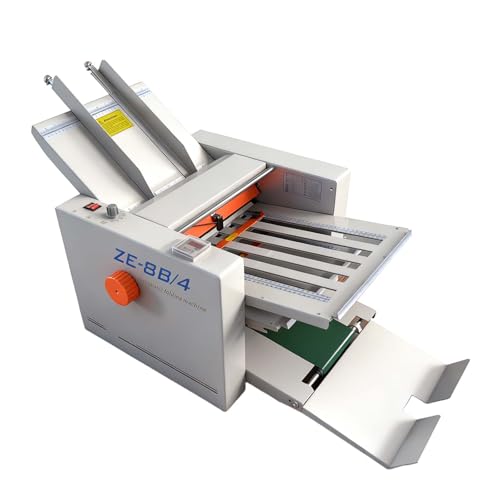
- Folds paper from 2" x 3" to 12" x 27"
- Up to 80 meters per minute with automatic counting
- 4 trays with adjustable speed and alignment
Best For: High-volume batch folding with wide-format paper
Preset Workflow Folder
Martin Yale 1711 Ease-To-Use Paper Folding Machine
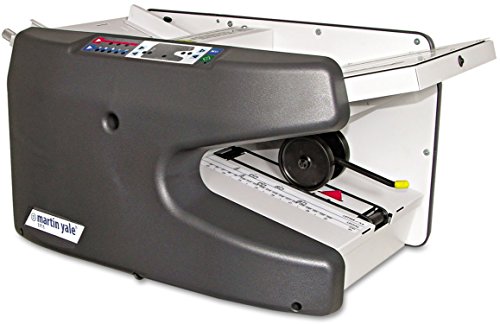
- Automatically feeds stacks up to 8 1/2 x 14
- Up to 9,000 sheets per hour with six preset folds
- Includes custom fold and skew adjustment
Best For: Medium to large office folding with preset modes
High-Volume Automatic Folder
MBM 408A Precision 3-Roller Friction Feed

- 500-sheet capacity for larger folding batches
- 18 standard folds and 12 custom memories
- Up to 14,400 sheets per hour with auto conveyor
Best For: Busy offices and mailrooms needing fast, programmable folding
Desktop Letter Folder
Martin Yale P6500 Manual-Feed Auto Operation

- Compact desktop size for small workspaces
- Tri fold and half fold for letter paper
- Up to 1,800 sheets per hour with hand feeding
Best For: Small offices and schools needing a simple desktop folder
Medium-Duty Auto Folder
Martin Yale 1217A 7-Pattern Document Machine
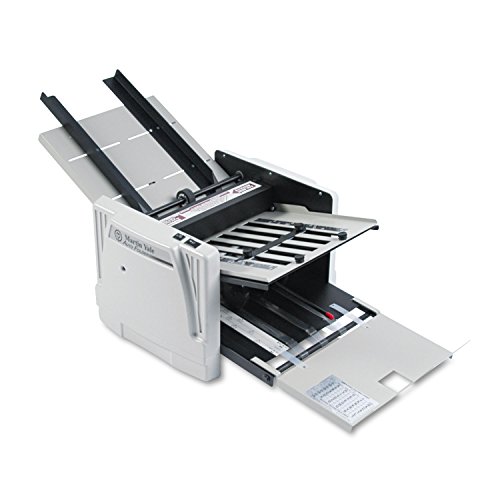
- Automatically feeds, folds, and collects documents
- Seven fold types with two adjustable fold tables
- Up to 10,300 sheets per hour for steady output
Best For: Schools, churches, and offices needing versatile medium-duty folding
Editor’s Pick – Martin Yale P7500 Automatic Feed Tabletop Folder
If you want paper folding machines with automatic feeding for a small office or mailroom, the Martin Yale P7500 is built for straightforward everyday use. It handles letter and legal-size paper, offers multiple fold styles, and is designed to keep up with repetitive folding jobs without complicated setup.
Best For: Small offices, churches, and mailrooms that need simple automatic folding for common document sizes.
Pros:
- Automatic feed table holds up to 50 sheets for convenient batch folding.
- Produces up to 4,000 folded sheets per hour for fast throughput.
- Supports letter, half, Z-fold, and double parallel folds.
- Simple operation makes it easy for different staff members to use.
Cons:
- Best suited to 8.5″ x 11″ and 8.5″ x 14″ paper sizes.
- Paper handling is centered on 20 lb. bond paper.
This is a practical tabletop option when you need dependable folding speed without a steep learning curve. It keeps the workflow simple, especially for teams that want a compact automatic feeder rather than a more complex production machine.
High-Capacity Value – WYDDDAR Automatic Paper Folding Machine
Among paper folding machines with automatic feeding, the WYDDDAR model stands out for its larger-format flexibility and adjustable feeding controls. It is designed to separate sheets automatically, reduce manual sheet-by-sheet feeding, and handle a wide range of paper sizes for more specialized folding work.
Best For: Businesses that need adjustable automatic feeding for manuals, documents, letters, and other mixed paper jobs.
Pros:
- Removable feed plate and adjustable paper baffles help guide smooth feeding.
- Automatic paper separation is designed to feed sheets one by one.
- Speed control and thickness adjustment add folding flexibility.
- Two folding trays support different folding styles and precise setup.
Cons:
- At 69 pounds, it is much less portable than compact tabletop folders.
- Setup may take more adjustment than simpler office folders.
This machine makes the most sense when flexibility matters as much as speed. Its adjustable separation, dual trays, and broader size range give it a more technical profile than a basic office folder.
Reliable Runner-Up – Martin Yale P7400 RapidFold Desktop Folder
If you’re comparing paper folding machines with automatic feeding for office use, the Martin Yale P7400 is a compact desktop option with proven folding basics. It offers automatic feed convenience, multiple fold types, and a 50-sheet tray that keeps small to medium jobs moving efficiently.
Best For: Offices that want a compact automatic folder with standard fold options and easy day-to-day use.
Pros:
- Folds up to 4,000 sheets per hour for strong productivity.
- Feed tray holds up to 50 sheets for batch jobs.
- Supports letter, half, Z-fold, and double parallel folds.
- Handles a wide sheet range from 3 1/2″ x 5″ to 8 1/2″ x 14″.
Cons:
- Folds up to 3 sheets at a time, so it is not aimed at heavier stacks.
- Best for 16-28 lb. bond paper rather than broader media types.
The P7400 is a good fit when you want a straightforward automatic feed folder that stays compact on a desk or table. It emphasizes consistent folding and simple operation over advanced controls.
Best Large Hopper – United Office Products F100 Automatic Folder
For buyers focused on paper folding machines with automatic feeding and a larger hopper, the United Office Products F100 is built for efficient office, school, or church workloads. It handles letter and legal paper, supports several common fold types, and adds an LCD control panel for easier job tracking.
Best For: Teams that want a high-speed automatic folder with a large sheet capacity and simple controls.
Pros:
- 200-sheet hopper capacity reduces frequent reloading.
- Processes up to 156 sheets per minute for fast folding.
- Supports C, Z, half, and double parallel folds.
- LCD control panel and resettable counter make operation simple.
Cons:
- Limited to letter and legal-size paper.
- Warranty coverage is shorter than some buyers may prefer.
The F100 is a solid choice when you want to feed more sheets at once and keep the workflow moving. Its combination of hopper capacity, fold variety, and basic controls makes it practical for frequent document folding.
Compact Office Folder – Martin Yale 1501X Automatic Paper Folder
If you want paper folding machines with automatic feeding for a smaller office workflow, the Martin Yale 1501X is built for dependable document handling. It automatically folds 8.5″ x 11″ and 8.5″ x 14″ sheets, and its manual feed bypass also lets you fold stapled sets of up to 3 sheets when needed.
Best For: Offices, mailrooms, schools, churches, and associations that need fast everyday folding with occasional stapled sets.
Pros:
- Automatically folds common letter and legal-size documents.
- Five fold types: letter, half, Z, double-parallel, and gate fold.
- Fast output rated up to 7,500 sheets per hour.
- Manual feed bypass handles stapled sets of up to 3 sheets.
Cons:
- Manual feed is limited to stapled sets of just 3 sheets.
- Two catch trays are not fixed to the machine.
- Designed around standard office paper sizes rather than wide-format jobs.
This is a practical choice if you need an automatic paper folder that stays focused on standard document batches and simple setup. Its speed and fold variety make it useful for routine office mailings without adding complexity.
High-Volume Wide-Format Picker – Automatic Folder with 4 Trays and Wide Size Range
For buyers comparing paper folding machines with automatic feeding for larger batches and oversized documents, this model stands out for its wide size range and high output. It handles paper from 2″ x 3″ up to 12″ x 27″, uses stable tray-fed operation, and adds automatic paper counting for easier batch work.
Best For: Commercial, school, or church environments that need high-speed folding across both standard and wide-format paper sizes.
Pros:
- Processes up to 80 meters of paper per minute.
- Supports a very wide size range, from small cards to 12″ x 27″ sheets.
- Automatic counting and one-click start/stop simplify operation.
- Includes stepless speed control and bidirectional tray adjustments.
Cons:
- At 113 pounds, it is a heavy machine.
- More advanced than basic office folders, so it may be overkill for small jobs.
- Requires careful tray alignment for the best results.
Buy this if your folding needs go beyond ordinary letters and brochures. The combination of automatic feeding, broad size compatibility, and speed makes it a strong fit for batch production environments.
Preset Workflow Folder – Martin Yale 1711 Ease-To-Use Paper Folding Machine
If you need paper folding machines with automatic feeding for medium to large jobs, the Martin Yale 1711 is built for straightforward office use. It automatically feeds and folds stacks of documents up to 8 1/2 x 14, and its electronic controls include preset folds for letter, legal, and A-4 sizes.
Best For: Offices and associations that want preset folding modes and fast automatic stack feeding.
Pros:
- Automatically feeds and folds document stacks up to 8 1/2 x 14.
- Rated at up to 9,000 sheets per hour.
- Six preset fold types plus custom fold adjustment.
- Includes precision paper skew adjustment.
Cons:
- Feed tray capacity is 150 sheets, so very large runs still need reloading.
- Only covers standard document sizes up to 8 1/2 x 14.
- Best suited to folding jobs rather than mixed-purpose paper handling.
This model is a strong pick if you want a simple, preset-driven folder that keeps common office folding jobs moving. Its automatic feeding and electronic controls make it especially useful when consistency matters more than advanced customization.
High-Volume Automatic Folder – MBM 408A Precision 3-Roller Friction Feed
If you need paper folding machines with automatic feeding for heavier daily workloads, the MBM 408A is built around speed, control, and consistent output. Its 3-roller friction feed system, 18 pre-programmed folds, and custom fold memory make it a practical choice when you want repeatable folding without constant reconfiguration.
Best For: Offices, mailrooms, and teams that need a high-capacity automatic folder for frequent folding jobs.
Pros:
- 500-sheet capacity supports larger batches before reloading.
- Up to 14,400 sheets per hour helps move through busy workloads quickly.
- 18 standard folds plus 12 custom fold settings add flexibility.
- Color LED touch screen, 4-digit counter, and test button improve control.
Cons:
- Designed as a larger machine, so it will take more space than desktop models.
- Friction-feed operation may be more than occasional users need.
Overall, the MBM 408A is the strongest fit here if your priority is automatic feeding with high throughput and programmable fold options. It is more of a production tool than a light-duty desktop folder, which is exactly what many busy offices need.
Desktop Letter Folder – Martin Yale P6500 Manual-Feed Auto Operation
For smaller teams comparing paper folding machines with automatic feeding, the Martin Yale P6500 offers a simple manual-feed, automatic-operation setup for letter-size work. It handles tri fold and half fold formats and is sized for everyday office tasks where convenience matters more than high-volume automation.
Best For: Small offices, schools, and mailrooms that want an easy desktop folder for letter-size documents.
Pros:
- Compact desktop design fits smaller work areas.
- Automatic operation folds hand-fed 8.5 x 11 documents into tri fold or half fold formats.
- Handles up to 1,800 sheets per hour for routine folding tasks.
- Can process stapled or unstapled documents when manually fed.
Cons:
- Manual feed means it is not a true fully automatic feeder.
- Limited to letter-size paper and simple fold types.
The P6500 is a straightforward choice if you want a compact folder that reduces manual folding without requiring a larger machine. It is best suited to regular, smaller-scale document handling rather than high-volume production.
Medium-Duty Auto Folder – Martin Yale 1217A 7-Pattern Document Machine
The Martin Yale 1217A is a strong option for buyers shopping paper folding machines with automatic feeding for medium-duty office work. It automatically feeds, folds, and collects documents, supports multiple fold types, and is designed for consistent use in offices, schools, mailrooms, and churches.
Best For: Organizations that need a versatile automatic folder for medium-duty document processing.
Pros:
- Automatically feeds, folds, and collects documents for less hands-on work.
- Seven fold types and two adjustable fold tables allow more customization.
- Processes up to 10,300 sheets per hour for efficient output.
- Conveyor belt exit helps manage stapled or unstapled sets smoothly.
Cons:
- 250-sheet capacity is lower than some high-capacity models.
- At 59 pounds, it is not a lightweight desktop unit.
For teams that want reliable automatic feeding with more fold versatility than a basic office folder, the 1217A strikes a useful balance. It has the speed and handling features to support routine production while staying focused on practical document folding.
How We Picked the Best Paper Folding Machines with Automatic Feeding
We focused on Paper Folding Machines with Automatic Feeding that balance speed, sheet capacity, fold accuracy, and everyday usability. We also looked for practical features such as adjustable fold settings, support for common paper sizes, and designs suited to real office workloads.
Quick Comparison
For light to moderate use, desktop models with smaller feed trays can be a smart value. For recurring batch jobs, higher-capacity units are better because they reduce reloading and keep workflow moving. If you fold varied documents, models with more preset fold types and broader size support offer more flexibility.
Key Buying Factors for Paper Folding Machines with Automatic Feeding
Feed Capacity and Duty Cycle
Higher sheet capacity matters most when folding large mail runs. A bigger feed tray usually means fewer interruptions, but make sure the machine is built for the volume you expect on a regular basis.
Fold Types and Paper Sizes
Think about the folds you use most often, such as letter, half, Z-fold, or double parallel. Also check whether the machine supports letter, legal, or other document sizes you routinely handle.
Speed Vs. Consistency
Fast output is useful, but only if the folds stay consistent. A good folder should run smoothly without frequent jams or adjustments, especially during back-to-back jobs.
Paper Handling and Document Type
Some Paper Folding Machines with Automatic Feeding are better for standard sheets, while others can handle stapled sets or mixed office workloads. If your documents vary, choose a model with clear limits and simple setup.
Workspace and Ease of Use
Desktop folders are easier to fit into smaller offices, while larger mailroom units may justify their footprint with higher throughput. Simple controls, accessible trays, and easy maintenance also matter in daily use.
Who Should Buy Which Paper Folding Machines with Automatic Feeding?
If you need a compact solution for periodic office batches, a smaller tabletop or desktop folder is usually enough. If you process high-volume mailings, look for a higher-capacity automatic feed machine designed for faster, continuous work. For schools, churches, nonprofits, and small businesses, the best choice is often the model that matches your typical sheet count, fold style, and available space—not just the highest speed on paper.