Accurate color depends on more than a good camera or monitor. The right portable calibration tool can help you create consistent results from capture through editing, printing, and display.
This roundup compares 10 options for photographers, designers, videographers, makers, and anyone who needs dependable color matching away from a permanent studio setup.
Best 10 Portable Color Calibration Tools Picks for 2026
Best for Camera Color References
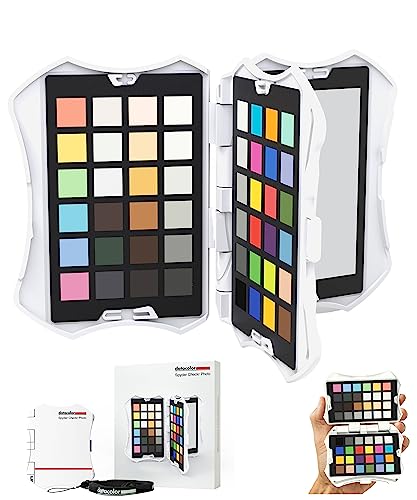
- Pocket-sized chart includes 62 color, grey, white, and black targets.
- Interchangeable cards cover skin tones, exposure, and white balance.
- Creates HSL presets for several supported photo-editing applications.
Best For: Photographers standardizing camera color in the field
Best Established Monitor Calibration Option

- Designed for repeatable monitor and projector color profiling.
- Works with ccProfiler or i1Profiler software.
- Diffuser arm and tripod mount support projector and ambient-light workflows.
Best For: Users calibrating monitors and projectors with a proven colorimeter
Best for Cross-Industry Color Matching

- D/8 sensor design claims repeat accuracy of ΔE ≤ 0.05.
- Supports 2° and 10° viewing angles for varied materials.
- Rechargeable battery supports up to 10,000 measurements per charge.
Best For: Mobile color analysis for paint, textiles, plastics, and quality control
Best for Camera Color Matching

- 48 targets include skin-tone and tonal references
- Creates HSL presets for supported editing software
- Gray chart and tripod mount support field work
Best For: Photographers matching color across cameras and lighting
Best for Paint and Digital Color Matching

- Matches colors to 300,000+ branded paints
- Provides RGB, HEX, and CMYK values
- No calibration required; IPX4 resistant
Best For: Paint matching and converting surface colors to digital values
Best Value White Balance Cards

- 12% and 18% gray references support white balance
- 18 coated color patches aid correction
- Includes two cards and a tabletop stand
Best For: Photographers wanting simple Photoshop and Lightroom references
Capture Color Reference
ColorChecker Passport Photo 2 Kit

- Four targets cover exposure, white balance, profiling, and enhancement.
- Adjustable holder fits charts from 2.4 to 10.8 inches.
- Supports DNG and ICC profiles with Calibrite PROFILER.
Best For: Portable camera profiling and on-location color references
Simple Display Check
Display 123 Monitor Colorimeter

- Easy 1 2 3 software guides the calibration process.
- Supports up to two monitors in a multi-screen setup.
- Includes brightness targets and a before-and-after check.
Best For: Straightforward calibration of photo-editing displays
End-to-End Color Control

- Combines monitor calibration with ColorChecker camera profiling.
- Supports mini LED, OLED, and Apple XDR displays.
- Includes custom RAW profiles plus white-balance references.
Best For: Photographers building a complete capture-to-edit workflow
Best for Modern HDR Displays – Display Pro HL
For photographers, designers, and editors working with bright LCD, Mini LED, OLED, or Apple XDR screens, the Display Pro HL is one of the more capable portable color calibration tools. Its high-luminance sensor, PROFILER software, and validation features are designed for accurate, repeatable monitor profiling.
Best For: Creative professionals calibrating high-brightness monitors, multiple displays, or compatible projectors.
Pros:
- Measures displays up to 3000 nits, including modern HDR-oriented panels.
- PROFILER software supports custom white point, luminance, gamma, and contrast settings.
- Includes validation, uniformity, flare-correction, and multi-monitor workflow tools.
- USB-C connectivity, USB-A adapter, travel pouch, and built-in 1/4-inch mount thread improve portability.
Cons:
- Its advanced feature set may be more than casual users need.
- Calibration requires a computer running the included Mac or Windows software.
The Display Pro HL is the strongest fit here when display brightness, HDR compatibility, and detailed verification matter. It is a practical choice for users who need consistent results across demanding creative workstations.
Best for Camera Color References – SpyderCheckr Photo
The SpyderCheckr Photo is a pocket-sized reference chart rather than a monitor sensor, making it a convenient option among portable color calibration tools for photographers. Photograph its targets during a shoot, then use the included software to create HSL presets for supported editing applications.
Best For: Photographers who want repeatable camera color, white balance, exposure, and skin-tone references in the field.
Pros:
- Compact case is designed for convenient transport and handling.
- Four interchangeable cards provide 62 targets, including skin tones, grey scales, whites, and blacks.
- Spyder Checkr software can create HSL presets for Lightroom Classic, Adobe Camera RAW, and Hasselblad Phocus.
- Grey-scale targets help with exposure checks and dynamic-range evaluation.
Cons:
- It does not directly calibrate a monitor.
- Color accuracy depends on photographing and processing the chart correctly.
- The supplied details do not indicate water resistance.
This is a useful field reference for photographers who want a consistent starting point before editing. Choose it for camera and lighting workflows, not as a replacement for a display colorimeter.
Best Established Monitor Calibration Option – ColorChecker Display Pro
The Calibrite ColorChecker Display Pro is a focused monitor and projector colorimeter for users who want repeatable profiling across display types. Its optical design, rotatable diffuser arm, and tripod mount make it a versatile entry in the portable color calibration tools category.
Best For: Photographers, designers, and studios calibrating monitors or projectors with established profiling software.
Pros:
- Optical design is intended to provide repeatable results on the same and different display types.
- Works with ccProfiler or i1Profiler software.
- Rotatable diffuser arm supports ambient-light measurement, tabletop projector profiling, and optical protection.
- Integrated tripod mount helps with projector profiling in larger venues.
Cons:
- The supplied notes do not specify high-luminance or HDR measurement capability.
- Software is required for the profiling workflow.
- Its listed connectivity includes USB, but the notes do not identify a USB-C connection.
This model is a sensible choice for conventional monitor and projector calibration where repeatability and mounting flexibility are priorities. It offers a more specialized workflow than a camera color chart, without the newer Display Pro HL feature emphasis.
Best for Cross-Industry Color Matching – Handheld Colorimeter
This handheld colorimeter is aimed at direct color measurement and matching across materials, making it a broader-purpose option among portable color calibration tools. Its D/8 integrating sphere, dual viewing angles, cloud synchronization, and rechargeable battery support mobile quality-control work.
Best For: Users measuring paint, textiles, plastics, and other samples who need portable color analysis and shared data.
Pros:
- Claims repeat accuracy of ΔE ≤ 0.05 with a D/8 integrating sphere structure.
- Supports both 2° and 10° viewing angles for different measurement scenarios.
- AI color recognition is designed to speed up color identification and matching.
- Rechargeable battery supports up to 10,000 measurements per charge, with USB data transfer.
Cons:
- Its feature set is oriented toward material and sample measurement rather than dedicated monitor profiling.
- Cloud synchronization may be unnecessary for users who only need local readings.
- The supplied notes do not identify included monitor-calibration software.
This is the most versatile choice for users who work across manufacturing, paint, textile, plastic, and sample-matching tasks. For dedicated screen calibration, a display-specific colorimeter may be a better fit.
Best for Camera Color Matching – Spyder Checkr
The Datacolor Spyder Checkr is one of the more comprehensive portable color calibration tools for photographers who need consistent results across cameras, lighting conditions, and editing workflows. Its 48 color targets, gray card, and tripod-ready design support both in-camera and post-production correction.
Best For: Photographers working with multiple cameras, varied lighting, or Lightroom Classic, Adobe Camera RAW, and Hasselblad Phocus.
Pros:
- Creates an HSL preset from a test shot for supported editing workflows.
- Includes 48 spectrally engineered targets, including extra skin-tone, near-white, and black-tone references.
- Provides a gray chart for scene-light data and in-camera white balance.
- Durable self-casing construction, larger targets, and a tripod mount suit studio or location work.
Cons:
- Requires software and a test shot to create the HSL preset.
- The target cards eventually need replacement when the Fade Checkr patch indicates fading.
- Its feature set may be more than casual photographers need.
Choose the Spyder Checkr when repeatable camera color is more important than having the simplest possible reference card. The fade indicator is a useful safeguard for long-term accuracy.
Best for Paint and Digital Color Matching – Nix Mini 3
The Nix Mini 3 is a compact portable color calibration tool for identifying colors on objects and surfaces. It can match scans to more than 300,000 brand-name paints and provide RGB, HEX, and CMYK values, making it useful for both decorating and digital color tasks.
Best For: Home improvement, paint matching, and users who need quick physical-to-digital color values.
Pros:
- Matches scans to more than 300,000 brand-name paints.
- Outputs RGB, HEX, CMYK, and other digital color values.
- Offers a reported 95%+ hit rate on listed major paint brands.
- Needs no calibration and has IPX4 dust and water resistance.
Cons:
- Paint libraries vary by country and region.
- Performance is better on matte samples.
- Premium Pantone, RAL, and NCS databases are available as separate matching options rather than the core paint library.
The Nix Mini 3 is the practical pick for fast surface scanning rather than camera or photography calibration. Its no-calibration operation and splash resistance make it convenient for repeated paint-matching jobs.
Best Value White Balance Cards – DKC-Pro 5 x 7 Set
The DKC-Pro set is a straightforward pair of portable color calibration tools for photographers who want physical references for white balance and digital color correction. Each 5-by-7-inch card combines 12% and 18% gray references with 18 color patches and includes a stand for tabletop use.
Best For: Photographers using Adobe Photoshop or Lightroom who want a compact two-card reference set.
Pros:
- Includes both 12% and 18% gray references for white balance.
- Provides 18 color patches for digital color correction.
- n-Chrome coating is designed for increased saturation, luminance, and accuracy while reducing metamerism.
- Two cards, a frame stand, and user guide are included.
Cons:
- Offers fewer color patches than the 48-target Spyder Checkr.
- Its supplied software compatibility is centered on Photoshop and Lightroom.
- A tabletop stand may be less convenient than a tripod-mount design for location photography.
This set makes sense for photographers who prefer a simple, physical white-balance reference without the added software-driven workflow of a more advanced calibration system. The two-card format also provides a spare or second setup.
Capture Color Reference – ColorChecker Passport Photo 2 Kit
For photographers seeking portable color calibration tools at the capture stage, this ColorChecker Passport Photo 2 kit combines reference targets, a protective case, and an adjustable holder. It is designed to support more consistent exposure, white balance, camera profiling, and editing workflows.
Best For: Photographers who need portable references for camera profiling, white balance, and exposure checks in the field or studio.
Pros:
- Includes four targets for exposure control, custom white balance, profiling, and enhancement.
- Adjustable holder fits charts from 2.4 to 10.8 inches and can stand freely.
- Supports custom DNG and ICC profiles through Calibrite PROFILER software.
- Folding protective case and lanyard make the kit convenient to carry.
Cons:
- Primarily addresses capture and camera profiling rather than monitor calibration.
- The adjustable holder is an additional component to set up when shooting.
This is a practical choice when repeatable color begins with a reliable reference in front of the camera. Its flexible holder and profiling software make it especially useful for multi-camera or larger editing projects.
Simple Display Check – Display 123 Monitor Colorimeter
This compact monitor colorimeter is one of the more approachable portable color calibration tools for creators who want a guided way to improve screen accuracy. Its Easy 1 2 3 workflow, USB-C connection, and support for two displays keep setup straightforward.
Best For: Photographers and creators who want simple monitor calibration across one or two displays.
Pros:
- Guided Easy 1 2 3 software workflow simplifies calibration.
- Supports calibration of up to two displays for a more consistent workspace.
- Includes Native or Photo brightness targets and a before-and-after comparison.
- Compact 4.8-ounce design with USB-C connection is easy to store and use.
Cons:
- Designed for display calibration, not camera profiling or capture references.
- Its workflow may offer fewer adjustment options than more advanced calibration systems.
The Display 123 is a sensible pick for users who value an uncomplicated calibration routine. The dual-display support and before-and-after check are useful additions for maintaining a matched editing setup.
End-to-End Color Control – Photo Kit with Display Pro HL
For photographers comparing portable color calibration tools for a complete RAW workflow, this kit combines the Display Pro HL monitor colorimeter with a ColorChecker Passport Photo 2. It covers both camera profiling and display calibration, creating a more consistent path from capture through editing.
Best For: Photo professionals who want camera profiling and monitor calibration in one workflow.
Pros:
- Combines a high-luminance display colorimeter with a ColorChecker Passport Photo 2.
- Supports modern mini LED, OLED, and Apple XDR displays.
- Enables custom camera profiles and white-balance references for RAW workflows.
- Calibrite PROFILER offers presets plus adjustable white-point and gamma targets.
Cons:
- More equipment than a display-only colorimeter, making it less minimal for casual users.
- The broader feature set may be unnecessary if camera profiling is not part of the workflow.
This kit is the strongest fit for users who want to reduce color uncertainty throughout the entire photography process. By pairing capture references with high-luminance display calibration, it provides a more unified foundation for editing and output consistency.
How We Picked the Best Portable Color Calibration Tools
We evaluated these tools by their intended job, portability, measurement or reference accuracy, supported workflows, software experience, build quality, and practical ease of use. The selection includes monitor colorimeters, camera color targets, gray cards, handheld color analyzers, and paint-matching sensors because “calibration” can mean different things depending on where color enters your workflow.
We also considered compatibility with modern LCD, Mini-LED, and OLED displays; USB connectivity; target size and layout; environmental durability; and whether a product is better suited to casual users, enthusiasts, or professional color-critical work.
Quick Comparison
| Tool type | Best suited to | What it helps control |
|---|---|---|
| Monitor colorimeter | Photo, video, and design editing | Screen brightness, white point, and color profile |
| Camera color chart | Photographers and videographers | Capture consistency across cameras and lighting |
| Gray and white-balance chart | Fast on-location setup | Exposure and neutral color reference |
| Handheld colorimeter | Color matching and inspection | Measured color readings and comparisons |
| Paint color sensor | DIY, decorating, and repairs | Paint identification and matching |
Key Buying Factors for Portable Color Calibration Tools
Choose the Right Calibration Point
A monitor colorimeter cannot replace a camera chart, and a gray card will not profile an OLED display. Start by identifying whether your biggest problem is capture, editing, output, or physical color matching.
Check Software and Device Compatibility
Display tools depend heavily on calibration software and operating-system support. Confirm compatibility with your computer, USB ports, HDR workflow, and display type before buying. For camera tools, check that your editing application can use the supplied profiles or reference data.
Consider Accuracy Versus Speed
Professional colorimeters and multi-patch charts generally offer more control, while simple gray cards and guided workflows are faster. If you calibrate several displays or cameras regularly, repeatability and software automation may matter more than the lowest purchase price.
Prioritize Portability and Durability
Look for protective cases, compact targets, secure stands or holders, and resistance to dust, splashes, and handling if you work on location. Keep reference charts clean and replace them when fading or wear could affect readings.
Who Should Buy Which Portable Color Calibration Tools?
Photographers and videographers: Choose a camera color chart or portable photo calibration kit to create a dependable reference at capture time. A monitor colorimeter is the logical second step for editing accuracy.
Designers and photo editors: Buy a dedicated display colorimeter, especially if you work on high-brightness, Mini-LED, or OLED screens. A suitable model can make screen-based decisions more trustworthy.
Traveling creators: Compact passport-style charts and gray cards provide fast white-balance and color references without adding much kit weight.
DIY users and tradespeople: A handheld paint or color sensor is more appropriate than a camera chart when the goal is identifying and matching real-world surfaces.
Color-critical professionals: Consider combining a monitor colorimeter with a camera chart rather than expecting one device to solve every stage of the workflow. Before purchasing, verify calibration intervals, software updates, target replacement needs, and the return policy.