Remote work is easier when your power backup can keep laptops, monitors, routers, and charging accessories running without interruption. The best portable power stations for remote offices balance runtime, output, charging speed, and portability.
Below, we focus on practical options for everything from a desk setup to a full-day home office contingency plan.
Best 10 Portable Power Stations for Remote Offices Picks for 2026
Fast-Charging Backup Pick

- 1,070Wh capacity with 1,500W output
- 1-hour emergency charging mode
- 23.8 lb design with foldable handle
Best For: Remote offices that need quick-recharge backup power for essential devices
Versatile Value Backup
Budget-Friendly 999Wh Work Backup

- 999Wh capacity with 1000W output
- Wide mix of AC, DC, USB-C, USB-A, and wireless ports
- Pass-through charging and folding handle
Best For: Remote-office setups that need flexible charging on a tighter budget
High-Output UPS Pick

- 2000W output with 4500W surge
- Under-20ms UPS transfer time
- Expands from 1024Wh to 5120Wh
Best For: Remote offices that need UPS backup and room to scale
Rapid-Recharge Backup
Anker SOLIX C1000 Gen 2 for Remote Offices
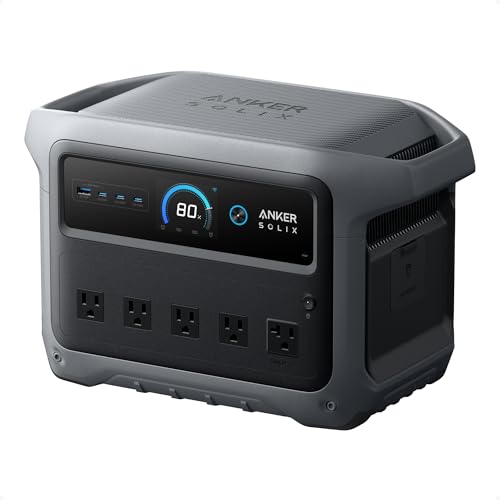
- 49-minute full recharge with HyperFlash.
- 2,000W output across 10 ports.
- Under 10 ms UPS switchover for essential gear.
Best For: Remote offices that need fast backup power and easy mobility.
High-Capacity Quiet Backup
Jackery Explorer 2000 v2 for Workspaces

- 2,042Wh capacity with 2,200W AC output.
- Silent charging mode below 30dB.
- 20ms seamless switching for backup continuity.
Best For: Remote offices needing longer runtime and quieter operation.
Lean Office Backup
Anker SOLIX S2000 for Remote Work
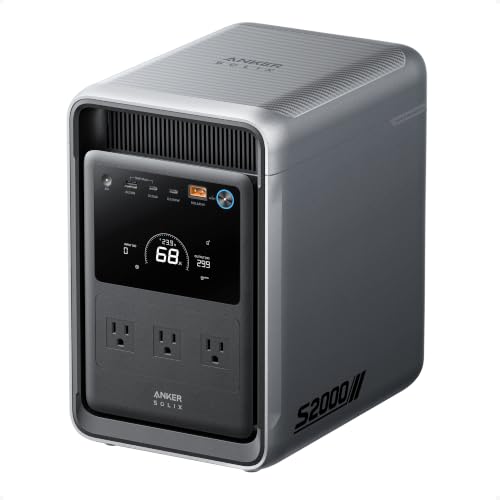
- 2,010Wh capacity with 1,500W output.
- <10 ms UPS switchover for office continuity.
- Eight outlets with front and rear organization.
Best For: Remote office setups that value efficient backup and tidy outlet layout.
Ultra-Portable TSA Pick
Venti-Cup Sized 89.6Wh Power Station

- TSA approved and 2.5 lbs
- Fanless, zero-noise operation
- 7 outlets with dual USB-C and AC
Best For: Remote workers needing a quiet, travel-ready laptop backup
Fast-Charge Backup Choice

- 10ms UPS for outage protection
- 640Wh capacity with 600W output
- Full recharge in about 1.5 hours
Best For: Home offices needing uninterrupted backup for routers and essential devices
High-Output Office Backup
Elite 100 V2 1024Wh Power Station

- 1800W output with 3600W surge
- 70-minute fast charging
- 10ms UPS with app control
Best For: Remote offices with higher power demands and multiple devices
Fast-Charging Backup Pick – Fast-Charging 1070Wh Backup
For portable power stations for remote offices, the Jackery Explorer 1000 v2 stands out as a compact, higher-capacity option that can keep laptops, monitors, phones, and other essential gear running when the grid is unstable or unavailable. Its 1,070Wh battery, 1,500W AC output, and 100W USB-C port make it a practical fit for work setups that need reliable everyday backup without a bulky footprint.
Best For: Remote workers who want a compact, fast-charging backup station for essential office gear and short outages.
Pros:
- 1,070Wh capacity with 1,500W AC output for powering multiple devices.
- One-hour fast charging mode, with 1.7-hour default charging to help protect battery health.
- Lightweight at 23.8 lbs with a foldable handle for easier moving between rooms or work sites.
- LiFePO4 battery rated for over 4,000 cycles and a 10-year lifespan claim.
Cons:
- Solar charging is limited to Jackery solar panels only.
- Only one USB-A port is listed, so USB accessory support is less flexible than some rivals.
This is a strong pick if fast recovery time matters as much as battery size. It balances portability, useful output options, and long-cycle battery design in a package that suits remote-office backup better than many camping-first units.
Versatile Value Backup – Budget-Friendly 999Wh Work Backup
Among portable power stations for remote offices, the EBL 1000W model is a practical all-rounder if you want solid capacity, broad port selection, and an approachable design for everyday backup. Its 999Wh battery and 1000W output are enough for small appliances and office electronics, while the built-in wireless charging and multiple USB options reduce the need for extra adapters.
Best For: Remote-office users who want a versatile, value-oriented backup station with lots of ports.
Pros:
- 999Wh capacity with 1000W continuous output for common work devices.
- Many output options, including AC, DC, car outlet, USB-C, USB-A, and 10W wireless charging.
- Supports solar, AC, and car charging, plus pass-through charging while powering devices.
- Weighs 17.86 lbs and includes a folding handle for easier transport.
Cons:
- AC charging takes 7-8 hours, so it is not the fastest recharging option here.
- At 1000W, it is better suited to essential office gear than heavier equipment.
This EBL unit makes sense if you value flexibility over premium speed features. It covers the basics well for a remote office and adds useful convenience touches like pass-through charging and wireless charging in one compact package.
High-Output UPS Pick – Expandable 2000W Office Power
If you need portable power stations for remote offices that can handle heavier loads, the OUPES Mega 1 is the most capable option in this group. With 1024Wh of base capacity, 2000W continuous output, and UPS support with under-20ms transfer time, it is built for keeping sensitive work equipment online during outages. It also charges extremely fast and can expand to 5kWh if your workspace grows.
Best For: Remote offices with higher power demands, sensitive electronics, or equipment that benefits from UPS protection.
Pros:
- 2000W continuous output and 4500W surge for demanding devices.
- UPS function with under-20ms transfer time for critical office gear.
- 0-80% recharge in 36 minutes via AC, or 26 minutes with AC plus solar.
- Expandable from 1024Wh up to 5120Wh with extra batteries.
Cons:
- More than many remote-office users need if you only power laptops and networking gear.
- Expansion requires additional batteries, which adds cost and complexity.
This is the best fit when a remote office needs near-continuous uptime and extra headroom. It offers the strongest mix of speed, protection, and scalability, making it ideal for workspaces that cannot afford a power interruption.
Ultra-Portable Backup – Compact 288Wh Quiet Backup
For compact portable power stations for remote offices, the Anker SOLIX C300 is the most travel-friendly choice here. Its 288Wh capacity and 300W output are best suited to light-duty work essentials like phones, laptops, cameras, and small electronics, while the small footprint and quiet operation make it easy to keep nearby during the workday.
Best For: Remote workers who need a small, quiet backup for light electronics and mobility.
Pros:
- Very compact design that is 15% smaller than similar models.
- Eight versatile ports, including dual 140W USB-C outputs and three AC outlets.
- Quiet 25dB operation from 3.3 ft away.
- LiFePO4 battery with a 3,000-cycle design and 5-year warranty.
Cons:
- 288Wh capacity is much smaller than the larger office-backup options in this roundup.
- 300W output limits it to lighter office electronics rather than power-hungry gear.
The SOLIX C300 makes the most sense when portability and quiet operation matter more than runtime. It is a smart grab-and-go backup for lighter remote-work setups, especially if you do not need to support many devices at once.
Rapid-Recharge Backup – Anker SOLIX C1000 Gen 2 for Remote Offices
If you need portable power stations for remote offices, the Anker SOLIX C1000 Gen 2 is built around speed, portability, and UPS support. Its 1,024Wh LiFePO4 battery, 2,000W output, and ultra-fast recharge time make it a practical fit for keeping laptops, networking gear, and other work essentials online during brief outages or off-grid workdays.
Best For: Remote office setups that need fast recharging, UPS-style backup, and easy day-to-day portability.
Pros:
- Full recharge in 49 minutes at 1,600W with HyperFlash enabled.
- 2,000W output and 10 ports support multiple devices at once.
- Under 10 ms UPS switchover helps keep laptops and vital gear running.
- 14% smaller and 11% lighter than similar models for easier moving.
Cons:
- Solar recharging requires up to 600W input and is best for users with panels.
- Best performance depends on using the app to enable certain charging modes.
Overall, this is the most speed-focused option in the group, and that makes it especially appealing for remote offices where short outages and quick turnaround matter more than sheer capacity.
High-Capacity Quiet Backup – Jackery Explorer 2000 v2 for Workspaces
For portable power stations for remote offices, the Jackery Explorer 2000 v2 stands out for its larger 2,042Wh capacity, 2,200W AC output, and quiet operation. It is a strong fit when you want enough reserve power for longer work sessions, small-business equipment, or a desk setup that needs dependable backup without a lot of noise.
Best For: Remote offices and small workspaces that want high capacity, quiet charging, and a compact 2kWh-class design.
Pros:
- 2,042Wh capacity and 2,200W output handle demanding office loads.
- Silent charging mode runs at less than 30dB.
- 20ms seamless switching supports uninterrupted backup power.
- Weighs 39.5 lbs and is described as smaller and lighter than typical 2kWh units.
Cons:
- Solar panels are optional and not included.
- Compared with smaller units, it is still a fairly substantial unit to move around.
This model is a good pick if your remote office prioritizes longer runtime and a quieter charging experience over ultra-light portability. The combination of capacity, low noise, and UPS-style switching makes it easy to justify for a serious work setup.
Lean Office Backup – Anker SOLIX S2000 for Remote Work
If you’re comparing portable power stations for remote offices, the Anker SOLIX S2000 is a practical pick for clean, efficient backup. Its 2,010Wh capacity, 1,500W output, and <10 ms UPS switchover make it a sensible option for keeping everyday office essentials powered while staying relatively compact and easy to place in a work area.
Best For: Remote office users who want efficient UPS backup, lots of outlet space, and a compact 2kWh-class unit.
Pros:
- 2,010Wh capacity with 1,500W continuous output covers common office essentials.
- <10 ms switchover supports uninterrupted backup for work gear.
- Eight outlets and front/rear layout help keep the setup organized.
- 30% smaller and 25% lighter than the industry average for its class.
Cons:
- No 12V DC port, so it is less flexible for some accessory setups.
- Output is lower than 2,000W-class competitors if you need heavier loads.
This is the most workspace-friendly option if you care about efficiency, outlet organization, and UPS behavior more than maximum raw output. It fits well in a remote office where a tidy, dependable backup unit matters every day.
Ultra-Portable TSA Pick – Venti-Cup Sized 89.6Wh Power Station
If you need portable power stations for remote offices, this compact LiFePO4 unit is built for light-duty workdays, travel setups, and quick backup. Its fanless design keeps things quiet for focused tasks, while the AC outlet, USB-C, and multiple USB-A ports can cover a laptop, phone, tablet, and other small devices at the same time.
Best For: Remote workers who want a carry-on-friendly backup for laptops, phones, and small office devices.
Pros:
- 89.6Wh LiFePO4 battery with long-life safety monitoring
- 7 total outlets, including dual AC and USB-C fast charging
- Fanless, zero-noise operation suits quiet office use
- TSA approved and only 2.5 lbs for easy transport
Cons:
- 100W AC output is best for small electronics, not heavy loads
- Solar panels are not included
- Runtime is limited compared with larger power stations
This is a smart pick if portability matters more than raw capacity. It works best as a personal office backup or travel companion rather than a full workstation power source.
Fast-Charge Backup Choice – C600 640Wh UPS Power Station
For remote offices that need more staying power, this portable power station for remote offices combines 640Wh of capacity with 600W output and a built-in 10ms UPS. That makes it practical for keeping WiFi routers and essential work gear running through short outages while still supporting multiple devices at once.
Best For: Home offices and hybrid work setups that need a dependable UPS-style backup for essential electronics.
Pros:
- 10ms UPS helps keep routers and key devices online during outages
- 640Wh battery and 600W output cover everyday office essentials
- Fast AC charging reaches full in about 1.5 hours
- 4 AC outlets plus USB ports support up to 8 devices
Cons:
- Indoor-use warning limits use in wet or adverse outdoor conditions
- Heavier-duty appliances may exceed the 600W output limit
- Less compact than smaller laptop-focused units
If your priority is keeping a remote office online instead of just charging a laptop, this model offers a strong balance of runtime, port variety, and UPS protection.
High-Output Office Backup – Elite 100 V2 1024Wh Power Station
If your remote office needs a stronger all-in-one backup, this portable power station for remote offices brings 1024Wh capacity, 1800W output, and a 10ms UPS into a compact 25 lb design. It is aimed at powering everyday appliances and multiple devices while also offering app-based monitoring for easier management.
Best For: Remote offices that want high output, fast charging, and backup power for more demanding setups.
Pros:
- 1800W rated output with 3600W surge for broader device support
- 70-minute fast charging helps reduce downtime
- 10ms UPS and silent 30dB mode suit work and indoor use
- Smart app control adds remote monitoring and OTA updates
Cons:
- More expensive and larger than ultra-compact backup units
- Only 4 total outlets, so you may need a power strip for more gear
- Best fit for users who can benefit from its higher output, not minimal setups
This is the most capable choice in the group for a serious desk setup or mixed home-office load. It stands out when you want both strong output and quick recovery between outages.
How We Picked These Portable Power Stations for Remote Offices
We prioritized models with enough wattage for real office gear, strong battery chemistry, and practical charging options. For remote offices, that means looking for clean AC output, USB-C power delivery, UPS or pass-through support where available, and fast recharge times so downtime stays short.
We also favored units that fit common work scenarios: a compact backup for a laptop-and-router setup, a mid-size option for multiple devices, and larger stations for extended outages or power-hungry accessories.
Quick Comparison
Smaller units are best for mobile desks and light backup. Mid-capacity models usually hit the sweet spot for laptop workstations, monitors, and networking equipment. Higher-capacity stations are better if you need longer runtime, multiple AC outlets, or the ability to keep a broader office setup online during longer disruptions.
Key Buying Factors for Portable Power Stations for Remote Offices
Battery Capacity and Runtime
Check watt-hours, not just peak output. A larger battery means longer backup for your monitor, modem, laptop charger, and other essentials. If you only need short backup during brief outages, a smaller pack may be enough.
Output and Surge Rating
Make sure the inverter can handle your gear. A laptop alone is easy to support, but monitors, docking stations, and printers can increase demand. Higher surge ratings help with startup spikes and give more flexibility.
Recharge Speed
Fast recharge is a major advantage for Portable Power Stations for Remote Offices, especially if you face repeated outages or want to top up between meetings. Wall charging, solar input, and dual-input designs can all reduce recovery time.
UPS and Pass-Through Support
If you need near-instant backup for a desktop, router, or NAS, look for UPS functionality or low transfer time. This helps keep your workflow stable when the grid drops.
Ports and Ergonomics
For office use, useful outputs matter as much as capacity: AC outlets, USB-C, USB-A, and DC ports should match your devices. Weight, handle design, and display clarity also matter if you plan to move the unit between rooms.
Who Should Buy Which Portable Power Stations for Remote Offices?
If you only need to keep a laptop, phone, and hotspot alive, choose a compact model with fast USB-C charging. If your setup includes a monitor, modem, and charging dock, a mid-size 1kWh-class station is usually the best fit. If you want to run a larger workstation or cover longer outages, step up to a high-capacity model with stronger output and quicker recharge options.
For most buyers, the best choice comes down to matching battery size to your actual workload rather than buying the biggest unit available. That approach keeps Portable Power Stations for Remote Offices efficient, affordable, and easy to live with every day.