The right USB-C cable can make a noticeable difference when moving large files, connecting external SSDs, running a monitor, or charging modern devices. However, USB-C describes the connector—not the cable’s actual speed, power, or video capabilities.
We selected 10 options spanning USB 2.0, 10Gbps, 20Gbps, and USB4-class performance, including USB-C-to-C and USB-A-to-C designs. Use the guide below to match cable specifications with your devices and avoid paying for capabilities you cannot use.
Best 10 USB C Cables for Data Transfer Picks for 2026
Best Balanced Pick
20Gbps USB-C Data Cable 2-Pack

- 20Gbps USB 3.2 Gen 2x2 transfer
- 4K/60Hz video and 100W charging
- Two 3-foot braided cables
Best For: Everyday transfers, SSDs, and portable monitors
Future-Proof Choice
USB4 40Gbps Cable with 240W Power

- Up to 40Gbps USB4 data transfer
- Supports 8K and dual 4K displays
- 240W PD 3.1 charging
Best For: USB4 workstations, docks, and high-power laptops
Versatile Value
20Gbps USB-C Cable with 4K Video

- 20Gbps USB 3.2 Gen 2x2 transfer
- 4K/60Hz video and 100W charging
- Supports CarPlay and Android Auto
Best For: Phones, SSDs, monitors, and compatible vehicles
Premium High-Speed Pick

- Up to 40Gbps data transfer
- Supports 8K/60Hz and 4K/144Hz
- 240W charging support
Best For: USB4 laptops, monitors, and fast storage
Top Pick

- Up to 20Gbps USB 3.2 Gen 2x2 transfers
- 100W PD charging and 4K/120Hz video
- Two 6-foot braided USB-C-to-USB-C cables
Best For: Fast transfers, charging, and USB-C monitor setups
Travel-Friendly Choice
Red 10Gbps USB-A to USB-C Cable

- 10Gbps data transfer over a 6-foot cable
- High-visibility red braided design
- Supports up to 3.1A charging
Best For: Travel, car connectivity, and USB-A computer ports
Compact Data Pick
3ft USB-A to USB-C 10Gbps Cable

- Up to 10Gbps transfers for compatible devices
- Compact 3-foot design for less clutter
- Supports up to 3A charging
Best For: Portable SSDs, desktops, Android Auto, and CarPlay
Top 10Gbps Pick

- Up to 10Gbps USB 3.1 Gen 2 transfers
- 3A charging with a 22AWG copper core
- Braided design for SSD, phone, and car use
Best For: Fast USB-A to USB-C transfers without video output
Reliable Everyday Choice
Amazon Basics USB-A to USB-C Cable

- USB 2.0 transfers up to 480Mbps
- Charging support up to 15W
- USB-IF Certified with a 1-year warranty
Best For: Routine charging and basic phone or tablet transfers
Durable High-Speed Option
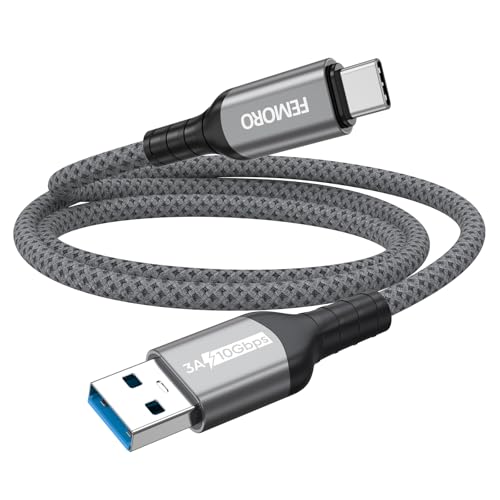
- USB 3.2 Gen 2 speeds up to 10Gbps
- Braided construction with 20,000+ bend cycles
- Includes a two-year warranty and support
Best For: Frequent large-file transfers and demanding everyday use
Best Balanced Pick – 20Gbps USB-C Data Cable 2-Pack
For shoppers comparing usb c cables for data transfer, this 3-foot, two-pack offers a practical mix of 20Gbps USB 3.2 Gen 2×2 performance, 4K display support, and 100W charging. It is compatible with USB4, Thunderbolt 3, and older USB standards, although actual transfer speeds depend on the connected devices.
Best For: Everyday file transfers, USB-C SSDs, portable monitors, and users who want a spare cable.
Pros:
- Supports data transfer speeds up to 20Gbps.
- Includes two 3-foot cables for convenient backup or multi-device use.
- Supports 4K at 60Hz, 100W PD charging, and portable-monitor video.
- Nylon braiding, reinforced connectors, and a claimed 40,000+ bend rating improve durability.
Cons:
- 20Gbps performance requires compatible source and destination hardware.
- Video output requires a USB-C port with DP Alt Mode.
This is a versatile choice when you need one cable for fast storage transfers, charging, and display connectivity. Its two-pack and 36-month warranty add useful value for a general-purpose setup.
Future-Proof Choice – USB4 40Gbps Cable with 240W Power
This USB4 cable is aimed at demanding data-transfer setups, delivering up to 40Gbps when paired with compatible USB4 or Thunderbolt hardware. Its 4-foot length also supports high-resolution displays and up to 240W PD 3.1 charging, making it a strong all-in-one option for docks, SSDs, laptops, and monitors.
Best For: USB4 and Thunderbolt users, professional displays, docking stations, and high-power laptops.
Pros:
- Supports up to 40Gbps data transfer.
- Handles 8K at 60Hz, 5K at 60Hz, 4K at 144Hz, or dual 4K at 60Hz.
- Supports up to 240W PD 3.1 charging with an E-Marker chip.
- USB-IF certified and backward compatible with Thunderbolt 3, USB 3.2, and USB 2.0.
Cons:
- Maximum speeds and display capabilities depend on compatible devices.
- The manufacturer recommends cables under 5 feet for stable docking performance.
Choose this cable if you want substantial headroom for fast storage, high-resolution displays, and future USB-C hardware. It is more capability than many basic setups need, but its specification range suits demanding workstations.
Versatile Value – 20Gbps USB-C Cable with 4K Video
For usb c cables for data transfer that also cover monitor and vehicle use, this 3-foot USB-C 3.2 Gen 2×2 cable offers up to 20Gbps transfers, 4K at 60Hz video, and 100W charging. It also supports CarPlay and Android Auto, provided the connected devices meet the required USB-C and display specifications.
Best For: Phone-to-laptop transfers, external SSDs, USB-C monitors, and compatible CarPlay or Android Auto setups.
Pros:
- Up to 20Gbps data transfer for compatible devices.
- Supports 4K at 60Hz video and plug-and-play operation.
- 100W charging with an E-Marker chip.
- Supports CarPlay and Android Auto and includes a claimed 3-year warranty.
Cons:
- Maximum speed depends on the connected interfaces; the notes specifically mention Thunderbolt 3/4 for top performance.
- Video requires USB-C DP Alt Mode support.
- Charging at 100W requires a suitable USB-C power adapter.
This cable is a useful multipurpose pick for buyers who want fast file transfers without giving up display, charging, or in-car connectivity. Verify DP Alt Mode and device compatibility before relying on its video features.
Premium High-Speed Pick – Anker USB4 40Gbps Cable
This Anker USB4 cable is designed for fast data movement and demanding displays, with up to 40Gbps transfer speeds and support for resolutions up to 8K at 60Hz. It also supports up to 240W charging, making it suitable for connecting compatible laptops, monitors, tablets, and other USB-C devices.
Best For: Buyers seeking a branded USB4 cable for fast storage transfers, external displays, and high-power charging.
Pros:
- Transfers data at up to 40Gbps.
- Supports up to 8K at 60Hz or 4K at 144Hz display output.
- Supports up to 240W charging with compatible equipment.
- Rated for up to 5,000 bends and includes an 18-month warranty.
Cons:
- Full 40Gbps and display performance requires compatible USB4 or Thunderbolt hardware.
- It is a single 3.3-foot cable rather than a multipack.
This is a straightforward premium option for users who prioritize USB4 bandwidth and broad display capability in a compact cable. Its shorter length can help keep desk connections tidy, while the charging rating adds flexibility for compatible devices.
Top Pick – 20Gbps USB-C Cable 2-Pack
For shoppers comparing usb c cables for data transfer, this 6-foot two-pack stands out with USB 3.2 Gen 2×2 performance, up to 20Gbps speeds, and USB-C connectors on both ends. It also supports up to 100W charging and compatible USB-C displays, making it a versatile option for laptops, SSDs, tablets, phones, and monitors.
Best For: Users who need fast USB-C-to-USB-C transfers plus charging and monitor connectivity.
Pros:
- Supports data transfer speeds up to 20Gbps when both devices support the standard.
- Handles up to 100W PD charging with an E-marker chip.
- Supports up to 4K at 120Hz video output with compatible DP Alt Mode devices.
- Includes two 6-foot braided cables with an 18-month warranty.
Cons:
- Maximum data and video performance depends on device and port support.
- USB-C monitor output requires DP Alt Mode compatibility.
This is the most feature-rich choice in the group, especially if you want one cable type for high-speed storage, charging, and displays. Confirm your devices support USB 3.2 Gen 2×2 before expecting the top transfer rate.
Travel-Friendly Choice – Red 10Gbps USB-A to USB-C Cable
This 6-foot red braided cable is a practical pick among usb c cables for data transfer when you need a USB-A connection for a computer, charger, car, or hub. It supports up to 10Gbps data transfer, up to 3.1A charging, and a high-visibility color that makes it easier to identify in a crowded bag or workspace.
Best For: Travelers and phone users who need a durable, easy-to-spot USB-A-to-USB-C cable.
Pros:
- Supports data transfer speeds up to 10Gbps.
- 6-foot length provides useful reach for desks, vehicles, and travel.
- Double-braided nylon is tested for 50,000-plus bends and 10,000-plus plug-ins.
- Works with many listed iPhone, Samsung Galaxy, Google Pixel, and other USB-C devices.
Cons:
- Uses USB-A on one end, so it is not suited to USB-C-only ports without an adapter.
- Charging and compatibility depend on the connected charger and device.
The bright red finish is genuinely useful for quick cable identification, while the 10Gbps rating makes it suitable for syncing photos, videos, and other files. Choose it when your setup still relies on USB-A connections.
Compact Data Pick – 3ft USB-A to USB-C 10Gbps Cable
If you want usb c cables for data transfer without excess length, this 3-foot USB-A-to-USB-C cable is designed for connecting USB-C SSDs, phones, tablets, cameras, and other devices to a computer or charger. It supports up to 10Gbps transfers and up to 3A charging in a compact, flexible format.
Best For: Short desktop connections, portable SSDs, Android Auto, and CarPlay setups.
Pros:
- Supports up to 10Gbps data transfer, suitable for compatible external SSDs.
- Compact 3-foot length helps reduce cable clutter.
- Supports charging up to 3A and lists broad device compatibility.
- Reinforced ABS connectors and TPE construction are tested for 10,000-plus bends.
Cons:
- Does not support video output.
- OnePlus phones are specifically listed as unsupported.
- Shorter length may be limiting for distant ports or vehicle setups.
This is a focused data-and-charging cable rather than an all-purpose display cable. Its 3-foot design makes the most sense for nearby USB-A ports, especially when pairing a computer with a portable SSD or keeping a car connection tidy.
Top 10Gbps Pick – Braided USB-C Data Cable
For shoppers comparing usb c cables for data transfer, this 3-foot USB-A to USB-C cable stands out with USB 3.1 Gen 2 speeds up to 10Gbps. It is designed for fast syncing with compatible devices, while also supporting up to 3A charging.
Best For: Fast transfers between USB-A computers, portable SSDs, smartphones, CarPlay, and Android Auto systems.
Pros:
- Supports data transfer speeds up to 10Gbps and is backward compatible with USB 3.0.
- Uses a 22AWG copper core for up to 3A charging.
- Nylon braiding and aluminum connector housings add durability.
- Compatible with iPhone 15/16 series devices, Samsung phones, portable SSDs, CarPlay, and Android Auto.
Cons:
- Does not support video output.
- Reaching 10Gbps requires compatible USB 3.1 Gen 2 ports and devices.
This is a strong choice when transfer speed matters more than display connectivity. Its 3-foot length and braided construction suit desk setups, vehicle connections, and portable storage use.
Reliable Everyday Choice – Amazon Basics USB-A to USB-C Cable
If you need usb c cables for data transfer for routine phone, tablet, or accessory use, this USB-IF Certified Amazon Basics cable offers a straightforward 3-foot design. It supports USB 2.0 transfer speeds up to 480Mbps and charging up to 15W.
Best For: Everyday charging and basic file, photo, and music transfers between USB-A chargers or computers and USB-C devices.
Pros:
- USB-IF Certified for connection between USB-A and USB-C devices.
- Supports data transfer speeds up to 480Mbps.
- Provides charging up to 15W, or 5V/3A.
- Backed by an Amazon Basics 1-Year Limited Warranty.
Cons:
- USB 2.0 speeds are substantially slower than 10Gbps USB 3.2 cables.
- Limited charging speed for USB Power Delivery-enabled devices.
- Not the best fit for high-speed external SSD transfers.
This cable makes sense for compatibility and dependable everyday use rather than maximum performance. Choose it for common USB-A charging setups and modest data-transfer needs.
Durable High-Speed Option – Reinforced 10Gbps USB-C Cable
Among usb c cables for data transfer, this 3-foot USB-A to USB-C model combines USB 3.2 Gen 2 performance with reinforced construction. It can reach up to 10Gbps, or approximately 1,050MB/s, when both connected ports support the required standard.
Best For: High-speed transfers involving portable SSDs, laptops, smartphones, Android Auto, and Apple CarPlay.
Pros:
- Supports up to 10Gbps USB 3.2 Gen 2 transfer speeds.
- Handles up to 3A charging in accordance with the USB-A standard.
- Double-layer cotton braiding is rated for 10 times the tensile strength of ordinary cables.
- Reinforced strain relief is designed to withstand more than 20,000 bend cycles.
Cons:
- Full 10Gbps performance requires USB 3.2 Gen 2 ports on both ends.
- USB-A charging is limited to the USB-A standard and up to 3A.
- Its 3-foot length may be short for some desk or vehicle layouts.
This cable is a practical performance pick for users who frequently move large files and want added protection against bending and pulling. Its two-year warranty and 24-hour support provide additional ownership coverage.
How We Picked the Best USB C Cables for Data Transfer
We focused on published transfer speeds, connector type, cable length, charging support, video compatibility, construction, and practical value. The selection includes affordable everyday cables as well as high-bandwidth choices for external SSDs, docks, Thunderbolt systems, and high-resolution displays.
We also separated USB-C-to-C cables from USB-A-to-C models because the host port can limit performance. A cable rated for 40Gbps cannot deliver that speed when connected to a USB 2.0 port or a lower-spec adapter.
Quick Comparison
| Use case | Recommended speed class | Best cable type |
|---|---|---|
| Basic charging and phone transfers | USB 2.0, up to 480Mbps | USB-A to USB-C or USB-C to USB-C |
| External drives and routine backups | 10Gbps | USB 3.2 Gen 2 |
| Fast SSD workflows | 20Gbps | USB 3.2 Gen 2×2 |
| Thunderbolt docks and high-end displays | 40Gbps | USB4 or Thunderbolt 4-compatible |
Key Buying Factors for USB C Cables for Data Transfer
Transfer Speed
Check the stated data rate rather than relying on “fast charging” language. USB 2.0 cables are suitable for synchronization and charging but are slow for large video libraries. For external storage, 10Gbps is a useful baseline, while 20Gbps or 40Gbps makes more sense for demanding workflows.
Port and Device Compatibility
USB-C ports may support USB 2.0, USB 3.x, USB4, DisplayPort, or Thunderbolt—or only charging. Confirm the capabilities of both connected devices. USB-A-to-C cables are convenient for older computers, but they generally cannot provide USB4 or Thunderbolt performance.
Power and Video Support
If you will charge a laptop, check the cable’s wattage rating and whether it supports USB Power Delivery. For monitors, verify the required DisplayPort, HDMI adapter, resolution, and refresh rate. Data speed alone does not guarantee video output.
Length and Build
Short cables usually offer a tidier setup and can be easier to certify at high speeds. Choose a longer cable when reaching a desk-mounted dock or hard-to-access port, but avoid unnecessary length. Braided jackets, reinforced connectors, and strain relief can improve durability for frequent use.
Who Should Buy Which USB C Cables for Data Transfer?
- For phones, tablets, and basic syncing: Choose a USB 2.0 option if low cost and charging are the priorities.
- For external SSDs and regular file backups: Select a 10Gbps or 20Gbps USB-C cable, provided your computer and drive support the same standard.
- For creators and large media files: A 20Gbps cable offers a strong balance of speed and value; consider USB4 when your storage and computer support it.
- For Thunderbolt docks and displays: Choose a certified USB4 or Thunderbolt 4-compatible cable with suitable power and video specifications.
- For older laptops and chargers: Pick a USB-A-to-C cable, and verify whether the USB-A port is USB 3.x or USB 2.0 before expecting high transfer speeds.