A USB hub with display output can turn a laptop’s limited ports into a practical workstation, adding monitor connectivity alongside USB data, charging, and other essential connections.
We selected 10 options spanning compact travel hubs, high-speed USB-C adapters, and multi-monitor docking solutions. The right choice depends on your device’s video support, preferred resolution, and the number of peripherals you need to connect.
Best 10 USB Hub with Display Output Picks for 2026
Best for Dual-Screen Productivity

- Dual 1080p@60Hz display support
- 10Gbps data transfer
- Up to 85W laptop charging output
Best For: Compatible Windows dual-monitor setups
Best Feature-Rich Legacy Dock

- HDMI with mirrored or extended display modes
- Gigabit Ethernet and three USB 3.0 ports
- SD/MicroSD readers and broad OS support
Best For: Mixed-device home-office connectivity
Best for Easy Setup

- 4K at 60Hz HDMI output
- Two USB-A, USB-C data, SD, and TF slots
- Up to 85W laptop charging
Best For: Everyday laptop expansion with display, storage-card, and peripheral support
Best for Dual USB-C Displays

- Dual 4K 60Hz USB-C display outputs
- Two 10Gbps USB-C data ports
- Up to 87W pass-through charging
Best For: Compatible Windows USB4 or Thunderbolt 4 dual-monitor setups
Best Compact Pick
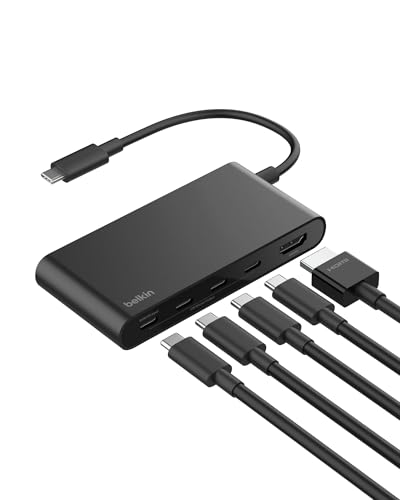
- 4K HDMI at 60Hz
- 10Gbps data transfer
- Up to 100W Power Delivery
Best For: Portable single-monitor laptop setups
Best All-in-One Pick

- 4K HDMI at 60Hz
- Four 10Gbps USB ports
- 100W Power Delivery
Best For: Users connecting mixed USB-A and USB-C peripherals
Best Multi-Monitor Pick

- Two HDMI and one DisplayPort
- Supports up to three displays
- 100W PD input with 87W output
Best For: Compatible Windows triple-monitor workstations
Best All-Around Choice – VANGREE 9-in-1 USB-C Hub
If you need a versatile usb hub with display output, the VANGREE 9-in-1 combines 4K video, fast connectivity, card readers, and power delivery in one aluminum hub. It offers both USB-C DP and HDMI display outputs, with 4K at 60Hz supported on each specified video connection.
Best For: Workstation setups that need multiple peripherals, external storage, memory-card access, and flexible display connectivity.
Pros:
- Includes USB-C DP and HDMI outputs with 4K@60Hz support.
- Provides 10Gbps connectivity through USB-C and USB-A 3.2 ports.
- Includes SD and MicroSD readers plus 100W PD input.
- Supports Windows MST and macOS SST display modes.
Cons:
- macOS cannot extend to two different external screens.
- Connected peripherals may disconnect if the laptop port cannot supply enough power.
- Power adapter is not listed as included.
With its broad port selection and dual display options, the VANGREE is a strong fit for a compact desktop replacement. Check your computer’s USB-C video and power capabilities before buying, especially if you plan to run several high-draw devices.
Best for Dual-Screen Productivity – Anker 7-in-1 Dual-Display Hub
The Anker 7-in-1 is a practical usb hub with display output for users who want two external screens from a compatible USB-C laptop. It supports dual 1080p displays at 60Hz, along with 10Gbps data transfer and up to 85W of laptop charging output.
Best For: Multitasking with two external monitors on compatible Windows laptops or Macs with the stated display limitations.
Pros:
- Supports two external displays at 1080p@60Hz.
- Offers 10Gbps data transfer for large files.
- Provides 100W input and up to 85W output charging.
- Works with USB-C, USB4, and Thunderbolt connections on supported systems.
Cons:
- No Ethernet port is included.
- On macOS, both external monitors show identical content.
- Not compatible with Linux, and the wall charger is not included.
This Anker hub focuses on straightforward dual-monitor productivity rather than maximum port variety. It is a good match when 1080p screens are sufficient, but verify DP Alt Mode, operating-system compatibility, and your charging setup first.
Best Compact USB-C Expansion – Selore 5-Port 4K Hub
The Selore 5-port adapter is a compact usb hub with display output built around one 4K@60Hz USB-C video connection and four 10Gbps USB-C data ports. It also supports up to 85W of continuous laptop power when supplied with a compatible charger through its 100W PD-in port.
Best For: Users who primarily need USB-C peripherals, one high-resolution monitor, and pass-through charging in a small aluminum adapter.
Pros:
- Supports 4K@60Hz video through its dedicated USB-C display port.
- Includes four 10Gbps USB-C data ports.
- Supports 100W PD input and up to 85W continuous laptop power.
- Compact aluminum design weighs about 50g.
Cons:
- Only one display output is available.
- External video requires power connected to the PD 100W port.
- Charger is not included and the host must support full-featured USB-C, USB4, or Thunderbolt 3/4.
Choose the Selore when your setup is USB-C-heavy and you do not need card readers, Ethernet, or multiple display outputs. Its simple layout keeps the adapter portable while retaining fast data and high-resolution video support.
Best Feature-Rich Legacy Dock – Giq USB 3.0 DisplayLink Dock
The Giq docking station is a feature-rich usb hub with display output for users who need HDMI expansion alongside Ethernet, USB 3.0, and card-reader connectivity. Its DisplayLink design supports mirrored or extended video, with UHD output up to 30Hz or Full HD 1080p.
Best For: Older or mixed-device setups that need network connectivity, card readers, multiple USB peripherals, and HDMI display expansion.
Pros:
- Includes HDMI, Gigabit Ethernet, three USB 3.0 ports, and SD/MicroSD readers.
- Supports mirrored or extended displays.
- USB 3.0 ports provide up to 5Gbps transfer speeds.
- Compatible with Windows, macOS, ChromeOS, Ubuntu, and Android systems listed by the manufacturer.
Cons:
- HDMI output is limited to UHD at 30Hz or 1080p.
- The SD and MicroSD slots cannot be used simultaneously.
- The USB-C port is for charging the dock’s connected devices and does not charge the laptop.
The Giq is a sensible choice when Ethernet and legacy USB connectivity matter as much as display output. It is less suited to high-refresh 4K work, but its broad port selection can simplify home-office and travel setups.
Best for Easy Setup – Anker 7-in-1 USB-C Hub
If you need a versatile usb hub with display output, this Anker model combines 4K video, fast USB connections, charging, and memory-card support in a compact metal design. Its HDMI port supports 4K at 60Hz, while the USB-C data port is not intended for video.
Best For: Laptop users who want one hub for an external HDMI display, peripherals, charging, and SD or TF cards.
Pros:
- HDMI output supports 4K at 60Hz.
- Includes two USB-A ports and one USB-C data port with 5Gbps transfers.
- Offers SD and TF card slots plus up to 85W laptop charging.
- Compact metal enclosure with an 18-month warranty.
Cons:
- Only the HDMI port supports video projection.
- USB-C charger is not included.
- Host device must support USB-C DisplayPort Alt Mode and Power Delivery.
This is a strong general-purpose choice when you want display output alongside card readers and everyday USB ports. Check your laptop’s USB-C compatibility before buying, especially if you need video and charging through the same connection.
Best for Fast USB Data – SABRENT 5-in-1 USB-C Hub
This SABRENT is a streamlined usb hub with display output for users who prioritize fast accessory connections. It provides one 4K 60Hz HDMI output and four USB-related ports, including 10Gbps USB-A and USB-C data ports, with up to 80W passed through to a laptop.
Best For: Mac, Windows, Chromebook, and Linux users who need one external display and high-speed USB connectivity.
Pros:
- Single HDMI 2.0 port supports up to 4K at 60Hz with HDR10, Dolby Vision, and HDCP 2.3.
- Two USB-A and two USB-C data ports support 10Gbps transfers.
- Passes up to 80W to a laptop from a compatible USB-C charger.
- Aluminum housing and a 60cm integrated cable suit portable setups.
Cons:
- Supports one display only, not dual monitors.
- No Ethernet, SD or microSD reader, or audio jack.
- Charger is not included.
Choose this hub if fast data transfer matters more than card readers or networking. Its single-display design is straightforward, but the host computer must support DisplayPort Alternate Mode over USB-C.
Best for Dual USB-C Displays – Selore Dual-Monitor USB-C Hub
For compatible systems, this Selore adapter is a specialized usb hub with display output that can extend one USB-C connection to two USB-C monitors. It supports dual 4K at 60Hz output, two 10Gbps USB-C data ports, and up to 87W pass-through charging, but compatibility requirements are more demanding than with a standard HDMI hub.
Best For: Windows users with USB4 or Thunderbolt 4 laptops and USB-C Alt Mode monitors who need a dual-display setup.
Pros:
- Supports dual USB-C display outputs at up to 4K and 60Hz.
- Provides two 10Gbps USB-C data ports.
- Accepts 100W PD input and passes through up to 87W.
- Includes a two-year warranty and plug-and-play operation.
Cons:
- Requires a compatible USB4 or Thunderbolt 4 laptop for the stated dual-display behavior.
- External displays require power through the PD 100W port, and the charger is not included.
- macOS does not support MST, limiting dual-display functionality.
This is the most display-focused option in the group, but it should be treated as a compatibility-dependent docking solution. Verify your laptop, monitor USB-C Alt Mode support, and operating system before purchase.
Best Compact Pick – Belkin 5-Port USB-C Hub
If you want a compact usb hub with display output for everyday laptop use, the Belkin 5-Port USB-C Hub combines 4K HDMI, fast 10Gbps data transfer, and up to 100W Power Delivery in a travel-friendly design. Its HDMI 2.0 port supports up to 4K at 60Hz, while the USB-C connection works with compatible Windows, Mac, and Chrome OS devices.
Best For: MacBook, iPad, Chromebook, and PC users who need one external display plus fast peripherals and pass-through charging.
Pros:
- 4K HDMI output at up to 60Hz.
- Up to 10Gbps data transfer speeds.
- Up to 100W Power Delivery for compatible devices.
- Compact, lightweight design with a 2-year limited warranty.
Cons:
- Provides one HDMI display output rather than multiple display ports.
- USB-C power and data output is shared among the USB-C ports.
The Belkin is a sensible choice when portability and balanced connectivity matter more than a large number of ports. Its single-display 4K output and fast data support cover common work, study, and travel setups.
Best All-in-One Pick – UGREEN Revodok Pro 6-in-1 Hub
The UGREEN Revodok Pro is a versatile usb hub with display output for users who need HDMI alongside several high-speed USB connections. It includes 4K HDMI at 60Hz, two USB-C 3.2 Gen 2 ports, two USB-A 3.2 Gen 2 ports, and 100W Power Delivery, allowing multiple ports to operate together.
Best For: Laptop, tablet, and handheld-gaming-device users who want a broad mix of USB-A, USB-C, HDMI, and charging connectivity.
Pros:
- Six-in-one design with HDMI, four USB ports, and Power Delivery.
- 4K HDMI output at 60Hz.
- Four USB ports support data speeds up to 10Gbps.
- Aluminum and plastic construction with a portable design.
Cons:
- Offers one HDMI display output.
- Heavier than the Belkin option at 180 g.
- Compatibility depends on the host device’s USB-C capabilities.
Choose the Revodok Pro when peripheral variety is a priority. Its combination of USB-A and USB-C ports makes it useful for modern and older accessories, while 4K HDMI and 100W charging support a capable desktop setup.
Best Multi-Monitor Pick – USB-C Triple Display Dock
For a workstation built around several screens, this USB-C dock is a usb hub with display output that expands one compatible port into two HDMI outputs and one DisplayPort output. It supports up to three external displays in supported configurations, plus USB 3.0 data and USB-C Power Delivery.
Best For: Windows users building a triple-monitor office setup with a laptop that supports DisplayPort Alt Mode and DisplayPort 1.4.
Pros:
- Two HDMI ports and one DisplayPort for up to three external displays.
- Supports 4K at 60Hz on individual outputs.
- Provides USB 3.0 data and up to 100W PD input, with charging output limited to 87W.
- Compact aluminum housing with plug-and-play operation and no drivers required.
Cons:
- Triple-monitor extension requires compatible DisplayPort Alt Mode and DisplayPort 1.4 hardware.
- On macOS, external monitors operate in SST mode and show the same content.
- Power adapter is not included.
This dock is the strongest option for multi-screen productivity, but compatibility should be checked before purchase. Windows users with the required host support can gain an extended triple-display workspace; macOS users should expect mirrored output instead.
How We Picked the Best USB Hub with Display Output
We focused on hubs and docking adapters that combine video output with useful everyday connectivity. Selection criteria included HDMI, DisplayPort, or USB-C display support; advertised resolution and refresh rate; USB data speeds; power-delivery capacity; monitor-count support; compatibility considerations; and practical port layouts.
We also included different designs rather than treating every model as interchangeable. A compact five-port hub may suit a travel laptop, while a dual-monitor DisplayLink dock or multi-output adapter is better for a permanent desk setup. Always confirm the manufacturer’s compatibility details for your laptop, tablet, operating system, and monitor configuration.
Quick Comparison
| What to Compare | Best For | What to Check |
|---|---|---|
| Single HDMI or USB-C display | Everyday productivity and travel | Resolution, refresh rate, and host-device support |
| Dual-monitor connectivity | Expanded desktop workstations | DisplayLink requirements or DP Alt Mode limits |
| 10Gbps USB ports | External SSDs and large file transfers | Whether the advertised speed applies to each port or the shared hub |
| 100W-class power delivery | Charging laptops while connected | Actual pass-through wattage after the hub’s own power use |
Key Buying Factors for a USB Hub with Display Output
Display Compatibility and Performance
Check whether your computer supports DisplayPort Alt Mode over USB-C. A USB-C port alone does not guarantee video output. For 4K gaming or smooth scrolling, verify the supported refresh rate, such as 60Hz, and confirm that the hub’s connector matches your monitor. HDMI and DisplayPort adapters may also differ in support for HDR, adaptive sync, or high-color-depth modes.
One Monitor Versus Multiple Displays
Many compact hubs support one external display natively. Dual-monitor models may rely on the host device’s graphics capabilities or DisplayLink software. DisplayLink can expand monitor options, but it may require drivers and is less ideal for latency-sensitive gaming or protected video playback. Read the stated limitations carefully before buying for two or three screens.
Ports, Bandwidth, and Charging
Count the connections you actually use: USB-A accessories, USB-C data devices, Ethernet, SD cards, audio, and external storage. A 10Gbps port is useful for fast SSDs, but total bandwidth can be shared across the hub. For charging, compare the advertised PD input with the power delivered to the laptop; a 100W input rating does not always mean 100W output.
Build, Cable, and Portability
A short attached cable is convenient for laptops but can be restrictive with tablets or desktop setups. Look for a sturdy enclosure, clearly labeled ports, adequate heat management, and a layout that leaves room for bulky plugs. If the hub will travel daily, size and cable durability may matter more than an extra display connector.
Who Should Buy Which USB Hub with Display Output?
Choose a compact single-display hub if you need occasional HDMI access, a few USB ports, and pass-through charging. Pick a 10Gbps model if you regularly move files to external SSDs. For a dedicated home or office desk, consider a dual-monitor dock or multi-output adapter, but verify operating-system and graphics support first. MacBook and iPad users should check display-extension behavior, since some devices mirror displays or impose monitor limits. Finally, select the highest charging capacity only when your laptop and charger can use it; otherwise, prioritize the ports and display features you will use every day.