Choosing among video switchers with SDI can be difficult when you need reliable multicamera control without sacrificing HDMI compatibility, recording, or streaming features. The right model depends on your camera inputs, production scale, operator workflow, and budget.
We selected 10 switchers ranging from compact hybrid mixers to advanced ISO-recording systems, so you can match your setup with the features that matter most.
Best 10 Video Switchers with Sdi Picks for 2026
Flexible SDI Streaming Hub

- 4 SDI and 4 HDMI inputs plus USB-C and NDI HX
- Keying, PIP, DSK, and multiple transition modes
- Streams to up to three platforms
Best For: Multi-source live streaming and event production
Touchscreen SDI Production Switcher

- 10.1-inch touchscreen with preview and T-bar control
- Four HDMI inputs plus one SDI input
- Chroma key, logo overlay, and USB 3.0 output
Best For: Accessible five-source live production
Broadcast-Style SDI Switcher
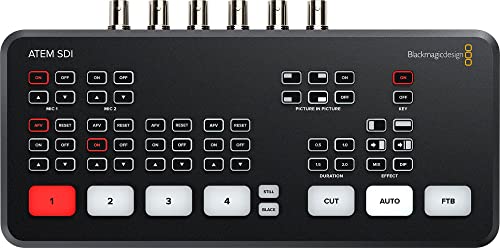
- Four 3G-SDI inputs with 10-bit HD support
- Built-in input frame-rate and format conversion
- Six-input audio mixer and USB-C webcam output
Best For: HD-SDI live production with integrated audio
Hybrid SDI/HDMI Production System

- Four 3G-SDI, four HDMI, and one USB UVC input
- PIP, chroma key, recording, playback, and audio mixing
- RTMP(S), USB-C streaming, PTZ control, and dual HDMI outputs
Best For: Advanced mixed-format live production
Best Feature-Rich SDI Switcher

- Eight 3G-SDI inputs with converters
- Nine-layer support and extensive keying
- Records nine H.264 streams simultaneously
Best For: Complex multicamera streaming and ISO recording
Best Portable SDI Kit

- Four HDMI/SDI inputs and two HDMI outputs
- Integrated 14-inch monitor
- AC, DC, and USB power options
Best For: Mobile, mixed-connectivity live production
Best Compact SDI Switcher

- Four 3G-SDI inputs with format conversion
- Ethernet and USB-C RTMP streaming
- Six-input Fairlight audio mixer
Best For: Small multicamera live streams and HD productions
Maximum Flexibility

- 12-channel HDMI, SDI, and IP workflow
- Records program plus eight ISO feeds
- Advanced routing, graphics, and audio tools
Best For: Large multi-camera events and productions needing extensive I/O
Compact Hybrid Control
RGBlink mini-ISO SDI/HDMI Mixer

- Four SDI and four 4K60 HDMI inputs
- Built-in PTZ control and touchscreen
- Streams to four platforms simultaneously
Best For: Compact teams mixing SDI, HDMI, and PTZ sources
Hybrid Production Workhorse

- Four HDMI and four 3G-SDI inputs
- Records eight ISO feeds plus program
- Dual XLR audio and triple streaming
Best For: Hybrid camera crews needing recording and professional audio
Flexible SDI Streaming Hub – Osee GoStream Duet
Osee GoStream Duet Multiple Camera SDI and HDMI Live Stream Video Mixer Switcher
Check Price On AmazonThe Osee GoStream Duet is a versatile option among video switchers with SDI, combining four SDI inputs, four HDMI inputs, USB-C, NDI HX, and media playback in a compact unit. It suits productions that need multiple source types, portrait or landscape output, and direct or software-based streaming.
Best For: Multi-camera streamers, event teams, and creators needing SDI, HDMI, NDI, and flexible streaming options.
Pros:
- Supports four SDI, four HDMI, USB-C, NDI HX, and SD/SSD playback sources.
- Includes chroma key, luma key, pattern key, PIP, DSK, and several transition effects.
- Can stream to up to three platforms and work with OBS or vMix.
- Offers GUI, computer software, and Bitfocus Companion control.
Cons:
- NDI HX requires the latest firmware download to unlock the included license.
- The broad feature set may require setup time for first-time users.
The GoStream Duet is a strong all-in-one choice when your workflow mixes SDI and HDMI cameras. Its input flexibility and streaming options are especially useful for growing productions, while its compact design keeps the setup manageable.
Touchscreen SDI Production Switcher – FEELWORLD L4
The FEELWORLD L4 is a practical choice among video switchers with SDI for operators who want an integrated touchscreen interface. It supports four HDMI inputs and one SDI input, with real-time preview, T-bar or touch control, and outputs for display, SDI, and USB streaming.
Best For: Small multi-camera productions, presenters, educators, and streamers who value simple hands-on operation.
Pros:
- Provides a 10.1-inch touchscreen with preview and an intuitive operation interface.
- Handles four HDMI sources and one SDI input for five-camera streaming.
- Supports chroma key and logo overlay for branded productions.
- Includes HDMI, SDI, and USB 3.0 outputs for monitoring and streaming workflows.
Cons:
- Only one of the five inputs is SDI.
- The listed input and output formats vary by connection, so source compatibility should be checked before purchase.
The L4 stands out for its built-in touchscreen and straightforward controls. It is a good fit when most cameras use HDMI but you still need SDI connectivity and a dedicated interface for switching, previewing, and streaming.
Broadcast-Style SDI Switcher – Blackmagic ATEM SDI
The Blackmagic Design ATEM SDI is a focused option among video switchers with SDI, built around four 3G-SDI inputs and 10-bit HD video. It adds Ethernet control, USB-C webcam output, and a six-input audio mixer for productions that prioritize dependable SDI connectivity and integrated audio handling.
Best For: Live producers, venues, and teams using multiple HD-SDI cameras with software or network-based control.
Pros:
- Offers four 3G-SDI inputs supporting 10-bit HD video.
- Includes frame-rate and format converters on all four SDI inputs.
- Provides USB Type-C webcam output for straightforward streaming setup.
- Features a six-input mixer with gain, compressor, gate, EQ, and audio-follow-video options.
Cons:
- Connectivity is centered on SDI, with no HDMI inputs listed.
- The USB interface is specified as USB Type-C 2.0, which may not suit every high-bandwidth workflow.
The ATEM SDI is a sensible pick for an HD-SDI-centered setup that needs more than basic source switching. Its input conversion and audio tools help simplify live production, while Ethernet and USB-C expand control and streaming options.
Hybrid SDI/HDMI Production System – FEELWORLD L3 PRO
The FEELWORLD L3 PRO is a comprehensive choice among video switchers with SDI, combining four 3G-SDI inputs, four HDMI inputs, and a USB UVC input. It is designed for multi-camera production with monitoring, keying, recording, audio mixing, PTZ control, and RTMP(S) or USB-C streaming in one workflow.
Best For: Studios, churches, classrooms, event teams, and advanced creators managing mixed SDI, HDMI, PTZ, and computer sources.
Pros:
- Combines four 3G-SDI, four HDMI, and one USB UVC source input.
- Supports transitions, PIP, chroma key, logo overlay, scaling, and cropping.
- Includes recording, playback, up to seven-channel audio mixing, and RTMP(S) streaming.
- Offers dual HDMI outputs, PTZ control, programmable keys, and PC control through the NexSwitch app.
Cons:
- 3G-SDI sources are limited to resolutions up to 1080p60, while HDMI supports up to 4Kp60.
- The extensive production features may be more than a simple switching-only setup requires.
- Proper power and ventilation are recommended for production environments.
The L3 PRO is the most expansive option in this group for mixed-format production. Its combination of SDI and HDMI connectivity, recording, streaming, audio, and PTZ features makes it well suited to teams that want to consolidate several production tasks into one switcher.
Best Feature-Rich SDI Switcher – ATEM SDI Extreme ISO
Blackmagic Design ATEM SDI Extreme ISO Live Stream Switcher (SWATEMMXEPCEXTISO)
Check Price On AmazonFor demanding multicamera productions, the Blackmagic Design ATEM SDI Extreme ISO is one of the most capable video switchers with SDI in this roundup. It combines eight 3G-SDI inputs with extensive keying, multiview, streaming, and ISO recording features for live events, presentations, education, and esports.
Best For: Multicamera streaming and broadcast-style productions that need ISO recording and extensive layering.
Pros:
- Eight 3G-SDI inputs with embedded audio and input converters.
- Supports up to nine layers, four upstream keyers, and two downstream keyers.
- Records nine separate H.264 video streams in real time.
- Offers Ethernet, USB-C, analog audio, and up to 16-screen multiview support.
Cons:
- Its broad feature set may be more than a simple production requires.
- Uses 3G-SDI HD inputs rather than higher-bandwidth formats.
The Extreme ISO is the strongest choice here for complex productions where recording each source matters. Its eight-input design and advanced layering provide considerable flexibility, though smaller setups may benefit from a simpler switcher.
Best Portable SDI Kit – GoStream Duet Kit
The Osee GoStream Duet Kit is a portable all-in-one option for buyers comparing video switchers with SDI. It combines four HDMI/SDI inputs, a built-in 14-inch monitor, recording and playback functionality, and flexible power options in a carryable kit weighing about 5 kg.
Best For: Mobile productions that need an integrated monitor, multiple input types, and flexible powering.
Pros:
- Includes a 14-inch 1080 × 1920 screen for monitoring.
- Accepts four HDMI/SDI inputs and provides two HDMI outputs.
- Two USB ports support a USB camera and software such as OBS, vMix, or Zoom.
- Can run from AC, DC, or a USB power bank, with USB power output for additional devices.
Cons:
- At about 5 kg or 12 pounds, it is portable but not especially lightweight.
- The supplied notes specify HDMI outputs rather than SDI outputs.
This kit stands out when portability and integrated monitoring are priorities. Its mixed HDMI/SDI connectivity and multiple power modes suit location work, while the included mounting plates support a customized mobile setup.
Best Compact SDI Switcher – ATEM SDI Pro ISO
The Blackmagic Design ATEM SDI Pro ISO is a compact choice among video switchers with SDI, offering four 3G-SDI inputs with frame-rate and format conversion. It is designed for streamlined live production, with Ethernet or USB-C streaming, software control, and a six-input Fairlight audio mixer.
Best For: Small multicamera productions that need direct streaming, reliable HD conversion, and ISO workflow features.
Pros:
- Four 3G-SDI inputs support diverse HD sources through built-in conversion.
- Streams through Ethernet or a shared mobile connection over USB-C using RTMP.
- Includes hardware-based color conversion and 10-bit processing for low-latency video.
- Provides six-input audio mixing with compressor, gate, EQ, and adjustable delay.
Cons:
- Has fewer SDI inputs than the Extreme ISO model.
- The supplied specifications identify four SDI ports and do not list additional video input types.
The Pro ISO offers a practical balance of connectivity and control for smaller crews. Its four-input layout is easier to manage than a larger switcher, while the audio tools and USB-C connectivity add useful flexibility for live streaming.
Maximum Flexibility – Osee GoStream Omni 12 ISO
For demanding productions that need video switchers with SDI, the Osee GoStream Omni 12 ISO combines 12-channel input flexibility with hardware-based processing. It supports HDMI, 3G-SDI, IP feeds, webcams, recording, routing, graphics, and live streaming in one unit.
Best For: Large events, sports, churches, podcasts, and multi-camera productions needing extensive routing and ISO recording.
Pros:
- Supports 8 HDMI or 3G-SDI camera inputs plus additional NDI, SRT, RTMP, webcam, and media-player sources.
- Records the program and up to eight ISO channels to SSD or CFexpress.
- Offers four assignable outputs, multi-source layouts, chroma/PiP/LUMA keys, and two downstream keyers.
- Includes XLR audio, AI noise reduction, AI voice-tracked switching, and up to three-platform streaming.
Cons:
- Its broad feature set may require more setup and operator experience than a basic switcher.
- Power cord is not included.
- HDMI camera inputs are limited to 4K60, while SDI inputs support up to 1080p60.
The Omni 12 ISO is a feature-rich choice when input count, recording, output routing, and production effects matter more than simplicity. Its dedicated FPGA processing is designed for stable operation under a heavy feature load.
Compact Hybrid Control – RGBlink mini-ISO SDI/HDMI Mixer
The RGBlink mini-ISO is a compact option for video switchers with SDI, pairing four SDI inputs with four 4K60 HDMI inputs. Its touchscreen, PTZ control, audio mixing, multi-view monitoring, and direct streaming make it practical for small production teams.
Best For: Churches, schools, events, creators, and compact studios mixing SDI and HDMI cameras with PTZ control.
Pros:
- Combines four 4K60 HDMI inputs, four SDI inputs, NDI|HX, and UVC/webcam sources.
- Controls up to five PTZ cameras through IP VISCA using the touchscreen and joystick.
- Streams to up to four platforms through RTMP(S) or outputs USB UVC video to OBS and vMix.
- Provides built-in audio mixing, chroma key, PIP, multi-layer effects, and AFV.
Cons:
- Requires a firmware update for reliable operation and an original or 35W-plus adapter.
- Audio delay is not supported.
- NDI|HX2 use requires obtaining and importing a license.
Choose the mini-ISO when portability and integrated control are priorities. It offers a strong mix of SDI, HDMI, PTZ, and streaming features, though setup details such as firmware and licensing should be handled before a live production.
Hybrid Production Workhorse – Osee GoStream Duet 8 ISO
The Osee GoStream Duet 8 ISO is designed for productions that need video switchers with SDI while retaining HDMI compatibility. It provides four HDMI 2.0 and four 3G-SDI inputs, professional XLR audio, ISO recording, network sources, and direct multi-destination streaming.
Best For: Churches, podcasts, panels, events, and crews combining mirrorless, computer, camcorder, and professional SDI sources.
Pros:
- Combines four HDMI inputs supporting up to 4K60 with four 3G-SDI inputs for longer cable runs.
- Records eight ISO feeds plus the program output using H.264 or H.265.
- Includes dual external audio channels with XLR and 3.5mm connectivity, phantom power, and detailed audio processing.
- Supports NDI|HX, SRT, RTMP, UVC webcams, media playback, and streaming to up to three RTMP destinations.
Cons:
- Program output is limited to 1080p despite accepting 4K HDMI inputs.
- The extensive recording, layering, and network features may take time to configure.
- It has four HDMI and four SDI camera inputs, so larger setups may need additional sources through its network or media options.
The Duet 8 ISO is a balanced choice for hybrid productions that need professional audio and dependable source recording. It is especially useful when preserving every camera angle is important for post-production or recovery.
How We Picked the Best Video Switchers with Sdi
We compared these switchers by examining their input formats, supported camera count, live-production controls, monitoring options, streaming and recording capabilities, audio connectivity, and overall workflow. We also considered whether each model suits a solo creator, event operator, studio, house of worship, education team, or professional production crew.
Hybrid SDI-and-HDMI designs received special attention because they can accommodate existing cameras while leaving room for future upgrades. Models with ISO recording, multiview monitoring, USB output, or XLR audio connections were evaluated for the additional flexibility they provide in more demanding productions.
Quick Comparison
Compact switchers are usually the easiest to transport and operate, making them suitable for interviews, webinars, small events, and mobile streaming. Midrange models add more inputs, better monitoring, or broader SDI and HDMI support for multicamera productions. Advanced systems with ISO recording are better suited to editors and teams that need separate camera files for post-production.
Before choosing, check the exact number and type of inputs rather than relying on the product name. Some units combine SDI and HDMI ports, while others offer dedicated output, USB, or network functions that affect how the switcher integrates with your computer, encoder, recorder, and displays.
Key Buying Factors for Video Switchers with Sdi
Inputs and Signal Compatibility
Confirm the number of SDI and HDMI inputs, supported resolutions and frame rates, and whether the switcher accepts the formats used by all your cameras. SDI is useful for longer, more secure cable runs, while HDMI remains common on mirrorless cameras and compact camcorders.
Switching and Monitoring Workflow
Look for physical buttons, touchscreen controls, preview and program displays, multiview output, picture-in-picture, transitions, and chroma-key support if your production needs them. A clear interface can matter as much as the raw input count during a live show.
Streaming, Recording, and ISO Features
Decide whether you need direct streaming, USB webcam output, onboard recording, or ISO recording of individual sources. ISO capability costs more but can significantly improve editing flexibility after the event.
Audio and Expansion
Review the available audio inputs, embedded-audio handling, mixing controls, headphone monitoring, and XLR support. Also check output types and network requirements so the switcher fits your existing production chain.
Who Should Buy Which Video Switchers with Sdi?
Choose a compact hybrid model if portability, simple operation, and mixed camera inputs are your priorities. A touchscreen switcher can be a strong choice for operators who prefer visual control and integrated monitoring. For SDI-focused setups, a dedicated ATEM SDI model or comparable professional unit may provide a cleaner, more dependable workflow.
Buy an ISO-capable switcher if you regularly produce paid events, need separate camera files, or want to refine edits later. Larger productions should prioritize input headroom, robust monitoring, audio flexibility, and recording options over the lowest purchase price. Whichever model you choose, verify camera compatibility, cable lengths, power requirements, and your desired streaming platform before ordering.