Choosing among today’s video transmitters means balancing range, latency, resolution, connection options, and the number of receivers you need. The right system can simplify camera monitoring, live production, presentations, and wireless home theater setups.
This roundup compares 10 options spanning professional SDI/HDMI systems, long-range wireless extenders, multi-receiver kits, and UVC-compatible transmitters. Use the buying guide below to match features with your equipment and workflow.
Best 10 Video Transmitters Picks for 2026
Professional 4K Link
Mars 4K SDI/HDMI Video Transmitter

- 4Kp30 HDMI transmission with HD SDI support
- 450-foot line-of-sight range and 66ms stated latency
- Up to four app monitoring connections
Best For: Professional crews needing SDI and HDMI flexibility
Simple Meeting Link
1080p Wireless HDMI Video Transmitter

- Plug-and-play setup without Wi-Fi, apps, or Bluetooth
- 1080p/60Hz output with 4K decoding
- Up to 328 feet outdoors in stated conditions
Best For: Presentations, classrooms, and everyday home viewing
Long-Range Crew Monitoring

- 4Kp30 transmission with dual-band channel scanning
- 1,300-foot stated range and 60ms latency
- Supports up to four receivers and UVC streaming
Best For: Production teams and multi-viewer monitoring setups
Extended HDMI Distribution

- 1080p/60Hz transmission with 0.05-second latency
- Loop-out and IR remote control support
- Up to 1,300 feet in an open field
Best For: Long-distance 1080p TV and projector connections
Professional Production Pick

- 3 km range with 1080p/60fps video
- SDR frequency hopping helps reduce interference
- SDI, HDMI, and USB-C monitoring options
Best For: Professional crews and multi-viewer live monitoring
On-Set Collaboration Pick
Wireless HDMI System with 7-Inch Monitor
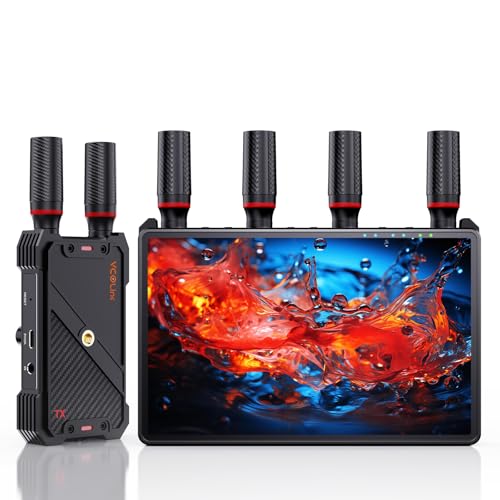
- Built-in 7-inch receiver monitor
- Supports up to five receivers per transmitter
- 1080p/60Hz transmission up to 1,312 feet LOS
Best For: Film crews, studios, and live-event collaboration
Easy Home and Office Pick
360-Foot Wireless HDMI Extender

- 4K decode with 1080p/60Hz output
- Plug-and-play setup without apps or Wi-Fi
- Supports mirror and extended screen modes
Best For: Presentations, classrooms, and home entertainment
Best for Live Streaming
Vrriis 1500FT UVC Wireless Video Transmitter
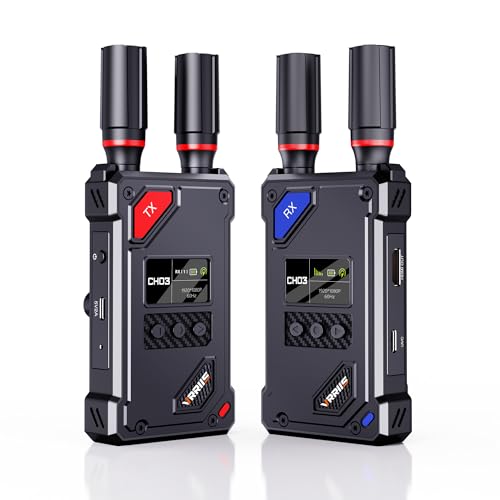
- UVC output works with OBS without a separate capture device
- 1500-foot line-of-sight range with claimed 0.05-second latency
- 20 selectable channels and HDMI loop out
Best For: Live streaming and mobile Full HD monitoring
Best 4K Pick
Vrriis 1150FT 4K Wireless HDMI Transmitter

- Supports UHD 4K at 30Hz with H.265 encoding
- Pre-paired plug-and-play operation
- Dual HDMI outputs and support for up to four receivers
Best For: Wireless 4K home theater and multi-display setups
Best for Multi-Display Control
Vrriis 1300FT Wireless HDMI Transmitter

- 1080p at 60Hz with claimed 0.05-second latency
- Dual receiver HDMI outputs for two screens
- IR support and transmitter loop out
Best For: Remote source control and dual-screen Full HD monitoring
Professional 4K Link – Mars 4K SDI/HDMI Video Transmitter
For crews that need flexible video transmitters, the Hollyland Mars 4K combines 4K HDMI transmission with SDI connectivity, decimal-point frame-rate support, and app monitoring. Its 450-foot line-of-sight range and 66ms stated latency suit on-set monitoring when professional interfaces matter.
Best For: Film crews, camera operators, and production teams using SDI and HDMI equipment.
Pros:
- Supports up to 4Kp30 over HDMI and HD formats over HDMI or SDI.
- Offers SDI output support for 23.98, 29.97, and 59.94 FPS.
- Supports up to four app monitoring connections without the receiver.
- Includes a color LCD, joystick controls, and multiple power options.
Cons:
- The stated 450-foot range and 66ms latency apply to interference-free laboratory conditions.
- QC/PD charging is not supported.
- Its professional SDI/HDMI feature set may be more than casual users need.
The Mars 4K is a strong choice when compatibility with professional video gear and flexible monitoring outweighs the simplicity of a basic HDMI extender.
Simple Meeting Link – 1080p Wireless HDMI Video Transmitter
This plug-and-play option keeps video transmitters simple for presentations, classrooms, and home entertainment. It supports 4K decoding while outputting 1080p at 60Hz, with no Wi-Fi, app, or Bluetooth setup required.
Best For: Presenters, teachers, small offices, and home users who want a lightweight HDMI connection.
Pros:
- Requires no HDMI cable between the source and display.
- Supports 1080p/60Hz output and 4K decoding.
- Offers up to 165 feet indoors or 328 feet outdoors in stated conditions.
- Works with laptops, cameras, projectors, monitors, and set-top boxes.
Cons:
- Walls and obstacles can reduce range and transmission speed.
- Both the transmitter and receiver must be connected to power.
- It outputs at 1080p rather than transmitting 4K output.
Choose this kit for straightforward everyday wireless display use, especially when easy installation and portability are more important than advanced production features.
Long-Range Crew Monitoring – Pyro H 4K Video Transmitter
The Hollyland Pyro H is one of the more capable video transmitters for multi-person monitoring. It combines 4Kp30 HDMI transmission, dual-band operation, smart channel scanning, a 1,300-foot stated line-of-sight range, and support for up to four receivers.
Best For: Film production, live streaming, ENG/EFP work, and teams that need several monitoring points.
Pros:
- Supports up to 4Kp30 transmission and 1080p60.
- Automatically scans 2.4GHz and 5GHz channels for an optimal connection.
- Supports up to four receivers plus HollyView app monitoring.
- Includes HDMI loop-out and UVC support for computer-based live streaming.
Cons:
- The 1,300-foot range is a stated maximum and depends on conditions.
- Its professional capabilities may be unnecessary for basic single-screen use.
- The supplied kit uses HDMI connectivity rather than SDI.
With its long range, multi-receiver design, and UVC streaming support, the Pyro H is the most collaboration-focused choice in this group.
Extended HDMI Distribution – WL081 1080p Video Transmitter
The Vrriis WL081 is a practical pick among video transmitters for extending a 1080p HDMI source over a long open-field distance. It adds loop-out, IR remote support, and a dual-band connection for offices, presentations, church displays, and home entertainment.
Best For: Users extending 1080p HDMI from laptops, set-top boxes, or cameras to a distant TV or projector.
Pros:
- Supports up to 1080p at 60Hz with stated 0.05-second latency.
- Includes transmitter-side HDMI loop-out for a local monitor.
- Provides IR control of the HDMI source from the display location.
- Advertises up to 1,300 feet in an open, interference-free field.
Cons:
- Walls, metal, brick, and glass can substantially reduce coverage.
- It is limited to Full HD rather than 4K transmission.
- Increasing the receiver count can reduce transmission distance.
The WL081 makes sense when you need long-distance 1080p distribution with local monitoring and remote source control, but it is not the right fit for 4K workflows.
Professional Production Pick – DJI SDR Transmission Combo
For demanding video transmitters use, the DJI SDR Transmission Combo combines 1080p/60fps wireless video with SDR frequency hopping, strong penetration, and multiple monitoring options. Its SDI, HDMI, and USB-C outputs make it a flexible choice for on-set and live-feed workflows.
Best For: Professional camera crews, live-feed monitoring, and multi-recipient production setups.
Pros:
- Transmits up to 3 km with 1080p/60fps video, up to 20 Mbps bitrate, and 35 ms minimum latency.
- Automatically hops across 2.4 GHz, 5.8 GHz, and DFS bands to help avoid interference.
- Supports SDI, HDMI, USB-C monitoring, and Broadcast mode with unlimited receivers.
- Includes both transmitter and receiver, plus camera and gimbal adapter plates.
Cons:
- Its professional feature set may be more than needed for simple home viewing.
- Requires a 12V battery.
This is the strongest fit when transmission distance, interference management, and production-oriented monitoring matter more than a basic plug-and-play setup.
On-Set Collaboration Pick – Wireless HDMI System with 7-Inch Monitor
This wireless HDMI video transmitter and receiver system is built for collaborative filming and live production. Its receiver includes a 7-inch monitor, while HDMI output, loop out, low latency, and support for up to five receivers add flexibility for crews and clients.
Best For: Film sets, studios, live events, and teams that need several simultaneous viewing points.
Pros:
- Includes a built-in 7-inch HD receiver monitor with brightness, volume, headphone, and sleep controls.
- Supports 1080p/60Hz transmission up to 1,312 feet in line-of-sight conditions with under 0.05-second latency.
- One transmitter can connect to up to five receivers for multi-viewer collaboration.
- Offers HDMI loop out, IR remote control, and NP-F battery, power bank, or USB-C power options.
Cons:
- External HDMI cable is not included.
- A Type-C-to-HDMI cable is required for smartphone or tablet compatibility.
- Its built-in monitor and expanded workflow may be unnecessary for basic point-to-point use.
Choose this model when convenient on-set viewing is a priority and multiple people need access to the same camera feed without adding separate monitors to every position.
Easy Home and Office Pick – 360-Foot Wireless HDMI Extender
For straightforward video transmitters use around the home, office, or classroom, this wireless HDMI extender offers automatic plug-and-play pairing without apps or Wi-Fi. It decodes 4K input, outputs 1080p/60Hz, and supports both mirrored and extended screen modes.
Best For: Presentations, classrooms, home theaters, events, and general HDMI screen extension.
Pros:
- Supports 4K decoding with smooth 1080p/60Hz output.
- Offers up to 360 feet in open spaces and uses 2.4G plus 5.8G dual-band transmission.
- Plug-and-play setup requires no app, Wi-Fi, or software, with automatic connection within seconds.
- Supports mirror and extend modes, up to eight transmitters per receiver, and three sets simultaneously.
Cons:
- Indoor range can drop to about 165 feet, and walls may affect distance and speed.
- Output is limited to 1080p/60Hz even when receiving 4K input.
- Supports a maximum of one receiver per set.
This is a practical choice for users who want to remove HDMI cables from a room without dealing with apps, network configuration, or a complicated installation.
Best for Live Streaming – Vrriis 1500FT UVC Wireless Video Transmitter
This Vrriis system is one of the more versatile video transmitters for creators who need wireless HDMI transmission plus computer-based streaming. It supports up to 1080p at 60Hz, offers manual channel selection, and includes UVC output for platforms such as OBS without requiring a separate capture device.
Best For: Live streaming, camera monitoring, meetings, and multi-device wireless video setups.
Pros:
- UVC output supports streaming to a computer without an additional capture device.
- 1500-foot line-of-sight range and 0.05-second claimed latency.
- 20 adjustable channels with an LCD display for checking signal conditions.
- HDMI loop out and support for up to five receivers.
Cons:
- Walls, metal, brick, and glass can significantly reduce range.
- Resolution is limited to Full HD 1080p at 60Hz.
- Additional receivers can reduce the transmission distance, and batteries are not included.
Choose this model when UVC streaming and channel control matter more than 4K resolution. Its flexible power options also suit mobile production, provided you plan around line-of-sight limitations.
Best 4K Pick – Vrriis 1150FT 4K Wireless HDMI Transmitter
For shoppers comparing video transmitters for higher-resolution home entertainment or presentation use, this Vrriis kit stands out with support for UHD 4K at 30Hz. The pre-paired transmitter and receiver are designed for plug-and-play setup, while dual outputs on the receiver can support larger display installations.
Best For: Wireless 4K streaming from cameras, computers, laptops, or TV boxes to remote displays.
Pros:
- Supports UHD 4K at 30Hz with H.265 encoding.
- Pre-paired setup requires no apps or drivers.
- Up to 1150 feet of claimed open-field line-of-sight range.
- Receiver has dual HDMI outputs and the system can support up to four receivers.
Cons:
- Walls, metal, brick, and glass may substantially shorten the range.
- 4K support is limited to 30Hz.
- Adding receivers can reduce transmission distance.
This is the strongest option of the three for users prioritizing 4K video. It is a practical choice for home theaters and multi-display layouts, though actual range will depend heavily on the environment.
Best for Multi-Display Control – Vrriis 1300FT Wireless HDMI Transmitter
This Vrriis kit is a practical choice among video transmitters when monitoring and remote source control are priorities. It delivers 1080p at 60Hz with claimed 0.05-second latency, adds transmitter loop out and dual receiver outputs, and includes IR support for controlling an HDMI source from the display location.
Best For: Camera monitoring, sports and gaming displays, and installations needing remote control or two-screen output.
Pros:
- 1300-foot claimed open-field range with 0.05-second latency.
- Transmitter loop out supports a local monitor.
- Receiver provides dual HDMI outputs for two screens.
- IR extension supports remote control of the HDMI source.
Cons:
- It supports Full HD 1080p rather than 4K.
- Obstacles such as walls, metal, brick, and glass can cause signal loss.
- Extra receivers can shorten the effective range, and batteries are not included.
Select this model if your setup benefits from local and remote monitoring or IR control. It offers useful installation flexibility, but users seeking UHD output should consider a 4K-capable alternative.
How We Picked These Video Transmitters
We focused on the specifications that have the greatest effect on real-world use: supported input and output formats, wireless range, latency, connection stability, loop-out functionality, receiver capacity, and setup complexity. The selection includes systems for professional cameras and production rigs as well as more affordable HDMI extenders for streaming, presentations, and home entertainment.
Advertised range should be treated as a best-case figure measured with a clear line of sight. Walls, competing wireless networks, operating frequency, and antenna placement can substantially reduce performance. We also separated systems designed for 4K sources from those that accept or decode 4K but output 1080p.
Quick Comparison
- Best for professional video: Look for dependable SDI and HDMI support, accurate frame-rate compatibility, low latency, and durable hardware.
- Best for long-distance HDMI: Choose a system with a strong line-of-sight range, clear status indicators, and stable performance at your required resolution.
- Best for multi-viewing: Select a transmitter that supports multiple receivers or includes monitor-equipped receivers.
- Best for streaming: UVC output, USB connectivity, loop out, and straightforward channel controls can simplify computer-based production.
- Best for budget installations: A plug-and-play 1080p kit may be sufficient when you do not need 4K output or advanced monitoring features.
Key Buying Factors for Video Transmitters
Resolution and Frame Rate
Check both the input and output specifications. Some products accept a 4K signal but transmit or decode it at 1080p. Confirm support for your camera’s frame rate, including common 23.98, 29.97, and 59.94 fps modes, before buying.
Latency and Reliability
Low latency matters for camera operators, live events, gaming, and interactive presentations. A stated delay is useful for comparison, but actual performance depends on distance, interference, and the selected video format. Dual-band operation, channel selection, and anti-interference features can help maintain a usable connection.
Ports and Workflow Compatibility
HDMI is common in consumer and mirrorless-camera setups, while SDI is preferred in many professional environments. A loop-out port lets you send the source to a local monitor or capture device while transmitting wirelessly. For computer streaming, verify whether the receiver provides UVC output and whether it works with your operating system and software.
Range, Receivers, and Power
Choose a range comfortably above the distance you actually need, especially when walls or people may obstruct the signal. If several viewers need the feed, confirm the maximum receiver count. Also check whether transmitters and receivers use batteries, USB power, or dedicated adapters, and account for runtime in mobile productions.
Who Should Buy Which Video Transmitters?
Camera crews and filmmakers should prioritize systems with SDI, HDMI flexibility, low latency, dependable range, and support for their exact camera formats. Live streamers may benefit most from UVC output, loop out, and simple channel management. Presenters and educators can often save money with a plug-and-play 1080p HDMI extender. Home theater and office users should concentrate on reliable range, easy pairing, and compatibility with the source and display rather than buying the longest-rated system.