The best wireless mechanical keyboards combine the feel and responsiveness of mechanical switches with the flexibility of Bluetooth or 2.4GHz connectivity. This roundup covers compact, full-size, hot-swappable, productivity-focused, and gaming-oriented options.
Use the guide below to compare layouts, switch options, connection modes, battery capacity, and useful extras before choosing the right keyboard for your desk.
Best 10 Wireless Mechanical Keyboards Picks for 2026
Custom Compact Pick

- Tri-mode connectivity for up to five devices
- Hot-swappable 3-pin and 5-pin switch support
- 75% layout with knob, RGB, and PBT keycaps
Best For: Gamers and keyboard hobbyists wanting compact customization
Quiet Office Favorite

- Low-profile tactile switches for quieter feedback
- Pairs with up to three devices
- Smart backlight and long rechargeable battery life
Best For: Productivity-focused users who need a full-size layout
Long-Battery Gaming Pick
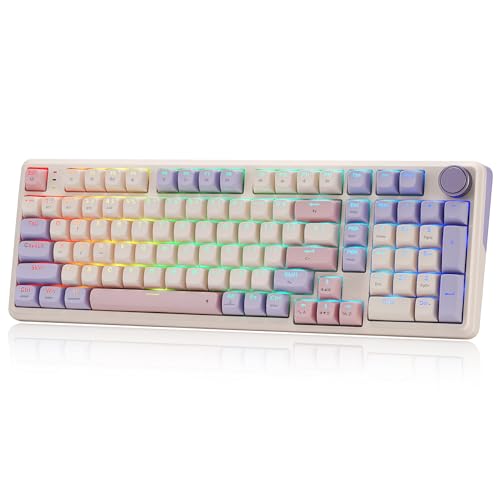
- Large 8000mAh battery with tri-mode connectivity
- Gasket design with cushioned linear typing feel
- 100-key layout, knob, RGB, and hot-swap support
Best For: Gamers wanting long runtime and a near-full-size layout
Full-Function Custom Pick

- 96% 99-key layout retains the number area
- Tri-mode connectivity and 8000mAh battery
- Hot-swap support with gasket build and PBT keycaps
Best For: Work-and-gaming setups needing a compact number pad
Best Compact Gaming Pick
Redragon K673 PRO Wireless Mechanical Keyboard

- 81-key compact layout with RGB lighting
- Tri-mode USB-C, Bluetooth, and 2.4GHz connectivity
- Gasket mount, dampening, and hot-swappable switches
Best For: Gamers wanting a compact, customizable wireless keyboard
Best for Quiet Customization
Kisnt KN85 Wireless Mechanical Keyboard

- 75% layout saves desk space while keeping navigation keys
- Tri-mode wireless with a 4000mAh rechargeable battery
- Gasket mount and hot-swappable linear switches
Best For: Small desks, shared spaces, and customizable typing setups
Best Full-Size Shortcut Pick
Redragon K745 PRO Wireless Mechanical Keyboard

- 108-key full-size layout with dedicated number pad
- Four extra hotkeys for common shortcuts
- Tri-mode connectivity and gasket-mounted dampening
Best For: Users who need a full-size wireless gaming keyboard with shortcuts
Best Retro Design
Redragon K710 Typewriter-Style Keyboard

- Typewriter-inspired design with round keycaps
- Tri-mode wired, Bluetooth, and 2.4GHz connectivity
- Clicky blue switches with customizable RGB
Best For: Retro-style typing and gaming setups
Best Compact Customization
Redragon K671KS 81-Key Keyboard
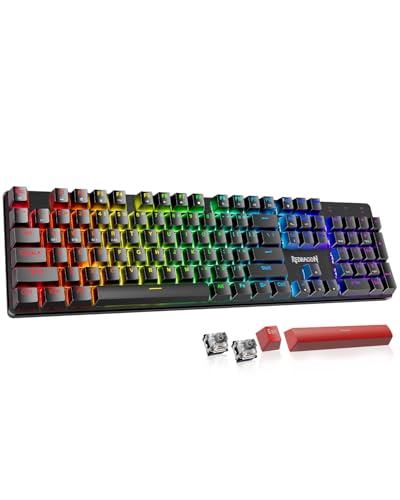
- Compact 81-key layout with hot-swappable switches
- Tri-mode connectivity and support for up to five devices
- PBT keycaps, RGB lighting, and programmable controls
Best For: Customizable compact gaming and workstations
Best Full-Size Modding
Redragon K556 PRO Aluminum Keyboard

- 104-key layout with a sturdy aluminum construction
- Tri-mode connectivity for wired and wireless use
- Hot-swappable support for 3-pin and 5-pin switches
Best For: Full-size gaming and switch customization
Custom Compact Pick – AULA F75 Pro
The AULA F75 Pro is a versatile choice among wireless mechanical keyboards, combining a space-saving 75% layout with tri-mode connectivity, hot-swappable switches, and a multi-function knob. Its 4000mAh battery and included pre-lubricated switches make it ready for gaming or everyday typing.
Best For: Gamers and hobbyists who want a compact, customizable keyboard with flexible device support.
Pros:
- Connects through Bluetooth 5.0, 2.4GHz wireless, or USB-C and can pair with up to five devices.
- Hot-swappable PCB supports 3-pin and 5-pin switches without soldering.
- Includes RGB lighting, a control knob, PBT keycaps, and five layers of sound-dampening material.
Cons:
- The 75% layout omits a dedicated number pad.
- Some customization features require the companion driver.
Choose the F75 Pro if you value a compact footprint and enthusiast features without giving up arrow keys. The knob, tri-mode connectivity, and hot-swap design give it broad appeal for both workstations and gaming setups.
Quiet Office Favorite – Logitech MX Mechanical
The Logitech MX Mechanical is a practical full-size option among wireless mechanical keyboards, using low-profile tactile switches for a quieter, more ergonomic typing experience. Smart backlighting, multi-device pairing, and USB-C charging make it especially suited to productive desk setups.
Best For: Office users who want a full-size wireless keyboard with quiet tactile feedback and multi-device control.
Pros:
- Low-profile tactile switches provide a noticeable bump with reduced typing noise.
- Pairs with up to three devices through Bluetooth Low Energy or the included Logi Bolt receiver.
- Smart backlighting activates as hands approach and adjusts to ambient conditions.
- Offers up to 15 days of battery life with backlighting or up to 10 months with it turned off.
Cons:
- It uses single-color backlighting rather than RGB.
- The full-size design takes more desk space than compact layouts.
The MX Mechanical prioritizes efficient, comfortable office typing over gaming-focused customization. It is a strong fit if you need a number pad, quiet tactile feedback, and easy switching between computers.
Long-Battery Gaming Pick – Redragon K768 PRO
The Redragon K768 PRO stands out among wireless mechanical keyboards with a practical 100-key layout, tri-mode connectivity, and an unusually large 8000mAh battery. Its gasket construction, linear switches, PBT keycaps, and control knob target gamers who want a cushioned feel and convenient onboard controls.
Best For: Gamers seeking a long-running wireless keyboard with a near-full-size layout and soft gasket typing feel.
Pros:
- Tri-mode USB-C, Bluetooth, and 2.4GHz connectivity supports flexible setup changes.
- 8000mAh battery is designed for longer runtime between charges.
- Gasket design, five-layer dampening, and custom linear switches provide a cushioned typing feel.
- Includes RGB lighting, PBT keycaps, hot-swap support, and programmable software.
Cons:
- The 100-key layout is larger than a typical compact gaming keyboard.
- Its custom linear switches may not suit users who prefer tactile feedback.
The K768 PRO is compelling when battery endurance and a softer typing experience matter more than minimal desk footprint. Its knob and 100-key arrangement also keep common controls readily accessible during gaming or media use.
Full-Function Custom Pick – AULA F99
The AULA F99 is a strong all-around choice among wireless mechanical keyboards, offering a 96% layout that retains a number pad while saving space compared with a traditional full-size board. Tri-mode connectivity, hot-swappable switches, gasket construction, and an 8000mAh battery support both work and gaming.
Best For: Users who need number-pad functionality plus enthusiast customization and wireless flexibility.
Pros:
- Supports Bluetooth 5.0, 2.4GHz wireless, and USB-C, with connections for up to five devices.
- Hot-swappable PCB accepts 3-pin and 5-pin switches without soldering.
- 96% 99-key layout preserves arrow keys and the number area while reducing desk space.
- Includes pre-lubricated linear switches, double-shot PBT keycaps, RGB, and an 8000mAh battery.
Cons:
- The compact 96% arrangement may take some adjustment compared with a standard full-size layout.
- Macro and lighting customization relies on the included driver.
The F99 is a sensible middle ground for buyers who want a number pad without committing to a full-size footprint. Its large battery and hot-swap capability make it particularly flexible for mixed work, study, and gaming use.
Best Compact Gaming Pick – Redragon K673 PRO Wireless Mechanical Keyboard
The Redragon K673 PRO is a compact option for shoppers comparing wireless mechanical keyboards with flexible connectivity and a cushioned typing feel. Its 81-key layout, tri-mode connection, control knob, gasket mount, and hot-swappable support suit gaming and everyday desk use.
Best For: Gamers and multitaskers who want a compact wireless board with a control knob and customizable switches.
Pros:
- Tri-mode connectivity supports USB-C, Bluetooth, and 2.4GHz wireless connections.
- Gasket mounting and five-layer dampening provide a softer, quieter typing feel.
- Hot-swappable sockets support many 3-pin and 5-pin switches.
- Control knob handles lighting brightness and media playback.
Cons:
- The 81-key layout does not include a dedicated number pad.
- Its gaming-focused RGB styling may not suit minimalist setups.
The K673 PRO balances desk-saving size with useful customization. Choose it if you value quick device switching, a built-in knob, and a softer linear typing experience more than full-size functionality.
Best for Quiet Customization – Kisnt KN85 Wireless Mechanical Keyboard
The Kisnt KN85 is a 75% choice for shoppers seeking wireless mechanical keyboards that save desk space without dropping the function row or arrow keys. It combines tri-mode connectivity, a 4000mAh battery, gasket mounting, and hot-swappable linear switches for a flexible typing setup.
Best For: Small-desk users, hybrid workers, students, and typists who want a quieter, customizable compact keyboard.
Pros:
- Compact 85-key layout preserves F1–F12 keys, arrows, and shortcuts.
- USB-C, 2.4GHz, and Bluetooth 5.0 support multi-device workflows.
- Gasket mounting is designed to soften vibrations and reduce hollow sound.
- Hot-swappable sockets accept both 3-pin and 5-pin switches.
Cons:
- There is no dedicated number pad.
- The companion driver is limited to Windows in wired or 2.4GHz mode.
- Animated RGB effects can reduce battery life.
The KN85 is a practical middle ground between a laptop-style compact board and a more elaborate custom build. Its layout and connectivity are especially useful for shared spaces and multi-device work, while the switch sockets leave room for future tuning.
Best Full-Size Shortcut Pick – Redragon K745 PRO Wireless Mechanical Keyboard
The Redragon K745 PRO is a full-size option among wireless mechanical keyboards, combining a 108-key layout with four dedicated shortcut keys. Its gasket construction, tri-mode connectivity, RGB lighting, and round PBT keycaps make it suited to users who want complete desktop functionality without giving up wireless flexibility.
Best For: Full-size users who need a number pad, dedicated shortcuts, and a cushioned gaming-oriented typing feel.
Pros:
- Full-size 108-key layout includes a dedicated number pad.
- Four programmable hotkeys are assigned to mute, calculator, screen lock, or desktop functions by default.
- Tri-mode USB-C, Bluetooth, and 2.4GHz connectivity supports multiple devices.
- Translucent PBT keycaps let RGB lighting shine through while resisting greasy shine.
Cons:
- The full-size design occupies more desk space than compact layouts.
- Its purple gaming design may not match every workspace.
The K745 PRO makes the most sense when a number pad and quick-access controls are priorities. It adds customization through hotkeys, macros, RGB software, and hot-swappable support while retaining a soft, dampened typing profile.
Best Retro Design – Redragon K710 Typewriter-Style Keyboard
The Redragon K710 stands out among wireless mechanical keyboards with its vintage typewriter styling, round keycaps, and clicky blue switches. Tri-mode connectivity supports USB-C wired, Bluetooth 3.0/5.0, and 2.4GHz wireless use, making it flexible for gaming, office work, and everyday typing.
Best For: Buyers who want a full-size wireless mechanical keyboard with retro styling, audible tactile feedback, and extensive RGB customization.
Pros:
- Distinctive typewriter-style design with round keycaps and a solid metal panel.
- Tri-mode connectivity supports USB-C, Bluetooth, and 2.4GHz wireless modes.
- Offers RGB lighting presets, per-key color customization, and programmable macros.
- Full 104-key layout with anti-ghosting and a rechargeable 4000mAh battery.
Cons:
- Clicky blue switches produce an audible sound that may not suit quiet spaces.
- Its full-size design takes up more desk space than compact layouts.
The K710 is a style-focused choice that combines classic aesthetics with modern connectivity and gaming features. Choose it if the typewriter look and clicky feedback matter as much as wireless flexibility.
Best Compact Customization – Redragon K671KS 81-Key Keyboard
The Redragon K671KS is a compact wireless mechanical keyboard built for users who want customization without a full-size footprint. Its 81-key layout offers tri-mode connectivity, hot-swappable switches, PBT keycaps, RGB lighting, and programmable controls for PC, tablet, and Mac setups.
Best For: Gamers and office users who want a compact keyboard with hot-swappable switches and multiple connection options.
Pros:
- Supports USB-C, Bluetooth 3.0/5.0, and 2.4GHz wireless connections across up to five devices.
- Hot-swappable design allows switch changes without soldering and includes eight spare switches.
- Double-injection PBT keycaps support clear lighting and accurate typing.
- Programmable macros, remapping, and per-key RGB adjustments expand customization.
Cons:
- The 81-key layout omits the dedicated number pad found on full-size keyboards.
- Its listed minimum operating system requirement is Windows 11.
With its compact layout and modular switch design, the K671KS is a practical entry point into customizable wireless mechanical keyboards. It is especially appealing if you expect to experiment with different switch feels over time.
Best Full-Size Modding – Redragon K556 PRO Aluminum Keyboard
The Redragon K556 PRO is a full-size option for shoppers comparing wireless mechanical keyboards with a sturdy aluminum build and quiet linear switches. It combines a 104-key layout with USB-C, Bluetooth, and 2.4GHz connectivity, plus hot-swappable sockets for switch experimentation.
Best For: Users who want a stable full-size gaming keyboard with quiet linear switches, wireless flexibility, and switch modding potential.
Pros:
- Brushed aluminum construction and an aluminum plate help keep the board steady.
- Tri-mode connectivity supports USB-C, Bluetooth, and 2.4GHz wireless operation.
- Hot-swappable sockets accept most 3-pin or 5-pin switches without soldering.
- Includes 20 RGB lighting modes, adjustable brightness, and software macro support.
Cons:
- Its 104-key full-size layout requires more desk space than compact alternatives.
- Quiet linear switches may provide less tactile feedback than clicky or tactile options.
The K556 PRO is a balanced pick for buyers who prioritize a traditional full-size layout and a firm aluminum chassis. Its hot-swap support also leaves room to tune the typing feel later.
How We Picked These Wireless Mechanical Keyboards
We selected keyboards across several common buying priorities: compact layouts for smaller desks, full-size models with dedicated number pads, multi-device connectivity, hot-swappable switches, RGB lighting, rotary or scroll knobs, and battery-focused designs. The list also includes both productivity-oriented and gaming-oriented keyboards so you can compare features rather than shop within a single category.
Because specifications can vary by configuration, verify the included switches, keycaps, connection modes, software support, and battery details before ordering. A keyboard advertised as wireless may support Bluetooth, a 2.4GHz USB receiver, wired USB-C, or only some of these modes.
Quick Comparison
| Best For | Look For | Typical Trade-Off |
|---|---|---|
| Small desks | 65% or 75% layouts | No dedicated function row or number pad |
| Office productivity | Full-size layout, quiet tactile switches, Bluetooth | Larger footprint |
| Gaming | 2.4GHz wireless, RGB, low-latency performance | More software and lighting controls to manage |
| Customization | Hot-swappable sockets and standard keycap compatibility | May require extra switches or keycaps |
| Long battery life | Large battery and adjustable lighting | Added weight or slower charging |
Key Buying Factors for Wireless Mechanical Keyboards
Layout and Desk Space
Choose a 75% or 81-key layout if you want dedicated arrow keys and a function row without the bulk of a full-size keyboard. A 100% or 108-key model is better for spreadsheets, accounting, and frequent number entry. Compact layouts may require function-layer shortcuts for navigation and media controls.
Wireless Connection Options
Bluetooth is convenient for laptops, tablets, and multiple devices, while 2.4GHz wireless usually offers a more direct connection for gaming and desktop use. USB-C wired mode is useful for charging, troubleshooting, or minimizing latency. Tri-mode keyboards provide the most flexibility, but check whether the receiver is included and whether switching between devices is straightforward.
Switches, Hot-Swapping, and Sound
Linear switches offer smooth keystrokes and are popular for gaming, while tactile switches provide a noticeable bump that many typists prefer. Hot-swappable boards let you replace switches without soldering, making them a better long-term choice for experimentation and repairs. Switch sound also depends on case construction, keycaps, stabilizers, and desk acoustics.
Battery, Lighting, and Controls
RGB lighting can improve visibility and personalization but may reduce runtime, especially at high brightness. Look for battery capacity, charging indicators, sleep behavior, programmable software, and convenient controls such as a rotary knob or dedicated media keys.
Who Should Buy Which Wireless Mechanical Keyboards?
Choose a compact 75% or 81-key model if you want a balanced everyday keyboard that saves desk space. Pick a full-size keyboard if number entry and dedicated navigation keys matter more than portability. For gaming, prioritize reliable 2.4GHz connectivity and comfortable switches over decorative lighting. For office use, favor Bluetooth support, subdued acoustics, and a layout that matches your workflow. If you expect to customize your setup, select a hot-swappable keyboard with replaceable keycaps and clearly documented compatibility.