The right desk gift can make work feel more organized, comfortable, or convenient. This list pairs useful workspace upgrades with small everyday comforts for home-office users and desk workers.
Desk Accessory Christmas Gifts for 2026
1. Anker Prime Thunderbolt 5 Docking Station
A Hub for a Connected Workspace
Anker Prime Thunderbolt 5 Docking Station

- Combines 14 ports, including Thunderbolt 5, USB-C, USB-A, Ethernet, and card readers.
- Supports multiple display connections, with up to 8K resolution listed for compatible setups.
- Includes a Thunderbolt 5 cable and AC power cable.
Best For: Someone who connects a laptop to several desk peripherals.
2. GOLDENMATE 1000VA Lithium UPS Battery Backup
A Power Backup for the Home Office
GOLDENMATE 1000VA Lithium UPS Battery Backup

- Provides battery backup and surge protection through eight outlets.
- The LCD panel displays battery and power conditions.
- Designed to support computers, workstations, network devices, and telecom equipment.
Best For: A home-office user seeking backup power for computer equipment.
3. SHW 55-Inch Electric Height Adjustable Desk
A Flexible Desk Setup
SHW 55-Inch Electric Height Adjustable Desk

- Electric lift adjusts the desk from 28 to 45 inches.
- Includes a drawer, cable management tray, desktop grommets, and two utility hooks.
- The 55-by-28-inch surface accommodates monitors, a laptop, and other work essentials.
Best For: Someone who wants sitting and standing flexibility in a home office.
4. TRALT Ergonomic Office Chair with Adjustable Lumbar
A More Supportive Place to Sit
TRALT Ergonomic Office Chair with Adjustable Lumbar
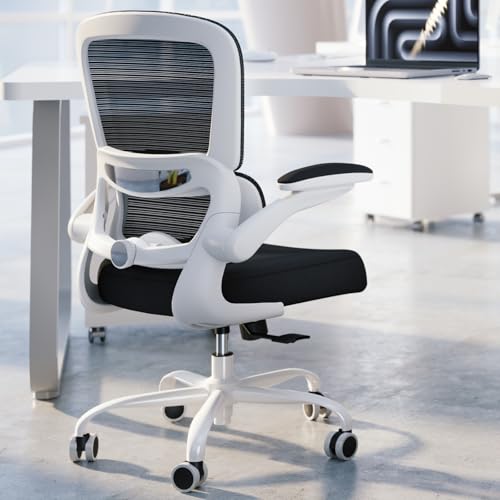
- Adjustable lumbar support changes depth to suit the user's back.
- Mesh backrest and molded foam seat are designed for desk sessions.
- Seat height adjusts from 17.7 to 21.7 inches.
Best For: Someone who spends long workdays at a desk.
5. HUANUO FlowLift Dual Monitor Stand
More Room for Two Screens
HUANUO FlowLift Dual Monitor Stand

- Fits two 13-to-32-inch monitors weighing 4.4 to 19.8 pounds each, with compatible VESA holes.
- Offers tilt, swivel, rotation, and height adjustment for positioning screens.
- Raises monitors off the desk and routes cables along the arms.
Best For: A two-screen user with a compatible wooden desk and monitors.
6. EMEET C960 4K Webcam
A Clearer Camera for Calls

- Offers 4K resolution, with video defaulting to 1080p until changed in software or an app.
- PDAF autofocus and auto light correction support video calls in varied lighting.
- Includes dual microphones and a privacy cover.
Best For: A remote worker who joins regular video calls.
7. EPOMAKER x Aula F75 MAX Wireless Keyboard
A Customizable Typing Upgrade
EPOMAKER x Aula F75 MAX Wireless Keyboard

- Connects by Bluetooth, 2.4 GHz wireless, or USB-C cable.
- Features a compact 75% layout, volume knob, and customizable TFT screen.
- Hot-swappable design supports compatible 3- and 5-pin switches.
Best For: A desk worker who enjoys customizable keyboards and tactile typing.
8. LYMAX USB Monitor Light Bar
Focused Light for a Small Desk

- Sits on top of a monitor to light the keyboard and desktop while limiting screen reflection.
- Adjustable color temperature ranges from 2900K to 6000K, with dimming controls.
- USB-C powered, with a wireless controller and a 59-inch cord.
Best For: Someone who wants task lighting without using desk space for a lamp.
9. Bamboo Desk Organizer with Three Drawers
A Home for Desk Essentials
Bamboo Desk Organizer with Three Drawers

- Three drawers and an open top tray hold small supplies and personal items.
- Measures 12.99 by 7.48 by 7.87 inches for desktop storage.
- Arrives fully assembled and is made from bamboo with an NC varnish coating.
Best For: Someone who likes keeping small essentials organized and close at hand.
10. Nulea M501 Wireless Trackball Mouse
A Different Way to Navigate
Nulea M501 Wireless Trackball Mouse

- Thumb-operated trackball moves the cursor without moving the mouse across the desk.
- Connects to up to three devices using Bluetooth or the USB receiver.
- Rechargeable and right-handed, with four DPI levels and six buttons.
Best For: A right-handed user interested in trackball navigation or a compact workspace.
11. Smart Coffee Mug Warmer with Timer
A Warm Drink Beside the Keyboard
Smart Coffee Mug Warmer with Timer

- Four temperature settings range from 131°F to 185°F.
- Timer can be set from one to 12 hours before automatic shutoff.
- Includes a coaster and accommodates many cup types, with flat or thin bottoms recommended.
Best For: Someone who enjoys a warm drink while working or reading.
12. Desktop Glass Whiteboard with Storage
A Handy Spot for Notes
Desktop Glass Whiteboard with Storage

- Glass writing surface is designed for smooth writing and clean erasing.
- Storage compartments and holders keep markers, eraser, phone, or tablet nearby.
- Includes two dry erase markers and a wipe; measures about 15.7 by 7 by 2 inches.
Best For: A planner, student, or professional who likes to jot down quick reminders.
How to Choose Desk Accessory Christmas Gifts
Start with the recipient’s work habits and the space they already use. A laptop-heavy setup may benefit from a docking station that gathers display, storage, and network connections in one place. Someone who works across two screens may appreciate an adjustable monitor arm, provided the monitors and desk meet its mounting requirements. For a simpler upgrade, a bamboo organizer, glass whiteboard, or monitor light bar can make a small desk feel more functional without replacing major furniture.
Think about what the recipient reaches for throughout the day. Frequent video calls point toward a webcam with autofocus and a privacy cover. A keyboard enthusiast may enjoy hot-swappable switches and customizable controls, while a trackball can suit someone who prefers cursor movement without sweeping a mouse around the desktop. A mug warmer is a personal comfort gift; consider whether the recipient has room near their keyboard and uses a cup with a suitable flat bottom.
Match the Gift to the Budget
A practical desk gift can be modest or a major workspace upgrade. Smaller accessories such as an organizer, monitor light, whiteboard, trackball, or mug warmer focus on one daily task. They can be especially thoughtful when you know the recipient’s habits but do not want to change their whole setup. Larger items such as a standing desk, chair, docking station, UPS, or dual monitor mount have a bigger effect on the workspace and require more room, planning, or compatibility checks.
Set a budget before choosing, then prioritize the feature the recipient will use most often. For example, adjustable height matters more than extra storage to someone who wants to alternate between sitting and standing. A multiport dock is most useful when there are several peripherals to connect. Avoid paying for functions that do not match their work pattern; a straightforward organizer can be a better gift than a complex upgrade if their desk is already well equipped.
Check Compatibility and Personalization
Before buying electronics or mounting hardware, check the recipient’s setup. For the dual monitor arm, verify screen size, weight, VESA hole spacing, desk material, thickness, and clearance beneath the desk. The docking station lists compatibility with particular MacBook and Thunderbolt laptop families, so confirm the laptop’s ports and operating system requirements. The UPS is intended for standard 110V household power; check the recipient’s outlet voltage and equipment needs.
Comfort and style are personal, too. Chair fit depends on the user’s body and desk height. A keyboard’s layout and switch feel are preferences, while a right-handed trackball may not suit everyone. For non-electronic gifts, consider desk dimensions, available surface area, and the recipient’s preferred materials or colors. When uncertain, choose an accessory that complements an existing routine and does not demand a full desk rearrangement.
Personal touches can be simple: pair a note with a whiteboard for someone who plans visibly, or choose a tidy organizer for a person who likes every small item to have a place. The gift itself does not need holiday decoration; useful everyday quality makes a fitting Christmas present.
Timing and Last-Minute Decisions
Plan ahead for furniture and mounting accessories because assembly, measurement, and setup can take time. An electric desk requires assembly, and its listing recommends two people. A monitor arm needs a compatible desk and screens before installation. These choices work best when you can verify the recipient’s setup and leave room for fitting everything properly.
For a late decision, focus on compact gifts with clear everyday uses, such as a desktop organizer, webcam, light bar, whiteboard, or mug warmer. Still check device connections and available space when relevant. If the gift is intended for a particular laptop, monitor, or outlet, verify those details before ordering. A well-matched desk accessory Christmas gift can make the next workday more pleasant long after the holiday has passed.