If you need a simple way to clone drives, recover files, or keep local backups, a good docking station can save time and hassle. The best models make swapping 2.5-inch and 3.5-inch SATA drives easy while keeping backups fast and reliable.
In this roundup, we focused on practical options for home users, tech enthusiasts, and small offices that want straightforward backup workflows without a full NAS setup.
Best 10 Hard Drive Docking Stations for Backups Picks for 2026
Dual-Bay Cloning Dock
SABRENT EC-HD2B dual-bay backup dock

- Dual bays for 2.5-inch and 3.5-inch SATA drives
- Offline cloning without a connected computer
- USB 3.0 plug-and-play design
Best For: Drive-to-drive backups and offline cloning
Single-Bay Lay-Flat Dock
SABRENT EC-DFLT simple SATA backup dock

- Supports 2.5-inch and 3.5-inch SATA drives
- Includes 12V adapter for 3.5-inch stability
- Tool-free plug-and-play design
Best For: Simple one-drive backup and drive swapping
Dual-Bay Backup Cloner
ORICO DD28U3-C cloning dock for backups

- Dual bays with offline clone support
- Up to 44TB total capacity support
- USB 3.0, UASP, and Trim compatibility
Best For: Backup cloning across many devices and platforms
Powered Single-Bay Dock
SABRENT EC-UBLB powered SATA backup dock
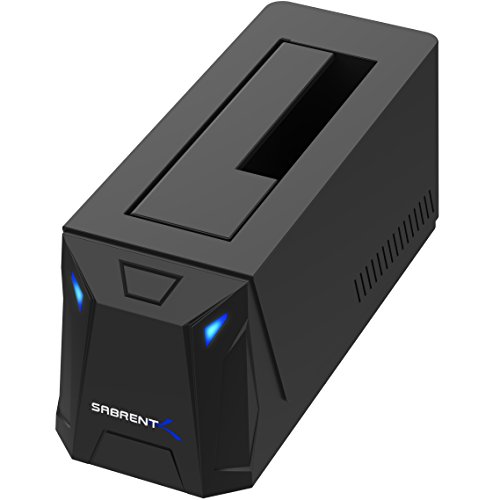
- Supports 2.5-inch and 3.5-inch SATA drives up to 20TB
- Includes required AC adapter
- USB 3.0 with UASP and auto-sleep
Best For: Stable, everyday SATA backup transfers
Dual-Bay Offline Cloner
Dual Bay SATA Hard Drive Cloner Dock USB C 5Gbps

- Offline one-key cloning without a computer
- Dual bays support up to 40TB total
- 5Gbps USB 3.2 Gen 1 with tool-free drive swapping
Best For: People who need a simple two-drive backup and cloning dock
Four-Bay Backup Hub
SABRENT 4-Bay USB 3.0 Hard Drive Docking Station

- Four-bay layout for multiple SATA drives
- Offline clone function with LED progress
- USB 3.0 up to 5Gbps and trayless operation
Best For: Users managing several backup drives from one station
Fast USB-C Backup Dock
SABRENT USB-C Hard Drive Docking Station, 2.5/3.5in SATA, 10Gbps

- 10Gbps USB-C for faster backups
- Supports 2.5-inch and 3.5-inch SATA drives
- Includes USB-A and USB-C cables plus tool-free hot swap
Best For: Users who want the fastest simple single-drive backup dock
Dual-Bay USB-C Clone Dock

- Supports two 2.5"/3.5" SATA drives at once
- Offline cloning works without a computer
- USB 3.1 Gen 1 with UASP up to 5Gbps
Best For: Backups, drive migration, and simple offline cloning
Compact USB-C Offline Cloner

- One-button offline cloning for SATA drives
- Dual-bay access with hot-swap support
- USB 3.0 speeds up to 5Gbps
Best For: Straightforward SATA backups and drive cloning
Value Dual-Bay Clone Dock

- Dual-bay dock for two SATA HDDs or SSDs
- Offline clone mode does not need a PC
- USB 3.0 with UASP up to 5Gbps
Best For: Budget-friendly backups and simple offline cloning
Dual-Bay Cloning Dock – SABRENT EC-HD2B dual-bay backup dock
If you want hard drive docking stations for backups, this dual-bay SABRENT model gives you a simple way to copy and move data between two SATA drives. It supports 2.5-inch and 3.5-inch HDDs and SSDs, includes plug-and-play setup, and adds offline cloning so you can duplicate a drive without a computer.
Best For: Users who want a straightforward dual-bay dock for backup workflows and offline drive cloning.
Pros:
- Supports standard 2.5-inch and 3.5-inch SATA HDDs and SSDs.
- Offline cloning works without connecting to a computer.
- USB 3.0 support provides up to 5Gbps transfer speeds.
- Plug-and-play design requires no drivers.
Cons:
- Limited to SATA drives, so it does not support M.2 NVMe or IDE/PATA.
- Offline clone mode is capped at 60Mbps.
For backup tasks, this dock is most useful when you want an easy drive-to-drive workflow and simple hot-swapping. The combination of dual bays and cloning support makes it practical for routine duplicates, though it is best suited to SATA-based drives only.
Single-Bay Lay-Flat Dock – SABRENT EC-DFLT simple SATA backup dock
This SABRENT dock is a simple option among hard drive docking stations for backups when you only need one bare SATA drive at a time. It supports 2.5-inch and 3.5-inch SATA drives and SSDs, uses a USB 3.0 Type-A host cable, and includes a 12V adapter for stable operation with 3.5-inch drives.
Best For: Buyers who want a compact single-bay SATA dock for one-drive backup jobs.
Pros:
- Works with bare 2.5-inch and 3.5-inch SATA HDDs and SSDs.
- Tool-free, lay-flat design makes drive swaps easy.
- Includes a 12V power adapter required for 3.5-inch drives.
- Plug-and-play operation on Windows, macOS, and Linux.
Cons:
- Does not support IDE/PATA, M.2 NVMe, M.2 SATA, SAS, or drives already in a USB enclosure.
- Uses USB-A, so USB-C-only systems need a separate adapter.
For basic backup use, this is a clean and uncomplicated dock that focuses on one drive at a time. It is a good fit if you prefer a simple SATA-only setup and do not need dual-bay cloning features.
Dual-Bay Backup Cloner – ORICO DD28U3-C cloning dock for backups
For hard drive docking stations for backups, this ORICO dual-bay model stands out because it combines broad drive support with offline cloning. It supports 2.5-inch and 3.5-inch SATA HDDs and SSDs, includes a 36W power supply, and can copy a drive without a computer by using the clone button.
Best For: Users who want a dual-bay dock with offline cloning and wide device compatibility.
Pros:
- Supports up to 44TB total with 2.5-inch and 3.5-inch SATA drives.
- Offline cloning lets you duplicate a drive without a PC.
- USB 3.0 with UASP and Trim support reaches up to 5Gbps.
- Includes a 36W power supply and 1m USB-A cable.
Cons:
- Target disk must be larger than the source disk for cloning.
- Does not power on if no hard drive is inserted.
This dock is a strong choice if you want backup flexibility across multiple devices and operating systems. Its clone function and higher-capacity support make it useful for more demanding storage workflows, especially when you want to duplicate drives quickly.
Powered Single-Bay Dock – SABRENT EC-UBLB powered SATA backup dock
This SABRENT dock is a practical choice for hard drive docking stations for backups when you want a powered single-bay setup for SATA drives. It handles 2.5-inch and 3.5-inch SATA HDDs and SSDs, includes the required AC adapter, and supports USB 3.0 with UASP for faster transfers where the host system allows it.
Best For: Users who want a stable, powered dock for regular SATA backup work.
Pros:
- Supports 2.5-inch and 3.5-inch SATA HDDs and SSDs up to 20TB.
- AC adapter is included and required for operation.
- USB 3.0 with UASP supports up to 5Gbps transfers.
- Auto-sleep and LED status indicators help with everyday use.
Cons:
- Limited to SATA drives only, with no support for SAS or M.2 NVMe.
- New or blank drives must be initialized before they appear.
As a backup dock, this model is best when you want predictable power and straightforward SATA compatibility. It is a good fit for users who do not need cloning and just want a dependable single-drive dock for access and transfers.
Dual-Bay Offline Cloner – Dual Bay SATA Hard Drive Cloner Dock USB C 5Gbps
If you want hard drive docking stations for backups that can also duplicate disks without a PC, this dual-bay SATA dock is built for that job. It supports 2.5-inch and 3.5-inch SATA drives, runs at up to 5Gbps over USB 3.2 Gen 1, and includes offline cloning with an LED progress bar for easy status checks.
Best For: Users who want a two-drive dock for straightforward backups, system migration, and standalone cloning.
Pros:
- Offline one-key cloning works without connecting to a computer.
- Dual-bay design supports up to 40TB total capacity, with 20TB per bay.
- 5Gbps USB 3.2 Gen 1 transfer rate helps with faster backup jobs.
- Tool-free vertical insertion makes drive swapping quick and simple.
Cons:
- Only supports two drives, so it is not ideal for larger multi-drive collections.
- Best features focus on SATA drives, not NVMe storage.
- RGB lighting and desktop styling may be unnecessary for utility-first setups.
This is a practical pick if cloning and backup speed matter more than advanced expansion. The added support for UASP, TRIM, and S.M.A.R.T. makes it a solid everyday dock for managing SATA drives.
Four-Bay Backup Hub – SABRENT 4-Bay USB 3.0 Hard Drive Docking Station
For hard drive docking stations for backups that need more room to manage multiple drives, this four-bay SABRENT dock gives you a single place to access, copy, and organize SATA HDDs or SSDs. It connects over USB 3.0 at up to 5Gbps, supports trayless insertion, and includes an offline clone function with LED progress indicators.
Best For: Users who want to back up and manage up to four SATA drives from one dock.
Pros:
- Four bays let you handle multiple 2.5-inch or 3.5-inch drives at once.
- Offline cloning allows direct drive-to-drive duplication without a computer.
- Trayless design makes drive insertion and removal straightforward.
- USB 3.0 connection supports reliable transfers up to 5Gbps.
Cons:
- Larger footprint and heavier build than a single- or dual-bay dock.
- Uses USB 3.0 rather than faster USB-C 10Gbps connections.
- Best suited to SATA drives, so it is not a universal storage dock.
This model makes sense if your backup workflow involves several drives and you want fewer cable swaps. It is a good utility-focused choice for homes, small offices, or anyone rotating multiple SATA disks.
Fast USB-C Backup Dock – SABRENT USB-C Hard Drive Docking Station, 2.5/3.5in SATA, 10Gbps
If you are comparing hard drive docking stations for backups and want higher transfer speed, this SABRENT USB-C dock stands out with a 10Gbps USB 3.2 Gen 2×1 connection. It supports 2.5-inch and 3.5-inch SATA SSDs and HDDs, includes both USB-A and USB-C cables, and is built for quick hot-swapping and tool-free use.
Best For: Users who want a fast, single-drive dock for backups on modern USB-C or USB-A systems.
Pros:
- 10Gbps USB-C connection offers faster backup transfers than 5Gbps docks.
- Supports 2.5-inch and 3.5-inch SATA SSDs and HDDs.
- Includes USB-A and USB-C to USB-C cables for flexible connectivity.
- Tool-less, hot-swappable design makes drive changes quick and easy.
Cons:
- Single-drive design limits simultaneous backup and cloning workflows.
- Memory storage capacity is listed at 20TB, which is less than some multi-bay options.
- Plastic enclosure is less rugged than some metal alternatives.
This is the best fit if speed and simplicity matter more than multi-drive capacity. It is a strong everyday dock for backing up one SATA drive at a time on Windows, macOS, or Linux.
Dual-Bay USB-C Clone Dock – BENFEI 2-Bay USB-C Dock
If you want hard drive docking stations for backups that can also duplicate drives without a PC, this BENFEI dual-bay dock is built for that workflow. It supports two 2.5″ or 3.5″ HDDs or SSDs at once, offers offline cloning, and uses USB 3.1 Gen 1 with UASP for faster transfers when connected to a computer.
Best For: Users who want a dual-bay dock for quick backups, drive migration, and standalone cloning.
Pros:
- Offline clone button lets you copy a drive without using a computer.
- Dual-bay design can read, write, and transfer between two drives at once.
- USB 3.1 Gen 1 with UASP is rated up to 5Gbps for faster backups.
- 12V/2.5A power adapter and power switch are included for stable operation.
Cons:
- For cloning, the target drive must be the same size as or larger than the source.
- Only supports 2.5″ and 3.5″ drives, not other form factors.
- Cloning is limited by the source and target drive capacities.
This is a practical pick if your priority is flexibility: it works as a regular two-drive dock for file moves and as a standalone cloner when you need a simple backup or migration tool.
Compact USB-C Offline Cloner – SABRENT EC-CH2B
For hard drive docking stations for backups, the SABRENT EC-CH2B keeps things straightforward: two SATA bays, USB-C connectivity, and one-button offline cloning when you want to duplicate a drive without opening software. It also mounts both drives as separate volumes over USB, which is handy for moving files or managing two disks side by side.
Best For: Users who want a compact SATA dock with easy cloning and simple two-drive access.
Pros:
- Offline cloner copies one SATA drive to another without a computer.
- Both bays can read and write at the same time when connected over USB.
- Supports bare 2.5″ and 3.5″ SATA HDDs and SSDs.
- USB-C cable is included, and the dock is plug-and-play on Windows and Mac.
Cons:
- Does not support IDE/PATA, M.2, or NVMe drives.
- Offline cloning runs up to 60MBps by design.
- Requires a USB-C port on the computer unless you supply your own adapter cable.
This dock makes sense if you want a no-fuss backup station for SATA drives and value the convenience of offline cloning more than extra format support.
Value Dual-Bay Clone Dock – FIDECO USB 3.0 Dual Bay
If you’re comparing hard drive docking stations for backups and want a dual-bay model with offline cloning, the FIDECO dock covers the basics well. It supports two 2.5″ or 3.5″ SATA HDDs or SSDs, offers USB 3.0 speeds up to 5Gbps, and includes UASP plus plug-and-play operation across Windows, Mac OS, and Linux.
Best For: Budget-minded users who want a simple dual-bay dock for backups and offline cloning.
Pros:
- Supports two SATA HDDs or SSDs at the same time.
- Offline clone function works without a computer.
- USB 3.0 with UASP is rated up to 5Gbps.
- Plug-and-play setup with broad OS compatibility.
Cons:
- Supports SATA drives only.
- New drives may need initialization before the computer can recognize them.
- Listed memory capacity is 24TB, so storage planning should stay within that limit.
FIDECO is a practical pick if you want a no-drama backup dock: it covers dual-drive access, offline cloning, and common OS support without adding extra complexity.
How We Picked the Best Hard Drive Docking Stations for Backups
We prioritized Hard Drive Docking Stations for Backups that balance speed, compatibility, and ease of use. Key factors included support for both 2.5-inch and 3.5-inch SATA drives, offline cloning, USB-C or USB 3.0 connectivity, tool-free design, and enough bay capacity for common backup and duplication tasks.
We also looked for models that suit different workflows, from single-drive file access to dual-bay cloning and multi-drive rotation.
Quick Comparison
Single-bay docks are the simplest choice if you mainly need to access one drive at a time or move backups between systems. Dual-bay docks are better for cloning and side-by-side comparisons, while four-bay units make sense for users managing multiple drives or larger backup libraries. USB-C models are the best fit for newer desktops and laptops, especially when you want a cleaner, faster connection.
Key Buying Factors for Hard Drive Docking Stations for Backups
Drive Compatibility
Make sure the dock supports the drive sizes and interfaces you use most often. Most backup users will want 2.5-inch and 3.5-inch SATA HDDs and SSDs, plus enough height clearance for thicker desktop drives.
Cloning and Backup Features
If you plan to duplicate drives without a computer, offline cloning is a major convenience. For simple backup access, cloning is optional, but it can be valuable for drive upgrades and disaster recovery.
Connection Speed
USB 3.0 is sufficient for many everyday backups, but USB-C docks may offer better convenience and faster performance depending on the implementation. UASP support can also improve transfer efficiency with compatible drives and systems.
Ease of Use and Workflow
Tool-free insertion, clear status indicators, and stable drive seating matter more than they first seem. For regular backups, a dock should be quick to use so you actually keep using it.
Who Should Buy Which Hard Drive Docking Stations for Backups?
Choose a single-bay dock if you want a simple, low-cost way to access one backup drive at a time. Pick a dual-bay cloner if you want direct drive-to-drive copying and more flexible backup management. Go with a four-bay dock if you maintain several drives, rotate archives, or want a more expandable setup.
For most buyers, the best Hard Drive Docking Stations for Backups are the ones that match your workflow first and your speed needs second. If you need the easiest path to reliable local backups, prioritize compatibility, cloning support, and a dock you can set up in seconds.