Bluetooth adapters with external antennas can extend wireless range beyond what a compact dongle typically delivers, making them useful for desktops, media PCs, workstations, and gaming setups.
We compared 10 long-range USB models by Bluetooth version, antenna design, claimed range, operating-system support, and setup features to help you find the right adapter for your devices and space.
Best 10 Bluetooth Adapters with External Antennas Picks for 2026
Best for Maximum Open-Air Range
Sena UD100-G03 300m Bluetooth Adapter

- 300m typical open-field range
- Exchangeable antenna
- Up to 7 simultaneous connections
Best For: Desktop users needing extended open-field coverage
Best for Bluetooth 5.4 Range

- Bluetooth 5.4 dual-mode support
- Detachable 5 dBi antenna
- Up to 150m open-area range
Best For: Windows users wanting modern long-range connectivity
Best for Dual-Antenna Reception
RENGOGA BT11 150M Bluetooth Dongle
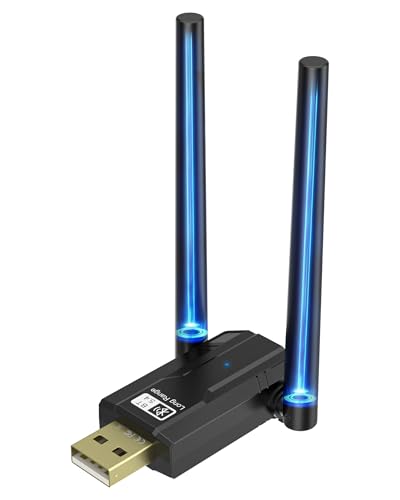
- Bluetooth 5.4 connectivity
- Two rotating high-gain antennas
- Up to 150m open-space range
Best For: Windows desktops needing flexible antenna positioning
Best Long-Range Pick

- Up to 300-foot open-area range
- 5dBi external antenna
- Connects up to seven devices
Best For: Windows users prioritizing long-range connectivity
Best Dual-Antenna Coverage

- Up to 656-foot stated range
- Adjustable dual 2dBi antennas
- Supports up to seven devices
Best For: Windows users covering larger spaces
Best Audio-Focused Option

- Rotatable antenna with 393-foot stated range
- AAC and SBC audio support at 48kHz
- Connects up to five devices
Best For: Windows PC audio and peripheral users
Best with Extra Features

- Up to 492-foot advertised range
- Connects up to seven devices
- Plug-and-play on Windows 10/11
Best For: Large workspaces and multi-device setups
Adjustable Antenna Value

- 150-meter advertised range
- Rotates vertically and horizontally
- Supports up to seven devices
Best For: Windows setups needing flexible antenna positioning
High-Gain Antenna Pick

- Detachable 5dBi antenna
- Bluetooth 6.0 with lower latency
- Adjustable for better signal direction
Best For: Desktop users needing stronger room-to-room coverage
Best for Maximum Open-Air Range – Sena UD100-G03 300m Bluetooth Adapter
If you need bluetooth adapters with external antennas for unusually long open-area coverage, the Sena UD100-G03 stands out with a stated working distance of 300 meters and an exchangeable antenna. It uses Bluetooth 4.0 over USB 2.0 and supports up to seven simultaneous connections, but Windows users should plan on installing the Bluesoleil driver.
Best For: Desktop users who prioritize extended open-field range and broad Bluetooth profile support.
Pros:
- Rated for a typical 300-meter open-field working distance, with up to 600 meters using a 5 dBi dipole antenna.
- Exchangeable antenna design allows antenna flexibility.
- Supports up to seven simultaneous connections and a wide range of Bluetooth profiles.
- Includes a one-year warranty.
Cons:
- Requires the Bluesoleil driver on Windows.
- Uses older Bluetooth 4.0 technology rather than a newer Bluetooth generation.
- The stated range applies to open-field conditions and may vary indoors.
The Sena is a specialized choice for long-distance desktop connectivity. Its replaceable antenna and extensive profile support are useful when range matters more than the simplicity of a modern plug-and-play dongle.
Best for Bluetooth 5.4 Range – BT548 Long-Range USB Adapter
The BT548 is one of the more versatile bluetooth adapters with external antennas for a Windows PC. Its Bluetooth 5.4 chipset supports dual-mode Bluetooth, while the detachable 5 dBi antenna is rated for up to 150 meters in open areas. It is plug and play on Windows 8.1, 10, and 11, with a driver required for Windows 7.
Best For: Windows desktop users who want modern Bluetooth features, long-range connectivity, and support for several device types.
Pros:
- Bluetooth 5.4 dual-mode support with backward compatibility to older Bluetooth versions.
- Detachable 5 dBi antenna and stated open-area range of up to 150 meters.
- Supports up to seven connected devices and data rates up to 3 Mbps.
- Plug and play on Windows 8.1, 10, and 11.
Cons:
- Not compatible with Mac, TV, car stereo, or Windows 8, XP, and Vista according to the supplied notes.
- Windows 7 requires a downloaded driver.
- Only one Bluetooth audio device of the same type can play music at a time.
Choose the BT548 if you want a current Bluetooth standard and a detachable antenna without giving up multi-device support. Its range claims are for open spaces, so walls and wireless interference can reduce real-world performance.
Best for Dual-Antenna Reception – RENGOGA BT11 150M Bluetooth Dongle
The RENGOGA BT11 is a practical option among bluetooth adapters with external antennas, pairing Bluetooth 5.4 with two high-gain antennas that rotate 180 degrees. It supports up to seven devices, reaches a stated 150 meters in open spaces, and offers plug-and-play setup for Windows 8.1, 10, and 11.
Best For: Windows users who want adjustable dual antennas for flexible positioning around a desktop or office.
Pros:
- Bluetooth 5.4 supports data transfer speeds up to 3 Mbps.
- Two high-gain antennas rotate 180 degrees to help optimize reception and transmission.
- Supports up to seven connected Bluetooth devices.
- Includes a two-year warranty.
Cons:
- Windows 7 requires downloading and installing a driver.
- The 150-meter range is specified for open spaces and may be lower indoors.
- The supplied compatibility details focus on Windows systems.
The BT11 makes the most sense when antenna positioning is important. Its rotating dual-antenna design gives you more flexibility than a compact fixed dongle, while Bluetooth 5.4 keeps it suitable for current Windows setups.
Best for Trusted Windows Setup – TP-Link UB500 Plus Bluetooth Adapter
The TP-Link UB500 Plus is a straightforward choice among bluetooth adapters with external antennas for Windows PCs. It uses Bluetooth 5.3 with EDR and BLE, includes an adjustable multi-direction antenna, and is plug and play on Windows 8.1, 10, and 11. Windows 7 users need to download a driver.
Best For: Windows desktop and laptop users who want an adjustable antenna from an established networking brand.
Pros:
- Bluetooth 5.3 with EDR and backward compatibility from Bluetooth 4.2 through 1.1.
- Adjustable multi-direction antenna can be positioned for improved reception.
- Plug-and-play support for Windows 8.1, 10, and 11.
- Includes a two-year manufacturer warranty.
Cons:
- Windows 7 requires a downloaded driver.
- The supplied notes do not provide a specific maximum range measurement.
- Compatibility information is centered on Windows systems.
The UB500 Plus is a sensible pick for buyers who value simple Windows installation and antenna adjustability over a published long-range figure. Its Bluetooth 5.3 support also gives it broader current-version compatibility than older adapters.
Best Long-Range Pick – Techkey Bluetooth 5.1 Adapter
If you need bluetooth adapters with external antennas for a Windows desktop or laptop, the Techkey Bluetooth 5.1 adapter combines a stated 300-foot open-area range with a 5dBi antenna. Its Class 1 radio, EDR, and BLE support make it a practical choice for extending connectivity to headphones, speakers, keyboards, mice, and printers.
Best For: Windows users who want long-range Bluetooth connectivity and support for up to seven paired devices.
Pros:
- Class 1 radio and 5dBi external antenna offer up to 300 feet in open areas.
- Bluetooth 5.1, EDR, and BLE support data rates up to 3Mbps.
- Supports simultaneous connections with up to seven Bluetooth devices.
- Designed for plug-and-play use on Windows 11, 10, and 8.1.
Cons:
- Does not support Mac OS or Linux.
- Not compatible with car stereos, Xbox, PS4, or TVs.
- Actual range can be reduced by walls and wireless interference.
This is a strong all-around option when range is the priority, especially for a Windows PC positioned far from wireless accessories. Check your operating system and remember that the advertised distance applies to open-area conditions.
Best Dual-Antenna Coverage – ZEXMTE Bluetooth 6.0 Adapter
The ZEXMTE Bluetooth 6.0 adapter is one of the more capable bluetooth adapters with external antennas for larger rooms, homes, and offices. Its Realtek RTL616 chip, Class 1 design, and two adjustable 2dBi antennas are intended to improve coverage, while dual-mode EDR and BLE support helps accommodate a range of peripherals.
Best For: Windows 8, 10, and 11 users who need broad coverage and simultaneous connections for several accessories.
Pros:
- Claims up to 656 feet of range using Class 1 technology and dual antennas.
- Two antennas adjust vertically and horizontally for positioning flexibility.
- Supports up to seven connected devices, including audio and input peripherals.
- Driver-free setup is designed for Windows 11, 10, and 8.
Cons:
- Requires disabling the computer’s built-in Bluetooth first.
- Not compatible with Mac OS, Linux, TVs, or gaming consoles.
- Range and wall penetration may vary with the surrounding environment.
Choose this model if adjustable dual antennas are more useful to you than a single fixed antenna. It offers the broadest stated coverage of these options, but its Windows-only compatibility and built-in Bluetooth requirement should be confirmed before purchase.
Best Audio-Focused Option – KAIY Bluetooth 6.0 Adapter
For buyers comparing bluetooth adapters with external antennas for PC audio, the KAIY Bluetooth 6.0 adapter emphasizes a rotatable antenna, low-latency performance, and support for AAC and SBC audio at a 48kHz sampling rate. It also supports up to five simultaneous devices and is designed for plug-and-play use with Windows PCs.
Best For: Windows users who want extended range for headphones or speakers alongside keyboard, mouse, or controller connectivity.
Pros:
- Class 1 radio and 360-degree rotatable antenna provide a stated range of up to 393 feet.
- Supports Bluetooth 6.0, EDR, BLE, and backward compatibility with older Bluetooth versions.
- Supports AAC and SBC codecs with 48kHz sampling for PC audio.
- Can connect up to five devices simultaneously and includes a connection-status LED.
Cons:
- Transmitter-only design may limit use cases.
- Compatible with Windows 11, 10, and 8.1, but not Mac OS or Linux.
- Not compatible with car stereos, Xbox, PS4, or TVs.
This model is a sensible pick for a Windows desktop or laptop where audio streaming is central and antenna positioning matters. Before buying, note that it is identified as a transmitter-only adapter and does not support the listed non-Windows platforms.
Best with Extra Features – ZEXMTE Bluetooth 6.0 Adapter
For shoppers comparing Bluetooth adapters with external antennas, the ZEXMTE stands out with Bluetooth 6.0, a Class 1 radio, and a high-gain antenna designed for long-range connections. It supports up to seven devices and offers plug-and-play setup on Windows 10 and 11.
Best For: Large workspaces, gaming setups, and users pairing several peripherals at once.
Pros:
- Advertised range of up to 492 feet with the extended antenna.
- Supports up to seven connected devices simultaneously.
- Bluetooth 6.0 dual-mode technology with low-latency performance.
- Driver-free setup on Windows 10 and 11.
Cons:
- Windows 7 requires driver installation.
- Compatibility is focused on Windows systems.
The ZEXMTE is a strong choice when range and multi-device support matter most. Its antenna-equipped design is especially useful for desktop users who need dependable coverage beyond a typical compact dongle.
Adjustable Antenna Value – FANTIA Bluetooth 5.4 Adapter
The FANTIA Bluetooth 5.4 adapter is a practical option among Bluetooth adapters with external antennas, combining a claimed 150-meter range with a rotating antenna. Its EDR support, backward compatibility, and Windows plug-and-play setup make it suited to everyday desktop and laptop connections.
Best For: Windows users who want an adjustable antenna and support for several peripherals.
Pros:
- Bluetooth 5.4 with EDR and backward compatibility through Bluetooth 4.0 and newer versions.
- Advertised transmission range of up to 150 meters.
- Antenna rotates 90 degrees vertically and 180 degrees horizontally.
- Supports up to seven connected devices.
Cons:
- Only one of two connected audio devices can play music at a time.
- Requires driver cleanup or disabling Bluetooth when switching from other products.
- Windows 8.1 or newer is required for the stated compatibility.
Choose the FANTIA if antenna positioning is important in your setup. The rotating design can help optimize signal direction, while its broad backward compatibility keeps it flexible for common Bluetooth accessories.
High-Gain Antenna Pick – WANJEED Bluetooth 6.0 Adapter
WANJEED’s adapter is designed for buyers seeking Bluetooth adapters with external antennas and stronger coverage. Its detachable 5dBi high-gain antenna, Bluetooth 6.0 technology, and adjustable design target stable connections across rooms and through walls.
Best For: Desktop users who want extended coverage for audio devices, peripherals, and controllers.
Pros:
- Detachable 5dBi high-gain antenna enhances signal strength and coverage.
- Bluetooth 6.0 is designed for faster transmission and lower latency.
- Adjustable antenna helps optimize signal direction.
- Plug-and-play operation on Windows 10 and 11.
Cons:
- Windows 7 requires the provided driver.
- Warranty description lists a two-month period.
- Compact USB design may still be less convenient than a fully internal solution.
The WANJEED is a compelling choice when antenna gain is the priority. Its detachable 5dBi antenna and adjustable positioning give desktop users more flexibility than a standard fixed, compact Bluetooth adapter.
How We Picked These Bluetooth Adapters with External Antennas
We focused on USB Bluetooth adapters that use an external or high-gain antenna and are intended for longer-range connections. Our comparison considered Bluetooth version, advertised transmission distance, antenna configuration, Windows compatibility, plug-and-play claims, and support for both classic Bluetooth accessories and Bluetooth Low Energy devices.
Because range claims are measured under ideal conditions, we treated them as comparison points rather than guarantees. Walls, metal furniture, nearby wireless networks, USB interference, and the connected device can all affect real-world performance.
Quick Comparison
- Best for maximum advertised range: Look for models claiming 150 to 300 meters or more, while keeping realistic indoor expectations.
- Best for newer devices: Bluetooth 5.4 and 6.0 adapters may offer newer feature support, but compatibility still depends on the computer and accessory.
- Best for simple setup: Choose a plug-and-play model with clearly stated Windows support and an included driver if your PC lacks internet access.
- Best for flexible placement: An adapter with a detachable or adjustable antenna can be positioned away from the computer and other sources of interference.
Key Buying Factors
Bluetooth Version and Compatibility
A newer Bluetooth number does not automatically make every connection faster or longer range. Check whether the adapter supports the profiles your accessories need, such as audio, keyboards, mice, controllers, or file transfer. Also verify support for your Windows version before buying.
Antenna Design and Placement
External antennas are most useful when they can be oriented vertically and placed clear of the desktop chassis. Detachable antennas provide more flexibility, while dual-antenna designs may help some products maintain a stable link. Avoid hiding the antenna behind a metal PC case or tightly packing it beside Wi-Fi equipment.
Range Claims and Interference
Manufacturers often list open-air range. Indoor performance is usually shorter, especially through concrete, brick, floors, or multiple walls. If you need a connection across a room or between floors, prioritize antenna placement and a clear line of sight over the largest number on the package.
Drivers and Operating-System Support
Confirm whether the adapter supports Windows 11, Windows 10, or an older version used by your computer. Some products require a specific driver or bundled software, and Bluetooth audio behavior can vary by driver and headset. A USB extension cable can also improve reception by moving the adapter away from electrical noise.
Who Should Buy Which Bluetooth Adapters with External Antennas?
Choose a compact long-range model if you want a straightforward upgrade for a laptop or desktop and do not need to reposition the antenna. Choose a detachable-antenna adapter for a desktop hidden under a desk or inside a cabinet, where antenna placement matters most. Choose a dual-antenna or newer Bluetooth 6.0 model if you want current hardware and a strong advertised range, provided its drivers support your computer. For basic keyboards, mice, and nearby headphones, a simpler Bluetooth 5.3 or 5.4 option may deliver all the performance you need without paying for maximum range.