Choosing the right register setup can make checkout faster, reduce errors, and keep your counter running smoothly. The best options balance printing speed, ease of use, and the features your business actually needs.
Below, we focus on practical picks for retail, restaurants, and small businesses, with an eye on reliability, compatibility, and value.
Best 10 Cash Registers with Receipt Printer Picks for 2026
All-in-One Offline Register
Electronic Cash Register with Thermal Printing

- Thermal receipt and journal printers
- Offline operation with secure lockable drawer
- Dual displays and cash management slots
Best For: Small shops that want an all-in-one offline checkout register
High-Speed Receipt Printer
Star Micronics TSP143IIILAN Ethernet Printer

- Fast LAN receipt printing up to 43 per minute
- Drop-In and Print loading with De-Curl output
- Compact design with internal power supply
Best For: Stores that need a fast Ethernet receipt printer for an existing POS
Printer-Linked Cash Drawer
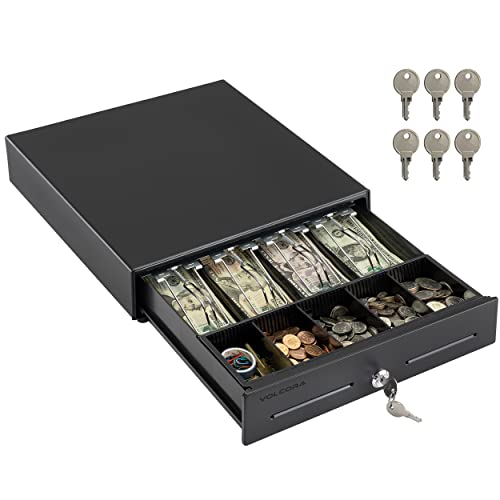
- Heavy-duty metal frame
- RJ11/RJ12 printer connection for auto-open
- 4 bill and 5 coin slots with key lock
Best For: Businesses that need a secure drawer to pair with a receipt printer
Thermal Paper Bulk Pack
BuyRegisterRolls 3 1/8" Thermal Rolls

- 50-roll bulk supply for POS registers
- BPA-free, lint-free paper reduces jams
- Red warning stripe shows low paper
Best For: High-volume checkout counters that need thermal receipt paper in bulk
Square POS Bundle
Cash Drawer and Receipt Printer

- Includes Epson USB thermal printer and EOM-100 drawer
- Connects to Square Stand via USB with no installation
- Thermal printing needs no ink or toner
Best For: Square users wanting an all-in-one printer and cash drawer bundle
Refurbished Retail Register

- Built-in thermal printer with receipt roll capability
- Accepts cash, cards, and mobile payments
- Supports up to 10,000 PLUs and 200 departments
Best For: Small retailers wanting an integrated register with receipt printing
Multi-Interface Receipt Printer

- USB, serial, and Ethernet connectivity
- Auto cutter supports 80mm and 58mm paper
- Works with Windows, Mac, and Linux
Best For: Wired POS setups needing a standalone receipt printer
Thermal Register Pick
Electronic Cash Register with Dual Displays
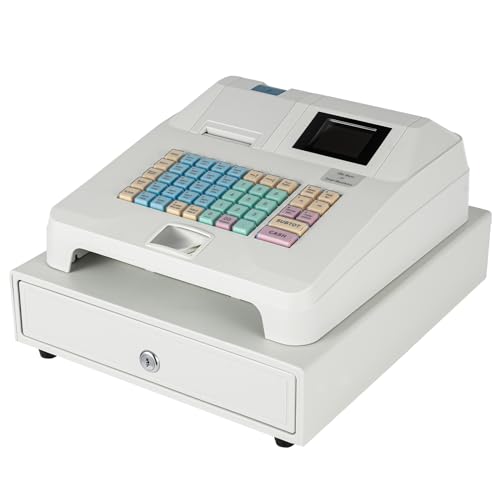
- Thermal printer with receipt and journal output
- Dual employee and customer displays
- Cash drawer, PLU, refund, and report functions
Best For: Small retailers and convenience counters
Thermal Paper Refill
BPA-Free 3 1/8 Thermal Receipt Rolls

- 50-roll bulk pack for compatible printers
- 48 GSM paper with crisp black imaging
- BPA-free, forestry-certified, recycled cores
Best For: Businesses buying receipt paper in bulk
Simple POS Register
Easy-Start Cash Register with Receipt Printer

- Built-in thermal receipt printer with no ink needed
- Easy programming and clear display
- Daily sales, inventory, and tax reports
Best For: Small shops and food service businesses
All-in-One Offline Register – Electronic Cash Register with Thermal Printing
This cash registers with receipt printer option is built for small businesses that want a self-contained checkout station rather than a basic drawer or standalone printer. It combines a thermal receipt printer, journal printing, dual displays, and a lockable drawer, so you can handle day-to-day retail transactions, cash control, and basic reporting from one unit.
Best For: Small retail shops, grocery counters, convenience stores, and other businesses that want an offline all-in-one checkout system.
Pros:
- Thermal receipt and journal printing in one electronic cash register.
- Supports cash, credit cards, and foreign currency billing.
- Offline operation helps avoid internet-related crashes and network risks.
- Lockable drawer includes 4 bill slots and 5 coin slots for organized cash handling.
Cons:
- Uses 58mm thermal paper, so it is not a wider receipt format system.
- Designed for small business retail use rather than advanced POS customization.
Overall, this is a practical pick if you want a straightforward register that prints receipts, keeps cash secure, and works without depending on a constant internet connection. The included interfaces and back-office reporting features add useful flexibility for routine operations.
High-Speed Receipt Printer – Star Micronics TSP143IIILAN Ethernet Printer
If you are comparing cash registers with receipt printer setups and already have a POS system, this Ethernet receipt printer is a strong fit. It focuses on fast, reliable receipt output through a LAN connection, with a compact footprint and internal power supply that helps keep the counter uncluttered.
Best For: POS users who need a fast LAN receipt printer for iOS, Android, or Windows environments.
Pros:
- Prints up to 43 receipts per minute at 250mm/s.
- LAN-only connection keeps setup simple for compatible systems.
- Drop-In and Print clamshell design makes paper loading easy.
- Embedded power supply saves counter space.
Cons:
- LAN connection only, so it is not a flexible multi-connection printer.
- Works as a printer component rather than a full cash register system.
For businesses that already rely on a POS platform, this printer is a dependable way to add quick, clean receipt output. Its space-saving design and broad platform compatibility make it a practical counter accessory.
Printer-Linked Cash Drawer – Volcora 13" POS Cash Drawer
This cash registers with receipt printer accessory is really a cash drawer built for POS setups that need secure, automatic opening through a printer connection. With a durable metal frame, removable coin tray, and RJ11/RJ12 compatibility, it is a solid add-on for checkout counters that already use a receipt printer.
Best For: Small businesses that want a durable cash drawer to pair with a receipt printer and POS system.
Pros:
- Heavy-duty metal frame for everyday business use.
- 4 bill slots and 5 coin slots with a removable coin tray.
- 3-position key lock for manual open, auto open, and lock.
- Connects to a receipt printer through included RJ11/RJ12 cable.
Cons:
- No USB port, so it cannot connect directly to POS via USB.
- Does not include receipt printing hardware on its own.
This is a straightforward choice if you already have a printer-based POS workflow and want a secure, durable drawer. Its compatibility with major receipt printer brands makes it easy to slot into many small business counters.
Thermal Paper Bulk Pack – BuyRegisterRolls 3 1/8" Thermal Rolls
When shopping for cash registers with receipt printer supplies, thermal paper is the consumable that keeps the checkout moving. These 3 1/8″ x 230′ rolls are designed for POS cash registers, with BPA-free material and lint-free construction that helps reduce printer jams.
Best For: Businesses that use wide-format thermal receipt printers and want a bulk paper supply.
Pros:
- Fits all POS cash registers that use 3 1/8″ thermal paper.
- BPA-free, lint-free paper helps reduce jams.
- Red warning stripe signals when a roll is near the end.
- Bulk pack of 50 rolls is practical for frequent receipt printing.
Cons:
- Only works with compatible thermal printers and paper size requirements.
- Bulk case weight may be more than casual users need.
This is a sensible replenishment choice for busy counters that go through receipt paper quickly. The packaging and paper quality are aimed at reducing interruptions and keeping print output clear without ink or toner.
Square POS Bundle – Cash Drawer and Receipt Printer
If you want cash registers with receipt printer support for a Square setup, this bundle combines an Epson USB thermal printer and an EOM-100 cash drawer in one ready-to-use package. The printer connects to the Square Stand via USB with no installation required, and the drawer links to the printer for automatic opening during transactions.
Best For: Square Stand and Square Register users who want a simple, bundled receipt-and-drawer solution.
Pros:
- Includes both an Epson USB thermal receipt printer and compatible cash drawer.
- USB connection to Square Stand means no installation is required.
- Drawer connects through the printer for automatic opening.
- Thermal printing does not require ink or toner.
Cons:
- Requires 80mm / 3-1/8 inch thermal paper rolls.
- Designed specifically for Square hardware, so it is less flexible for other systems.
This is a straightforward choice if you want a bundled POS hardware setup rather than sourcing a printer and drawer separately. The included 2-year full warranty and lifetime tech support add extra peace of mind for retail or counter service use.
Refurbished Retail Register – Royal 7000ML POS System
For businesses comparing cash registers with receipt printer features, the Royal 7000ML offers an integrated POS-style cash register with a fast thermal printer built in. It is factory refurbished, and the system is designed to handle retail and small-business checkout with multiple payment options and a clear LCD display.
Best For: Retail and small businesses that want an all-in-one cash register with built-in receipt printing.
Pros:
- Built-in alphanumeric thermal printer includes receipt roll capability.
- Supports cash, credit/debit cards, and mobile payments.
- Large capacity for up to 10,000 price look-ups, 200 departments, and 40 clerk IDs.
- Clear LCD display helps with transaction monitoring and programming.
Cons:
- Sold as manufactured refurbished rather than brand new.
- Includes a 1-year warranty, which is shorter than some bundle options.
This is a practical pick if you want one machine to manage checkout and receipt printing without adding separate hardware. Its programming capacity and payment flexibility make it well suited to growing retail counters that need a more complete register system.
Multi-Interface Receipt Printer – Rongta RP850 Receipt Printer
If you already have a register and just need cash registers with receipt printer compatibility, the Rongta RP850 is a standalone thermal receipt printer built for commercial point-of-sale use. It supports USB, serial, and Ethernet connections, works with Windows, Mac, and Linux desktops or laptops, and includes auto-cutting for quicker checkout.
Best For: Businesses that need a flexible receipt printer to pair with an existing POS or cash drawer.
Pros:
- USB, serial, and Ethernet connectivity for different POS setups.
- Auto cutter and support for 80mm or 58mm thermal paper.
- Compatible with Windows, Mac, and Linux computers.
- Supports cash drawer integration and ESC/POS or OPOS commands.
Cons:
- Not compatible with Square, Clover, Chromebook, or many tablet-based delivery apps.
- No Wi-Fi or Bluetooth support.
- Designed for computers rather than phones or tablets.
The RP850 makes sense when you want a dependable, no-frills receipt printer with broad wired connectivity. Its built-in sound/light indicator and wall-mount design are useful extras for busy retail or restaurant counters.
Thermal Register Pick – Electronic Cash Register with Dual Displays
If you want cash registers with receipt printer support for a small shop, this model is built around straightforward checkout and basic business tracking. It pairs an integrated thermal printer with a cash drawer, dual displays, and multiple connection ports, making it a practical fit for stores that need an all-in-one register rather than a complex POS setup.
Best For: Small retailers, convenience stores, grocery counters, and businesses that want a simple thermal cash register with reporting features.
Pros:
- Integrated thermal printing for receipts and journal output
- Dual display setup with a large employee screen and 8-digit customer screen
- Organized bill and coin compartments with auto pop-up cash drawer
- Includes reporting functions, PLU support, refund handling, and multiple ports
Cons:
- Designed as a simple register, not a full modern POS platform
- Listed as a print-only unit, so it focuses on receipt output rather than broader printing tasks
Overall, this register suits businesses that value a reliable thermal receipt printer, visible customer totals, and basic sales reporting in one unit. It is a solid fit when you want essential checkout tools without adding unnecessary complexity.
Thermal Paper Refill – BPA-Free 3 1/8 Thermal Receipt Rolls
For cash registers with receipt printer systems, the paper matters just as much as the hardware. These 3 1/8-inch thermal rolls are made for compatible POS and cash register printers, delivering clear black images and a BPA-free option for businesses that want a dependable supply of receipt paper.
Best For: Stores, restaurants, fuel stations, and other businesses that need a bulk thermal paper refill for compatible receipt printers.
Pros:
- 3 1/8″ x 230′ thermal rolls in a 50-count pack
- 48 GSM paper designed to produce crisp, clear black images
- BPA-free and made with forestry-certified paper and recycled cores
- Compatible with many POS, cash register, and pay-at-the-pump devices
Cons:
- Paper-only product, so it must match an existing thermal printer
- Compatibility depends on your register or printer model
This is a practical stocking choice when you need a large refill supply rather than a new register. If your setup already uses compatible thermal paper, the bulk count and clean print quality make it easy to keep checkout moving.
Simple POS Register – Easy-Start Cash Register with Receipt Printer
This option is aimed at buyers looking for cash registers with receipt printer functionality in a simple, small-business-friendly format. It combines an integrated thermal printer, manual override keys, and business reporting tools, so it can handle everyday checkout in retail or restaurant settings without a steep learning curve.
Best For: Small retail stores, cafes, food trucks, and restaurants that want a straightforward register with built-in receipt printing.
Pros:
- Integrated high-speed thermal receipt printer with no ink required
- Easy-to-program keys and clear display for faster staff training
- Daily sales, inventory, and tax reporting features
- Heavy-duty cash drawer with manual override keys
Cons:
- Positioned as a simple alternative rather than a full advanced POS system
- Best suited to smaller operations with straightforward checkout needs
In practice, this is the kind of register that helps smaller businesses get up and running quickly while keeping receipt printing built in. Its mix of reporting, security, and easy setup makes it a sensible everyday checkout tool.
How We Picked the Best Cash Registers with Receipt Printer
We prioritized checkout systems and accessories that make sense for real-world use: dependable receipt output, straightforward operation, common paper compatibility, and the right mix of drawer, printer, and POS functionality. For Cash Registers with Receipt Printer, we also considered whether each option fits a standalone register setup or a broader POS workflow.
Quick Comparison
Some products in this roundup are full cash registers, while others are supporting components such as receipt printers, cash drawers, and thermal paper. That matters because many businesses build a checkout station from multiple pieces rather than buying one all-in-one unit. If you need a complete front counter, focus on integrated register systems; if you already have POS software, a printer-and-drawer combo may be the better value.
Key Buying Factors for Cash Registers with Receipt Printer
Print Type and Speed
Thermal printing is the most common choice because it is fast, quiet, and low-maintenance. Look for print speed that can keep up with your peak hours, especially in busy retail or food service settings.
Compatibility
Check whether the system works with your software, interface type, and paper size. A receipt printer that supports your POS platform can save setup time and avoid costly returns.
Cash Handling
Consider the drawer layout, bill and coin capacity, and whether the tray is removable. A well-designed cash drawer improves accuracy and speeds up change making during rush periods.
Paper and Consumables
Thermal rolls are not all identical. Confirm width, roll length, and BPA-free status if those details matter to your operation. Easy-to-source paper helps avoid downtime.
Business Fit
Restaurants often need faster receipt printing and durable interfaces, while retail shops may value simpler controls and a cleaner counter footprint. Small businesses should weigh ease of use against expansion potential.
Who Should Buy Which Cash Registers with Receipt Printer?
If you want a complete, straightforward checkout station, choose an integrated cash register with receipt printer. If you already use Square or another POS setup, a compatible printer and cash drawer may be the smarter buy. Businesses that need high-volume, dependable printing should lean toward thermal printer-based systems, while very small counters may prefer a compact, simple register that is easy to train staff on.
In short, the best choice depends on how complete your current setup is, how many transactions you handle, and how much flexibility you want as your business grows.