Choosing the right facial recognition employee time clocks can make attendance tracking faster, cleaner, and far more reliable. For small businesses and growing teams, the right system also helps cut down on buddy punching and manual timecard errors.
In this roundup, we focus on touch-free options, software flexibility, and features that matter most for real-world payroll workflows.
Best 10 Facial Recognition Employee Time Clocks Picks for 2026
Multi-Biometric Attendance Hub
BISOFICE Facial/Palm Time Clock

- Facial, palm print, and password entry
- Supports USB report downloads
- Works in 12 system languages
Best For: Businesses wanting multi-biometric attendance tracking
No-Fee Standalone Tracker

- No monthly fees or ink needed
- Standalone setup with no software install
- Backup battery lasts about 4 hours
Best For: Small offices wanting simple, fee-free attendance tracking
Cloud-First Access Clock

- Free cloud software for 1 admin and 1 device
- Face, RFID, fob, and PIN support
- Stores 1,500 users and 100,000 logs
Best For: Small businesses needing cloud tracking and door access
Touch-Free Cloud Time Clock
uAttend DR2000 Voice/Face Clock

- Touch-free face and voice control
- Cloud-connected with real-time reports
- Includes secure cloud backups
Best For: Teams wanting hygienic cloud attendance with payroll tools
Cloud-Focused Touchless Attendance
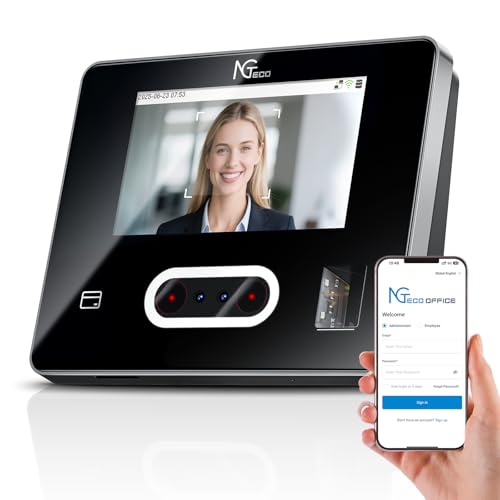
- Face, fingerprint, RFID, and PIN punch options
- Remote management with web and mobile access
- Dual-band WiFi and AWS cloud storage
Best For: Small businesses wanting flexible check-ins and cloud monitoring
No-Touch Biometric System
COMPUMATIC CFR-20/20 v2 Facial Time Clock

- Dual HD cameras create a 3D facial image map
- Includes software with no monthly fees
- Stores up to 50,000 punches and 10,000 RFID cards
Best For: Offices or industrial teams wanting touchless facial recognition
Subscription Biometric Kiosk
Employee Time Clock with Face, Palm, and Fingerprint

- Face, palm, fingerprint, PIN, and RFID punch options
- Cloud access with mobile app and no software installation
- Payroll alerts, GPS tools, and optional selfie capture
Best For: Small businesses that want flexible biometrics and cloud tools
App-Controlled Face & Fingerprint Clock
App-Controlled 50-Employee Time Clock
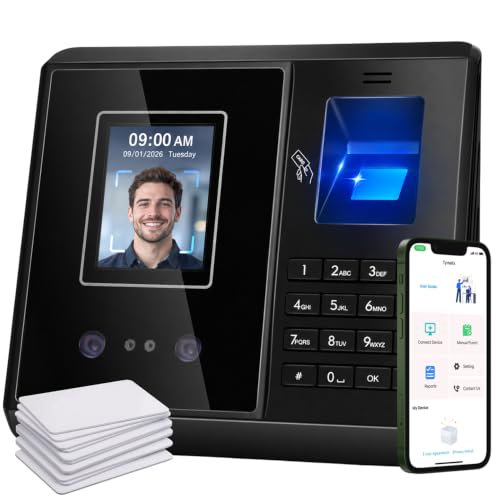
- Connects to the app in about 5 seconds
- Face, fingerprint, IC card, and PIN entry
- Includes 4 payroll reports and rule editing
Best For: Small teams that want app-based attendance control and local storage
Cloud FacePass Door-Access Clock
Cloud Biometric Clock With Face and RFID
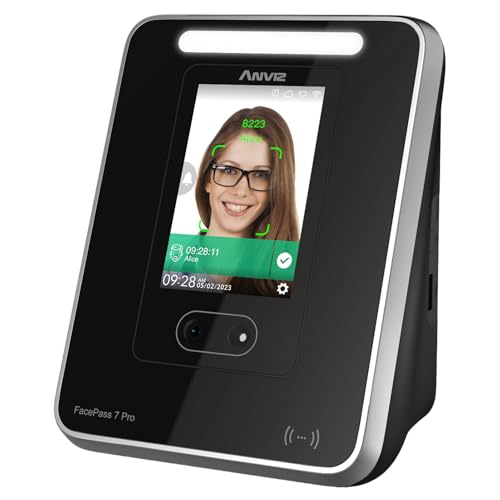
- Cloud browser access for time data and reports
- Face recognition plus RFID, PIN, and fob support
- Handles up to 1,500 users and 100,000 logs
Best For: Growing teams that want cloud reporting and door access support
Multi-Biometric Attendance Hub – BISOFICE Facial/Palm Time Clock
If you need facial recognition employee time clocks that can handle more than just face scans, this BISOFICE unit is built for flexible attendance tracking. It combines facial recognition, palm print, and password entry, adds an infrared camera for lower-light use, and includes USB-based report download for simpler admin work.
Best For: Teams that want a multi-biometric clock with offline-friendly report export and multilingual support.
Pros:
- Supports up to 1,000 faces, 1,000 palm prints, and 1,000 password inputs.
- Infrared camera helps with recognition in dimly lit environments.
- USB flash drive support makes attendance report download straightforward.
- Offers 12 system languages for more flexible workplace use.
Cons:
- Focuses on on-device management rather than cloud-based software.
- Best suited to businesses that want biometric variety, not a minimal single-method clock.
Overall, this is a practical choice if you want a feature-rich standalone time clock with multiple ways to verify employees and simple data retrieval.
No-Fee Standalone Tracker – Acroprint RT200 Face Clock
The Acroprint RT200 is a straightforward option among facial recognition employee time clocks if you want to avoid recurring software fees. It runs standalone on the device, uses face recognition to help reduce buddy punching, and includes a backup battery for short outages.
Best For: Small offices that want a no-monthly-fee time clock with simple on-device operation.
Pros:
- No monthly fees, paper punch cards, or ink required.
- Face recognition helps prevent buddy punching.
- Backup battery provides about 4 hours of operation during outages.
- Standalone setup means no software installation is needed.
Cons:
- Designed for direct device management rather than cloud access.
- Best for teams comfortable moving data from the clock to a computer for payroll.
This is a solid pick if you want a low-maintenance facial recognition clock that keeps attendance tracking local and predictable.
Cloud-First Access Clock – ANVIZ FacePass 7 Pro
For businesses comparing facial recognition employee time clocks with cloud management, the ANVIZ FacePass 7 Pro stands out with CrossChex Cloud and multiple punch methods. It supports face recognition, RFID, and PIN entry, while also adding door access support and remote reporting through a web browser.
Best For: Small businesses that want cloud-based time tracking plus access control.
Pros:
- Forever free cloud software for 1 admin and 1 device.
- Supports face, RFID, fob, and PIN punching options.
- Door access relay output can open the door after clock-in.
- Stores up to 1,500 users and 100,000 logs, with offline capture when internet drops.
Cons:
- Free plan is limited to one admin and one device.
- 2.4GHz Wi-Fi support may require extra setup for some networks.
It makes sense if you want flexible punch methods and cloud visibility without paying for a basic small-business setup.
Touch-Free Cloud Time Clock – uAttend DR2000 Voice/Face Clock
The uAttend DR2000 is a touch-free choice in facial recognition employee time clocks for teams that want cloud-connected attendance tracking and remote management. It combines facial recognition with voice control, adds real-time reporting, and backs data with automatic cloud storage.
Best For: Businesses that want hygienic, cloud-connected time tracking with payroll support.
Pros:
- Touch-free design helps support a more hygienic workflow.
- Cloud-connected access allows real-time attendance management from any device.
- Detailed reporting supports staffing and labor cost review.
- Secure automatic cloud backups help protect employee data.
Cons:
- Requires an affordable monthly service for premium features.
- Less suitable if you want a completely subscription-free setup.
Choose this model if you want a modern cloud system that goes beyond basic clock-in tracking and helps connect attendance data to payroll tasks.
Cloud-Focused Touchless Attendance – NGTeco 4-in-1 WiFi Time Clock
If you want facial recognition employee time clocks that are easy to manage from anywhere, this NGTeco model is built for remote oversight. It combines face, fingerprint, RFID, and PIN check-ins with cloud-based attendance tools, so you can review punches, adjust schedules, and generate reports without being on-site.
Best For: Small businesses that want flexible punch options and cloud access without monthly fees for the core management app.
Pros:
- 4 punch methods: face, fingerprint, RFID card, and PIN.
- Remote access through web software and iOS/Android apps for punch edits, schedules, and reports.
- Dual-band 2.4GHz/5GHz WiFi for more stable connectivity.
- AWS cloud storage with end-to-end encryption for attendance records.
Cons:
- Full employee app features require a separate TimeEntrix subscription.
- Included card capacity is limited to 10 cards.
Overall, this is a practical pick if your priority is a modern, connected time clock with multiple verification methods and straightforward attendance management. It balances convenience and control well for a small team.
No-Touch Biometric System – COMPUMATIC CFR-20/20 v2 Facial Time Clock
For buyers comparing facial recognition employee time clocks, this COMPUMATIC system leans hard into touchless punch-in security. It uses dual HD cameras to capture a 3D facial image map, and it includes Ethernet plus WiFi connectivity, local punch memory, and software so you can run attendance tracking without a monthly subscription.
Best For: Offices or industrial settings that want touchless facial recognition with no monthly fees and built-in software.
Pros:
- Touchless facial recognition with dual HD cameras and 3D face mapping.
- No subscription or monthly fees; CompuTime101 software is included.
- Holds up to 1,200 face templates, 10,000 RFID cards, and 50,000 punch records.
- Ethernet, WiFi, and USB download options for flexible setup.
Cons:
- Included setup support is limited to 90 days.
- Constant computer connection is not required, but that may matter for teams wanting simpler always-online workflows.
This is a strong fit if you want a dedicated biometric clock with a big on-device memory and a one-time purchase model. It is especially appealing when touchless face scanning and software inclusion matter more than app-based cloud management.
Subscription Biometric Kiosk – Employee Time Clock with Face, Palm, and Fingerprint
If you need facial recognition employee time clocks with broader biometric coverage, this subscription-based model gives you several ways to track attendance. It supports face, palm, fingerprint, PIN, and RFID punch options, plus cloud access through WiFi or LAN and a mobile app for monitoring punches and reports.
Best For: Small businesses that want biometric flexibility, mobile access, and location tools in a cloud-connected system.
Pros:
- Multiple clock-in methods including face, palm, fingerprint, PIN, and RFID cards.
- Cloud-connected setup with mobile app access and no software installation required.
- Automated payroll helpers like early/late alerts, overtime alerts, job tracking, and CSV exports.
- Includes geo-fencing, GPS coordinates, employee kiosk features, and optional selfie capture.
Cons:
- Requires a subscription after the 30-day free trial.
- Uses a cloud workflow, so it is less suited to buyers who want a one-time purchase only.
In practice, this is a versatile option if you want more than face recognition alone and value remote oversight tools. The subscription model is the main tradeoff, but the feature set is broad for small-business attendance tracking.
App-Controlled Face & Fingerprint Clock – App-Controlled 50-Employee Time Clock
For buyers comparing facial recognition employee time clocks, this model stands out for app-based control and fast setup. It connects in about 5 seconds and lets you manage punches, corrections, rules, and reports from your phone, which is useful if you want a practical system without depending on the terminal alone.
Best For: Small businesses that want app-based attendance management with flexible rules and local data storage.
Pros:
- Face recognition, fingerprint, IC card, and PIN clock-in options
- App tools for editing missed punches, fixing records, and exporting 4 payroll reports
- Custom break, lunch, overtime, and revision-zone rules
- Auto-handles overnight shifts and supports multiple punches per day
Cons:
- Supports up to 50 employees, so it is not built for larger teams
- No Wi-Fi or cloud dependency may not suit buyers who want browser-only access
Overall, this is a strong fit if you want a simpler attendance workflow with direct control from the app. The mix of flexible rules, local storage, and multiple clock-in methods makes it well suited to small, mixed-role teams.
Cloud FacePass Door-Access Clock – Cloud Biometric Clock With Face and RFID
If you need facial recognition employee time clocks with cloud management, this ANVIZ unit is built around browser-based control and quick facial punch-in. It supports face, RFID, PIN, and door access integration, making it a good fit when attendance tracking and entry control need to work together.
Best For: Small businesses that want cloud software, door access support, and high user capacity.
Pros:
- CrossChex Cloud lets you manage punches and reports from a web browser
- Advanced facial recognition helps prevent buddy punching, even with masks
- Supports face, RFID cards, fobs, and PIN entry
- Large capacity with up to 1,500 users and 100,000 logs
Cons:
- Free cloud software is limited to 1 admin and 1 device
- Requires LAN or Wi‑Fi connectivity for normal operation
This model makes sense if you want a more connected system with cloud reporting and optional door access features. It is especially appealing for growing teams that need higher capacity and don’t mind a networked setup.
Three-Way Biometric Punch Clock – Face Palm PIN Attendance Tracker
Among facial recognition employee time clocks, this KUIIYER model adds palm print and PIN entry for teams that want multiple ways to punch in. It is designed for fast identification, offline use, and simple USB-based data handling, which keeps setup straightforward for small businesses that do not want app or network complexity.
Best For: Small to medium businesses that want offline biometric attendance with three punch methods.
Pros:
- Face recognition, palm print, and password punch options
- Fast identification with infrared support for dim environments
- No monthly fee, no app, and no network required
- USB report transfer with support for departments and shifts
Cons:
- USB flash drive is not included
- Does not offer cloud or app-based attendance management
For buyers who want a practical offline time clock, this one focuses on speed, capacity, and low admin overhead. The combination of facial and palm recognition can be a useful upgrade for workplaces that want more than one biometric option.
How We Picked the Best Facial Recognition Employee Time Clocks
We looked for Facial Recognition Employee Time Clocks that balance accuracy, ease of setup, and day-to-day usability. Priority went to models with touch-free clock-in options, clear admin controls, exportable records, and hardware that fits both small offices and multi-shift environments.
We also considered whether a unit offers cloud access, offline backup options, and useful extras like PIN, RFID, fingerprint, palm, or voice support for backup authentication.
Quick Comparison: What Matters Most
If you want the simplest setup, choose a model with straightforward clock-in and basic reporting. If you need more oversight, cloud-connected systems with rule settings, overtime controls, and multi-location access are better suited for larger teams.
For businesses worried about hygiene and speed, touchless facial systems are the strongest fit. If your workforce includes outdoor staff, shift workers, or employees with inconsistent network access, look for devices that can store punches locally and sync later.
Key Buying Factors for Facial Recognition Employee Time Clocks
Authentication Methods
Facial recognition is the main feature, but backup methods matter. PIN, RFID, fingerprint, and palm print options can keep operations moving when lighting, masks, or user conditions affect face scans.
Software and Reporting
Check whether the system includes free cloud software or requires a subscription. Useful reporting features include overtime tracking, break rules, attendance exports, and payroll-ready summaries.
Connectivity and Deployment
Ethernet, Wi-Fi, and app-based control can simplify installation, especially if the clock will be used across multiple rooms or remote sites. Local storage and offline modes are also valuable for continuity.
Capacity and Team Fit
Some devices are designed for small business teams, while others scale better for larger staff counts. Match the clock’s user capacity, admin controls, and workflow features to your actual headcount and shift structure.
Who Should Buy Which Facial Recognition Employee Time Clocks?
Small businesses that want low-maintenance attendance tracking should favor simple, touch-free models with free or low-cost software. Teams with strict payroll rules may benefit from systems with custom overtime, lunch, and break controls. If you need flexibility for mixed environments, choose a device with multiple verification methods so employees always have a backup way to clock in.
For the best long-term value, look for Facial Recognition Employee Time Clocks that are easy to manage, reliable under daily use, and built around your payroll process rather than the other way around.