The best laptop mounts for home offices can free up desk space, raise your screen to a more comfortable height, and make a laptop work better alongside one or two external monitors. The right choice depends on whether you prioritize portability, adjustability, cooling, or a firmly mounted multi-screen setup.
We compared 10 laptop stands and desk-mounted solutions across fit, stability, ergonomics, adjustability, and everyday practicality. Below, you’ll find options for compact workstations, dual-monitor users, and anyone building a more comfortable home office.
Best 10 Laptop Mounts for Home Offices Picks for 2026
Best Desk-Mounted Combo
Adjustable Monitor Arm with Laptop Tray
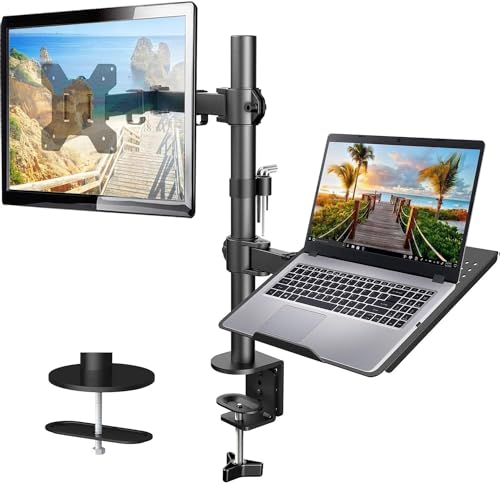
- Ventilated 14 x 12-inch laptop tray
- Supports 13-32-inch VESA monitors
- Articulating arm with cable management
Best For: Combined laptop-and-monitor desk setups
Best Simple Riser
Detachable Aluminum Laptop Stand

- Fits 10-15.6-inch laptops
- Raises screens up to 5.7 inches
- Folds flat and promotes airflow
Best For: Portable tabletop laptop setups
Best Rotating Portable Stand

- 360-degree rotating base
- Foldable for travel and storage
- Fits 10-16-inch laptops
Best For: Flexible, portable tabletop use
Best Full-Motion Mount

- Supports laptops up to 17 inches
- Switches to 13-34-inch VESA monitors
- Full-motion arm with ventilated tray
Best For: Flexible laptop-or-monitor workstations
Best Portable Riser

- Adjustable height and angle
- Supports up to 17.6 pounds
- Foldable with ventilation holes
Best For: Portable home-office laptop elevation
Best Multi-Screen Mount

- Holds two monitors and one laptop
- Supports monitors up to 32 inches
- Clamp or grommet mounting
Best For: Three-screen home-office workstations
Best Heavy-Duty Riser
Nulaxy Adjustable Laptop Stand

- Supports up to 22 pounds
- Dual-rod stability
- Foldable with heat-vent panel
Best For: Stable riser support for heavier laptops
Best Multi-Device Mount
HUANUO Dual Monitor and Laptop Mount

- Holds two monitors and a laptop
- Highly adjustable viewing positions
- C-clamp and grommet installation
Best For: Multitasking home office workstations
Best Heavy-Duty Pick
Amazon Basics Adjustable Laptop Stand

- Raises devices up to 7 inches
- Folds flat for storage and travel
- Ventilated aluminum design
Best For: Portable laptop elevation and everyday desk use
Best Heavy-Duty Arm

- Supports laptops up to 17 inches
- 22-pound weight capacity
- Wide articulation with cable management
Best For: Fixed desks needing a sturdy adjustable laptop arm
Best Desk-Mounted Combo – Adjustable Monitor Arm with Laptop Tray
For home offices that need both a laptop platform and monitor support, this HUANUO model combines them in one adjustable desk mount. Its ventilated tray, articulated arm, and cable management help create a more organized workstation while keeping compatibility requirements in view.
Best For: Users who want a clamp- or grommet-mounted laptop and monitor setup.
Pros:
- Supports laptops on a 14 x 12-inch ventilated tray and monitors from 13 to 32 inches.
- Offers tilt, swivel, rotation, and up to 17 inches of height adjustment.
- Includes C-clamp and grommet mounting hardware plus integrated cable management.
Cons:
- Monitor support requires a compatible VESA 75x75mm or 100x100mm display weighing up to 22 pounds.
- Mounting hardware is intended for wooden desks within the specified thickness ranges.
This is a practical choice when you want a laptop mount for a home office that can also support a conventional monitor. Check your desk material, thickness, laptop dimensions, and monitor specifications before buying.
Best Simple Riser – Detachable Aluminum Laptop Stand
This BESIGN LS03 is a straightforward tabletop option for shoppers comparing laptop mounts for home offices. The detachable aluminum stand raises compatible notebooks toward eye level, folds flat for storage, and uses protective rubber grips to help keep the computer stable.
Best For: Laptop users who want a compact, non-clamp riser for everyday desk work.
Pros:
- Compatible with laptops from 10 to 15.6 inches, including MacBook, Dell, HP, Lenovo, ASUS, and Chromebook models.
- Raises the laptop up to 5.7 inches to support a more ergonomic viewing position.
- Open aluminum construction promotes airflow, while rubber supports help prevent sliding and scratches.
Cons:
- Supports up to 8.8 pounds, so heavier devices may not be suitable.
- It is a tabletop stand rather than an attached desk mount.
The LS03 makes sense for a clean, flexible workstation where portability and simple setup matter more than arm-style adjustment. Its size limit and tabletop design should be checked against your laptop and desk needs.
Best Rotating Portable Stand – 360-Degree Laptop Riser
For a flexible tabletop solution, this LOXP stand adds a 360-degree rotating base to an adjustable laptop platform. It folds for transport, supports laptops from 10 to 16 inches, and lets you change the height and angle for seated or standing work.
Best For: Home-office users who frequently reposition or carry their laptop stand.
Pros:
- Rotates 360 degrees so the laptop can be turned to different viewing angles.
- Foldable design is suited to desk use, travel, and storage.
- Metal construction and non-slip silicone help provide a stable platform for 10- to 16-inch laptops.
Cons:
- It supports laptops up to 16 inches only.
- As a tabletop stand, it does not attach to the desk like a clamp-mounted arm.
This stand is a strong fit if angle flexibility and portability are priorities in your home office. Its broad laptop compatibility is useful, but the 16-inch maximum should be confirmed before purchase.
Best Full-Motion Mount – 2-in-1 Laptop and Monitor Arm
This HUANUO 2-in-1 arm is designed for home offices that want to switch between a laptop tray and a VESA monitor without changing the desk mount. It provides full-motion positioning, a ventilated secured tray, and clamp or grommet installation for a space-saving setup.
Best For: Multitaskers who want one adjustable arm for either a notebook or monitor.
Pros:
- Holds notebooks up to 17 inches or monitors from 13 to 34 inches when the tray is removed.
- Provides ±45-degree tilt, ±90-degree swivel, 360-degree rotation, and up to 18.1 inches of arm extension.
- Ventilated tray includes anti-slip pads, a bottom guard, and Velcro straps for added security.
- Supports clamp or grommet mounting on desks within the specified thickness ranges.
Cons:
- Monitor mode requires a compatible VESA 75x75mm or 100x100mm display within the listed weight range.
- The counterbalanced arm may rise when the laptop is removed and should be handled carefully.
This is one of the more versatile laptop mounts for home offices, especially when your setup changes between notebook and monitor work. Confirm VESA, weight, desk thickness, and laptop size before installation.
Best Portable Riser – Adjustable Metal Laptop Stand
If you want laptop mounts for home offices that can also travel, this adjustable metal riser offers a practical balance of elevation, ventilation, and portability. Its foldable design fits laptops from 10 to 15.6 inches and supports up to 17.6 pounds.
Best For: Home-office users who need a portable, adjustable stand for standard-size laptops.
Pros:
- Adjustable height and angle can support a more comfortable working posture.
- Metal construction supports up to 17.6 pounds.
- Ventilation holes and an open design promote airflow beneath the laptop.
- Foldable, padded, and compatible with 10- to 15.6-inch laptops.
Cons:
- The stated compatibility does not cover laptops larger than 15.6 inches.
- This is a tabletop riser rather than an arm or clamp-mounted solution.
Choose this model when portability and straightforward ergonomic adjustment matter more than adding a second display or freeing desk space with a mounted arm.
Best Multi-Screen Mount – Dual Monitor Laptop Stand
For laptop mounts for home offices that need a full multi-screen setup, this stand combines a ventilated laptop tray with two monitor arms. It supports two 17- to 32-inch monitors, accommodates laptops up to 15 inches, and offers clamp or grommet installation.
Best For: Home-office users building a three-screen workstation around a laptop.
Pros:
- Supports two monitors up to 32 inches and a laptop simultaneously.
- Heavy-duty arms hold up to 19.8 pounds per monitor.
- Offers 360-degree rotation, 45-degree tilt, and 90-degree swivel.
- Includes clamp and punched-hole mounting options plus cable management.
Cons:
- The laptop tray is limited to laptops up to 15 inches.
- Its multi-part installation requires a suitable desktop and mounting space.
This is the most capable option for expanding a home office into a three-screen setup, especially if monitor positioning and cable organization are priorities.
Best Heavy-Duty Riser – Nulaxy Adjustable Laptop Stand
For laptop mounts for home offices that prioritize stability, this Nulaxy stand uses dual support rods and supports devices up to 22 pounds. Its adjustable, foldable design works with 10- to 16-inch laptops and includes a ventilated cooling panel.
Best For: Users who want a stable, portable riser for heavier laptops and extended desk work.
Pros:
- Dual-rod construction is designed for a wobble-free typing experience.
- Supports up to 22 pounds, exceeding the capacity of many lighter risers.
- Heat-vent design promotes airflow during demanding tasks.
- Fits 10- to 16-inch laptops and folds flat for transport.
Cons:
- It is a tabletop stand, not a clamp-mounted desk arm.
- The stand may be more substantial than necessary for users seeking a minimal riser.
Pick this model for heavier laptops, frequent typing, or hybrid work where a stable yet foldable stand is more useful than a permanently installed mount.
Best Multi-Device Mount – HUANUO Dual Monitor and Laptop Mount
For home offices that rely on multiple screens, this laptop mounts for home offices option combines a laptop tray with two monitor arms. It supports two monitors up to 32 inches and a laptop up to 17 inches, helping free desk space while giving you plenty of positioning flexibility.
Best For: Multitasking setups with two monitors and a laptop.
Pros:
- Supports two monitors and one laptop at the same time.
- Offers extensive tilt, swivel, rotation, and height adjustment.
- Includes both C-clamp and grommet mounting options.
- Can hold monitors up to 32 inches and a laptop up to 17 inches.
Cons:
- Its larger multi-arm design may be more than a single-screen user needs.
- Grommet mounting is limited to wooden and plastic desks.
The HUANUO is a strong choice when your priority is maximizing screen space and keeping a laptop elevated beside or below your monitors. Its many adjustment points make it versatile, though the multi-device format is best suited to a dedicated desk setup.
Best Heavy-Duty Pick – Amazon Basics Adjustable Laptop Stand
This Amazon Basics riser is a straightforward choice among laptop mounts for home offices, especially if you want adjustable height without a permanent desk installation. It raises compatible laptops or tablets by up to 7 inches and folds flat for storage or travel.
Best For: Flexible desk setups, travel, and improved laptop viewing height.
Pros:
- Provides up to 7 inches of height adjustment.
- Supports laptops and tablets from 10 to 15.6 inches.
- Folds flat and weighs 1.7 pounds for easier portability.
- Open design promotes airflow and heat dissipation.
Cons:
- It is not designed for laptops larger than 15.6 inches.
- Heavier or larger devices may affect balance and stability.
- As a tabletop stand, it does not offer clamp-mounted positioning.
Choose this stand if you want a compact, easy-to-move riser rather than an articulated arm. Its adjustable height, ventilation, and fold-flat design make it practical for everyday home office use and occasional travel.
Best Heavy-Duty Arm – VIVO Single Laptop Desk Mount
For a dedicated workstation, the VIVO STAND-V001L offers a clamp-mounted laptop tray with broad articulation. This laptop mounts for home offices model fits laptops up to 17 inches, supports up to 22 pounds, and can be installed without drilling using its C-clamp.
Best For: Users who want a sturdy, adjustable laptop arm with generous weight capacity.
Pros:
- Supports laptops up to 17 inches and 22 pounds.
- Provides tilt, swivel, rotation, height, and extension adjustments.
- Offers C-clamp and grommet mounting for desks up to the listed thickness limits.
- Includes detachable cable clips for tidier cord routing.
Cons:
- The tray and arm require more permanent desk space than a folding riser.
- Its single-device design is less suitable for dual-monitor setups.
The VIVO stands out for users who need a laptop positioned off the main work surface while retaining the ability to fine-tune its angle and height. It is a practical fit for heavier laptops and fixed home office layouts.
How We Picked the Best Laptop Mounts for Home Offices
We evaluated these Laptop Mounts for Home Offices based on the features that matter during extended work sessions: compatible laptop and monitor sizes, weight capacity, height range, tilt and swivel adjustment, desk-clamp design, portability, ventilation, and overall footprint. We also considered whether each mount is best suited to a fixed workstation or a flexible setup that needs to be moved regularly.
Because “laptop mount” can mean several different designs, this list includes freestanding risers, foldable stands, laptop trays that attach to monitor arms, and combination mounts for laptops and displays. That variety makes it easier to match the product to your desk rather than forcing every user into one style.
Quick Comparison
- Best for a permanent workstation: A C-clamp or monitor-arm mount provides strong support while preserving desk space.
- Best for portability: A foldable aluminum or ventilated laptop stand is easy to store and reposition.
- Best for dual-screen setups: A dual monitor and laptop mount keeps multiple displays aligned on one desk system.
- Best for flexible positioning: Full-motion arms allow height, tilt, swivel, and rotation adjustments.
- Best for simple elevation: A freestanding riser offers quick setup without drilling or clamping.
Key Buying Factors for Laptop Mounts for Home Offices
Compatibility and Weight Capacity
Check your laptop’s size and weight before buying. Tray dimensions and listed laptop limits vary, and a mount designed for a 17-inch notebook may not provide the same stability for a smaller, unusually thick model. For monitor-arm products, confirm VESA compatibility and the supported monitor range as well.
Adjustment Range
Height adjustment is the most important feature for reducing neck strain, but tilt, swivel, and rotation can also help you position a screen directly in front of you. A full-motion arm is useful when you alternate between sitting, standing, collaboration, and portrait-oriented monitor use.
Stability and Desk Attachment
Freestanding stands are convenient, but clamp-mounted arms generally occupy less desk surface and resist shifting when properly installed. Measure your desk thickness, check clearance behind the desk, and avoid mounting to fragile, hollow, or unsuitable surfaces.
Cooling and Portability
Ventilated trays and stands can improve airflow around the underside of a laptop, while foldable designs are better for users who share a desk or work in multiple rooms. If the stand will remain in one place, prioritize rigidity and adjustment over compact folding.
Who Should Buy Which Laptop Mounts for Home Offices?
Choose a freestanding riser if you want the quickest setup, easy repositioning, and no clamp installation. These are practical for occasional laptop elevation and shared workspaces.
Choose a single monitor-arm laptop tray if you already use one external monitor and want to clear space beneath the laptop. This is a strong option for a cleaner, more adjustable desk.
Choose a dual monitor and laptop mount if your workflow involves several screens, spreadsheets, editing, coding, or frequent multitasking. Before purchasing, confirm that your desk can support the combined load.
Choose a portable folding stand if you travel between rooms or need to pack away your home office. Look for a stable base, useful height range, and airflow openings rather than choosing solely by folded size.
Whichever style you select, position the top of the laptop display near eye level and use an external keyboard and mouse when the screen is raised for long periods. That setup usually delivers a more comfortable posture than relying on the built-in keyboard alone.