USB-C KVM extenders make it easier to control one or more computers from a remote workstation while carrying video, USB peripherals, and sometimes power or network connectivity over longer distances. They are useful for clean desk setups, conference rooms, control spaces, and shared displays.
Our selection includes HDBaseT systems for long cable runs, USB-C KVM switches for nearby computers, multi-monitor solutions, and a wireless option. Compare signal requirements, host compatibility, charging support, and installation needs before choosing.
Best 10 USB C Kvm Extenders Picks for 2026
Long-Run USB-C KVM Extender

- Up to 230ft over Cat6a/7
- 4K@60Hz and 18Gbps support
- USB, RS-232, HDR, and PoC
Best For: Professional AV installations and long cable runs
Wall-Plate USB-C KVM Extender

- HDMI and USB-C host switching
- Up to 330ft over one Cat cable
- Wall plate, PoC, USB KVM, and HDR
Best For: Permanent conference-room and commercial AV installations
Compact USB-C KVM Switch

- Shares one monitor or dock between two computers
- Supports up to 20Gbps USB4 transfer
- Passes through up to 140W PD charging
Best For: Two-laptop desks using one USB-C monitor or dock
Best Long-Range Dual-Display Kit
J-Tech Digital USB 3.2 HDBaseT Extender

- 330-foot USB 3.2 extension over Cat6A/7
- Dual 4K@60Hz HDMI outputs
- USB, Ethernet, audio, RS232, and FSYNC pass-through
Best For: Conference rooms and professional dual-monitor AV installations
Best Three-Computer USB-C Switch
Cable Matters 20Gbps USB-C KVM

- Switches one monitor or dock among three computers
- Up to 20Gbps bandwidth and 140W PD
- RF remote control included
Best For: Multi-computer desks using a compatible USB-C monitor or dock
Best Zero-Latency 4K Balun
OREI 4K USB-C HDBaseT Extender

- 4K@60Hz extension up to 330 feet
- Zero-latency HDBaseT 3.0 transmission
- USB 2.0 KVM support over CAT6A/7
Best For: Long-distance 4K AV installations prioritizing smooth video
Flexible Desk Switching
Cable Matters USB-C KVM Switch

- Switches two USB-C laptops through one HDMI display
- Supports 4K at 60Hz and up to 100W charging
- Includes 10Gbps USB-C and USB-A ports
Best For: Dual-laptop desks and hot-desk workstations
Wireless Long-Range Link
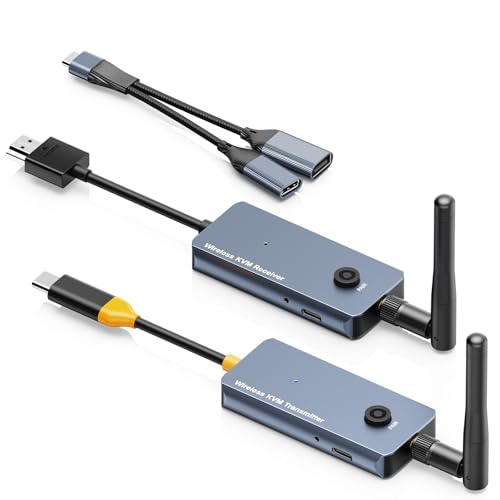
- Wireless video and keyboard/mouse extension
- 1080p at 60Hz with HDMI receiver output
- PD100W charging and pre-paired setup
Best For: Wireless presentations and remote HDMI displays
Conference Room Extension
AV Access 4K USB-C KVM Extender

- Extends dual 4K displays up to 100m over Cat6A/7
- Switches one USB-C and one USB-B host
- Carries USB, Ethernet, audio, control, and power
Best For: BYOM rooms and professional AV installations
Long-Run USB-C KVM Extender – 230ft 4K HDBaseT
For installations that need dependable distance, this USB C KVM extender sends USB-C video and USB 2.0 data over one Cat6a/7 cable. It supports 4K video, HDR, advanced audio formats, RS-232 control, and PoC for a cleaner professional AV setup.
Best For: Conference rooms, classrooms, and professional AV systems requiring long cable runs.
Pros:
- Extends USB-C signals up to 230 feet at 4K@30Hz, or 130 feet at 4K@60Hz.
- Supports uncompressed 4K@60Hz 4:4:4 video with 18Gbps bandwidth.
- Includes USB peripheral ports, RS-232 pass-through, and bidirectional 24V PoC.
- Supports HDR formats and premium audio including Dolby Atmos and DTS:X.
Cons:
- 4K@60Hz range is shorter than the maximum 230-foot range.
- Its professional feature set may be more than needed for a simple home setup.
This is a strong choice when distance, control integration, and high-quality USB-C video matter more than compact size. The one-year warranty adds useful reassurance for installed systems.
Triple-Display USB-C KVM Dock – Thunderbolt 4 3-Monitor KVM
This USB C KVM extender alternative is built for switching a full workstation between two laptops. It combines triple-monitor output, DisplayLink support, shared USB peripherals, Ethernet, card readers, and laptop charging in a single docking station.
Best For: Windows and Mac users who need to share three displays and peripherals between two laptops.
Pros:
- Supports three simultaneous displays up to 4K@60Hz.
- Enables extended-display modes on Macs with M1 through M5 processors through DisplayLink.
- Provides USB-C and USB-A ports, SD/TF readers, Gigabit Ethernet, and charging.
- Includes button and wired-remote switching for convenient source changes.
Cons:
- Requires DisplayLink driver installation.
- Keyboard hotkey switching is not supported.
- Not compatible with Linux or Unix systems.
Choose this model for a feature-rich shared desk or studio setup, especially if a Mac needs extended triple-display support. Keep the driver requirement and platform limitations in mind before buying.
Wall-Plate USB-C KVM Extender – 330ft Dual-Host 4K HDBaseT
For a permanent installation, this USB C KVM extender combines HDMI and USB-C host connectivity with up to 330 feet of transmission over a single Cat6/6a/7 cable. Its wall-plate design, PoC, automatic or manual switching, and USB 2.0 peripheral extension suit clean professional deployments.
Best For: Conference rooms, control centers, offices, and other installed AV environments.
Pros:
- Extends HDMI and USB-C signals up to 330 feet.
- Supports 4K@60Hz, 18Gbps bandwidth, HDR10/HDR10+, and 4:4:4 video.
- Switches between two computers using automatic or manual control.
- Offers USB 2.0 KVM, USB-C charging, PoC, and a one-gang Decora wall-plate design.
Cons:
- Designed for installation rather than portable desktop use.
- Its 330-foot specification depends on suitable Cat6/6a/7 cabling and installation conditions.
This is the better fit when the extender needs to disappear into a room design while supporting two different host types. Its long reach and audio-format support make it particularly useful for structured AV installations.
Compact USB-C KVM Switch – 20Gbps 140W PD Switch
This compact USB C KVM extender-style switch shares one USB-C or Thunderbolt 4 monitor or dock between two computers. It focuses on fast USB4 connectivity and power pass-through, making it useful for a two-laptop desk without requiring a separate full KVM workstation.
Best For: Users switching one USB-C monitor or compatible dock between two laptops.
Pros:
- Provides USB4 data transfer up to 20Gbps.
- Supports up to 8K@30Hz on Windows and 4K@60Hz on macOS with a single display.
- Passes through up to 140W Power Delivery to the active computer.
- Can share compatible Thunderbolt 4 docks between two computers.
Cons:
- Requires the included USB4 20Gbps cables; substitute Thunderbolt cables are not recommended.
- 20Gbps bandwidth may limit displays or refresh rates compared with 40Gbps docks.
- Mac systems support one display in the stated dock configurations.
This switch is a practical, desk-friendly option for users who mainly need one-cable monitor or dock sharing and substantial charging. Verify that the dock has a detachable host cable and that the included-cable requirement fits your setup.
Best Long-Range Dual-Display Kit – J-Tech Digital USB 3.2 HDBaseT Extender
For buyers comparing usb c kvm extenders for a conference room or hybrid workspace, this J-Tech Digital kit combines USB-C hosting with long-distance HDBaseT connectivity. It sends USB 3.2 signals up to 330 feet over a Cat6A/7 cable while supporting dual 4K displays, peripherals, audio, Ethernet, RS232, and FSYNC pass-through.
Best For: Conference rooms, video conferencing systems, and professional setups requiring dual displays and extensive signal pass-through.
Pros:
- Extends USB 3.2 up to 330 feet over a single compatible Cat6A/7 cable.
- Supports dual HDMI displays at up to 4K@60Hz with DisplayLink.
- Includes USB, Ethernet, audio, RS232, and FSYNC pass-through features.
- Offers USB-C host connectivity and backward compatibility with older USB standards.
Cons:
- Requires suitable Cat6A/7 cabling and a more involved installation than a desktop switch.
- Its professional features may be more than needed for a basic home setup.
This is a feature-rich choice when long-distance extension and dual-monitor control matter more than simplicity. The one-year replacement warranty and lifetime technical support add reassurance for business and AV installations.
Best Three-Computer USB-C Switch – Cable Matters 20Gbps USB-C KVM
This Cable Matters model is a practical option among usb c kvm extenders for sharing one USB-C or Thunderbolt 4 monitor or dock between three computers. It supports up to 20Gbps data transfer, up to 140W Power Delivery for the active computer, and convenient RF remote switching.
Best For: Users switching three Windows computers through one compatible USB-C monitor or detachable-host-cable docking station.
Pros:
- Shares a USB-C display or docking station among three computers.
- Supports up to 20Gbps data transfer and up to 140W Power Delivery for the selected computer.
- Supports up to 8K@30Hz, 5K@60Hz, or 4K@144Hz on Windows with a compatible display.
- Includes an RF remote for convenient switching without additional software or drivers.
Cons:
- Requires the included USB4 20Gbps cables; Thunderbolt 3/4/5 cables are not recommended.
- macOS supports only one external display, and bandwidth limits may affect some docks or display setups.
- Only the active computer receives Power Delivery charging.
Choose this switch when your priority is fast, local switching between three computers rather than extending signals hundreds of feet. Carefully check your dock, monitor, operating system, and cable compatibility before buying.
Best Zero-Latency 4K Balun – OREI 4K USB-C HDBaseT Extender
For buyers seeking usb c kvm extenders with long reach and low-latency video, the OREI UHD-EXB330CU-K uses HDBaseT 3.0 technology over CAT6A/7 cable. It supports 4K@60Hz transmission up to 330 feet and can reach up to 490 feet at 1080p@60Hz, while also providing USB 2.0 KVM extension.
Best For: Home theater, commercial display, and AV installations that need long-distance 4K video with USB KVM control.
Pros:
- Extends 4K@60Hz video up to 330 feet over CAT6A/7 cable.
- Reaches up to 490 feet at 1080p@60Hz.
- Uses HDBaseT 3.0 for lossless, zero-latency transmission.
- Supports USB 2.0 KVM extension and includes an international-use adapter/converter.
Cons:
- USB connectivity is limited to USB 2.0 rather than USB 3.x speeds.
- Its supplied US-plug power setup may require the included adapter for international installations.
This OREI extender is a strong fit when stable, lag-free 4K transmission over structured cabling is the main requirement. It is less suitable for buyers who need high-speed USB 3.x peripheral transfers.
Flexible Desk Switching – Cable Matters USB-C KVM Switch
If you want to share one HDMI display and a full set of USB accessories between two laptops, this USB C KVM extenders-style desktop solution keeps switching simple. It supports 4K at 60Hz, laptop charging, and both USB-C and USB-A peripherals without requiring you to replug each device.
Best For: Home offices, hot desks, and dual-laptop workstations that need local switching and charging.
Pros:
- Connects two USB-C or Thunderbolt laptops to one HDMI display and shared peripherals.
- Supports up to 4K at 60Hz when the laptops support DisplayPort Alt Mode.
- Provides up to 100W charging for one laptop, or up to 85W each with two connected.
- Includes 10Gbps USB-C and USB-A ports plus RF remote and button switching.
Cons:
- It is designed for HDMI displays, not HDMI-output PCs or USB-C portable monitors.
- Keyboard and mouse hotkey switching requires downloading the required software.
This is a practical choice when your devices are close together and you prioritize high-speed peripherals, charging, and straightforward two-laptop control over long-distance extension.
Wireless Long-Range Link – 650ft USB-C HDMI KVM Kit
This wireless USB C KVM extenders option sends a USB-C device’s screen to a remote HDMI display while extending keyboard and mouse signals. Its pre-paired transmitter and receiver support 1080p at 60Hz and are suited to presentations, monitoring, and setups where running a long cable is inconvenient.
Best For: Wireless presentations, remote monitoring, and home or meeting-room setups using HDMI displays.
Pros:
- Wirelessly mirrors video and extends keyboard and mouse signals up to a stated 650 feet in unobstructed conditions.
- Supports 1080p at 60Hz and works with TVs, projectors, and monitors through HDMI.
- Offers dual-band 2.4G/5G transmission and dual external antennas.
- Includes a PD100W charging port on the transmitter and plug-and-play pairing.
Cons:
- Range can decrease with walls, ceilings, and other wireless devices.
- Video output is limited to 1080p at 60Hz rather than 4K.
- A USB docking device is not included for simultaneous keyboard and mouse connection as described.
Choose this kit when wireless placement matters more than maximum resolution. Confirm that the source supports USB-C DisplayPort Alt Mode and plan for receiver power and the required USB accessories.
Conference Room Extension – AV Access 4K USB-C KVM Extender
For structured meeting rooms, this USB C KVM extenders system carries video, USB, Ethernet, audio, control signals, and power over one Cat6A/7 cable. It supports two hosts, dual 4K displays, and up to 100 meters of transmission, making it a more installation-focused choice than a short desktop KVM.
Best For: BYOM conference rooms, hybrid meeting spaces, and professional AV installations.
Pros:
- Switches between one USB-C host and one USB-B host, with front-button or automatic switching.
- Extends two 4K displays at 60Hz up to 100m/330ft over a single Cat6A/7 cable.
- Carries USB 3.2 Gen 1, 1G Ethernet, audio, RS232, and GPIO signals alongside video.
- PoH+ allows one transmitter-side power adapter to power both units.
Cons:
- Its professional feature set and rack-oriented installation may be excessive for a basic home desk.
- USB-C and USB-B host connections are not the same as two USB-C host inputs.
- DisplayLink functionality requires the integrated driver to be used as intended.
This is the strongest fit when distance, multi-display output, and conference-device integration are priorities. Its Cat6A/7 architecture and control connections are especially useful for permanent room installations.
How We Picked the Best USB C Kvm Extenders
We focused on products that combine computer switching with practical extension or docking features. The lineup covers USB-C and Thunderbolt hosts, HDMI and multi-monitor output, HDBaseT transmission over Cat6 or Cat6A, wireless operation, USB peripheral support, power delivery, and professional control features such as RS-232. We also considered advertised resolution, bandwidth, transmission distance, operating-system support, and installation format.
Because USB-C capabilities vary widely, specifications should be checked against your computer, monitor, and cable setup. A product labeled USB-C may support video, data, charging, or only some combination of those functions.
Quick Comparison
- Best for long wired runs: HDBaseT models rated for 230 to 330 feet over suitable Ethernet cable.
- Best for a compact desk: USB-C KVM switches with integrated hubs and power delivery.
- Best for multiple displays: Thunderbolt or DisplayLink-based models and dual-monitor extenders.
- Best for professional installations: Wall-plate units with PoC, RS-232, HDR support, and structured cabling.
- Best for avoiding cable runs: Wireless transmitter and receiver kits, where 1080p performance is sufficient.
Key Buying Factors for USB-C KVM Extenders
Video Resolution and Bandwidth
Confirm the maximum resolution and refresh rate for every display you plan to use. 4K at 60Hz requires more bandwidth than 1080p, while HDR support depends on the complete signal chain. Multi-monitor setups may require Thunderbolt, DisplayLink, or a dedicated dual-output design.
Distance and Cabling
For long installations, HDBaseT extenders typically use Cat6 or Cat6A cable between transmitter and receiver. Check the rated distance, cable category, termination quality, and whether the system requires separate HDMI, USB, or control connections. Wireless models simplify installation but may introduce latency or range limitations.
USB-C Compatibility and Power
Determine whether the host port supports DisplayPort Alt Mode, Thunderbolt, USB data, and charging. Compare the KVM’s power-delivery rating with your laptop’s requirements, and verify whether charging is available to one host or multiple hosts.
Switching and Peripheral Support
Look for the switching method that fits your workspace: physical buttons, wired remotes, hotkeys, or software controls. USB 3.2 support is important for fast storage and cameras, while basic USB 2.0 may be adequate for keyboards and mice.
Who Should Buy Which USB C Kvm Extenders?
Choose a compact USB-C KVM switch for two nearby laptops and a simple shared keyboard, mouse, and monitor setup. Choose an HDBaseT extender when the computer and display are separated by a room or an equipment closet. For conference rooms or dual-screen workstations, prioritize models with dual outputs, reliable EDID handling, Ethernet, and adequate power delivery. A wireless kit is best when drilling or pulling cable is impractical and 1080p is acceptable.